sjson: one source file, a discarded error, and three examples missing a brace
Set JSON values very quickly in Go
At a glance
- What is it?
- A Go package for setting values in a JSON document with dot-separated paths, kept in a single file, whose benchmark table names a variant its own getting started text never describes.
- Who is it for?
- sjson suits code that has to change one field in a document it did not build, particularly config rewriting and template patching, because the path syntax handles nested objects, array indices and appends in one string. Check four things before relying on it.
- Can I use it commercially?
- Yes. MIT is a permissive licence: you can use, modify and sell software built on it, as long as you keep its copyright and licence notices.
- Is it still maintained?
- Yes. The repository last received commits 5 days ago.
- What is it written in?
- Mainly Go, according to GitHub's language statistics.
Answers come from the project's GitHub data, last synced on November 14, 2026, and from our analysis. They are not legal advice.
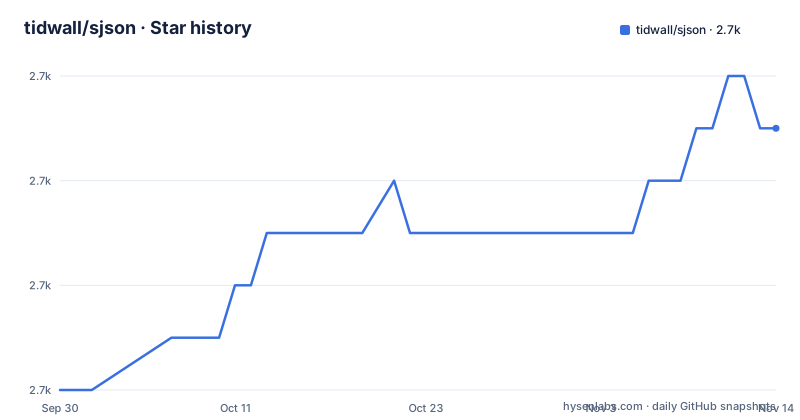
Star history
- tidwall/sjson2,739 ★ · +5
| Repository | 2026-09-30 | 2026-11-14 |
|---|---|---|
| tidwall/sjson | 2.7k | 2.7k |
5 Stars in the last 45 days, measured from the daily GitHub snapshot. Compare with other projects
Editorial analysis
The whole package is one source file beside one test file
The repository root holds eight entries: a .github directory, LICENSE, README.md, go.mod, go.sum, logo.png, sjson.go, and sjson_test.go. There is no subpackage, no command directory, no examples directory, and no benchmark file of its own. Every capability described in the overview lives in that single Go source file, which is why the path syntax, the type handling, the set and delete operations, and the fallback to the standard marshaller can all be described in one page without cross references. The cost of that layout is that the examples are not runnable. Each snippet in the file is a complete main package in its own right, printed with the result it claims, but none of them exists as a file in the tree, and there is no test asserting the printed output matches. The one place the README points outward for an executable is a command line interface, and that lives in a different repository.
The reading library the page points to is also a build dependency
The overview tells readers that for quickly retrieving JSON values they should look at a different package, linking GJSON, and for a command line interface a third, linking JJ. The module file makes the first of those more than a suggestion. go.mod requires github.com/tidwall/gjson at v1.14.2 and github.com/tidwall/pretty at v1.2.0, so the retrieval library is compiled into every build of this one, and the third package, pretty, is a dependency the overview never mentions at all. The module also declares go 1.14, which is the version floor for consumers. The benchmark section then compares SJSON against encoding/json, ffjson, EasyJSON, and Gabs, four other projects, and does not include the package it depends on. So the sibling library is promoted in the introduction, required in the module file, and absent from the comparison.
$ go get -u github.com/tidwall/sjsonThat single line is the entire installation section, and it pulls both dependencies without saying so.
The contract warns about malformed input and every example drops the error
Four sentences define the failure behaviour, and they are unusually precise. The function expects that the JSON is well formed and validated. Invalid JSON will not panic, but it may return back unexpected results. Invalid paths may return an error. So malformed input is not rejected loudly, it is passed through, and the only documented error case is a bad path rather than a bad document. That contract is then contradicted by the examples. Set is shown with the error assigned to the blank identifier, as in value, _ := sjson.Set, and Delete is shown the same way, in every snippet that calls either function. Not one example in the file checks the returned error, including the ones that demonstrate the error-producing case of an invalid path. A caller who copies the documented pattern therefore inherits both behaviours at once: no panic on malformed input, and no check on the one error the file does describe.
Three array examples print a document with no closing brace
The example section walks through setting from an empty document, updating an existing value, setting a new array element, appending, appending past the end, and three delete variants. Three of the array cases print an output line that is missing its closing brace. Setting index 2 on a two element array prints an unterminated document, appending with the -1 key prints the same unterminated document, and appending at index 4 prints an unterminated document as well.
// {"friends":["Andy","Carol","Sara"]Every other output line in the file closes properly, including the nested object and array cases, so this is confined to the array examples rather than a formatting style. The index 4 case is worth reading on its own, since it shows the documented padding behaviour: writing past the end of an array fills the gap with null values rather than failing, so a caller who indexes by a stale position silently gets nulls in the document. Since the printed result is the only specification of that behaviour in the file, and the printed result is itself malformed, the behaviour has to be read from the input side instead.
A numeric object key needs a colon, and the dotted key in the sample is never addressed
A path is a series of keys separated by a dot, and the file states that the dot and colon characters can be escaped with a backslash. Escaping is what makes the numeric object key case work. Normally a number key means an array index, so a document whose users object is keyed by numeric identifiers would be ambiguous, and the colon is the disambiguator: the sample path for a user keyed 2313 is written with a colon directly after the dot. The demonstration document for that case defines a users object with numeric keys and then shows exactly one path against it. Meanwhile the larger sample document earlier in the file contains a key with a dot in it, a movie title under a dotted key, and no path anywhere in the file addresses it. So the escaping rule exists, is stated in one sentence, is demonstrated only for the colon half, and the document that would need the dot half is left without an example.
The fastest benchmark row names a variant the getting started text never mentions
The performance table has seven rows and six of them carry numbers. The documented entry point appears twice: the plain set at 805 ns per operation with 1077 bytes and 3 allocations, and a replace in place variant at 449 ns per operation with zero bytes and zero allocations. The second row is both the fastest and the only one that allocates nothing, and the visible text never names it, since the API sections cover Set and Delete and stop there. The seventh row, for one of the four comparison libraries named in the introduction, has a name and no figures at all. The table also predates the module file it sits next to: the note under it says the benchmarks were run on a 15 inch Intel Core i7 MacBook Pro using Go 1.7, while go.mod declares a floor of 1.14. So the numbers describe a machine and a toolchain several versions behind the package's own stated requirement.
Set builds the parent objects it needs, and borrows the read side's notation
Setting a nested value in an empty string produces a complete nested document, so no schema, no template, and no prior structure is required. That is the mechanism behind the package's usefulness for patching documents it did not create. The type list is short and explicit: nil, booleans, integers, floats, strings, a string slice, and a map with interface values, each shown against the same one key document. Anything outside that list falls through to the standard library marshaller, which is the honest cost of the fast path, since a type it does not recognise gets correctness through reflection instead of speed. The path examples are the last oddity. They are written with a double angle bracket and a result on the right, as in a quoted path followed by a quoted value, which is retrieval syntax borrowed from the sibling package the overview points readers to. A page about writing values documents its paths in the reading library's notation.
Editorial conclusion
sjson suits code that has to change one field in a document it did not build, particularly config rewriting and template patching, because the path syntax handles nested objects, array indices and appends in one string. Check four things before relying on it. It expects well-formed validated JSON and says malformed input may return unexpected results without panicking, so a parse failure upstream becomes a silent wrong answer here. The error return exists and every example in the file discards it. Three of the array examples print a document with no closing brace, so the file cannot be pasted into a test as an expected string. And the benchmark that shows zero allocations names a variant the getting started text never mentions, so the headline numbers do not describe the documented entry point. Teams needing validation, ordering guarantees or unmarshalling into structs should reach for the standard library instead.
Frequently asked questions
How do I install sjson in a Go project?
The installation section is one line, go get -u github.com/tidwall/sjson, against the module path github.com/tidwall/sjson. The module file declares a Go floor of 1.14 and requires two packages, gjson at v1.14.2 and pretty at v1.2.0, so the retrieval library and a formatting library come along with it.
What happens if I pass malformed JSON to sjson.Set?
The function expects that the JSON is well formed and validated. Invalid JSON will not panic, but the file says it may return back unexpected results, so a malformed document is not rejected loudly. Invalid paths may return an error, and that error is the one every example in the file discards.
How do I append to an array with sjson?
Use the -1 key, which the file describes as appending a value to the end of an array. Writing a numeric index past the end also appends, but pads the gap with null values, so a stale index silently produces nulls rather than an error.
How does sjson address a key that contains a dot or a number?
A path is a series of keys separated by a dot, and the dot and colon characters can be escaped with a backslash. Because a plain number key means an array index, a numeric object key is forced with a colon, written as a path with the colon directly after the dot.
How does sjson compare with encoding/json in the benchmarks?
The table gives the plain set at 805 ns per operation with 1077 bytes and 3 allocations, a replace in place variant at 449 ns with zero allocations, JSON_Map at 21236 ns with 150 allocations, and JSON_Struct at 14691 ns with 24. The note says these were run using Go 1.7, and the EasyJSON row carries no figures.
What types can sjson set?
The file shows nil, booleans, integers, floats, strings, a string slice, and a map with interface values. When a type is not recognised, the package falls back to the encoding/json marshaller rather than rejecting the value.
Official sources
Add this badge to your README
If you maintain this project, the badge below links readers to this analysis and shows its maintenance status from the daily GitHub snapshot. Paste the markdown into your README; add ?metric=license or ?metric=stars to the image URL for a different field.

[](https://hysenlabs.com/projects/tidwall-sjson)Star history chart for your README
[](https://hysenlabs.com/projects/tidwall-sjson)Was this useful?