Furnace: three licence files, eleven emulator cores, and a module downgrader
a multi-system chiptune tracker compatible with DefleMask modules
At a glance
- What is it?
- Furnace is a chiptune tracker that is compatible with DefleMask modules and can load every version of them, save them back out, and downgrade a module to an older format. Its feature list is a catalogue of sound chips, and its audio accuracy comes from other people's emulators.
- Who is it for?
- Furnace suits someone making chip music who wants one tracker for many console and computer sound chips rather than one per machine. Four things to know before you adopt it.
- Can I use it commercially?
- Check first. The repository uses a licence we do not classify automatically, so read its LICENSE file before any commercial use.
- Is it still maintained?
- Yes. The repository last received commits 4 days ago.
- What is it written in?
- Mainly C++, according to GitHub's language statistics.
Answers come from the project's GitHub data, last synced on November 15, 2026, and from our analysis. They are not legal advice.
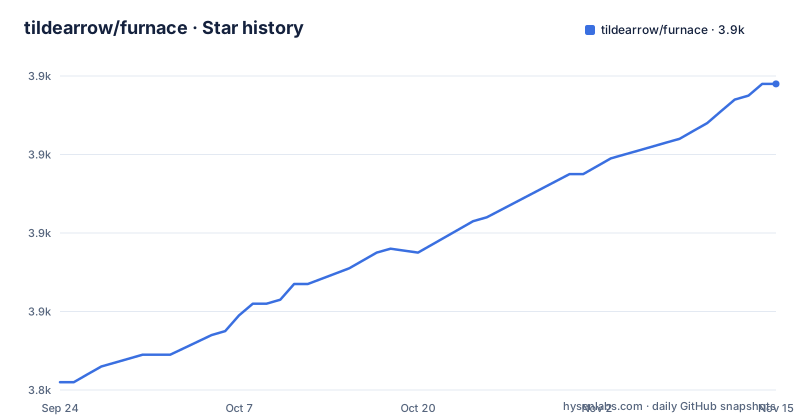
Star history
- tildearrow/furnace3,918 ★ · +76
| Repository | 2026-09-24 | 2026-11-15 |
|---|---|---|
| tildearrow/furnace | 3.8k | 3.9k |
76 Stars in the last 52 days, measured from the daily GitHub snapshot. Compare with other projects
Editorial analysis
Three licence files and a silent metadata field
The page states the terms as open source under either of two versions of the GNU General Public License, or later, and links a single licence file. The tree tells a more detailed story: there are three licence files at the root, one general, one for the second version and one for the third. That is the standard shape for a project granting the recipient a choice between two licences, which matters in practice because the two versions differ in their patent and device-transfer terms, so a distributor who needs one specific grant can pick it. The repository's own licence metadata, meanwhile, reports nothing. So a tool that scans package metadata will find no licence at all, and a tool that reads the tree will find two options. Neither is wrong, but the metadata is the field that automated compliance usually reads first.
Three install paths that are all the same workaround
Each platform's installation note comes down to defeating a security prompt, and each says so differently. On Windows, extract the archive into a new directory, or into one you created before, then make a shortcut if you want one. The parenthetical is the giveaway: extracting into a directory you already own is the way to avoid the mark-of-the-web prompt that a fresh extract inherits. On macOS, drag the application into the Applications folder, drag everything else somewhere separate, and then, on first open, right-click the icon and choose Open rather than double-clicking it, which is the documented way past the quarantine gate. That second instruction also reveals something about the bundle, since the application and its support files have to be placed in two different directories by hand. On Linux and elsewhere, the page says the process is like Windows unless you use a package manager, which is the one platform where none of this applies.
The audio comes from eleven named emulator cores
One feature line lists what the project calls quality emulation cores, and then names eleven of them: a Yamaha FM core, two Commodore SID cores, a Game Boy core, a PC Engine core, a NES core, a Spectrum-related core, and several more. Every one of those is somebody else's project. That is the real architecture of this tracker, and the page is straightforward about it: the tracker is the interface, the module format and the chip layer, and the audio is produced by cores it links in. It has a knock-on effect for anyone writing songs on it. A song that sounds wrong is as likely to be a regression in a linked core as it is to be a mistake in the module, and the page does not offer a way to pin or select a core version per song. The page does compensate in a different direction, with compatibility flags for deliberately emulating a chip bug or quirk when that produces more accurate playback of the original machine.
It loads every DefleMask module version and doubles as a downgrader
The compatibility section is the most interesting part of the page and it is unusually precise about method. It loads module files from every version of the original tracker, from the first beta through a specific later release, and saves them back in both the modern and the legacy format, which is why the page says the application doubles as a module downgrader. Instruments and wavetables load and save in the original tracker's formats too. And then the sentence that tells you how to read the rest: the design is clean-room, with guesswork and listening tests only and no decompilation involved. That is a specific claim about how behaviour was established, and it is a stronger one than saying the code is original. It also means accuracy is argued rather than proven, which is consistent with the compatibility flags for chip quirks sitting a few lines below: where the real hardware misbehaves, matching the misbehaviour is a deliberate choice the user makes.
The module format is a superset, which is why a downgrader ships
Three of the miscellaneous features explain the downgrader. The tracker can change tempo partway through a song, it accepts a decimal tempo or tick rate rather than only the original's integer model, and it supports several distinct sub-songs inside one module. Each of those is an extension to the format it reads, and each would be lost on export to the original format. That is not a criticism; it is the design of a tracker that treats the original format as a floor rather than a ceiling. It does mean the file you make here is not always the file the original tracker can open, which is exactly what the save-as-legacy option and the downgrader are for. The export list follows the same logic: three of the export types are for specific target machines, and one of them is audio for the whole song, per chip or per channel, which is the format everyone else can actually open.
The chip list mixes hardware, other people's projects and the author's own chip
The feature list is grouped by chip family and runs to several dozen entries, and the grouping is where it becomes informative rather than decorative. Real hardware is listed with the machine it shipped in, so a chip entry doubles as a hardware trivia note. Sample-playback chips list the console. Then there is a group labelled modern and fantasy, and it contains a graphics chip from a recent home computer, a handful of sound chips from open source emulator projects, a generic pulse-wave converter, and one entry named after the author of this project. The author's own chip sits in the same list as the hardware it imitates, with no marker distinguishing it. For a tracker whose pitch is breadth, that is a defensible choice, but a reader choosing a chip for a song has to know which entries are a real part number and which are someone's emulation project.
Seven Unix packages, each with a named maintainer, and no Debian package
The packages section credits an individual for most of the entries rather than a team or a distribution, and the credits are per package: the Flatpak is on the desktop application store thanks to one person, the Nix package is in the unstable channel thanks to another, the BSD ports entry is courtesy of a third, and the openSUSE package of a fourth. Arch Linux is in the official repositories and Void Linux is in its own tree. What is not on the list is a Debian or Ubuntu package, which for a project that describes itself as the biggest tracker of its kind is a notable gap on the two largest Debian-family distributions. The page also links a package-version aggregator, so you can see how far behind each distribution's build is without installing anything.
Localisation files and shipped songs, neither mentioned on the page
Two directories in the tree describe work the page never mentions. One is a translation catalogue, so the application is localised even though the feature list and the installation notes are English only. The other is a directory of songs in the tracker community's shared text format, meaning demo music ships inside the repository rather than living on a separate site. There is also a directory of instruments and one of wavetable data, both at the root, which tells you the project carries content rather than only code. Alongside them sit vendored third-party directories and a submodules file, matching the earlier observation that the emulation cores come from elsewhere. The repository also keeps a plain to-do file at the root, which is unusual for a project with documentation this structured and is the one place a contributor would look first.
Editorial conclusion
Furnace suits someone making chip music who wants one tracker for many console and computer sound chips rather than one per machine. Four things to know before you adopt it. Its accuracy depends on other people's emulator cores, so a regression in one of those projects is a regression in your songs, and the tracker itself is the layer that decides which core to use. It ships a module downgrader as a first-class feature, which is unusual and useful precisely because its own module format is a superset of the one it reads. It is maintained by one person who says so plainly and asks for bugs through the tracker, not the game. And the install instructions are three different workarounds for the same operating system habit, so expect one extra step per platform.
Frequently asked questions
What does a furnace do?
This repository is not about heating. Furnace is a chiptune tracker: a program for writing music for sound chips, comparable to a tracker for a specific machine's audio hardware. It supports dozens of chips from Yamaha FM parts through square wave and sample playback chips to several home computers and consoles, lets you mix chips in one song, and reads and writes modules from another tracker.
how to use furnace
The page does not carry usage instructions. It points at a quick start guide, a documentation index and a frequently asked questions file, all three inside a documentation directory in the repository. For installation it gives per-platform steps, and for help it names two discussion channels while stating explicitly that no other place is official, including one social group that is not the author's.
How much should a new furnace cost?
The repository is a music tracker and does not discuss prices for anything. The only commercial figures on the page are about support: the author offers sponsorship, and the project distributes itself through releases, a nightly build link, and volunteer-maintained packages for seven Unix systems, each credited to a named person.
What do you mean by furnace?
The name is the project's, and the page opens with an unquantified claim about being the largest tracker of its kind rather than with a definition. What it then does is list what that means in practice: which sound chips are emulated, which module formats are read and written, which export formats are produced, and that the emulation cores themselves come from other projects.
How to install furnace filter
The repository contains no filter installation instructions, since it is a music application. Its installation notes cover three platforms and are really about defeating an operating system security prompt: on Windows, extract into a directory you created beforehand; on macOS, open the application from its context menu the first time; on Linux, extract as on Windows or use a package manager. There is also a nightly build link for the latest unstable binaries.
Official sources
Add this badge to your README
If you maintain this project, the badge below links readers to this analysis and shows its maintenance status from the daily GitHub snapshot. Paste the markdown into your README; add ?metric=license or ?metric=stars to the image URL for a different field.

[](https://hysenlabs.com/projects/tildearrow-furnace)Star history chart for your README
[](https://hysenlabs.com/projects/tildearrow-furnace)Was this useful?