Tiny RDM ships two programs that look like one
Tiny RDM (Tiny Redis Desktop Manager) - A modern, colorful, super lightweight Redis GUI client for Mac, Windows, and Linux. It also provides a web version that can be deployed via Docker.
At a glance
- What is it?
- Tiny RDM is a Redis desktop manager for Mac, Windows and Linux, built as a Wails app over a Vue frontend, and it also publishes a Docker image that serves the same interface through nginx. The two are separate main packages, and the differences that matter live in the build: the server defaults to version 1.0.0, the compose file shown in the docs is missing settings the repository's own copy has, and the image publishes port 8086 while its backend reads 8088 from the environment.
- Who is it for?
- Tiny RDM suits someone who wants a quick local GUI for keys, hashes, streams and pub/sub, and the Docker image is a workable way to hand a browser to a teammate as long as you replace the example credentials. Expect to learn the SSH tunnel and SSL connection settings from the app itself and the custom decoder contract from tinyrdm.com, because the README only lists them as features.
- Can I use it commercially?
- Yes, with conditions. GPL-3.0 is a copyleft licence: if you distribute software that includes it, you must release that software's source code under the same licence. Running it internally without distributing it does not trigger that obligation.
- Is it still maintained?
- Yes. The repository last received commits 125 days ago.
- What is it written in?
- Mainly Vue, according to GitHub's language statistics.
Answers come from the project's GitHub data, last synced on November 14, 2026, and from our analysis. They are not legal advice.
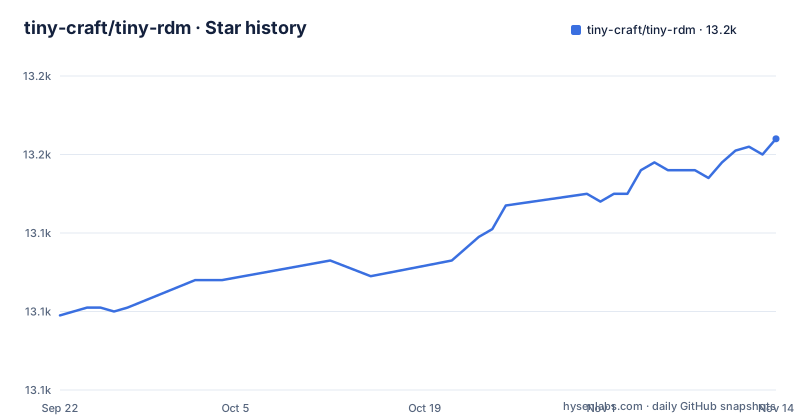
Star history
- tiny-craft/tiny-rdm13,164 ★ · +45
| Repository | 2026-09-22 | 2026-11-14 |
|---|---|---|
| tiny-craft/tiny-rdm | 13.1k | 13.2k |
45 Stars in the last 53 days, measured from the daily GitHub snapshot. Compare with other projects
Editorial analysis
Two main packages, and the written build recipe only reaches one of them
The repository carries main.go and main_web.go side by side, and only one of them has a documented build. What the guides walk you through is the desktop path: install Wails, clone shallow, install the frontend packages, run wails dev.
go install github.com/wailsapp/wails/v2/cmd/wails@latestgit clone https://github.com/tiny-craft/tiny-rdm --depth=1The frontend install is offered two ways, `npm install --prefix ./frontend` or a change into the directory followed by `npm install`, and then `wails dev` starts a desktop process. Nothing in that sequence produces the server. The only place the web build is shown is the Dockerfile, and it does it with a build tag: the Go compile ends in `go build -tags web`. So a contributor who wants the browser version has no written recipe for it outside the Dockerfile, while the README's Docker instructions pull the finished image from ghcr.io.
The self-built server stamps itself 1.0.0 and keeps that number
Version information in the container does not come from a tag or a file. It is a build argument with a hardcoded fallback that gets pushed into the binary with a linker flag:
ARG APP_VERSION=1.0.0
RUN CGO_ENABLED=0 GOOS=linux GOFLAGS="-mod=mod" go build -tags web -ldflags "-s -w -X main.version=${APP_VERSION}" -o /app/tinyrdm-server .
Build the image without passing that argument and the server calls itself 1.0.0 indefinitely. Meanwhile the published releases are v1.2.7 from 2026-03-30, v1.2.6 from 2026-02-12, and v1.2.5 from 2025-08-19, so 1.0.0 names nothing you can look up. The two entry points are separate mains, and only the web one is shown writing the version string, so a desktop build and a web build of the same tree have no guarantee of agreeing on anything. The consequence bites when something goes wrong: a self-hosted instance that reports 1.0.0 tells you nothing about which upstream code sits inside it, and the next conversation with whoever maintains it starts with a question you cannot answer. Capture the digest of the image you actually deployed before you need it, and treat a 1.0.0 banner in a web UI as a build system default rather than a release.
The frontend build stage is pinned to linux/amd64, and the local install is not the image's install
The first Dockerfile stage opens with `FROM --platform=linux/amd64 node:22-alpine AS frontend-builder`, and that one line decides what runs your npm build. On an Apple Silicon laptop or an arm64 build host, the frontend compile goes through emulation, or fails on a builder that offers no amd64 support at all. The later stages are not pinned the same way: the Go builder is `FROM golang:1.25-alpine` and the runtime is `FROM alpine:3.21`, so both follow whatever platform you target. A second mismatch sits right beside it. The image installs frontend packages with `npm ci --ignore-scripts` and sets `NODE_OPTIONS=--max-old-space-size=4096`, while the local instructions say `npm install --prefix ./frontend`. Those are different operations. Skipping lifecycle scripts means a dependency postinstall step runs on your machine but not inside the image, and the 4 GB heap setting applies only inside the image. If you reproduce a build failure locally and it does not match, check whether you ran the command from the docs or the command from the Dockerfile.
The compose file in the docs is thinner than the one in the repository
The documentation shows a compose file, the repository carries its own docker-compose.yml, and they are not the same file. The published snippet sets only the image, the container name, the 8086 mapping, the two credentials and the data volume:
services:
  tinyrdm:
    image: ghcr.io/tiny-craft/tiny-rdm:latest
    container_name: tinyrdm
    restart: unless-stopped
    ports:
      - "8086:8086"
    environment:
      - ADMIN_USERNAME=admin
      - ADMIN_PASSWORD=tinyrdm
    volumes:
      - ./data:/app/tinyrdm
The repository's own copy adds `PORT=8088` and `GIN_MODE=release` to the environment block, and it also carries a fourth entry that is commented out, `# - SESSION_TTL=24h`. Copying the version from the docs loses nothing on those two, because the Dockerfile already sets ENV PORT=8088 and ENV GIN_MODE=release in the image. SESSION_TTL is the sharper problem: it is visible in the repository file and named nowhere else, so you can see that session lifetime is meant to be configurable, and you cannot learn the variable's units, its default, or the range it accepts. For operators, start from the repository file, and treat any session timeout you set as undocumented behavior you validated with your own login testing.
The container publishes 8086 while the Go service reads 8088 from the environment
Read the runtime stage and the compose files together and the port story splits in two. The image does `apk add --no-cache ca-certificates tzdata nginx`, ships the built frontend into nginx's document root, puts the Go binary beside it, sets `ENV PORT=8088`, and then `EXPOSE 8086`. So 8086 is the front that nginx serves, 8088 is the Go service listening behind it, and the mapping `"8086:8086"` publishes the front. The Go port never appears in the ports block. The consequence shows up the moment you touch configuration. Change PORT in the environment block and the mapping still targets 8086. Remove the PORT line the way the docs snippet does, and the image's own ENV PORT=8088 applies. Only 8086 is exposed, which also means the Go service is not reachable from the host unless you add a second mapping, so any health check, probe or script that wants to talk to the backend directly has to be given its own published port first.
Three named capabilities have no specification anywhere in the repository
The feature list compresses SSH Tunnel, SSL, Sentinel Mode, Cluster Mode, HTTP proxy and SOCKS5 proxy into one line. go.mod backs part of that up: `github.com/xanzy/ssh-agent v0.3.3` and `golang.org/x/crypto v0.54.0` are direct requirements, and everything routes through `github.com/redis/go-redis/v9 v9.21.0`. None of that describes the connection form, the key formats the SSH agent accepts, or how certificate verification is configured for SSL. The same gap shows up twice more in the same list. It says the app provides a command-line mode without describing it. It says you can write a custom encoder and decoder for value display, and sends you to https://tinyrdm.com/guide/custom-decoder/ for the contract, which means the decoder interface is not in the tree next to the code that calls it. A feature line is a claim that something exists, not a description of how to use it. The consequence is that you cannot preconfigure this client from its documentation alone, so budget time to click through the dialogs and read the screen, and confirm the surface yourself before you build automation or a custom data format on top of it.
Keyspace listing rides on a SCAN cursor, so the count on screen is a moving target
The stated approach to large keyspaces is segmented loading through SCAN, and the same segmented treatment is applied to List, Hash, Set and Sorted Set so paging and querying do not pull every element into memory at once. That is the right shape for a keyspace you did not write, and it comes with a property worth holding onto: SCAN is a cursor walk, not a snapshot read. Keys added, removed or expired while the cursor advances can show up twice in one pass or not at all. So if you are reading the count in the key list to decide whether an environment is healthy, or to compare two instances against each other, that number is a sample of something in motion rather than a total. Nothing here is broken, and the alternative of fetching everything would be worse on a large database, but it does mean the tool is a good browser for what is in Redis and a poor authority on how much is in Redis.
The macOS download will not open until you run one command as root
Installation itself is a link to the releases page, and the only post-install instruction in the whole document is for macOS users:
sudo xattr -d com.apple.quarantine /Applications/Tiny\ RDM.appThat is a root command against a hardcoded path. It needs an administrator account, and on a managed or locked-down Mac where the quarantine attribute cannot be cleared, the app simply does not launch and the documentation offers no notarization story or alternate route. Move the bundle somewhere other than /Applications and the path no longer matches either. Windows and Linux get no note at all, which is consistent with the dependency list: go.mod carries `github.com/Microsoft/go-winio` and `github.com/jchv/go-winloader` for the Windows side and `github.com/godbus/dbus/v5` for the Linux side, which is how one Vue and Go tree ends up with three packaged builds. For anyone compiling from source, the version requirements are stated loosely as Go at the latest version plus Node.js 20 or newer and NPM 9 or newer, but go.mod declares `go 1.25.0` and the image builds with node:22-alpine, so the README's stated floors are looser than what the repository itself builds with.
Editorial conclusion
Tiny RDM suits someone who wants a quick local GUI for keys, hashes, streams and pub/sub, and the Docker image is a workable way to hand a browser to a teammate as long as you replace the example credentials. Expect to learn the SSH tunnel and SSL connection settings from the app itself and the custom decoder contract from tinyrdm.com, because the README only lists them as features. Before deploying the web build, check the port mapping, find out what SESSION_TTL does, pin the image by digest instead of latest, and confirm that a server you built yourself is not reporting 1.0.0.
Frequently asked questions
Is Tiny RDM the best Redis GUI tool?
Nothing here settles that comparison. What Tiny RDM claims for itself is a Wails desktop client built on Webview2, CRUD across Lists, Hashes, Strings, Sets, Sorted Sets and Streams, SCAN based segmented loading, a slow log list, real-time command monitoring, and a separate Docker web version.
How do I download Tiny RDM?
Installers are published free on the GitHub releases page for Mac, Windows and Linux, and the web version is pulled as ghcr.io/tiny-craft/tiny-rdm:latest. On macOS the one documented post-install step is sudo xattr -d com.apple.quarantine /Applications/Tiny\ RDM.app if the app will not open.
Does the Tiny RDM Docker image contain the same program as the desktop app?
Not the same binary. The repository has two entry points, main.go for the desktop build and main_web.go for the server, and the Dockerfile compiles the server with the web build tag and links a version string into it at compile time.
What does the Tiny RDM web image need before anyone can log in?
Both the compose example and the docker run example set ADMIN_USERNAME and ADMIN_PASSWORD, and the environment table lists no default for either, so a container started without them has no configured login. The example values in the docs are admin and tinyrdm.
Which port does the Tiny RDM container actually serve on?
The compose file maps 8086 to 8086 and the docs tell you to open http://localhost:8086. The Go service reads its own port from PORT, which the repository's compose file sets to 8088, and only 8086 is exposed, so changing one number does not change the other.
Official sources
Add this badge to your README
If you maintain this project, the badge below links readers to this analysis and shows its maintenance status from the daily GitHub snapshot. Paste the markdown into your README; add ?metric=license or ?metric=stars to the image URL for a different field.

[](https://hysenlabs.com/projects/tiny-craft-tiny-rdm)Star history chart for your README
[](https://hysenlabs.com/projects/tiny-craft-tiny-rdm)Was this useful?