tinymce-vue: the official Vue wrapper for TinyMCE and its version matrix
Official TinyMCE Vue component
At a glance
- What is it?
- A thin Vue 3 component around the TinyMCE editor, published by the editor's own vendor under MIT, with a peer dependency range and a compatibility table that decides which major version you install.
- Who is it for?
- tinymce-vue is a good fit when you want TinyMCE inside a Vue 3 application and would rather not manage the editor's script loading and lifecycle yourself, and a poor fit if you need the Vue 2 line or an editor whose behaviour you cannot change.
- Can I use it commercially?
- Yes. MIT is a permissive licence: you can use, modify and sell software built on it, as long as you keep its copyright and licence notices.
- Is it still maintained?
- Yes. The repository last received commits 10 days ago.
- What is it written in?
- Mainly TypeScript, according to GitHub's language statistics.
Answers come from the project's GitHub data, last synced on October 20, 2026, and from our analysis. They are not legal advice.
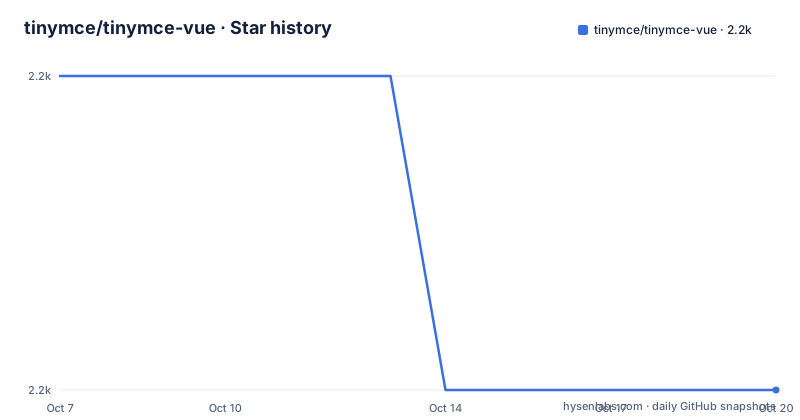
Star history
- tinymce/tinymce-vue2,202 ★ · -1
| Repository | 2026-10-07 | 2026-10-20 |
|---|---|---|
| tinymce/tinymce-vue | 2.2k | 2.2k |
-1 Stars in the last 13 days, measured from the daily GitHub snapshot. Compare with other projects
Editorial analysis
What the wrapper actually does, and what it deliberately leaves to you
The package describes itself as a thin wrapper around TinyMCE, there to make the editor easier to use in a Vue application. Thin is the important word. The repository has no src subdirectory full of editor features, no theme, no plugin implementations. The tree shows src, stories, a Storybook configuration, a Rollup build script, several tsconfig variants and a CHANGELOG.
The division of labour that follows from that is straightforward. TinyMCE itself brings the editor, its themes, its plugins and its content model, and it is consumed as a peer dependency rather than bundled. The Vue component brings the reactivity: it mounts the editor when the component is created, keeps the editor's value in step with a Vue model binding, and tears the editor down when the component goes away.
That last part is where most wrappers earn their keep. An editor that owns a DOM subtree and its own event listeners does not respond well to being reparented by a virtual DOM diff, and wiring that correctly by hand is repetitive work across every screen that has a rich text field. The README does not document the internals, so what can be said is what the package is scoped to rather than how it does it.
The compatibility table is the real documentation
The README's most useful content is a pair of tables. The first maps the editor to the wrapper:
| tinymce | tinymce-vue version | | 7.6 and above | 6.2 and above | | below 7.6 | Versions prior to 6.2 |
The second maps Vue to the wrapper:
| vue | tinymce-vue | | 3.x | 4.0 and above | | 2.x | Versions prior to 4.0 |
Read as one table, that gives you four combinations and one rule: version 4.0 is the Vue 3 cut, and version 6.2 is the TinyMCE 7.6 cut. If you are on Vue 3 and need an editor older than 7.6, the correct answer is tinymce-vue somewhere between 4.0 and 6.1, not the latest release. If you are still on Vue 2, the current line is not for you at all.
The mismatch is worth spelling out because nothing at install time will stop you. The peerDependencies field in package.json declares vue at ^3.0.0, so npm will warn rather than refuse when a Vue 2 application pulls in a current tinymce-vue. The result is a component whose lifecycle hooks follow Vue 3 conventions in an application running Vue 2.
Peer dependencies, build output and how the package is assembled
The package.json describes the shape precisely. It publishes under the name @tinymce/tinymce-vue, and its peer dependencies are tinymce at ^8.0.0 || ^7.0.0 || ^6.0.0 || ^5.5.1 and vue at ^3.0.0, with tinymce marked optional in peerDependenciesMeta.
That optional marker is the more interesting of the two. It means a project can depend on the Vue component without necessarily depending on the editor through the package manager, which covers the case where the editor is loaded from a self hosted copy or a CDN instead of from node_modules. The wide tinymce range, spanning 5.5.1 through 8, is consistent with the wrapper being a stable surface across a moving editor.
Two build outputs are produced. The main field points at lib/cjs/main/ts/index.js and the module field at lib/es2015/main/ts/index.js, so a bundler will pick the ES module and a CommonJS consumer will get the other. The build script runs clean, then lint, then two TypeScript compiles against tsconfig.es2015.json and tsconfig.cjs.json, then the Rollup script that bundles the result.
The devDependencies show the testing approach more clearly than the README does. Tests run through bedrock-auto in headless Chrome against files matching src/test/ts/**/*Test.ts, with a bedrock variant for running them by hand. Supporting packages such as @ephox/agar, katamari and sugar indicate the tests drive the editor as a browser would rather than mocking it.
Demos, Storybook and where the documentation lives elsewhere
The README is a pointer document. Detailed documentation for the editor itself is at the TinyMCE documentation site, and the wrapper has its own three pages there: a Vue integration quick start, a Vue technical reference, and the general editor documentation. Version 8 is what those links currently point at, which lines up with the ^8.0.0 in the peer range.
For working examples, the README points at a published Storybook. The repository has a .storybook directory, a storybook script that starts on port 6006, and a stories directory, plus Storybook packages in devDependencies. A build-storybook script and a deploy-storybook script that publishes to gh-pages under a bot account are also defined, which is how the hosted demo is produced.
The division is sensible and worth understanding before you evaluate the project. The wrapper's own repository answers what the component is and which versions pair correctly. Anything about configuring the editor, its plugins, its toolbar or its content handling belongs to the documentation at tiny.cloud rather than to this page, so an evaluation that stops at the README will conclude too early.
Reporting problems, and the boundary the README draws
Issues and pull requests go to this repository, and the README is explicit about the boundary: for issues related to TinyMCE itself, go to the editor's repository instead. That split matters when something breaks, because a bug in the editor looks identical to a bug in the wrapper from inside your application, and the two are triaged by different teams.
The repository also carries a SECURITY.md and a CONTRIBUTING.md, and a Jenkinsfile sits next to the Rollup build script, which suggests a continuous integration setup that is not the GitHub Actions default. The author field in package.json names Ephox Inc, the company behind the editor's commercial cloud offering.
One detail deserves a flag rather than a conclusion. The package.json version is 6.3.1-rc, a release candidate, and the README's table sends you to 6.2 and above for TinyMCE 7.6 and later. So the tree you would clone is a candidate build of a version that has not been finalized, while the compatibility guidance points at the 6.2 line. Install from the registry rather than from a clone if you need something a colleague can reproduce.
How it compares with the alternatives
The obvious alternative is not another wrapper, it is no wrapper. TinyMCE can be initialized directly in a mounted hook and disposed in an unmounted hook, which is a few dozen lines you would otherwise paste into every component that needs an editor. The wrapper earns its place by removing that repetition and by keeping the model binding consistent across screens.
The other alternative is a different editor in a different wrapper, which is a comparison people make often enough that CKEditor Vue comes up alongside this package in search. The difference in approach matters more than the feature lists: TinyMCE is a commercial product with a paid cloud tier and a self hosted open source core, so adopting this wrapper means adopting that licensing and upgrade path, not just a component. A wrapper project cannot change that, and it inherits it.
There is also the version ceiling to weigh. peerDependencies pins vue to ^3.0.0, so Vue 2 applications are out, and the editor range bottoms out at 5.5.1. If your application is on an older Vue, the honest comparison is between two old wrapper lines rather than between wrappers, and neither is where new work should start.
Editorial conclusion
tinymce-vue is a good fit when you want TinyMCE inside a Vue 3 application and would rather not manage the editor's script loading and lifecycle yourself, and a poor fit if you need the Vue 2 line or an editor whose behaviour you cannot change. Read the compatibility table before anything else, because it encodes two independent axes, Vue 3.x paired with tinymce-vue 4.0 and above and TinyMCE 7.6 and above paired with tinymce-vue 6.2 and above, and picking the wrong cell costs you a debugging session. The last push was on 2026-09-25 and the package.json carries a 6.3.1-rc version, so the release candidate marker is worth noticing before you depend on it.
Frequently asked questions
Is TinyMCE still free to use?
The wrapper itself is MIT licensed, as package.json states and the LICENSE.txt file in the tree covers. The editor it wraps is a separate product with a commercial cloud offering, so licensing for the editor itself is a question about TinyMCE rather than about this package. The README sends editor questions to the editor's own repository.
Which version of tinymce-vue should I install for Vue 3?
Vue 3.x pairs with tinymce-vue 4.0 and above, according to the compatibility table in the README. Separately, TinyMCE 7.6 and above pairs with tinymce-vue 6.2 and above, and versions prior to 6.2 are for editors below 7.6. The package.json peer dependency requires vue at ^3.0.0.
How do I use tinymce-vue in a Vue application?
Install the package, add TinyMCE itself as a dependency or load it separately, and render the editor component where you need a rich text field. The README describes the package as a thin wrapper and points to a Vue integration quick start and a Vue technical reference in the TinyMCE documentation for the details, plus a hosted Storybook for working examples.
Does tinymce-vue bundle TinyMCE itself?
No. TinyMCE is declared as a peer dependency rather than a regular dependency, spanning ^5.5.1 through ^8.0.0, and peerDependenciesMeta marks it optional. That allows the editor to come from node_modules, a self hosted copy or a CDN instead.
Official sources
Add this badge to your README
If you maintain this project, the badge below links readers to this analysis and shows its maintenance status from the daily GitHub snapshot. Paste the markdown into your README; add ?metric=license or ?metric=stars to the image URL for a different field.

[](https://hysenlabs.com/projects/tinymce-tinymce-vue)Star history chart for your README
[](https://hysenlabs.com/projects/tinymce-tinymce-vue)