tlaplus/Examples: A Library of TLA+ Specifications and Models
A collection of TLA⁺ specifications of varying complexities.
At a glance
- What is it?
- tlaplus/Examples collects TLA+ specifications across algorithms, puzzles, distributed systems, proofs, and language-tool testing. It is most useful for learning formal specification and selecting examples compatible with TLC, Apalache, or TLAPS.
- Who is it for?
- Adopt this repository when you need a documented TLA+ example, a specification checked by CI, or a corpus containing particular language features. Do not treat it as a unified application or a substitute for a dedicated toolchain tutorial.
- Can I use it commercially?
- Check first. The repository uses a licence we do not classify automatically, so read its LICENSE file before any commercial use.
- Is it still maintained?
- Yes. The repository last received commits 2 days ago.
- What is it written in?
- Mainly TLA, according to GitHub's language statistics.
Answers come from the project's GitHub data, last synced on November 7, 2026, and from our analysis. They are not legal advice.
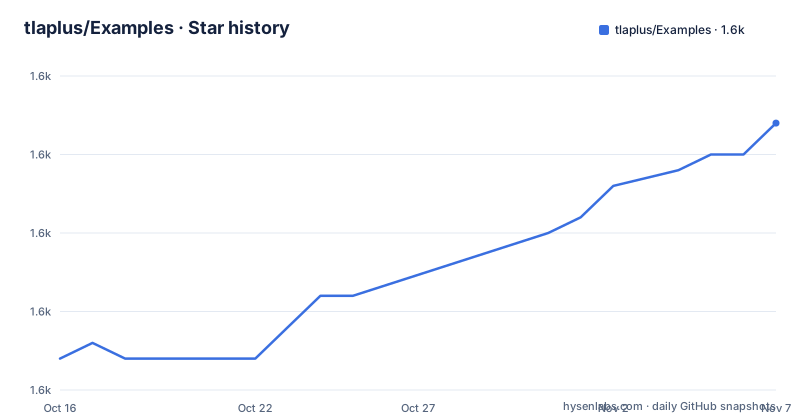
Star history
- tlaplus/Examples1,602 ★ · +15
| Repository | 2026-10-16 | 2026-11-07 |
|---|---|---|
| tlaplus/Examples | 1.6k | 1.6k |
15 Stars in the last 22 days, measured from the daily GitHub snapshot. Compare with other projects
Editorial analysis
What the TLA+ Examples Repository Contains
tlaplus/Examples is a library of TLA+ specifications and models rather than an executable application with a user interface or service. The README identifies three roles for the collection: demonstrating how to specify an algorithm in TLA+, providing a diverse corpus for development and testing of TLA+ language tools, and documenting applications of formal specification.
The intended users are specific. Someone learning TLA+ can use examples marked as beginner-friendly, while tool developers can search the collection for specifications containing particular language features. Formal specification practitioners can inspect case studies involving proofs, model checking, symbolic checking, trace generation, and intentional failures. These uses overlap, but they do not require the same starting point or verification workflow.
All specifications are stored under the `specifications` directory, with examples isolated in separate subdirectories. The collection includes teaching material, classic algorithms, concurrent behavior, mathematical examples, and puzzles. Listed examples include Teaching Concurrency, Loop Invariance, Learn TLA+ Proofs, Boyer-Moore Majority Vote, N-Queens, The Dining Philosophers Problem, The Car Talk Puzzle, The Die Hard Problem, EWD687a, and The Coffee Can Bean Problem.
Several entries have TLAPS proofs, some include PlusCal variants, and many are listed as compatible with TLC or Apalache. This breadth is the repository's main value, but it also means there is no single uniform workflow shared by every example. A learner should inspect an example's local files before assuming that its TLA+ module, configuration, and proof setup can be treated alike with every other entry.
How Specification Metadata Connects Examples to Verifiers
The repository uses two metadata layers. The README contains a compact table that identifies whether an example is beginner-friendly, whether it includes a PlusCal variant or uses PlusCal exclusively, and whether it can be verified with TLC, Apalache, or TLAPS. Because the table has space constraints, each specification directory contains a more detailed `manifest.json` file. The repository also includes `manifest-schema.json`, which gives the project a defined structure for this metadata.
This arrangement allows a learner to begin with the visible table and then inspect the directory for details. It also lets tool developers locate examples by feature instead of scanning every specification. The README identifies searchable metadata values such as `pluscal`, `proof`, `action composition`, `generate`, `simulate`, `symbolic`, `deadlock failure`, `safety failure`, `liveness failure`, and `assumption failure`.
The verifier flags describe different routes through formal methods. A PlusCal column concerns the presence or use of the PlusCal variant, while a TLC model flag identifies examples listed for TLC verification. Apalache is associated with symbolic checking, and TLAPS is associated with proofs. The README does not present these tools as interchangeable checkboxes. Each example's local files and metadata determine whether the indicated route applies, so a reader should inspect both the table row and the example directory before choosing a tool.
Finding a Specification by Feature Before Installing a Verifier
The README gives a direct first use for the repository: search its manifests for a keyword. The command below searches every specification manifest under `specifications` and prints files whose contents contain the supplied keyword. Replace `$keyword` with a metadata value documented by the project, such as `pluscal`, `proof`, or `action composition`.
ls specifications/*/manifest.json | xargs grep -l $keywordFor example, a reader looking for PlusCal material can assign `pluscal` to the variable, while a reader seeking proof-related metadata can assign `proof`. The output is a list of matching manifest files, not a ranked result or an automatically verified compatibility report. From there, open the corresponding specification directory and review its model, configuration, proof files, and metadata together.
The project provides a separate search for TLC configuration features. This command looks for `SYMMETRY`, `VIEW`, `ALIAS`, `CONSTRAINT`, or `DEADLOCK` when those names are assigned to `$keyword`.
ls specifications/*/*.cfg | xargs grep -l $keywordThe first command asks which specifications advertise a feature or verification mode in `manifest.json`; the second asks which TLC configuration files contain a named feature. A match is a starting point for inspection, not evidence that the entire specification is beginner-friendly or that its checks are trivial. The README does not define a universal command that checks every specification in the collection.
Access and First Workflow Through the Published Repository
This is not packaged as an npm, Python, or system package, and the README does not provide an installation command. It describes the repository as a Gitpod-ready-to-code project, so the documented route into the files is the repository itself or the linked Gitpod workspace. A first user can browse `specifications`, choose one of the beginner-marked entries, and inspect its manifest and specification files before arranging a verifier.
The repository includes a GitHub Actions workflow named `CI.yml`, and the README identifies a badge for validating specifications and models. That workflow distinguishes examples that are validated from files merely present in the tree. However, the README excerpt does not document the local commands used by the workflow, supported operating systems, or a complete installation procedure for TLC, Apalache, or TLAPS. Those details cannot be inferred from the CI badge.
A first session should stay within documented operations. Browse the README table, choose a row marked as beginner-friendly, open its directory, read `manifest.json`, and use the repository search commands when comparing examples. Treat the verifier column as a capability label until you have checked the local files. The repository is a collection of artifacts to study, not a command whose success can be inferred from repository creation.
Why a Collection Is More Useful Than One Canonical Example
A single specification can teach syntax, but it cannot show how the same language appears across concurrency, algorithms, proofs, generated traces, symbolic checking, and failure-oriented models. tlaplus/Examples addresses that gap by keeping those cases in one searchable corpus. The table's separate columns for beginner status, PlusCal, TLC, Apalache, and TLAPS make the differences visible without claiming that every model supports every tool.
The collection also includes examples that fail in specified ways. The README names `deadlock failure`, `safety failure`, `liveness failure`, and `assumption failure` as searchable metadata categories. Those examples can give tool developers cases for checking whether a tool reports the intended condition. For a learner, the tradeoff is that the directory contains examples with different verification burdens and assumptions. The repository is a corpus, not a progression where every entry is ready for the same first exercise.
The table also shows why PlusCal needs separate attention. A specification may include an additional PlusCal variant, or it may use PlusCal exclusively. That distinction matters when deciding whether to read the TLA+ representation directly or begin from the algorithm-oriented source. The README does not claim that every PlusCal example has a proof, nor that a model listed for TLC is also listed for Apalache. Local metadata is the authority for those combinations.
Limits of Validation, Tool Setup, and Reuse
The main limitation is that the repository is an example library, not a turnkey formal-methods environment. The README confirms validation for listed specifications, but it does not give a general local command for checking every directory, a complete installation matrix for the external tools, or a promise that examples without a listed verifier can be checked with the same command. Users who need reproducible local validation must inspect the CI workflow and each example's files. The README is silent on those local procedures, so they are not replaced with invented commands here.
The collection is not a single application architecture. It spans unrelated domains, including teaching, algorithms, distributed termination, puzzles, and mathematical statements. This makes keyword search useful, but it can produce a heterogeneous result set. An engineer looking for a production-ready concurrency component should not treat the Teaching Concurrency example as an implementation library. Likewise, an engineer looking for a proof tutorial should not assume every proof-marked model has the same proof structure or tooling requirements.
Licensing requires a separate check. The repository metadata reports a custom license that GitHub cannot classify, and the project directs readers to `LICENSE.md`. The README does not reproduce the license terms, grant scope, attribution requirements, or redistribution conditions. Reuse cannot be assessed from the repository description alone. Review `LICENSE.md` before copying a specification, modifying it, or redistributing it as part of another project. This is a licensing boundary, not legal advice.
Maintenance Signals and Upgrade Cost
The repository is not archived, and its last push was on 2026-10-03. The release history lists version 1.1.0 on 2024-04-20 and v1.0.0 on 2024-02-23. These dates provide the documented maintenance signals, but they do not establish how often individual specifications change. The project should be treated as a validated example collection with a current development signal, rather than as a dependency with a conventional automated upgrade path.
For users adopting examples, the maintenance question is concrete: will the model files, `manifest.json` files, configuration files, and CI expectations remain compatible with the verifier version they use? The README does not document compatibility ranges for TLC, Apalache, or TLAPS, so it cannot answer that question. A new contribution should follow `CONTRIBUTING.md`. `DEVELOPING.md` is present at the repository root, but the README does not summarize its procedures.
There is no indication that adopting one specification creates an automatic runtime or package upgrade obligation. The practical cost is editorial and tooling-related: select an example, verify its metadata, check the relevant configuration or proof, and read the custom license. If a project depends on a specification as documentation, pin its source revision and preserve the accompanying files.
Editorial conclusion
Adopt this repository when you need a documented TLA+ example, a specification checked by CI, or a corpus containing particular language features. Do not treat it as a unified application or a substitute for a dedicated toolchain tutorial. Before choosing an example, inspect its manifest.json and verification flags for TLC, Apalache, or TLAPS, then read LICENSE.md before redistributing material.
Frequently asked questions
What is tlaplus/Examples used for?
It is a collection of TLA+ specifications and models for learning formal specification, developing and testing TLA+ language tools, and studying application examples. The repository places its specifications in the `specifications` directory.
How do I find a tlaplus/Examples specification by feature?
Search the specification manifests with `ls specifications/*/manifest.json | xargs grep -l $keyword`, assigning `$keyword` a value such as `pluscal`, `proof`, or `action composition`. The README documents these metadata searches.
Does tlaplus/Examples support TLC, Apalache, and TLAPS?
The README lists verification support per example, so the collection includes specifications associated with TLC, Apalache, and TLAPS. It does not say that every specification supports every tool, so check the example's `manifest.json`.
Official sources
Add this badge to your README
If you maintain this project, the badge below links readers to this analysis and shows its maintenance status from the daily GitHub snapshot. Paste the markdown into your README; add ?metric=license or ?metric=stars to the image URL for a different field.

[](https://hysenlabs.com/projects/tlaplus-examples)Star history chart for your README
[](https://hysenlabs.com/projects/tlaplus-examples)Was this useful?