babel-plugin-module-resolver: a resolver for the compiler, not for your editor
GitHub describes it as Custom module resolver plugin for Babel. The repository metadata lists JavaScript as its primary language. The metadata lists the MIT license. This article stays within the project description and details documented in the GitHub repository README.
At a glance
- What is it?
- A Babel plugin that lets you write short module paths instead of chains of parent directory references, configured with root directories and aliases. The configuration takes two minutes; telling your editor and your linter about the same aliases takes the rest of the afternoon.
- Who is it for?
- This plugin earns its place in a codebase full of deep relative paths, particularly one where a shared utilities directory is imported from many depths. Two things to know before you install it.
- Can I use it commercially?
- Yes. MIT is a permissive licence: you can use, modify and sell software built on it, as long as you keep its copyright and licence notices.
- Is it still maintained?
- Activity is slowing. The repository last received commits 7 months ago.
- What is it written in?
- Mainly JavaScript, according to GitHub's language statistics.
Answers come from the project's GitHub data, last synced on October 21, 2026, and from our analysis. They are not legal advice.
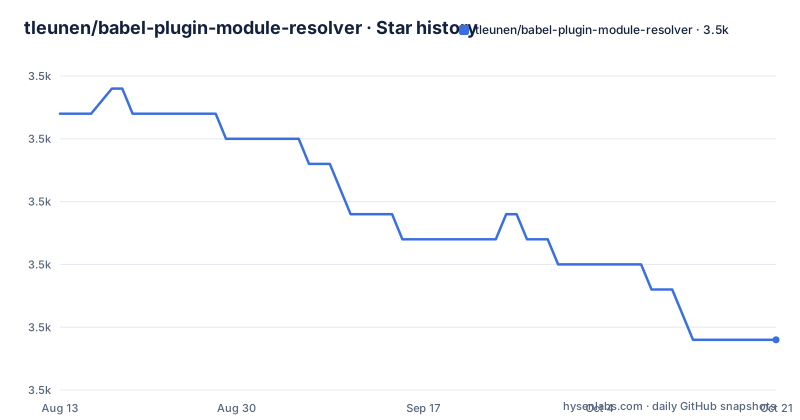
Star history
- tleunen/babel-plugin-module-resolver3,467 ★ · -9
| Repository | 2026-08-13 | 2026-10-21 |
|---|---|---|
| tleunen/babel-plugin-module-resolver | 3.5k | 3.5k |
-9 Stars in the last 69 days, measured from the daily GitHub snapshot. Compare with other projects
Editorial analysis
Short paths, rewritten while compiling
The problem the plugin solves is arithmetic. Reaching a shared utility from a file four directories deep means writing four parent references before the path you actually want, and every file that moves changes that prefix. The plugin lets you write the tail of the path alone and have the compiler work out the rest. Two forms are supported with no extra configuration: import statements and require calls, so the same alias works in a source file and in a script that predates modules. The rewrite happens during compilation, which is the single fact that explains the rest of this article. Nothing about your source layout changes, and nothing about your editor's understanding of that layout changes either, because the plugin never runs in either place.
Roots and aliases do different jobs
npm install --save-dev babel-plugin-module-resolverThe configuration has two parts and they are easy to confuse. A root is a directory added to the list of places the resolver searches, so anything under it becomes importable by its tail. An alias maps one name to something else, and the target can be a directory, a single file, or another package entirely. The documented example does both at once: one root pointing at the source directory, and two aliases, one pointing at a test directory and one mapping a friendly name onto a differently named package. The second kind is the more interesting of the two, because it lets you write the name you would have chosen if the dependency were yours, which is a good way to keep a rename from rippling through a codebase. There is also a JavaScript form of the configuration for projects that build it in code, and the longer reference lives in a separate document.
Three editors, three different instructions
The autocompletion section is the longest in the readme, and reading it as a list explains why. One editor needs a module autocomplete package with this plugin's option switched on. Another needs a path mapping written into its JavaScript or TypeScript configuration file, mapping a wildcard to your source directory, a named prefix to your test directory, and an alias name to the package it stands for. The JetBrains editors get two options and an honest warning about the first: you can mark the directories as resource roots, which makes the editor resolve them, but then the alias has to be named the same as the directory it points at, which defeats the point of choosing a short friendly name. The second option is to give the editor a bundler configuration file and point it there, which is more setup but accepts any alias you like. That trade-off is the whole section in one sentence.
The linter needs two companions, not one
Editor support is only half the problem, because a linter that cannot resolve an import reports it as missing. The readme's answer is to use the import plugin together with a resolver package built for this one, which removes those false reports by giving the linter the same view of your paths that the compiler has. A second companion does the opposite job: it warns when a module that has an alias is imported through a relative path instead, which is the failure mode nobody notices until a file moves and the alias quietly stops being used. Both are separate packages, and the readme names them. Neither is part of this plugin, which is a recurring pattern in the JavaScript ecosystem: the compiler is one tool, the linter is another, the editor is a third, and an alias has to be declared to all three.
The adoption list is mostly React Native
The list of projects using the plugin is a roster rather than a testimonial page, and it has a shape. Several entries are React Native libraries, including a component library, a maps package, an animation library, and a charting library, and the Expo SDK is named as well, which suggests the configuration travels through a shared Babel preset in that ecosystem. The rest is a spread of web work: a search library, a component library, a framework, a component framework for Vue, and a data-visualisation toolkit. The framework entry matters more than the others, because a framework that ships the plugin in its default configuration is how a tool reaches projects that never chose it. The list is maintained by pull request, which is a small sign that it is read.
The project lints and compiles itself with Babel
The repository configuration is a small time capsule. Formatting is handled by one tool, linting by another, and the source is compiled with the same toolchain it extends, from a configuration file at the root. The manifest shows the shape of the release: a compile script that runs the compiler from the source directory into a library directory, a prepublish hook that runs that compile step, and only the library directory is published. A test script runs the linter first, which is the cheapest place to catch a problem, then the unit tests, with separate scripts for coverage and watch mode. Commits are filtered through a staged-content hook, and versioning is handled by a conventional changelog tool rather than by hand. The result is a plugin whose own build is the kind of small, boring, reproducible pipeline it encourages in its users.
Five runtime dependencies, one borrowed from Redux
The dependency list is short and one entry is surprising. Two packages exist to find things: one locates a Babel configuration, the other walks upward looking for a package manifest, which together explain how the plugin finds your settings and your project root. A glob implementation handles pattern matching, and a resolution library does the actual path arithmetic. The fifth is a selector library borrowed from the Redux ecosystem, which is an odd thing to find in a compiler plugin's runtime dependencies and suggests the author reached for a well-tested memoisation helper rather than writing one. It is the sort of choice that is invisible when it works and puzzling when you read the manifest, and it is also a small argument for reading a package's dependencies before deciding whether a five-line alias layer is worth adding to a build.
Editorial conclusion
This plugin earns its place in a codebase full of deep relative paths, particularly one where a shared utilities directory is imported from many depths. Two things to know before you install it. It only changes what the compiler sees, so every other tool that resolves paths needs its own configuration, and the readme covers those one editor and one linter at a time. And check the version you install against your Babel major, because a resolver plugin that fails to load produces a missing-module error that looks nothing like a version mismatch.
Frequently asked questions
What does babel-plugin-module-resolver do?
It is a Babel plugin that rewrites module paths while your code is compiled, so you can write a short path such as a utilities path instead of a chain of parent directory references. It works with both import statements and require calls, and is configured with root directories and aliases.
How do I configure babel-plugin-module-resolver?
Add it to the plugins list in your Babel configuration with a root array of directories and an alias object mapping names to directories, files, or other packages. A JavaScript configuration file is shown as an alternative to the JSON form, and the full reference lives in a separate documentation file in the repository.
Why does my editor not resolve aliased imports?
Because the plugin only changes what the compiler sees. The readme gives per-editor instructions: a module autocomplete option for one editor, a path mapping in the editor's JavaScript configuration for another, and for the JetBrains editors either marking directories as resource roots, which constrains the alias name, or pointing the editor at a bundler configuration file.
Is babel-plugin-module-resolver still maintained?
The readme carries a maintained status badge and the most recent push to the master branch is dated 2026-03-16. The repository publishes no tagged releases, so the version to install comes from the package registry, where the manifest reads 5.0.3.
Official sources
Add this badge to your README
If you maintain this project, the badge below links readers to this analysis and shows its maintenance status from the daily GitHub snapshot. Paste the markdown into your README; add ?metric=license or ?metric=stars to the image URL for a different field.

[](https://hysenlabs.com/projects/tleunen-babel-plugin-module-resolver)Star history chart for your README
[](https://hysenlabs.com/projects/tleunen-babel-plugin-module-resolver)