Tokens Studio for Figma: Design Tokens, Styles, and Sync Providers
Official repository of the plugin 'Tokens Studio for Figma' (Figma Tokens)
At a glance
- What is it?
- Tokens Studio for Figma is an open source Figma plugin for defining, storing, syncing, and applying design tokens. It is suited to design teams that want Figma Styles and properties such as spacing and border radius to come from one token source.
- Who is it for?
- Teams that want a single token source for Figma Styles and properties such as spacing should adopt it after checking the sync provider, local-style behavior, and their preferred style application workflow. Organizations that depend entirely on remote Figma Styles or require a documented rollback path should first confirm those boundaries with the project documentation.
- Can I use it commercially?
- Yes. MIT is a permissive licence: you can use, modify and sell software built on it, as long as you keep its copyright and licence notices.
- Is it still maintained?
- Yes. The repository last received commits 2 days ago.
- What is it written in?
- Mainly TypeScript, according to GitHub's language statistics.
Answers come from the project's GitHub data, last synced on November 7, 2026, and from our analysis. They are not legal advice.
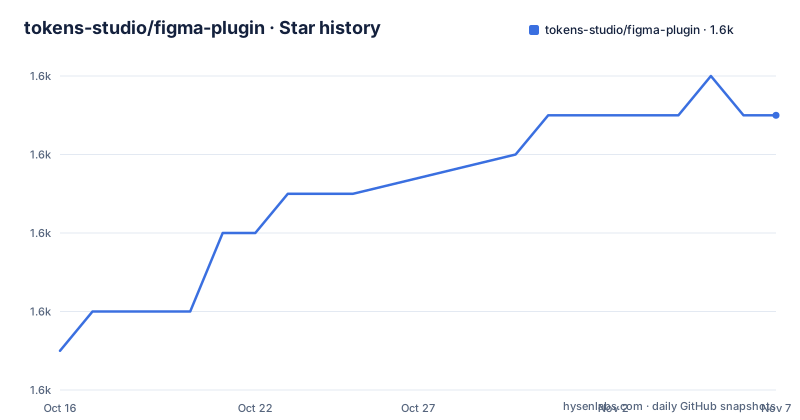
Star history
- tokens-studio/figma-plugin1,629 ★ · +6
| Repository | 2026-10-16 | 2026-11-07 |
|---|---|---|
| tokens-studio/figma-plugin | 1.6k | 1.6k |
6 Stars in the last 22 days, measured from the daily GitHub snapshot. Compare with other projects
Editorial analysis
Why Tokens Studio for Figma exists
Tokens Studio for Figma, formerly known as Figma Tokens, addresses a specific gap in Figma's native model. The plugin lets designers define tokens in JSON and use them inside Figma, while also covering properties that Figma does not natively expose as token-like decisions. The README specifically identifies borderRadius and spacing as examples. It also supports color and typography tokens at a granular level by separating atomic decisions into reusable values and aliases.
The intended audience is design teams working with Figma who need more control than ordinary Styles provide. A team can use the plugin only to create or update Figma Styles, keeping color and typography application in Figma itself. Alternatively, it can apply tokens directly to layers, providing style-like behavior for properties such as spacing and border radius. This gives the plugin a dual role: a token manager for Figma Styles and a direct token application layer for additional properties.
The central design choice is that a token can represent a decision and its relationship to other decisions. Aliases allow teams to reuse values instead of repeating raw values throughout a file. Theme sets and Figma's Swap library feature are mentioned in the README as useful when the plugin manages Styles without applying every token directly. This is useful for teams that want centralized token logic while preserving native Figma Style workflows.
How token values reach Figma layers
The plugin stores tokens as JSON and can synchronize that data with a sync provider such as GitHub. When a designer applies a token to a layer, Tokens Studio records hidden information on that layer. The record identifies which token should be applied to which property. After the token data changes, the plugin scans the document for layers containing that hidden information and updates those layers.
This mechanism explains why the plugin can manage properties that Figma does not natively support. The layer is not simply receiving a one-time value. It is linked to token metadata that the plugin can revisit when the underlying token set changes. The same mechanism also means that the plugin's behavior depends on whether the hidden information remains attached to the relevant layers.
For color and typography tokens, the plugin checks local Styles whose names match the corresponding tokens and updates those Styles. The README distinguishes local Styles from remote Styles. If a file uses remote Styles, the plugin currently cannot apply the Style in the same way and instead applies the raw hex value for the documented color case. This boundary makes the plugin's local-style workflow easier to understand than its remote-style workflow.
Installing and first using the plugin
The repository documents a local development setup for contributors. The project uses Yarn workspaces and declares `[email protected]` as its package manager. The following command installs dependencies with the lockfile and immutable settings documented in the README:
yarn --frozen-lockfile --immutableAfter dependencies are installed, start Webpack in watch mode:
yarn startThe README says to open Figma, go to `Plugins`, select `Development`, choose `Import plugin from manifest...`, and select the `manifest.json` file from the relevant package. This is a plugin-development setup, not a published-plugin installation procedure. The repository's main documentation site is linked by the README for a quick start and other usage instructions, but the README does not provide a separate command for installing the published plugin from npm.
For a first real use, the README gives two possible workflows. A team can create or update Styles without applying tokens directly, which preserves Figma's native Style application. A user who applies a token to a layer can instead manage values such as spacing and border radius. The exact plugin UI sequence for creating a token or importing JSON is not documented in the README. The first verifiable steps are the local dependency installation, `yarn start`, and importing the package `manifest.json` through Figma's Development plugin flow.
JSON storage and sync provider choices
JSON is the documented storage format for Tokens Studio, which makes the token set inspectable and suitable for synchronization outside the Figma canvas. The README names GitHub as an example of a sync provider, but it does not specify a required provider, authentication method, repository format, conflict policy, or offline workflow. Teams should therefore treat the sync provider as a separate integration decision rather than assuming that JSON storage automatically supplies version-control semantics.
The plugin's two application modes affect what synchronization needs to accomplish. If the team uses the plugin only to manage Styles, token changes can be written into matching local Styles while designers continue to apply those Styles through Figma. If the team applies tokens directly, token updates require scanning affected layers and rewriting their properties. The latter mode gives the plugin more control over unsupported Figma properties, but it also makes the hidden token metadata and document scan part of the update path.
The repository layout indicates a TypeScript monorepo with packages under `apps/*` and `packages/*`, managed through Turbo tasks. The root package includes build, start, lint, test, formatting, bundle, release, and changeset scripts. This is relevant for contributors, but it does not by itself document a public API for importing tokens or controlling synchronization from an external application.
Remote Styles and documented failure modes
The clearest limitation is remote Styles. The README states that when local Styles are remote, the plugin has no way to apply the Style currently and applies the raw hex value instead. That behavior can produce a file that appears to contain the right color value while no longer referring to the expected remote Style. The project documentation specifically advises using Figma's Style feature for Styles and treating the plugin as a manager when this limitation matters.
Another documented error is `Cannot read property document of undefined`. The README says that clearing Figma's cache can solve it and links to Figma's cache-clearing documentation. On macOS, it gives a specific Terminal procedure: quit Figma, remove the Desktop and DesktopProfile cache directories, and reopen the application. This is a troubleshooting path, not a general claim that every plugin failure has the same cause.
The README does not document rollback behavior, conflict resolution, permissions for GitHub sync, schema validation, migration behavior, or how direct token application interacts with every Figma layer type. Those omissions matter for production adoption because a token system is often shared by several designers and maintained across versions. The repository is not archived, and its last push was on 2026-10-15. That indicates recent repository activity, but the README does not promise a particular support response time or compatibility policy.
How this differs from a Figma-only token workflow
Figma's native Styles remain the direct alternative for color and typography. Native Styles are appropriate when designers should apply and inspect those decisions through Figma's built-in Style mechanism. Tokens Studio adds a JSON token layer and can update local Styles whose names match color or typography tokens. It also handles spacing and border radius through direct layer application, which native Styles do not cover in the workflow described by the README.
The practical difference is therefore not a replacement for Figma Styles in every case. It is a choice between a manager-plus-native-Styles workflow and a manager-plus-direct-token workflow. The former keeps Figma's Style interface central. The latter extends token behavior to additional properties and relies on hidden layer metadata plus document scanning. Remote Styles are the clearest case where the native Style workflow is safer because the plugin currently falls back to a raw hex value.
Tokens Studio is also a repository and development project, not just a hosted service description. Its MIT license permits use and modification under that license's terms, subject to its conditions. The README links to product documentation, a roadmap, translation instructions, and a Slack channel. It does not publish a release cadence, an upgrade procedure, or a compatibility matrix in the README.
Editorial conclusion
Teams that want a single token source for Figma Styles and properties such as spacing should adopt it after checking the sync provider, local-style behavior, and their preferred style application workflow. Organizations that depend entirely on remote Figma Styles or require a documented rollback path should first confirm those boundaries with the project documentation.
Frequently asked questions
What is Tokens Studio for Figma used for?
It is a Figma plugin for defining and using design tokens, storing them in JSON, and synchronizing them with a provider such as GitHub. It supports color, typography, spacing, borderRadius, aliases, and token-based updating of local Styles.
Does Tokens Studio for Figma support remote Figma Styles?
The README says that remote Styles are not currently applied by the plugin in the same way as local Styles. In that case, the plugin applies the raw hex value instead, so teams that require remote Style references should verify this behavior before adopting direct color-token application.
How do I install Tokens Studio for Figma for local development?
The README instructs contributors to run `yarn --frozen-lockfile --immutable`, then run `yarn start`. In Figma, use `Plugins` > `Development` > `Import plugin from manifest...` and select the `manifest.json` from the relevant package.
Official sources
Add this badge to your README
If you maintain this project, the badge below links readers to this analysis and shows its maintenance status from the daily GitHub snapshot. Paste the markdown into your README; add ?metric=license or ?metric=stars to the image URL for a different field.

[](https://hysenlabs.com/projects/tokens-studio-figma-plugin)Star history chart for your README
[](https://hysenlabs.com/projects/tokens-studio-figma-plugin)Was this useful?