Topdu/OpenOCR: General OCR and Document Parsing Toolkit
OpenOCR: An Open-Source Toolkit for General-OCR Research and Applications, integrates a unified training and evaluation benchmark, commercial-grade OCR and Document Parsing systems, and faithful reproductions of the core implementations from a wide range of academic papers.
At a glance
- What is it?
- Topdu/OpenOCR is a Python toolkit for text detection and recognition, formula and table recognition, and document parsing. It targets developers, researchers, and organizations that need a unified training and evaluation environment alongside application-facing OCR systems.
- Who is it for?
- OpenOCR fits researchers and developers who need a single Python-facing environment for OCR research and document parsing, while its beta classification, sparse quick-start documentation, and unreported deployment details should be checked before production adoption.
- Can I use it commercially?
- Yes. Apache-2.0 is a permissive licence: you can use, modify and sell software built on it, as long as you keep its copyright and licence notices.
- Is it still maintained?
- Yes. The repository last received commits 32 days ago.
- What is it written in?
- Mainly Python, according to GitHub's language statistics.
Answers come from the project's GitHub data, last synced on October 23, 2026, and from our analysis. They are not legal advice.
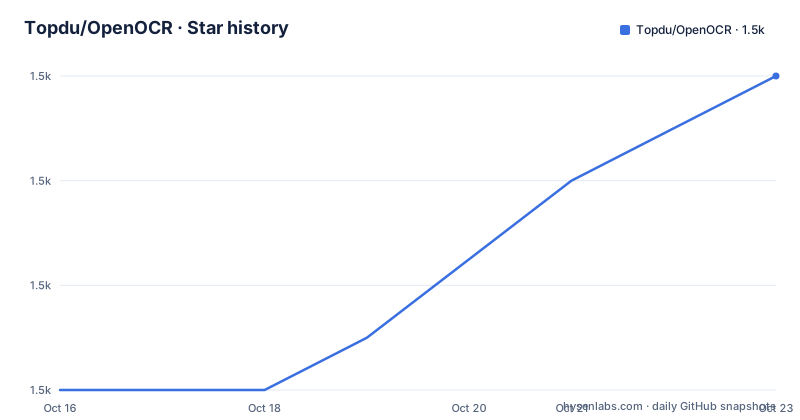
Star history
- Topdu/OpenOCR1,480 ★ · +6
| Repository | 2026-10-16 | 2026-10-23 |
|---|---|---|
| Topdu/OpenOCR | 1.5k | 1.5k |
6 Stars in the last 7 days, measured from the daily GitHub snapshot. Compare with other projects
Editorial analysis
OpenOCR's General OCR Scope
Topdu/OpenOCR addresses the fragmentation problem in general OCR work. Instead of treating text recognition as the only OCR task, its scope includes text detection and recognition, formula and table recognition, document parsing, and document understanding. The repository also presents OpenDoc-0.1B, described as an ultra-lightweight document parsing system with 0.1B parameters. The intended users are researchers reproducing academic methods, developers building document-processing applications, and industry teams looking for an OCR foundation that can cover both benchmark work and application systems.
The project is a toolkit rather than a narrowly scoped command-line converter. Its directory structure reflects several concerns: `opendet/` for detection-related code, `openrec/` for recognition-related code, `configs/` for configuration, `tools/` for supporting utilities, and demo files for OpenDoc and UniRec. This organization suggests a codebase intended to accommodate multiple OCR models and workflows, although the README does not describe each model or establish that every component shares one command interface.
OpenOCR's Training and Evaluation Design
The central architectural claim is a unified training and evaluation benchmark, combined with implementations of systems described as commercial-grade and faithful reproductions of academic papers. The README does not provide an architecture diagram or describe tensor shapes, model registries, dataset loaders, or checkpoint formats. Based on the repository layout, configuration is separated into `configs/`, reusable Python packages into `opendet/` and `openrec/`, and auxiliary operations into `tools/`. Demo entry points such as `demo_opendoc.py`, `demo_gradio.py`, and `demo_unirec.py` indicate separate user-facing paths for document parsing, a graphical interface, and recognition.
That separation is useful when a project spans detection, recognition, and parsing, but it also creates an integration question. A user needs to know which detection output feeds which recognizer, how predictions are represented, and whether evaluation metrics are shared across tasks. The README names those capabilities without documenting the interfaces. The package metadata lists `onnxruntime`, `PyMuPDF`, `opencv-python`, `Pillow`, and `huggingface-hub` among dependencies, which is consistent with image handling, model access, and document-related processing. It does not, however, specify the runtime path for a complete document parsing request.
Installing and Reaching the First OpenOCR Workflow
The repository names the PyPI distribution `openocr-python` and requires Python `>=3.8`. Its optional dependency groups are `onnx-gpu`, `pytorch`, `gradio`, and `all`. The main dependencies include `numpy`, `opencv-python`, `Pillow`, `pyyaml`, `tqdm`, `rapidfuzz`, `pyclipper`, `pydantic`, `shapely`, `huggingface-hub`, `modelscope`, `onnxruntime`, and `PyMuPDF`. The metadata also exposes a console entry point named `openocr`.
The README points readers to `QUICKSTART.md` for the quick start and to `docs/opendoc.md` for OpenDoc setup and a local demo. Those documents are not included, so a reproducible command sequence cannot be given here. The package metadata is the authoritative starting point for package installation, while the quick-start file is the place to check the documented first invocation and model preparation steps.
The first real use should be selected according to the intended component: OpenDoc for document parsing, the recognition code for scene-text recognition, or the demo linked from the documentation. A user should confirm the required optional dependency, download the documented model or dataset, and inspect the relevant demo configuration before passing an image or document. The repository does not document a universal `openocr` subcommand, input schema, output format, or rollback procedure, so installing the package alone does not establish a working OCR pipeline.
OpenDoc-0.1B and Application-Facing OCR
OpenDoc-0.1B is the clearest application-facing component described in the README. It is presented as an ultra-lightweight document parsing system with 0.1B parameters, with links to HuggingFace and ModelScope demos and a local demo document. The name indicates a compact model relative to larger systems, but the repository does not provide a measured memory footprint, latency figure, supported language list, or hardware matrix. It is therefore not possible to infer deployment performance from the parameter label.
OpenOCR also advertises OCR and document parsing systems for applications, alongside paper reproductions. This creates two possible adoption paths. A research user can select a reproduced method and work within the benchmark-oriented repository. An application developer can focus on OpenDoc or another documented model and use the demo as an integration reference. The boundary between these paths is not clearly described in the README, so users should not assume that a training configuration is also a supported production configuration, or that a demo is a stable application API.
The presence of `demo_gradio.py` suggests an interactive path through Gradio, while the package metadata makes Gradio optional. That is sensible for avoiding an unnecessary dependency, but it also means that a graphical demo requires an additional installation choice. The repository does not document authentication, concurrency, request limits, model caching, or production serving behavior.
License, Maintenance, and Upgrade Boundaries
The repository and package metadata identify Apache-2.0, which generally provides a permissive open-source licensing basis, subject to the actual license file and any separate model or dataset terms. The README links to the repository's `LICENSE` file. That distinction matters for OpenOCR because the toolkit may obtain models through HuggingFace or ModelScope, and those model artifacts can carry terms not described by the Python package metadata. Users should inspect the license for each downloaded model and dataset rather than infer asset rights from `Apache-2.0` alone.
The repository is not archived, and its last push was on 2026-09-21. Its listed release history contains `develop0.0.1`, released on 2024-11-23, while `pyproject.toml` reports version `0.1.5` and classifies the project as `Development Status:: 4 - Beta`. These facts indicate ongoing repository activity but do not establish a stable release cadence or compatibility policy. No upgrade instructions, migration notes, supported dependency ranges, or compatibility matrix are present in the listed files.
For maintainers, the split between `setup.py`, `pyproject.toml`, `requirements.txt`, and package subdirectories creates several places where installation metadata and runtime assumptions can drift. The metadata requires setuptools, wheel, and setuptools_scm, while the requirements file lists a different set of runtime packages from the project dependencies. That mismatch should be checked before building a controlled deployment image.
OpenOCR Versus a Specialized OCR Pipeline
A real alternative is a specialized OCR pipeline that separates layout analysis, text detection, text recognition, and post-processing behind a narrow application interface. The difference is not merely feature count. OpenOCR is positioned as a broad research and application toolkit with benchmark, paper reproduction, and document parsing components in one repository. A specialized pipeline can instead focus on one production workload, define its own input contract, and optimize around a fixed model family and deployment environment.
OpenOCR is the better fit when a team needs access to multiple OCR research directions or wants to compare reproduced methods within one Python project. It is less suitable when the immediate requirement is a single stable OCR API with documented latency, language support, model lifecycle, and deployment operations, because those details are absent from the README. It is also a poor choice for a workload that assumes a single stable model and does not need document parsing, formula recognition, or table recognition, since the toolkit's broader scope adds navigation and dependency decisions.
The decision should be based on the specific component being adopted. A team interested in OpenDoc should verify its model documentation, input types, output structure, and licensing. A research team should identify the paper implementation, dataset, configuration file, and evaluation entry point. A production team should first establish whether the repository's CLI and demo interfaces are intended as stable interfaces.
Editorial conclusion
OpenOCR fits researchers and developers who need a single Python-facing environment for OCR research and document parsing, while its beta classification, sparse quick-start documentation, and unreported deployment details should be checked before production adoption.
Frequently asked questions
What is Topdu/OpenOCR used for?
It is a Python toolkit for general OCR tasks, including text detection and recognition, formula and table recognition, document parsing, and document understanding. It is aimed at developers, researchers, and industry partners.
How do I install Topdu/OpenOCR?
The repository identifies the PyPI package as `openocr-python` and requires Python `>=3.8`. The README directs users to `QUICKSTART.md`, but its full installation commands and model setup steps are not shown here.
Does Topdu/OpenOCR support document parsing and tables?
Yes. The README lists document parsing and understanding, formula recognition, and table recognition among the toolkit's task areas. It also describes OpenDoc-0.1B as a document parsing system.
Official sources
Add this badge to your README
If you maintain this project, the badge below links readers to this analysis and shows its maintenance status from the daily GitHub snapshot. Paste the markdown into your README; add ?metric=license or ?metric=stars to the image URL for a different field.

[](https://hysenlabs.com/projects/topdu-openocr)Star history chart for your README
[](https://hysenlabs.com/projects/topdu-openocr)Was this useful?