MediaPipe TouchDesigner runs its models inside a Chromium window
GPU Accelerated MediaPipe Plugin for TouchDesigner
At a glance
- What is it?
- A plugin whose main component launches a browser to host Google's MediaPipe tasks, then spends most of its documentation on the two things that arrangement makes hard: getting segmentation packets to arrive in order, and keeping them tied to the right camera frame. The manifest, meanwhile, is still on the version before the last release.
- Who is it for?
- This is a plugin for a specific job: getting camera frames into MediaPipe's vision models inside TouchDesigner without installing a runtime, on Mac or PC. Read the segmentation documentation before you rely on it, because that is where the design decisions live and where the failure modes are named.
- Can I use it commercially?
- Yes. MIT is a permissive licence: you can use, modify and sell software built on it, as long as you keep its copyright and licence notices.
- Is it still maintained?
- Yes. The repository last received commits 19 days ago.
- What is it written in?
- Mainly JavaScript, according to GitHub's language statistics.
Answers come from the project's GitHub data, last synced on November 25, 2026, and from our analysis. They are not legal advice.
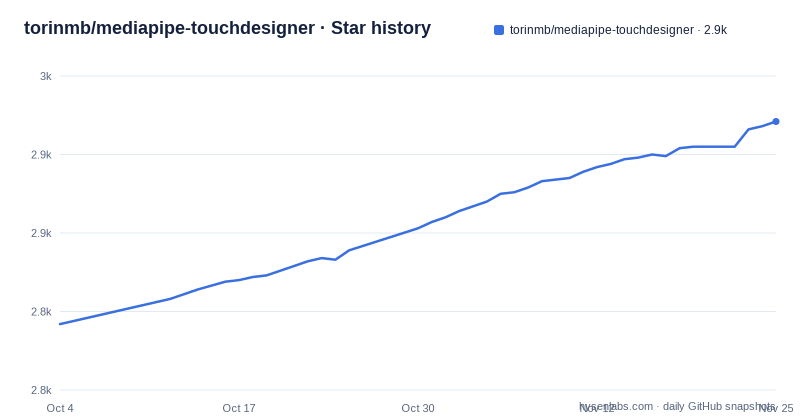
Star history
- torinmb/mediapipe-touchdesigner2,921 ★ · +129
| Repository | 2026-10-04 | 2026-11-25 |
|---|---|---|
| torinmb/mediapipe-touchdesigner | 2.8k | 2.9k |
129 Stars in the last 52 days, measured from the daily GitHub snapshot. Compare with other projects
Editorial analysis
The models run in a Chromium window, not in TouchDesigner
Read the component list from the top. The main component, MediaPipe.tox, launches a Chromium web browser to host and run all of the MediaPipe vision tasks. Everything downstream is a wrapper around data coming back from a browser window: a DAT output for each vision task, and a TOP output carrying the video feed and any overlays. Seven further components process results, one per task, covering face detection, face landmarks, hand landmarks and gestures, object detection, pose landmarks, image segmentation and image classification. That architecture explains most of what the documentation has to say afterwards. Segmentation has to travel as a binary image over a dedicated socket, frame numbers have to be painted into a pixel, and packets have to wait in CPU memory until TouchDesigner holds the frame they belong to, because the compute is not in the same process as the graphics. The repository also commits the geometry the landmarks refer to: canonical_face_model.fbx and canonical_face_model.obj, a separate face_model_with_iris.obj, and two reference images.
package.json says 0.5.2 while v0.5.3 is the published release
The manifest at the repository root carries version 0.5.2. The newest release is v0.5.3, published on 10 August 2026, and the two before it are v0.5.2 from November 2025 and v0.5.1 from June 2025. The number in the manifest therefore matches the release before the current one, and nothing in the file explains the gap. It matters more here than it would for an ordinary library, because the build product is not something a package manager resolves. The repository root contains MediaPipe TouchDesigner.toe and segmentation_demo.toe, the toxes folder holds the components, and what a user downloads is a release.zip assembled from those. The last push to the default branch is dated 19 August 2026, nine days after that tag. So a reader who wants to know which code they are running has to compare the release tag against the component they loaded, because the version string in the manifest does not travel with the tag.
Two lockfiles sit beside a declared package manager
Three files govern the front end build and they do not settle on one installer. package.json names yarn at 4.6.0 as the package manager. The repository also contains yarn.lock and package-lock.json, so both a yarn resolution and an npm resolution are committed side by side. The dependency list is short and heavily pinned. The only development dependency is vite at ^6.0.7. The two runtime entries are the MediaPipe tasks package pinned to exactly 1.0.1 with no range at all, and vite-plugin-static-copy at ^2.2.0. Fixing the MediaPipe package to a single exact version is the sensible choice for something whose model behaviour depends on which release it is, and it is also the entry that has to be moved deliberately rather than by a routine install. The three scripts are the vite defaults and nothing else: dev, build and preview. There is no test script, no lint step and no type check in the manifest.
720p input, and two models deliberately left out
Two limits are stated early. The first is resolution: the model is currently limited to 720p input resolution, as long as that is a resolution the webcam supports. The second is coverage: the plugin supports all MediaPipe vision models except Interactive Segmentation and Image Embedding. The list of shipped components and the list of MediaPipe tasks are therefore close but not identical, and those two exclusions are the whole difference. The documentation does not say why either is excluded, and it does not say whether they are expected to arrive. The resolution ceiling belongs to the input path and not to the output, which matters when you compare it against what comes back. Binary masks arrive at each model's own tensor resolution: 256x256 for Selfie and Selfie Multiclass, 256x144 for Selfie Landscape, 512x512 for Hair Segmenter, and 257x257 for DeepLab V3. So the input cap and the mask size are unrelated numbers, and the mask is the smaller of the two in every case.
Enable External .tox or the project file bloats
The first warning in the file is about file size, and it comes before anything else. When the MediaPipe component is dragged into a new project, the Enable External .tox option has to be selected, or the toe file size will be massive. A community post about external files in 2023.10k builds is linked for the detail, while the repository's own external_tox.md sits in the tree without being pointed at from the documentation. The reason the option exists is visible in the layout: all the components are stored inside a /toxes folder, MediaPipe.tox is the main one, and the other seven exist as examples of how to load and display each model's data. Those examples are part of what gets copied into your project rather than a separate demo you can skip. The repository root also carries a Windows shortcut named for a specific TouchDesigner 2022 build, so the naming around the supported editor version is spread across a binary asset and a blog link rather than stated in one place.
Segmentation takes its own socket so masks cannot queue
The longest part of the file is about how the segmentation path avoids two specific failures. Segmentation is sent directly to the MediaPipe Web Server DAT as a binary image and copied into the seg_data Script TOP; the browser does not render the segmentation output at all. It travels on a dedicated /segmentation WebSocket connection on the same server and port, and the reason given is ordering, so that landmark and control JSON cannot queue ahead of mask packets or their acknowledgements. Then there is the frame matching. A new packet stays pending in CPU memory until its frame number appears in the history that seg_offset keeps; only then is its NumPy array copied into seg_data and the acknowledgement returned to the browser. The stated purpose is to prevent a mask from becoming active before the webcam frame it came from is available. Unmatched packets are dropped and acknowledged after 900 ms, so a single missing Web Render frame cannot stop segmentation permanently, and a set of diagnostic outputs named segPending, segPendingFrame, segPendingAgeMs, segSyncWaitMs and segDroppedUnmatched reports on that gate.
The frame number is painted into one pixel
The frame identifier is carried through the video path as a colour. The bottom left pixel of the browser output holds the low 24 bits of the frame counter as an opaque RGB marker, in little endian order, so red contains bits 0 to 7, green bits 8 to 15 and blue bits 16 to 23. TouchDesigner exposes TOP colour channels in the 0 to 1 range, so the decode has to happen after converting each channel to its nearest 8 bit integer, and the arithmetic given is R8 + G8 * 256 + B8 * 65536. The instruction is to crop the marker pixel out of the visible output once it has been read. Ordering is specified too: the visible webcam and the marker are drawn into the same canvas update, while MediaPipe receives the clean canvas before the marker is added, so the model never sees the marker it is being timed against. A timers CHOP carries the frame number, the media time, a timestamp, the inference time, the pipeline time and the receive frame metadata.
The mask format follows the option you chose
Segmentation comes back in one of two shapes, and which one you get is decided by the model and the option rather than by a setting in the interface. The single mask models and the multiclass background only option produce a one channel float32 confidence mask. The normal multiclass option produces an RGBA8 image using the configured legend colours. For full precision coloured transport there is a constant to edit: DEFAULT_COLORED_OUTPUT_FORMAT in src/imageSegmentation.js becomes COLORED_OUTPUT_FLOAT32, which is a source change rather than a preference. Anyone who needs a texture larger than the model's native resolution is told to resize the TOP after seg_data rather than to ask the model for more. There is a second control on the model side as well. For the most accurate webcam cutout the file points at the MultiCam model inside MediaPipe.tox, and there is a toggle that displays only the background cutout, which it says can be enabled while on the multiclass model.
Editorial conclusion
This is a plugin for a specific job: getting camera frames into MediaPipe's vision models inside TouchDesigner without installing a runtime, on Mac or PC. Read the segmentation documentation before you rely on it, because that is where the design decisions live and where the failure modes are named. Two things to check against your own setup. The model path is capped at 720p input, and if your webcam does not offer that resolution the file does not have an answer for you. And the build product is a TouchDesigner project file rather than a package, so version identification runs through release tags and not through the manifest, which still reads 0.5.2. Interactive Segmentation and Image Embedding are out of scope, and every other MediaPipe vision model is claimed as covered. If your work needs those two, or needs masks at full colour precision without editing a constant in the source, this is the wrong shape of tool.
Frequently asked questions
What is MediaPipe TouchDesigner?
A GPU accelerated, self-contained MediaPipe plugin for TouchDesigner that runs on Mac and PC with no installation. Its main component launches a Chromium web browser to host and run the MediaPipe vision tasks, and it supports all MediaPipe vision models except Interactive Segmentation and Image Embedding.
How do I install MediaPipe TouchDesigner?
Download the latest release.zip from the release section and open the MediaPipe TouchDesigner.toe file. All the components live in the /toxes folder, with MediaPipe.tox as the main one, and you have to select Enable External .tox when dragging that component into a new project or the toe file size will be massive.
Which MediaPipe models does the plugin not support?
Interactive Segmentation and Image Embedding. Everything else in the MediaPipe vision family is claimed as supported, with shipped components for face detection, face landmarks, hand landmarks and gestures, object detection, pose landmarks, image segmentation and image classification.
What resolution does MediaPipe TouchDesigner accept?
720p input, as long as the webcam supports it. The output side is separate: binary masks arrive at each model's own tensor resolution, which is 256x256 for Selfie and Selfie Multiclass, 256x144 for Selfie Landscape, 512x512 for Hair Segmenter and 257x257 for DeepLab V3.
How does segmentation stay in sync with the webcam?
A packet stays pending in CPU memory until its frame number appears in a marker history kept by seg_offset, and only then is its NumPy array copied into the seg_data Script TOP and the acknowledgement returned. Unmatched packets are dropped and acknowledged after 900 ms so a missing Web Render frame cannot stop segmentation permanently.
Official sources
Add this badge to your README
If you maintain this project, the badge below links readers to this analysis and shows its maintenance status from the daily GitHub snapshot. Paste the markdown into your README; add ?metric=license or ?metric=stars to the image URL for a different field.

[](https://hysenlabs.com/projects/torinmb-mediapipe-touchdesigner)Star history chart for your README
[](https://hysenlabs.com/projects/torinmb-mediapipe-touchdesigner)Was this useful?