TrafeX docker-php-nginx: Running PHP-FPM 8.5 with Nginx
Docker image with PHP-FPM 8.5 & Nginx 1.30 on Alpine Linux
At a glance
- What is it?
- TrafeX/docker-php-nginx packages Nginx, PHP-FPM 8.5, and supervisord in an Alpine Linux container intended for small PHP deployments and as a readable starting point for customization. It suits teams that want one container for web serving and PHP execution, but its bundled service configuration is less suitable for projects needing separate application containers.
- Who is it for?
- Adopt this image for a compact PHP-FPM and Nginx deployment when combining both services in one Alpine container fits your architecture. Do not adopt it if independent scaling or separate container ownership for Nginx and PHP-FPM is a requirement.
- Can I use it commercially?
- Yes. MIT is a permissive licence: you can use, modify and sell software built on it, as long as you keep its copyright and licence notices.
- Is it still maintained?
- Yes. The repository last received commits 8 days ago.
- What is it written in?
- Mainly Dockerfile, according to GitHub's language statistics.
Answers come from the project's GitHub data, last synced on November 7, 2026, and from our analysis. They are not legal advice.
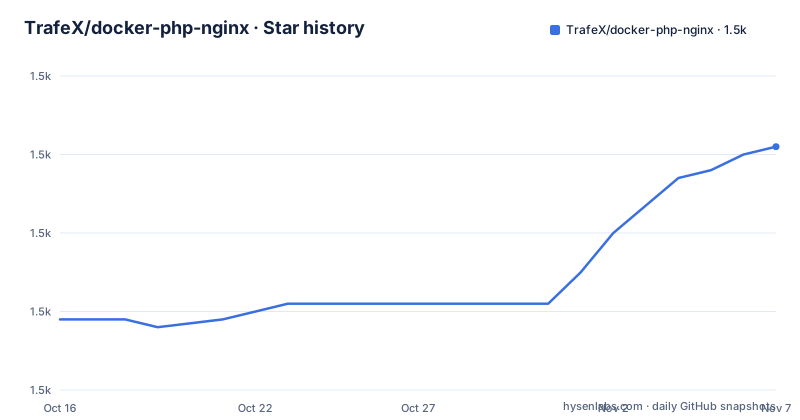
Star history
- TrafeX/docker-php-nginx1,531 ★ · +22
| Repository | 2026-10-16 | 2026-11-07 |
|---|---|---|
| TrafeX/docker-php-nginx | 1.5k | 1.5k |
22 Stars in the last 22 days, measured from the daily GitHub snapshot. Compare with other projects
Editorial analysis
What TrafeX/docker-php-nginx Combines
TrafeX/docker-php-nginx solves the basic deployment problem of placing an HTTP server and a PHP execution service in one Docker container. It is aimed at developers who want a compact PHP runtime with Nginx handling web traffic and PHP-FPM handling PHP requests. The repository also describes the image as an example that is easy to understand and modify, so it can serve either as a direct runtime or as a starting point for a project-specific image.
The base is Alpine Linux 3.24. Based on the repository layout, the Dockerfile installs Nginx, PHP 8.5 packages, and supervisor with Alpine's `apk` package manager. It places the document root at `/var/www/html`, then copies Nginx, PHP, PHP-FPM, and supervisord configuration into the image. This is a bundled-service design rather than an image for PHP code execution alone.
The repository metadata identifies several supported architectures, while the README describes AMD, ARMv6, ARMv7, and ARM64 support. The README also claims an image size of approximately 40 MB and describes the image as optimized for 100 concurrent users. Those are project claims, not independently verified measurements, so capacity planning should account for the application, PHP extensions, request mix, and memory settings rather than treating the stated concurrency as a guarantee.
Request Flow Through the Alpine Container
The visible architecture has three service responsibilities. Nginx is the front-facing HTTP server, PHP-FPM is the process manager for PHP, and supervisord keeps the server processes running inside the container. The README states that Nginx, PHP-FPM, and supervisord run under the non-privileged `nobody` user. It also says that PHP-FPM uses the `on-demand` process manager so worker processes consume resources only when requests arrive.
The default configuration comes from separate directories under `config/`. The Dockerfile copies `config/nginx.conf` to `/etc/nginx/nginx.conf`, copies `config/conf.d` to `/etc/nginx/conf.d/`, installs the FPM pool as `/etc/php85/php-fpm.d/www.conf`, and installs the base PHP settings as `/etc/php85/conf.d/custom.ini`. It also copies `config/supervisord.conf` to `/etc/supervisor/conf.d/supervisord.conf`. This separation gives an adopter identifiable mount points for changing each part of the stack.
Service output is redirected to the container's standard output, according to the README. That makes `docker logs -f <container name>` the documented way to follow logs from all three services. The repository does not provide the full `supervisord.conf` or Nginx server configuration in the available text, so restart policies, health checks, request routing details, and graceful shutdown behavior cannot be confirmed from the documented files alone.
Pull the Image and Serve the Default Page
The README starts with a direct Docker Hub invocation. Map the container's port 8080 to port 80 on the host, then open the documented URLs to confirm that PHP information and the bundled static test page are being served.
docker run -p 80:8080 trafex/php-nginxThe container should continue running rather than return immediately because supervisord is managing its services. On the host, `http://localhost` is documented as the PHP information page, while `http://localhost/test.html` serves the bundled static HTML page. If port 80 is already occupied, the README does not provide an alternative host-port example, so the exact replacement port would need to be selected by the operator.
The repository publishes the image through Docker Hub at `https://hub.docker.com/r/trafex/php-nginx`. The README documents four tag forms. `latest` represents the latest stable release and is updated weekly with Alpine Linux patches. Patch, minor-line, and major tags such as `3.9.1`, `3.9`, and `3` provide progressively broader version selection, while a full patch tag is described as immutable.
Mount Application Code into /var/www/html
For a first application use, the README mounts a local codebase over the image's document root. Docker then exposes that code through the bundled Nginx and PHP-FPM configuration instead of serving only the default sample files.
docker run -p 80:8080 -v ~/my-codebase:/var/www/html trafex/php-nginxThe mount replaces `/var/www/html`, so the local codebase must contain the files expected by the bundled web configuration. The available documentation does not state whether the container automatically installs an application's Composer dependencies. Composer support exists as a separate documentation example, which indicates that application dependency setup is treated as an image customization rather than an automatic startup action.
File ownership deserves attention. The Dockerfile explicitly changes ownership under `/var/www` so that the paths needed by processes running as `nobody` can be accessed. A host-mounted codebase has permissions from the host rather than those image-build changes, and the README does not document an explicit permission or UID mapping procedure. If a mounted application cannot be read by the container user, checking the host-side ownership and permissions is the first project-specific troubleshooting step.
Replace Nginx, PHP, or PHP-FPM Configuration
The image is designed to be modified without rebuilding it for every configuration change. The README provides one mount target for each major configuration area: `/etc/nginx/conf.d/server.conf` for the Nginx virtual host, `/etc/php85/conf.d/settings.ini` for additional PHP settings, and `/etc/php85/php-fpm.d/www.conf` for the FPM pool.
docker run -v "`pwd`/nginx-server.conf:/etc/nginx/conf.d/server.conf" trafex/php-nginxdocker run -v "`pwd`/php-setting.ini:/etc/php85/conf.d/settings.ini" trafex/php-nginxdocker run -v "`pwd`/php-fpm-settings.conf:/etc/php85/php-fpm.d/www.conf" trafex/php-nginxThe README uses backticks with `pwd` because Docker's `-v` option requires an absolute source path. These examples mount single files rather than copying whole configuration trees. The FPM example replaces the pool file installed by the Dockerfile; a replacement file must preserve the syntax and directives needed by its service, although the available documentation does not enumerate those requirements. The repository's separate examples also cover xdebug support, Composer, obtaining a client IP behind a load balancer, and sending email. They are extension recipes, not evidence that those features are enabled in the base image.
PHP Extensions and Platform Boundaries
The Dockerfile installs more than PHP-FPM itself. Its explicit package list includes ctype, curl, dom, fileinfo, gd, intl, mbstring, mysqli, openssl, phar, session, tokenizer, xml, xmlreader, and xmlwriter packages for PHP 8.5. It also installs Nginx, curl, and supervisor. `curl` is present as a runtime package, but the README does not document a health-check command or recommend one.
This package selection makes the image more useful for common PHP applications than a minimal PHP-FPM base. It does not mean that every PHP extension is present. The repository topics include older PHP 8.4 tags, but the displayed Dockerfile specifically targets PHP 8.5 through package names such as `php85` and `/etc/php85`. Requirements for extensions outside the Dockerfile would require an image customization.
Architecture is another adoption boundary. The README claims support for AMD, ARMv6, ARMv7, and ARM64, but its wording includes an apparent `AMD4` label elsewhere. Before deployment, check the actual manifest for the specific host architecture rather than relying only on the topic list. Multi-platform support is useful for mixed deployments, but it does not remove differences in native extension compatibility or Alpine package availability across architectures.
Image Versioning, Maintenance, and Upgrade Work
The last push was on 2026-10-14, and the repository is not archived. The latest listed release is 3.11.1 from 2026-03-18, following 3.11.0 on the same date and 3.10.0 from 2025-12-14. The README says `latest` is automatically updated weekly with Alpine patches, while a full semantic version provides an immutable release choice. That makes tag policy important when unexpected base-layer changes would complicate reproduction.
There is a documentation inconsistency that should be resolved before adoption. The repository description names Nginx 1.30, while the README title, badges, and Dockerfile label say Nginx 1.28. The Dockerfile uses Alpine's unversioned `nginx` package, so verify the Nginx version in the chosen published image before relying on either stated number. Verify the Nginx and PHP versions actually present in the chosen published image before relying on either number.
The project uses the MIT license. That permits use and modification under the license's conditions, but this review does not interpret those legal terms. The operational upgrade cost is tied to image tags and mounted configuration. Teams that mount Nginx, PHP, or FPM files retain control over those files, but they must keep them compatible with each image release. Moving from `latest` can also change Alpine patches without changing the semantic image version.
Editorial conclusion
Adopt this image for a compact PHP-FPM and Nginx deployment when combining both services in one Alpine container fits your architecture. Do not adopt it if independent scaling or separate container ownership for Nginx and PHP-FPM is a requirement. Verify first that your target CPU architecture is covered and that the published image version matches the PHP and Nginx versions required by your application.
Frequently asked questions
How do I run TrafeX/docker-php-nginx for the first time?
Run `docker run -p 80:8080 trafex/php-nginx`, then visit `http://localhost` for PHP information or `http://localhost/test.html` for the static example page.
How do I mount a PHP codebase into TrafeX/docker-php-nginx?
Mount the codebase at `/var/www/html`. The README uses `-v ~/my-codebase:/var/www/html` with the image's port mapping.
Can I change the Nginx and PHP configuration in TrafeX/docker-php-nginx?
Yes. The README documents bind mounts for `/etc/nginx/conf.d/server.conf`, `/etc/php85/conf.d/settings.ini`, and `/etc/php85/php-fpm.d/www.conf`.
Which Docker tag should TrafeX/docker-php-nginx users choose?
Use a full tag such as `3.9.1` when an immutable release is required. Major and minor tags track later releases, while `latest` is automatically updated with stable releases and Alpine patches.
Official sources
Add this badge to your README
If you maintain this project, the badge below links readers to this analysis and shows its maintenance status from the daily GitHub snapshot. Paste the markdown into your README; add ?metric=license or ?metric=stars to the image URL for a different field.

[](https://hysenlabs.com/projects/trafex-docker-php-nginx)Star history chart for your README
[](https://hysenlabs.com/projects/trafex-docker-php-nginx)Was this useful?