transmission ships five front ends and a build guide for an older release
Official Transmission BitTorrent client repository
At a glance
- What is it?
- Transmission is a BitTorrent client written mostly in C++ that ships as a native macOS application, GTK+ and Qt interfaces on Linux and the BSDs, a Qt interface on Windows, a headless daemon, and a web interface over the top. The engineering around the core is careful. The documentation around it is not, and the project says so: its docs are declared out of date while volunteers are sought, and the documented release build still unpacks a version four patches behind the current one.
- Who is it for?
- Transmission suits a user who wants a free client with a headless daemon they can run on a server or router. Two things to weigh.
- Can I use it commercially?
- Check first. The repository uses a licence we do not classify automatically, so read its LICENSE file before any commercial use.
- Is it still maintained?
- Yes. The repository last received commits 3 days ago.
- What is it written in?
- Mainly C++, according to GitHub's language statistics.
Answers come from the project's GitHub data, last synced on November 14, 2026, and from our analysis. They are not legal advice.
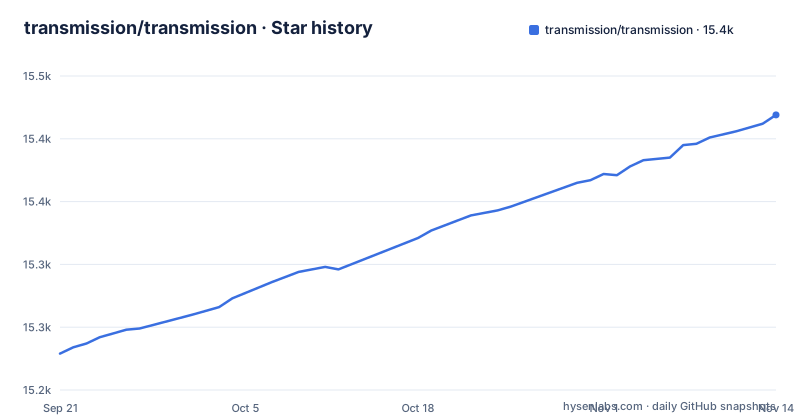
Star history
- transmission/transmission15,419 ★ · +190
| Repository | 2026-09-21 | 2026-11-14 |
|---|---|---|
| transmission/transmission | 15.2k | 15.4k |
190 Stars in the last 54 days, measured from the daily GitHub snapshot. Compare with other projects
Editorial analysis
The documented release build unpacks a version three patches behind
The build section offers three routes, and the first is the one most people take. It unpacks a tarball and configures a build directory:
$ tar xf transmission-4.1.0.tar.xz
$ cd transmission-4.1.0
# Use -DCMAKE_BUILD_TYPE=RelWithDebInfo to build optimized binary with debug information. (preferred)
# Use -DCMAKE_BUILD_TYPE=Release to build full optimized binary.
$ cmake -B build -DCMAKE_BUILD_TYPE=RelWithDebInfo
$ cd build
$ cmake --build .
$ sudo cmake --install .
Those lines name version 4.1.0, in the archive name and the directory you change into. The most recent releases are 4.1.4, then 4.1.3, then 4.1.2.
So the documented commands are four patch releases behind what the project publishes. That is the kind of staleness that survives because the command still works and nobody is checking the version in an example.
The Git-based route does not have the problem, since it clones rather than naming a release. So the practical fix is small: read the version off the release you actually want and substitute it in those two lines.
Worth noting the preference stated in the comment. The maintainers recommend a build type that keeps debug information, and offer a fully optimized one as the alternative, which is the opposite of the usual default in a comment like this.
The project states its own documentation is out of date
There is a documentation section, and it opens by telling you not to trust it.
Transmission's documentation is currently out-of-date. The team has recently begun a new project to update it and is looking for volunteers, and contributors are invited to submit pull requests.
That is an unusually direct admission on a project front page, and it is the single most useful thing here for setting expectations.
A documentation gap is not a cosmetic problem. The README links a separate guide for building and another for translating. If those are stale, getting a working build means reading the source rather than following a guide.
So the practical reading is that this repository is a reliable way to get the software and an unreliable way to be taught it. The invitation for volunteers also tells you something about the project's capacity: the documentation rewrite is a role that is open rather than filled.
If you are evaluating this, budget for reading the source directly rather than assuming a hosted manual will answer your question.
Five front ends sit over one core, and a deprecated client is still shipped
The project lists what it produces, and the list is a menu rather than a single application.
A native macOS graphical application. GTK+ and Qt graphical applications for Linux and the BSDs. A Qt-based graphical application for Windows. A headless daemon for servers and routers. And a web interface for remote controlling any of the above.
Five interfaces over one core means a setting is defined once and has to be reachable from five places, and that the daemon is a first-class citizen rather than an afterthought. For a router or a small server, the daemon plus the web interface is the combination most people actually want.
The command-line side has the same shape. There is a preferred client with full support, three standalone tools for examining, creating and editing torrent files respectively, and a fourth that is explicitly deprecated.
That deprecated one is limited to a single torrent at a time and is said to exist primarily to support older hardware that depends on it, with the guidance that the preferred client should be used in almost all instances. So a deprecated tool remains in the tree for compatibility.
One more packaging wrinkle: distributions may package any or all of these tools in one or more separate packages, so what you get from a package manager varies.
The update recipe runs an aggressive clean inside every submodule
There is a documented procedure for updating a Git checkout, and it is seven commands long. The third one is the interesting one:
$ cd Transmission/build
$ cmake --build . -t clean
$ git submodule foreach --recursive git clean -xfd
$ git pull --rebase --prune
$ git submodule update --init --recursive
$ cmake --build .
$ sudo cmake --install .
That clean runs inside every submodule, recursively, with the flags that remove ignored files as well as untracked ones, and without prompting.
So any untracked or ignored file inside any vendored dependency directory is deleted as part of a routine update. That is the correct behaviour for a submodule you do not intend to edit, and the wrong behaviour for someone who patched one locally.
The rest of the recipe is sound. A clean of the build directory first, a rebased and pruned pull, and a submodule update. The sequence exists to keep a long-lived checkout consistent, which is exactly the situation where a destructive clean inside dependencies is least welcome.
Related to that, the first-time clone is documented with a recursive submodules flag.
Newcomers are told to build from a nightly tarball instead of Git
Among the three build routes there is an instruction with a rationale attached, and it is the opposite of what you would expect.
Download a tarball from the project's nightly build location and follow the steps from the previous section. If you are new to building programs from source code, this is typically easier than building from Git.
So the project advises against cloning if you are new, and points you at a nightly artefact instead.
That is a sensible piece of advice about build friction rather than about the software. A first-time build from Git means a recursive clone, a configure step and a compile, whereas a nightly tarball skips the clone entirely and goes straight to the same configure steps.
The tradeoff is that you are building whatever the nightly produced rather than a tagged release, so the version you get is not one you can name. For someone evaluating the project that is a poor fit, and for someone who just wants a working binary on a machine it is the faster path.
Two facts in one paragraph: the project considers its own source checkout harder than its nightly tarballs, and it publishes a continuously built artefact for that reason.
Windows signing and macOS continuous integration run on donated infrastructure
The sponsors table has two entries and both are about infrastructure rather than money.
Continuous integration builds for macOS run on an M1 Mac Mini provided by a hosting company. Free code signing on Windows is provided by SignPath.io, with the certificate from the SignPath Foundation.
So two parts of the release pipeline depend on donated resources. That is normal for an independent project and worth knowing as a matter of fact rather than criticism.
The Windows signing entry is the one with a supply-chain angle. Code signing is what tells an operating system that a binary came from the project rather than from an attacker, and a free-signing programme is a donation with an expiry. If that sponsorship lapses, the practical effect is that Windows binaries stop being signed, and users see an unknown-publisher warning.
The macOS entry is less consequential, since continuous integration hardware does not affect the trust properties of a released artefact.
So when you judge a Transmission release on a Windows machine, the signature is a function of an external programme rather than only of the project's own process.
An Android client is in the tree but missing from the list of flavours
The top-level directory list includes a directory for an Android client, alongside the ones the front page describes.
The flavour list on the front page covers a native macOS application, GTK+ and Qt applications for Linux and the BSDs, a Qt application for Windows, a headless daemon, and a web interface. Android is not in it.
So the repository contains a mobile client that the project's own summary does not mention. That does not mean it is unmaintained, and the front page is a summary rather than an inventory. It does mean a reader deciding which flavour to try will not learn about it here.
Two smaller entries in the same list are worth recognising for what they are. A directory of translation files, alongside a configuration directory for the translation platform, which is the usual arrangement for a project localising a desktop application. And a third-party directory, which is where the submodules the build requires live.
There is also a script for updating a version header, and a C++ formatter configuration file plus an ignore list and an include list for it.
Editorial conclusion
Transmission suits a user who wants a free client with a headless daemon they can run on a server or router. Two things to weigh. That the documentation is known-stale by the project's own statement, so plan to read the source or ask rather than to follow a guide. And that the build commands you will copy name an older release than the one published, so substitute the current version before you start.
Frequently asked questions
how to install transmission
For a release, unpack the source tarball and run a configure, build and install sequence with CMake. For a Git checkout, clone with the recursive submodules flag first and then run the same steps. The documentation also offers nightly build tarballs and notes that for someone new to building from source, a nightly tarball is typically easier than building from Git.
how to use transmission
Transmission ships as a native macOS application, GTK+ and Qt applications for Linux and the BSDs, a Qt application for Windows, a headless daemon for servers and routers, and a web interface for remote controlling any of them. On the command line the preferred client is fully supported, three further tools examine, create and edit torrent files, and an older single-torrent client is deprecated.
how to use transmission mac
Transmission provides a native macOS graphical application, described as one of several flavours from the same codebase. macOS continuous integration builds run on an M1 Mac Mini provided by a hosting company sponsor, and there is also an Xcode project file in the repository for building in Xcode directly.
how to use transmission linux
On Linux there are two graphical interfaces, one built with GTK+ and one with Qt, alongside the headless daemon intended for servers and routers and the web interface for remote control. The project also documents a documented update procedure for a Git checkout, which includes cleaning ignored files inside every submodule recursively.
Official sources
Add this badge to your README
If you maintain this project, the badge below links readers to this analysis and shows its maintenance status from the daily GitHub snapshot. Paste the markdown into your README; add ?metric=license or ?metric=stars to the image URL for a different field.

[](https://hysenlabs.com/projects/transmission-transmission)Star history chart for your README
[](https://hysenlabs.com/projects/transmission-transmission)Was this useful?