NetherSX2 Classic: an AetherSX2 build with anti-tampering and a resigned APK
Continuation of NetherSX2 based on AetherSX2 3668
At a glance
- What is it?
- NetherSX2 Classic is a modified copy of AetherSX2 3668 with the NetherSX2 anti-tampering hack applied, built on a base that was itself a script-generated variant. It exists for people who want RetroAchievements, no advertisements and current configuration files, and it ships as a resigned APK so that an automatic store update cannot overwrite it.
- Who is it for?
- Adopt NetherSX2 Classic if you want the AetherSX2 interface with RetroAchievements, no advertisements, current configuration files and a build that a store auto-update cannot silently replace. Do not adopt it if you want the latest upstream bug fixes, because the Classic line deliberately sits on the older 3668 base, and follow the guidance about the Patched 4248 variant if you are on a more powerful GPU.
- Can I use it commercially?
- Yes. Unlicense is a permissive licence: you can use, modify and sell software built on it, as long as you keep its copyright and licence notices.
- Is it still maintained?
- Yes. The repository last received commits 132 days ago.
- What is it written in?
- Mainly HTML, according to GitHub's language statistics.
Answers come from the project's GitHub data, last synced on November 7, 2026, and from our analysis. They are not legal advice.
Star history
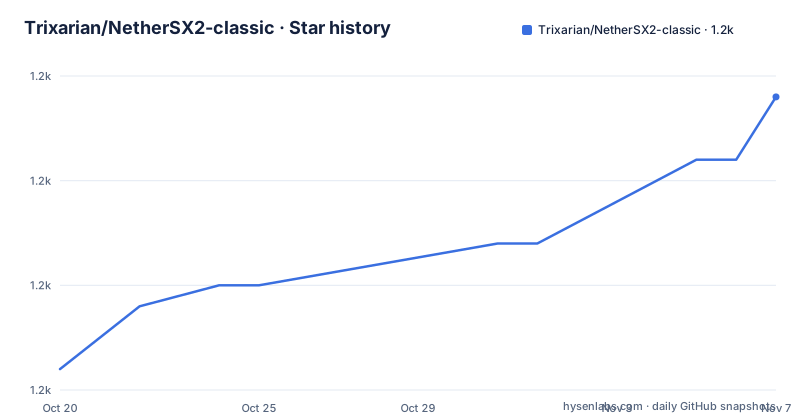
- Trixarian/NetherSX2-classic1,229 ★ · +13
| Repository | 2026-10-20 | 2026-11-07 |
|---|---|---|
| Trixarian/NetherSX2-classic | 1.2k | 1.2k |
13 Stars in the last 18 days, measured from the daily GitHub snapshot. Compare with other projects
Editorial analysis
A script-generated variant of a modified AetherSX2
NetherSX2-classic is a modified copy of AetherSX2 3668 with the NetherSX2 anti-tampering hack applied. It is based on NetherSX2, originally created by Anon and EZOnTheEyes, and generated by a script created by Arjoe.
That single paragraph describes three generations of tooling, and it is worth taking apart because it explains the shape of the project.
AetherSX2 is the Android PlayStation 2 emulator, and 3668 is a specific build of it. NetherSX2 is a variant of that, produced by a script that takes the AetherSX2 sources and applies a set of changes automatically. And the anti-tampering hack is what stops the Play Store version of the emulator from updating itself back over the modified build, which is the problem the project exists to solve.
The list of aims is short and specific: fix the RetroAchievements notifications, expose more global settings in the app settings to the user, update the GameDB, controller support and the widescreen and no-interlace patches, add additional AetherSX2 and NetherSX2 specific fixes to the GameDB, and resign the APK to prevent Google Play Store auto-update from installing 3064 over it.
The last two items are the ones that make this a maintenance project rather than a one-off patch. Keeping a GameDB current and tracking upstream fixes means the build has to be regenerated, and the script is what makes that repeatable.
The repository is released under the Unlicense, which is the most permissive licence there is, and the primary language in the listing is HTML, which is a reflection of the fact that this repository is mostly a diff and a data conversion pipeline rather than emulator source.
Why the APK has to be resigned
The Play Store auto-update problem is the one technical constraint that shapes everything else about this project.
If you install a modified build of an application that also exists on the Play Store, the store can push its own version over yours, silently, and your modifications disappear. The fix is to resign the APK, so that its signature no longer matches the store build and a store update cannot be installed on top of it.
That has a second, less obvious consequence, which is that the project is not distributed through the Play Store at all. The downloads are APKs from the GitHub releases, and the stable one is linked as NetherSX2-v2.1-3668.apk under the 2.1 tag, with the development builds following the same naming pattern.
The same mechanism explains the FAQ entry about why you would use NetherSX2 rather than AetherSX2, where one of the bullets is no advertisements, and it says for AetherSX2 3036 and 4248 users. The advertisements are the giveaway that those builds are the store versions, and the anti-tampering hack is what the classic line avoids.
The other reasons in that list are the ones a user would actually feel: RetroAchievements, online gaming support, up to date configuration files, NetherSX2 specific bug fixes for games, better controller support for automatic setup, and more control over the emulator through the settings.
Classic 3668 or Patched 4248
The question of which variant to use has an answer that depends on the games and on the device, and the README is unusually concrete about it.
It largely depends on the games you will be playing. Generally Classic will be more performant, and some games will only function well on it, with the Nascar ones named as the example. But it will be lacking some graphical and bug fixes that are only present in 4248.
The recommendation follows from that. Use 3668 with Mali or less powerful devices to get the best performance, and for more powerful or Adreno devices, 4248 is the recommended variant.
The GPU vendors matter here because that is where the two builds differ most in practice. A Mali GPU in a budget Android phone, where the extra work of the patched renderer is the difference between playable and not, is the case for Classic. An Adreno GPU, which is what most current Snapdragon devices use, has the headroom for the fixes, and the additional graphics corrections are worth having.
So the choice is a trade of correctness against speed, and the answer is not universal, which is why both builds are maintained and why the two APKs are published side by side with the stable one linked first and the development ones underneath.
The naming convention carries the information you need. The suffix after the version is the AetherSX2 base, 3668 or 4248, so the file name tells you which lineage a given APK belongs to, and the tag, 2.1 for stable and 2.2n for the latest development build, tells you which release channel it came from.
The performance settings that actually matter
The performance question gets a short answer, which is useful.
The default Optimal and Safe settings are the most compatible and performant for most games. You can further optimise them by using the Vulkan GPU renderer and setting Hardware Download Mode to Disable Readbacks. With 3668, also make sure to enable Threaded Presentation when using the Vulkan GPU renderer.
Three settings, and the reasoning behind them is the standard one for an emulator on a mobile GPU. The Vulkan renderer is the modern graphics path, and the older OpenGL path is what leaves performance on the table. Hardware Download Mode set to Disable Readbacks avoids copying the framebuffer back to the CPU, which is the single most expensive thing an emulator does per frame on a phone. Threaded Presentation moves the presentation step off the render thread, which matters most on the older 3668 base, which is why it is called out separately.
The fact that the defaults are described as both the most compatible and the most performant is a useful signal. It means the settings in the app are already tuned for the general case, and the advice is for people who have profiled and found a specific problem.
Moving your data across the upgrade
The installation section is long, and the reason is that the migration from an AetherSX2 install involves a full data transfer, and the README is careful not to lose your saves.
If you were using a copy of NetherSX2 1.9a or above, the path is short. Back up your files, optionally, using the AetherSX2 built-in Transfer Data function and its Export feature to move your files to an external folder, which backs up your bios files, memcards, save states, game settings, covers and texture packs. Then install the APK normally to update to the latest version and keep your current settings.
If you were using AetherSX2 or a copy of NetherSX2 older than 1.9a, the process is longer, and the order matters. Back up the same set of files. Then remove any previous copies of AetherSX2 or NetherSX2 by uninstalling the app normally, and be sure not to keep any files if prompted. With the backup and uninstall done, navigate to the APK with your file manager and tap it to install. Then run the app and configure it normally, reach the Game List screen, use the Transfer Data and Backup Data feature to import the files you exported earlier, and finally spend some time redoing the global app settings.
The step about not keeping files when uninstalling is the one that catches people out, and it is why the backup comes first and why the list of what is backed up is spelled out: bios files, memcards, save states, game settings, covers and texture packs.
The repository is a diff and a data pipeline
The top-level entries tell you what this repository actually is, and it is not the emulator source.
There are three GameIndex files with bracketed qualifiers, GameIndex[converted].yaml, GameIndex[merged].yaml and GameIndex[override].yaml, which is the pipeline in three names. A converted index, a merged index, and an override index are the three stages of taking upstream game data, merging the fixes, and applying the local changes on top.
Then there is gamedb-convert.py, the script that does the conversion, and a decomp/ directory, a docs/ directory, an old/ directory holding what the previous version was, and an assets/ directory.
That is a data-centric project, and it matches the aim of adding additional fixes to the GameDB. The emulator itself is upstream code that the script patches, so the interesting content here is in the YAML and the Python, and the repository is organised so that a change to a game database entry is a small diff rather than a recompilation.
The homepage is a Discord invite rather than a website, which is a reasonable choice for a project of this type, and the project is Unlicensed, which in the SPDX sense means the code is placed in the public domain. The documentation lives in the docs/ directory in the repository.
The last detail in the tree, the old/ directory, is the one that catches attention, because keeping the previous generation of the GameIndex files is what makes a rollback possible. A user whose game stops working after an index update can go back, and the data is still in the tree rather than only in the history.
Release naming and the maintenance state
The release tags use a scheme that is worth understanding before you pick a download.
There are three development builds listed. 2.2a is a dev build from 2025-10-15, 2.2b is a hotfixed dev build from 2025-10-22, and 2.2n is a net dev build from 2025-12-25. The letters carry the meaning, with a as a plain build, b as a hotfix and n as a net build, and each tag also carries the 3668 base in the name.
Alongside them sits a stable channel, the 2.1 release with the NetherSX2-v2.1-3668.apk asset, and the stable download is what the README lists first under Downloads.
The maintenance picture is mixed, and the honest reading is that this is a low-activity project with a published history. The last push was on 2026-06-29 and the repository is not archived, so the GameDB and the script are still being touched. The most recent release, though, is the 2.2n net dev build from 2025-12-25, which is a gap of about six months before the last commit.
That shape fits the project. A GameDB that tracks game compatibility does not need a release every week, but it does need to be regenerated when upstream fixes land, and the fact that the script and the YAML are in the repository means somebody can do that without waiting for the maintainer.
Editorial conclusion
Adopt NetherSX2 Classic if you want the AetherSX2 interface with RetroAchievements, no advertisements, current configuration files and a build that a store auto-update cannot silently replace. Do not adopt it if you want the latest upstream bug fixes, because the Classic line deliberately sits on the older 3668 base, and follow the guidance about the Patched 4248 variant if you are on a more powerful GPU. Before you start, back up your bios files, memory cards, save states, game settings, covers and texture packs with the built-in Transfer Data export, because the uninstall step asks you not to keep any files, and check the device guidance in the README, since the choice between Classic and Patched depends on whether your GPU is Mali, Adreno or something else.
Frequently asked questions
What is NetherSX2 Classic?
It is a modified copy of AetherSX2 3668 with the NetherSX2 anti-tampering hack applied, based on NetherSX2 which was originally created by Anon and EZOnTheEyes and generated by a script created by Arjoe. Its aims include fixing the RetroAchievements notifications, exposing more global settings, updating the GameDB and the controller, widescreen and no-interlace patches, and resigning the APK.
Why is the NetherSX2 Classic APK resigned?
So that the Google Play Store auto-update cannot install the store's build over the modified one. The practical consequence is that these builds are distributed as APK downloads from the GitHub releases rather than through the Play Store, with a stable release and separate development builds.
Should I use the Classic 3668 build or the Patched 4248 build?
It depends on the games and the device. Classic is generally more performant and some games only work well on it, the Nascar ones being named, but it lacks the graphical and bug fixes in 4248. Use 3668 with Mali or less powerful devices, and 4248 for more powerful or Adreno devices.
How do I move my data from AetherSX2 to NetherSX2 Classic?
Back up first with the built-in Transfer Data and its Export feature, which covers bios files, memcards, save states, game settings, covers and texture packs. Then uninstall the old app, answering the prompt so no files are kept, install the new APK, and import the exported files from the Game List screen using Transfer Data and Backup Data, and finally redo your global app settings.
What are the best performance settings for NetherSX2 Classic?
The default Optimal and Safe settings are the most compatible and performant for most games. You can go further by using the Vulkan GPU renderer and setting Hardware Download Mode to Disable Readbacks, and on the 3668 base you should also enable Threaded Presentation when using Vulkan. The project is released under the Unlicense.
Official sources
Add this badge to your README
If you maintain this project, the badge below links readers to this analysis and shows its maintenance status from the daily GitHub snapshot. Paste the markdown into your README; add ?metric=license or ?metric=stars to the image URL for a different field.

[](https://hysenlabs.com/projects/trixarian-nethersx2-classic)Star history chart for your README
[](https://hysenlabs.com/projects/trixarian-nethersx2-classic)Was this useful?