Live Video Magnification separates three algorithms and one off switch
Real‑time Eulerian video magnification: amplify subtle motion & color from webcam or video. Linux/Windows/macOS
At a glance
- What is it?
- A Qt 6 and C++ desktop application, LiViM, that amplifies motion and colour too subtle to see by eye in a webcam feed or a video file, implementing the MIT CSAIL Eulerian techniques. The parameter table is the part to read, because each of the three algorithms exposes a different subset of controls and they fail in different ways.
- Who is it for?
- Live Video Magnification suits anyone who needs to see small motion in footage, which in practice means vibration analysis, shaker testing, plant or structural movement and some kinds of medical imaging, and the phase-based algorithm in particular is the one to reach for when noise is the limiting factor. It is not a video editor, and the export path being video only with no audio means it will not serve anyone who needs a finished cut.
- Can I use it commercially?
- Yes, with strict conditions. AGPL-3.0 is a network copyleft licence: if people use a modified version over a network, for example as a hosted service, you must offer them its source code under the same licence.
- Is it still maintained?
- Yes. The repository last received commits 106 days ago.
- What is it written in?
- Mainly C++, according to GitHub's language statistics.
Answers come from the project's GitHub data, last synced on November 15, 2026, and from our analysis. They are not legal advice.
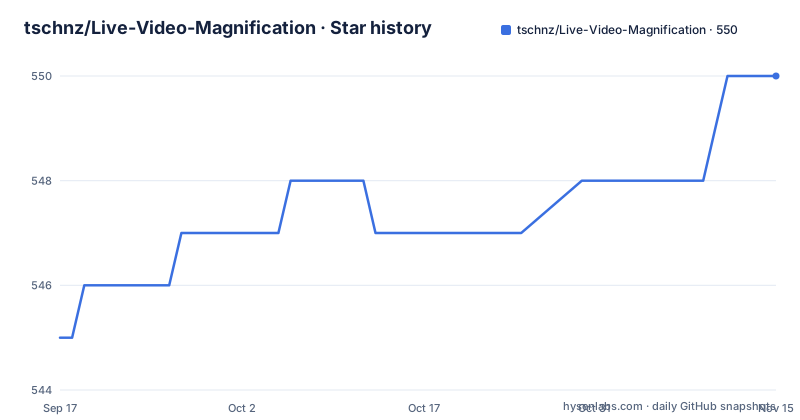
Star history
- tschnz/Live-Video-Magnification550 ★ · +5
| Repository | 2026-09-17 | 2026-11-15 |
|---|---|---|
| tschnz/Live-Video-Magnification | 545 | 550 |
5 Stars in the last 59 days, measured from the daily GitHub snapshot. Compare with other projects
Editorial analysis
Three algorithms, and the table tells you which control applies
There are three magnification paths and they are not variations of one filter, which the parameter table makes clear by marking which controls each one exposes. Motion (Laplace) is the classic Eulerian approach, a Laplacian pyramid with a temporal IIR bandpass. Motion (Phase) is phase based on a Riesz pyramid with a Butterworth bandpass, and it is described as producing less noise. Color uses a Gaussian pyramid with an ideal FFT bandpass over a rolling window, with blood flow given as the example of what it reveals. Amplification, frequency band and levels apply to all three. Cutoff wavelength applies to the two motion paths and controls the spatial cutoff as a percentage, where higher means coarser structures and less noise. Chroma attenuation applies only to Motion (Laplace) and sets how much colour is carried along with the magnified motion. Frequency band is a dual-handle slider capped at Nyquist, which is capture frame rate divided by two, and it doubles as a beats-per-minute readout. Levels is pyramid depth, so a higher value moves the effect to a larger spatial scale.
Original doubles as the off switch
The display modes are Processed, Original, Side-by-Side and Top-and-Bottom, and every one of them is synchronised to the same frame, which is what makes them usable as a comparison rather than as a slideshow. The clever bit is that Original is not merely a reference view: it doubles as the off switch, because selecting it skips magnification entirely rather than running the pipeline and discarding the result. That is the difference between a mode that costs nothing and one that still burns the frame budget, and it matters on a live camera where the processing resolution and region of interest are the controls you reach for when the frame rate drops. Reset restores the defaults for whichever mode is current rather than a global set of defaults, so switching between the phase and colour paths does not leave one configured as the other. The remaining real-time controls are processing resolution in eighths, from one to one down to one to eight, a drawable region of interest, and a grayscale toggle.
Capture FPS is not playback FPS, and it sets the frequency band
This is the setting most prone to producing a result that looks wrong for a reason nobody can name. Capture FPS is the true footage rate that the temporal filters use to compute the Hz band, and it is not the rate the file plays back at. The documented case is high-speed footage played back slowly, where you set the real capture rate, an example of one thousand, regardless of the playback speed. Get this wrong and the passband you dialled in is not the passband being applied, which shows up as either no visible response or a response dominated by the wrong part of the frame. The bottom bar carries an FPS readout whose meaning differs by source, and that difference is worth internalising. Video plays back at the rate set next to the readout, and if the machine cannot keep up, playback slows rather than dropping frames, because nothing is buffered ahead of you. A camera runs at whatever the hardware delivers, so frames are dropped under load instead. For a full-rate result from a file you use Export rather than trusting playback.
File export re-decodes; camera export buffers 8 GB of RAM
Export opens a dialog pre-filled with the current settings, which means layout, output frame rate, format, and for a file a frame range, and the render previews live in the main window so you can abort at any point. What happens underneath differs by source. A file export re-decodes the chosen range at full quality. A camera export has nothing to re-read, so it first records raw frames into RAM and processes them afterwards, and because that memory grows quickly, recording stops automatically at eight gigabytes. That ceiling is a real limit on how long a camera export can be, and it is worth knowing before you start one rather than discovering it at the end. Formats offered are MP4 with H.264, AVI with MJPG, and MKV with FFV1 for lossless. The output is video only with no audio track, which is consistent with the tool being an analysis view rather than a player, but it does mean anything recorded through it has to be muxed elsewhere if sound matters.
vcpkg builds Qt, OpenCV and FFmpeg on the first configure
The source build is honest about its cost. Dependencies, which are Qt 6, OpenCV and FFmpeg, are built by vcpkg rather than consumed as binaries, and the first configure compiles them, with a documented window of about 30 to 90 minutes and the word once attached to it. What you need is a C++20 compiler, CMake 3.25 or newer, Ninja, nasm, and vcpkg with `VCPKG_ROOT` set. On Linux a helper script installs system packages through apt, dnf or pacman and bootstraps vcpkg for you:
scripts/setup-linux.sh --configure
cmake --build --preset gcc-release && ./build/gcc/RelWithDebInfo/livim
The three platform paths are CMake presets, and `cmake --list-presets` shows what a given machine offers rather than making you read the file. The `*-release` presets are RelWithDebInfo builds and the `*-debug` ones are debug builds, which is the usual arrangement but is worth stating because the debug preset is also the slower path for any interactive tuning session. The repository carries `CMakePresets.json`, a `vcpkg.json` manifest and a `triplets/` directory for the platform triplets.
AppImage, NSIS and a dmg, each with its own gate
Prebuilt packages cover all three desktop platforms and the video view has one hard requirement: OpenGL 3.3 with the core profile. On Linux you get a deb, an rpm and an AppImage for x86_64, and camera access needs your user added to the video group, which is the one install step that is not automatic. Windows offers an NSIS installer and a portable zip for x86_64, and the unsigned installer triggers SmartScreen, so the documented path through it is More info then Run anyway. macOS is a single dmg for Apple Silicon only, and Gatekeeper blocks it on first launch; the two workarounds are right-click then Open once, or clearing the quarantine attribute from a terminal. None of these is unusual for an unsigned hobby release, but all three are on the critical path to first run, so they are worth skimming before you download. The application also follows the operating system light or dark theme, and the releases page carries the demo footage used to illustrate the effect, including an ESA shaker test.
A 2015 bachelor thesis, rebuilt with heavy AI assistance
The closing section explains the project's shape better than any feature list. The colour and motion magnification algorithms, the pipeline and its various optimisations were part of the author's bachelor thesis at the University of Tübingen in 2015, and reviving that work into a program that does not crash every other click is described as a long-standing personal goal. The disclosure that follows is unusual to see stated plainly: the app is heavily vibecoded, and the author's reasoning is that as a solo developer with a full-time job who does not want money for the project, it could not have been built to this scope without the help of AI, while noting that donations are not prevented. The licence follows the same directness. It is AGPL-3.0 with a separate commercial licence available from the maintainer, and the dynamically linked third-party components are named with their own terms, Qt 6 under LGPLv3, OpenCV under Apache-2.0, and FFmpeg under LGPLv2.1 or later with no GPL components. Only one release exists, v0.1.0, dated the same day as the last push on 2026-08-01.
Editorial conclusion
Live Video Magnification suits anyone who needs to see small motion in footage, which in practice means vibration analysis, shaker testing, plant or structural movement and some kinds of medical imaging, and the phase-based algorithm in particular is the one to reach for when noise is the limiting factor. It is not a video editor, and the export path being video only with no audio means it will not serve anyone who needs a finished cut. Before you build it, budget the first configure honestly, because vcpkg compiles Qt, OpenCV and FFmpeg from source on the first run and the documented window is 30 to 90 minutes. Then read the Capture FPS note before you tune anything, since setting it to playback rather than capture rate silently computes the wrong frequency band. And check the licence position, since AGPL-3.0 with a separately sold commercial licence is a different arrangement from permissive.
Frequently asked questions
Which magnification algorithms does Live Video Magnification implement?
Three. Motion (Laplace) uses a Laplacian pyramid with a temporal IIR bandpass, Motion (Phase) is phase based on a Riesz pyramid with a Butterworth bandpass and produces less noise, and Color uses a Gaussian pyramid with an ideal FFT bandpass over a rolling window. They come from the MIT CSAIL Eulerian video magnification work by Wu and colleagues and Wadhwa and colleagues.
What does the Capture FPS setting do in LiViM?
It is the true footage rate the temporal filters use to compute the frequency band, not the playback rate. For high-speed footage played back slowly you set the real capture rate, for example one thousand, regardless of playback speed. The frequency band slider is capped at Nyquist, which is capture frame rate divided by two.
How do I build Live Video Magnification from source?
You need a C++20 compiler, CMake 3.25 or newer, Ninja, nasm and vcpkg with VCPKG_ROOT set. Qt 6, OpenCV and FFmpeg are compiled by vcpkg during the first configure, which the documentation puts at roughly 30 to 90 minutes. Each platform has its own presets, and cmake --list-presets shows what the machine offers.
What are the limits of LiViM's export?
Output is video only with no audio. A file export re-decodes the chosen range at full quality, but a camera export records raw frames into RAM first and recording stops automatically at eight gigabytes. Formats are MP4 with H.264, AVI with MJPG, and MKV with FFV1 for lossless.
Official sources
Add this badge to your README
If you maintain this project, the badge below links readers to this analysis and shows its maintenance status from the daily GitHub snapshot. Paste the markdown into your README; add ?metric=license or ?metric=stars to the image URL for a different field.

[](https://hysenlabs.com/projects/tschnz-live-video-magnification)Star history chart for your README
[](https://hysenlabs.com/projects/tschnz-live-video-magnification)Was this useful?