TunaOS: bootc desktop images, seventeen variants and an honest build matrix
Bringing a modern cloud-native experience to the Enterprise Linux Desktop
At a glance
- What is it?
- TunaOS builds immutable bootc desktop images on top of Enterprise Linux and community bases, with atomic updates, rollbacks and a live matrix that reports failures instead of hiding them. Some variants are x86_64 only, and RHEL is local-build only.
- Who is it for?
- TunaOS suits someone who wants a desktop that updates atomically and rolls back cleanly, and who is willing to read the build matrix before choosing a variant, because several rows are red on the day of release and two are permanently narrower than the marketing line suggests. It does not suit someone who needs RHEL 10 from a public registry, an arm64 GNOME image on the Enterprise Linux bases today, or a promise of five desktops on every variant.
- Can I use it commercially?
- Yes. Apache-2.0 is a permissive licence: you can use, modify and sell software built on it, as long as you keep its copyright and licence notices.
- Is it still maintained?
- Yes. The repository received new commits within the last day.
- What is it written in?
- Mainly Shell, according to GitHub's language statistics.
Answers come from the project's GitHub data, last synced on October 24, 2026, and from our analysis. They are not legal advice.
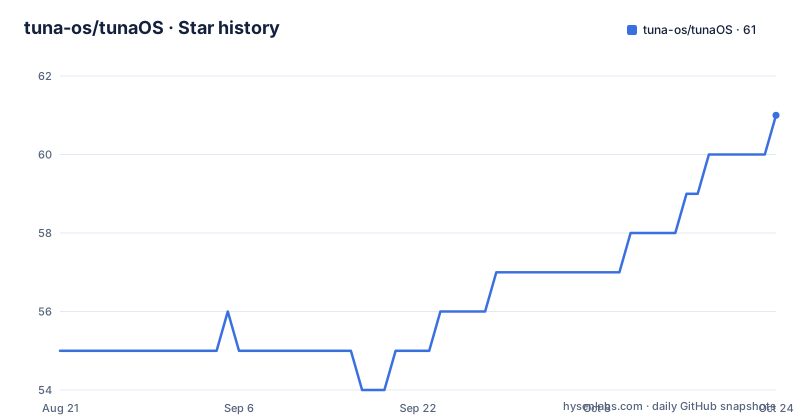
Star history
- tuna-os/tunaOS61 ★ · +6
| Repository | 2026-08-21 | 2026-10-24 |
|---|---|---|
| tuna-os/tunaOS | 55 | 61 |
6 Stars in the last 64 days, measured from the daily GitHub snapshot. Compare with other projects
Editorial analysis
Atomic updates and rollbacks are the whole pitch
TunaOS builds bootc-based desktop operating systems, and the two words it leads with are atomic updates and straightforward rollbacks. The system model is image-based: you do not patch a running desktop, you replace it, and the previous image is still there to go back to. The choice offered is between an Enterprise Linux base for long-term stability and an alternative distribution for a faster release cadence, and the README is explicit that both choices use the same image-based management model, so nothing about the update mechanism changes with the base. The desktop stack is kept current on top of whichever base you pick, with fresh desktop features and updates backported to Enterprise and community bases. The project is Apache-2.0 licensed, its primary language is Shell, and the last push to the default branch main is dated 2026-09-30.
Seventeen variants share one registry namespace
The variant table is the map, and every published image lives under ghcr.io/tuna-os. The Enterprise Linux end of it is Yellowfin on AlmaLinux Kitten 10, Albacore on AlmaLinux 10, Skipjack on CentOS Stream 10, and Redfin on RHEL 10, which has no registry path at all. The community end is much longer: Bonito on Fedora 44, Hummingbird on Fedora Hummingbird, Wahoo on a Fedora ELN EL11 preview, Grouper on Ubuntu 26.04, Gurnard on Ubuntu 24.04, Marlin on Arch Linux, Flounder on Debian 13, Flounder Sid on Debian Sid, Bonito Rawhide on Fedora Rawhide, Sailfin on openSUSE Tumbleweed and Guppy on Gentoo. Two more, Tromso and XFCE Linux, are built from freedesktop-sdk with BuildStream in separate repositories. So a single tag namespace spans rolling, stable and experimental bases at once. Two variants publish suffixed tags on an existing repository rather than a path of their own: Flounder Sid is Debian Sid built as ghcr.io/tuna-os/flounder with a -sid suffix, and Bonito Rawhide is Fedora Rawhide built as ghcr.io/tuna-os/bonito with a -rawhide suffix. The architecture column varies too, with Yellowfin and Albacore offering x86_64, x86_64/v2 and arm64, while most community variants list only x86_64 and arm64.
Five desktops are first class, but not on every variant
The claim is that GNOME, KDE Plasma, COSMIC, Niri and XFCE are equal first-class options across distribution bases, and that holds on Yellowfin, Albacore, Skipjack, Bonito, Marlin, Bonito Rawhide and Sailfin, which list all five. Read the individual rows and the symmetry breaks. Hummingbird offers Base, GNOME and COSMIC. Wahoo offers Base, GNOME, KDE and COSMIC, and is flagged experimental with no codecs. Gurnard offers Base and Pantheon, which appears nowhere else in the table. Flounder and Guppy offer KDE and XFCE only, and the two freedesktop-sdk builds are single-desktop: Tromso ships KDE, XFCE Linux ships XFCE. Choosing a base therefore chooses which desktops you can have. Two entries are also labelled experimental in the base column rather than in a separate section: Hummingbird, on Fedora Hummingbird, and Gurnard, on Ubuntu 24.04 with the Noble Numbat codename. Wahoo is flagged as an EL11 preview with no codecs. Where a variant offers a Base image, that is the desktop-less starting point for a session that brings its own interface.
The GNOME 50 tier is why some arm64 cells are empty
GNOME on the Enterprise Linux variants comes from the tunaOS GNOME 50 package tier, which GitHub Actions builds without COPR. That tier supports only x86_64 today, so the `gnome` and `gnome-hwe` images have x86_64 support only, and the `gnome-asahi` image is switched off until the tier gains aarch64, tracked as issue 673 in the packages repository. Every GNOME image uses GNOME 50 or newer, and the project states it does not promote older versions. Hummingbird has a separate, narrower problem: the aarch64 package snapshot has no xfsprogs and the base stage needs it, so no arm64 image builds. The wording there is worth repeating, because it is unusual precision: the architecture is absent, not thinner.
A full green row can still sit beside a failed run
The live build matrix is the most honest thing in the README, and it needs reading carefully. Each cell reports the newest conclusive main-branch run that asserted it, so a rebuild filtered to one flavour does not blank the cells it never scheduled, and cancelled runs are omitted entirely. A green cell means a successful promotion to the published tag, Failed means a job ran and failed, and Not reached means no recent run asserted the cell, usually because an earlier stage stopped. Those definitions explain the odd-looking rows: Yellowfin shows 18/18 green cells next to a failed run on 2026-09-30, and Albacore shows 18/18 beside another failure the same day, while Bonito shows 16/16 beside a successful run on 2026-09-29. Hummingbird is 2/3 with gnome named as the failing cell. The cells and the run verdict measure different things.
Redfin is local-build only under the RHEL licence
One variant cannot be pulled. Redfin, the RHEL 10 image, is marked local-build only because of EULA restrictions, and the note gives the command and the document behind it:
just build redfin <desktop>The setup steps live in docs/rhel-setup.md. That `just` invocation is not an isolated detail, because the repository ships a Justfile and a just/ directory at the top level, which is how build recipes are driven. The container layer is similarly explicit: nine Containerfiles sit at the root, named for the bases they build, including Containerfile.el10, Containerfile.debian, Containerfile.gentoo, Containerfile.opensuse, Containerfile.ubuntu, Containerfile.arch, Containerfile.overlay, Containerfile.custom and Containerfile.final. Signing material is there too, with cosign.pub at the top level for verifying what was published.
Homebrew and Flathub are in the base layer
Two desktop distribution channels are described as present from the start rather than configured later. Homebrew is baked into the image, so command line applications and fonts are a `brew` command away without a package manager install step. Flathub access is on by default, with the claim that any Flatpak available on the network can be installed. Hardware is handled through image tags instead of a separate installer: Hardware Enablement kernels and NVIDIA drivers with CUDA are offered as tags, following the pattern `<desktop>[-hardware]`, with `yellowfin:gnome-hwe` and `albacore:kde-nvidia` given as the examples. The full tag reference is in docs/IMAGE-TAGS.md and hardware requirements, including ARM laptop status, in docs/HARDWARE.md.
The repository documents its own governance
The top level reads like a project that expects to be audited. There are VISION.md, GOAL.md, ROADMAP.md, MIGRATION.md, VERSIONING.md, RFC-PROCESS.md, SECURITY.md, CONTRIBUTING.md, CODE_OF_CONDUCT.md, COMMUNITY.md, MAINTAINERS.md, TRIAGE-POLICY.md and VARIANT-LIFECYCLE.md, plus four documents with dates or quarters in their names: Q3_CHECKPOINT-2026-08-22.md, Q4-ADOPTION-PLAN.md, Q4-MATURE-DEFINITION.md and ADOPTION-METRICS.md. Distribution decisions have their own files in FEDORA-BASE-POLICY.md and PACKAGE-SOURCING.md, adoption has ADOPTERS.md, and the ADOPTERS.md badge in the README points at it. Agent-assisted work is anticipated, with AGENTS.md, CLAUDE.md, a .claude/ and .cursor/ directory, a .memory/ directory, a .ste-budget file, a .devcontainer.json, codecov.yml and artifacthub-repo.yml for the chart repository. Alongside the prose sit the working directories a build needs: build_scripts/, custom/, files/, docs/, experiences/, live-iso/ and an _upstream-snapshots/ directory, plus one worked example at examples/redfin-image-factory/. The releases follow the same naming discipline, published per desktop with a date stamp: xfce-20260930, niri-20260930 and kde-20260930 all went out on 2026-09-30.
Editorial conclusion
TunaOS suits someone who wants a desktop that updates atomically and rolls back cleanly, and who is willing to read the build matrix before choosing a variant, because several rows are red on the day of release and two are permanently narrower than the marketing line suggests. It does not suit someone who needs RHEL 10 from a public registry, an arm64 GNOME image on the Enterprise Linux bases today, or a promise of five desktops on every variant. Before pulling an image, check the matrix row for that variant, read the tag scheme, and confirm the architecture is listed. Releases are published per desktop with a date stamp, and the default branch was last pushed on 2026-09-30.
Frequently asked questions
What is GNOME OS in relation to TunaOS?
In TunaOS, GNOME appears as a desktop environment image rather than as a separate operating system: GNOME, KDE Plasma, COSMIC, Niri and XFCE are the five desktops offered. Every GNOME image uses GNOME 50 or newer, and on the Enterprise Linux variants it comes from the tunaOS GNOME 50 package tier, which is built by GitHub Actions without COPR and currently supports x86_64 only.
How do I pull a TunaOS image?
Published variants live at ghcr.io/tuna-os/<variant>, and tags follow the pattern <desktop>[-hardware], for example yellowfin:gnome-hwe or albacore:kde-nvidia. The full tag reference is in docs/IMAGE-TAGS.md, with hardware requirements in docs/HARDWARE.md.
Can I download a TunaOS image based on RHEL 10?
No published image exists for Redfin, the RHEL 10 variant, because of EULA restrictions. It is local-build only, and the README gives the command as just build redfin <desktop>, with the setup steps in docs/rhel-setup.md.
Which TunaOS variants have arm64 images?
Yellowfin, Albacore, Skipjack, Bonito, Wahoo, Gurnard and Bonito Rawhide list arm64, as does the local-build Redfin. Hummingbird is x86_64 only because the aarch64 package snapshot has no xfsprogs, and the gnome and gnome-hwe images on the Enterprise Linux variants are x86_64 only until the GNOME 50 package tier gains aarch64.
What does a row in the TunaOS build matrix mean?
Each cell reports the newest conclusive main-branch run that asserted it, so a flavour-filtered rebuild does not blank cells it never scheduled, and cancelled runs are left out. Green means a successful promotion to the published tag, Failed means a job ran and failed, and Not reached means no recent run asserted that cell.
Official sources
Add this badge to your README
If you maintain this project, the badge below links readers to this analysis and shows its maintenance status from the daily GitHub snapshot. Paste the markdown into your README; add ?metric=license or ?metric=stars to the image URL for a different field.

[](https://hysenlabs.com/projects/tuna-os-tunaos)Star history chart for your README
[](https://hysenlabs.com/projects/tuna-os-tunaos)Was this useful?