Twemoji's default base points at a CDN the project says is shut down
Emoji for everyone. https://twemoji.twitter.com/
At a glance
- What is it?
- Twemoji is Twitter's library that swaps Unicode emoji in a document for images, and its whole mechanism is a callback that assembles a URL from four option values. The catch is that the default base is the MaxCDN host the project itself says is gone, so an unmodified parse call writes image sources that no longer resolve.
- Who is it for?
- Use Twemoji when you need identical emoji on every platform and can host or pin the assets yourself, and set base on the first call, because the default points at a host the project says is shut down. Skip it if you need emoji newer than Emoji 14.0, since that is the newest spec the README says Twemoji v14.0 supports.
- Can I use it commercially?
- Yes. MIT is a permissive licence: you can use, modify and sell software built on it, as long as you keep its copyright and licence notices.
- Is it still maintained?
- Yes. The repository last received commits 129 days ago.
- What is it written in?
- Mainly HTML, according to GitHub's language statistics.
Answers come from the project's GitHub data, last synced on November 14, 2026, and from our analysis. They are not legal advice.
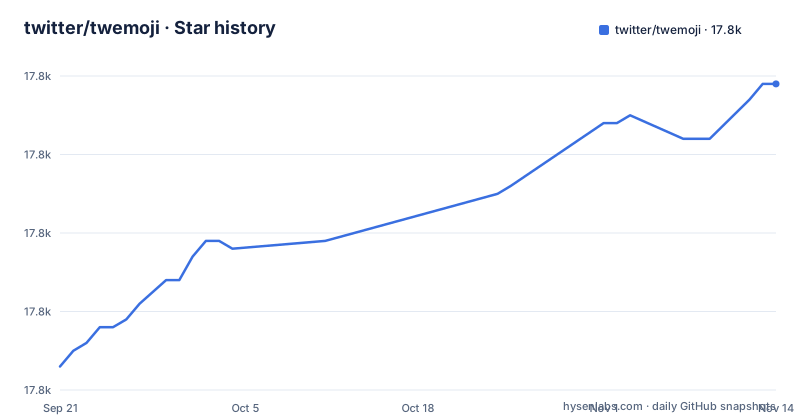
Star history
- twitter/twemoji17,819 ★ · +36
| Repository | 2026-09-21 | 2026-11-14 |
|---|---|---|
| twitter/twemoji | 17.8k | 17.8k |
36 Stars in the last 54 days, measured from the daily GitHub snapshot. Compare with other projects
Editorial analysis
The default base is MaxCDN, and the CDN section is struck through
Twemoji works by building an image URL and inserting an img element. The pieces of that URL are the options: base, size, the emoji code point, and ext. Every one of them has a default, and the one that matters most is the default base, which the option table records as MaxCDN. The default replacer spells the same assumption out in a comment, `options.base, // by default Twitter Inc. CDN`, and the DOM example ends with an img.src of `https://twemoji.maxcdn.com/v/latest/72x72/2764.png`.
Meanwhile the CDN section of the documentation is wrapped in a strikethrough and says MaxCDN is shut down, with an instruction to use a different CDN or download the assets, and a link to issue 580 titled "Maxcdn has shut down, cdn not working anymore".
So the documented default and the documented CDN status cannot both be current. If you take the defaults, parse runs, img elements appear with the right class and alt text, and every source points at a host that is no longer serving files. Nothing in the API raises an error for this, because from the library's point of view it wrote a valid string. Set base before the first parse call, or copy the assets yourself, and the mismatch stops mattering.
DOM parsing rewrites text nodes only, and pays for each one in DOM operations
There are two kinds of parsing, and the project is explicit about which one to use. If the first argument to twemoji.parse is an HTMLElement, generated image tags replace emoji inside #text nodes only, without compromising surrounding nodes or listeners, and without touching innerHTML. The element you passed in survives: the example asserts `img.parentNode === div` and notes that the div is preserved.
The cost is named too. DOM parsing is described as the safest option when security matters, with a slight performance penalty from DOM operations that are called inevitably costly. A page with a few emoji pays nothing worth measuring. A page that renders a long thread of messages pays per replacement, and the cheaper-looking alternative is the one the project tells you to avoid.
That is string parsing, and the reason is specific rather than aesthetic: the string form does not sanitize the string or otherwise prevent malicious code from being executed, and sanitization is stated to be out of scope. The separation is clean, then. Take HTMLElement input and you get the safer rewrite; hand twemoji a string and sanitizing it before the call is your job, not the library's.
Four options have a global twin, and folder overrides size entirely
The optional object passed to parse accepts seven properties. callback is the function that builds the image src, attributes is a function that returns the attributes object, base is the host, ext is the file extension, className is the class on the generated img, size is a string or number, and folder is a directory name.
Three of them mirror a global. base, ext and size have the same defaults as twemoji.base, twemoji.ext and twemoji.size, and modifying the global reflects as the default for all parsed strings or nodes. That gives you two places to change the same value, which is convenient until it is not: the src is written into the img at parse time, so changing the global afterwards does not rewrite the images already sitting in the document.
folder is the odd one out. When it is set, it replaces the size information entirely, and paired with ext it produces a size-independent URL:
twemoji.parse(genericNode, {
  folder: 'svg',
  ext: '.svg'
});
The resulting shape is shown as `https://twemoji.maxcdn.com/svg/2764.svg`, which is the size-free form. Note that this inherits the same base problem: the host in that URL is the one described as shut down.
The URL is assembled by string concatenation, one option at a time
The default replacer is small enough to read in full, and it explains every segment of the path:
function imageSourceGenerator(icon, options) {
  return ''.concat(
    options.base, // by default Twitter Inc. CDN
    options.size, // by default "72x72" string
    '/',
    icon,         // the found emoji as code point
    options.ext   // by default ".png"
  );
}
Two defaults are worth writing down before you touch anything: ext is ".png" and size is the string "72x72". A size is not optional in the default path, and neither is the extension, so switching the library to SVG means setting folder and ext together rather than just ext.
The callback is replaceable, which is the extension point that makes the rest workable. Supplying your own function means you can point at your own host, add a content hash, or route through an image pipeline without touching the library. The exclusion callback is the same hook used for filtering, returning false for a code point you do not want converted, and the example switches on 'a9', 'ae' and '2122' to leave the copyright, registered and trademark symbols as text.
Emoji 14.0 is the ceiling, and anything newer stays as text
Twemoji v14.0 adheres to the Unicode 14.0 specification and supports the Emoji 14.0 specification, and the scope is stated as all Unicode-defined emoji recommended for general interchange. Custom emoji are explicitly out of scope.
That ceiling is the quiet limitation in the whole project. The library supports the Emoji 14.0 spec, so a character from a later Unicode version is outside what it covers. In a paragraph that mixes old and new emoji you get a line where some characters are images sized to 1em and the rest are glyphs from whatever font the reader's system has, at whatever size that font decides.
The same reasoning applies to the custom emoji question. Platforms now ship their own sets of characters outside the Unicode registry, and a project whose users paste those gets nothing from this library. The asset set is the feature, and the feature is frozen at the version named in the documentation.
The newest tag is from 2022 while package.json says 14.0.3
Take the release history and the package metadata together. The three most recent GitHub releases are v14.0.2, v14.0.1 and v14.0.0, all dated 2022-03-31. package.json declares version 14.0.3. The repository is not archived, and the last push was on 2026-07-07.
So the branch still receives work while no release has been cut in over four years, and the version in the package manifest is ahead of every tag. For a consumer that means two different answers to the question what is the latest version, depending on whether you look at releases or at the registry. The CDN tags make it three: @latest serves whatever the registry currently holds, which is not guaranteed to be a tagged release.
The README's first script tag is the unpinned @latest form:
<script src="https://unpkg.com/twemoji@latest/dist/twemoji.min.js" crossorigin="anonymous"></script>The unpinned form is presented as a guarantee that you always use the latest version, and the pinned form carries an integrity hash instead, which is the one that tells you the bytes you received are the bytes you asked for. The built assets for both current and older versions are also published on the gh-pages branch for anyone who would rather download than link.
The test suite runs on phantomjs and the published package ships no tests
The build story is in package.json. The test script is `phantomjs ./src/test/testrunner.js`, and the dev dependencies include phantomjs-prebuilt, npm-run-all and a pinned uglify-js. Publishing runs build, then test, then deploy through npm-run-all, and the deploy script is `./scripts/deploy.sh gh-pages`.
A headless browser from that era is the constraint. Running the suite means installing a phantomjs binary, and the minifier is pinned to an old release rather than tracking a maintained one. None of that affects consumers, who get the built files, and all of it affects contributors, who cannot exercise the suite with a modern headless setup without changing the script first.
The published file list is narrow as well: the package ships `dist/twemoji*.js` and `index.d.ts` and nothing else. The main, module and unpkg entry points point at the built bundles. So a downstream project that wants to run upstream tests against its own integration has nothing to run, which puts the cost of regression testing on the consumer.
Editorial conclusion
Use Twemoji when you need identical emoji on every platform and can host or pin the assets yourself, and set base on the first call, because the default points at a host the project says is shut down. Skip it if you need emoji newer than Emoji 14.0, since that is the newest spec the README says Twemoji v14.0 supports. Before you ship, check which version the unpkg @latest tag actually serves, since the newest GitHub tag is v14.0.2 from 2022-03-31 while package.json says 14.0.3, and read LICENSE-GRAPHICS as well as LICENSE, because the code and the images carry different licences.
Frequently asked questions
What is a Twemoji?
It is Twitter's library for standard Unicode emoji support across all platforms, implemented as images rather than as text. Twemoji v14.0 adheres to the Unicode 14.0 spec and supports the Emoji 14.0 spec, and custom emoji are not supported.
How do I use twemoji?
Load twemoji.min.js and call twemoji.parse() with an HTMLElement, which replaces emoji inside text nodes only and avoids innerHTML. Pass an options object to control base, ext, className, size or folder, and note that the default base is the MaxCDN host, which the project says is shut down.
How do I install twemoji?
The README's Usage section opens with CDN script tags rather than an install command, offering a script tag pointing at unpkg, either the latest version or a pinned one, and points to the gh-pages branch for the built assets of the latest and older versions. The npm package is published as twemoji.
Is twemoji open source?
Yes, with two licences rather than one. package.json declares MIT and CC-BY-4.0, and the repository root holds LICENSE and LICENSE-GRAPHICS as separate files.
Is twemoji copyright free?
No. The code is under MIT and the emoji graphics are under CC-BY-4.0, which is why the repository ships LICENSE and LICENSE-GRAPHICS as separate files. If you render the images in a product, read the graphics licence before you assume the MIT terms cover them.
Is twemoji dead?
The repository is not archived and the last push was on 2026-07-07, but the most recent releases are v14.0.2, v14.0.1 and v14.0.0, all from 2022-03-31, and package.json is at version 14.0.3. Branch activity has continued without a new release tag.
Official sources
Add this badge to your README
If you maintain this project, the badge below links readers to this analysis and shows its maintenance status from the daily GitHub snapshot. Paste the markdown into your README; add ?metric=license or ?metric=stars to the image URL for a different field.

[](https://hysenlabs.com/projects/twitter-twemoji)Star history chart for your README
[](https://hysenlabs.com/projects/twitter-twemoji)Was this useful?