Vortex for SwiftUI: Particle Effects, Presets, and Custom Control
High-performance particle effects for SwiftUI.
At a glance
- What is it?
- Vortex is an MIT-licensed SwiftUI package for building reusable and custom particle effects across Apple platforms. Its preset API is compact, while its system model supports bursts, attraction, and secondary particle systems.
- Who is it for?
- SwiftUI developers should adopt Vortex when effects need to remain declarative, reusable, and embedded directly in a view hierarchy. Developers who need a documented scheduler, persistent simulation state model, or release-managed upgrade path should first verify those needs against the repository.
- Can I use it commercially?
- Yes. MIT is a permissive licence: you can use, modify and sell software built on it, as long as you keep its copyright and licence notices.
- Is it still maintained?
- Activity is slowing. The repository last received commits 7 months ago.
- What is it written in?
- Mainly Swift, according to GitHub's language statistics.
Answers come from the project's GitHub data, last synced on November 7, 2026, and from our analysis. They are not legal advice.
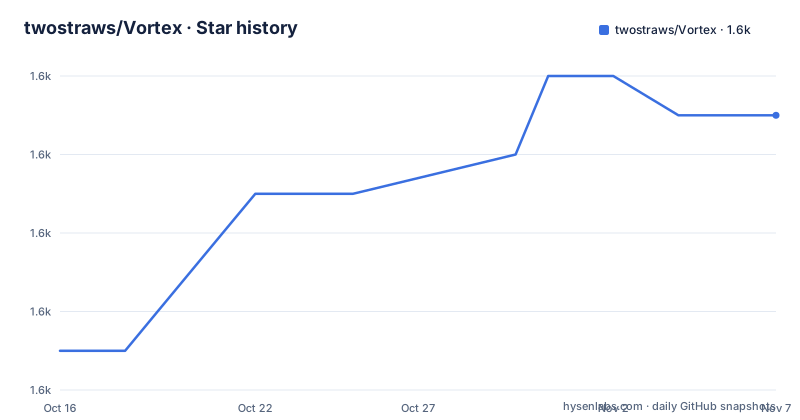
Star history
- twostraws/Vortex1,591 ★ · +6
| Repository | 2026-10-16 | 2026-11-07 |
|---|---|---|
| twostraws/Vortex | 1.6k | 1.6k |
6 Stars in the last 22 days, measured from the daily GitHub snapshot. Compare with other projects
Editorial analysis
What Vortex Adds to a SwiftUI Interface
Vortex addresses the need for animated particle effects inside SwiftUI applications without requiring the interface to be built around a separate particle-rendering scene. It is intended for developers who want effects such as rain, fireworks, fire, snow, smoke, or confetti to participate in normal SwiftUI composition. A particle can be a SwiftUI `Circle`, `Rectangle`, or another tagged view, rather than being limited to the example images stored in the repository's `Assets` directory.
The package supports iOS 15.0 and later, macOS 12.0 and later, tvOS 15.0 and later, watchOS 8.0 and later, and visionOS 1.0 and later. That breadth matters when an application shares visual behavior across several Apple platforms. The repository also contains a `Sandbox/` sample project for its presets, although the README says that sample requires iOS 17, macOS 14, or visionOS 1. The higher sample requirement should not be mistaken for the package's stated minimum platform versions.
Vortex is primarily a UI effects library, not a general animation timeline or game engine. Its documented model centers on particle systems, emitted SwiftUI views, emission timing, movement, appearance, and interaction points. That makes it most relevant when the visual result can be expressed as tagged views and particle behavior can be configured through `VortexSystem`.
VortexSystem, Tags, and VortexView Data Flow
The basic data flow has two explicit stages. First, application code creates a `VortexSystem` and declares the tag names associated with the particles it should render. Second, `VortexView` receives that system and a view builder containing the tagged SwiftUI views. The tag list connects configuration to presentation: `tags` identifies which supplied views participate, while properties on the system define their behavior.
The README shows rain as a `VortexView` containing a white `Circle` tagged `"circle"`. Fire uses the same broad structure but adds `.blendMode(.plusLighter)` and a blur radius. This illustrates an important design choice. The effect preset determines particle behavior, but the caller still supplies the concrete SwiftUI rendering. The package therefore does not hide all visual decisions inside a preset.
A preset can expect more than one tag, so copying an example without checking its documentation can leave the builder without a required particle view. This is a concrete integration constraint rather than a general warning. Developers also need to account for tags used by secondary systems. Vortex requires all tags from primary and secondary systems to be supplied when creating the enclosing `VortexView`, even though each system can maintain its own tag set.
`VortexView` does not copy the supplied particle system by default. The documented exception is `yourSystem.makeUniqueCopy()`. Reusing one system instance across multiple views therefore preserves its state rather than silently creating independent copies. That is useful when shared state is intentional, but it makes ownership an explicit adoption concern for applications that expect each rendered instance to evolve separately.
Adding Vortex and Rendering the First Preset
The README directs users to add the package through Xcode using Swift Package Manager, with `https://github.com/twostraws/Vortex` as the package repository. It does not provide a terminal installation command or a version requirement for Xcode, so there is no documented command to reproduce here. After Xcode resolves the dependency, a Swift file can import the module:
import VortexA first effect consists of a preset and at least one tagged SwiftUI view. The following example creates the rain effect with a white circle tagged for that preset:
VortexView(.rain) {
    Circle()
        .fill(.white)
        .frame(width: 32)
        .tag("circle")
}
The tag must correspond to what the rain preset expects. The frame controls the particle view's displayed size, while fill and shape remain ordinary SwiftUI choices. Add this view to the application's existing view hierarchy where the animation should occupy its layout position.
The repository provides three example particle images in `Assets`, but they are optional. The README explicitly allows a variety of SwiftUI views and shapes. A project can therefore start from a preset while retaining direct control over each particle's appearance. Developers should inspect the selected preset's tag requirements before copying the example because matching the tag is part of making the supplied view eligible for rendering.
Configuring a Custom Snow System
Custom effects use the same `VortexSystem` configuration model as presets. The README's snow example creates a system with the `"circle"` tag, places it near the top of its coordinate space, varies speed and size, and uses a narrow box shape. Its `ContentView` then supplies the matching SwiftUI view through `VortexView`.
struct ContentView: View {
    var body: some View {
        VortexView(createSnow()) {
            Circle()
                .fill(.white)
                .blur(radius: 5)
                .frame(width: 32)
                .tag("circle")
        }
    }

    func createSnow() -> VortexSystem {
        let system = VortexSystem(tags: ["circle"])
        system.position = [0.5, 0]
        system.speed = 0.5
        system.speedVariation = 0.25
        system.lifespan = 3
        system.shape = .box(width: 1, height: 0)
        system.angle = .degrees(180)
        system.angleRange = .degrees(20)
        system.size = 0.25
        system.sizeVariation = 0.5
        return system
    }
}
This structure exposes several separate controls. `position` selects the emitter location, `speed` and `speedVariation` govern movement, `lifespan` controls particle duration, and `angle` plus `angleRange` define direction and spread. `size` and `sizeVariation` separate the base particle size from its variation. The `.box` shape narrows the distribution geometry.
The documented initializer offers defaults for all configuration options except the required tag list, according to the README. That lowers the setup cost for a first custom system. Still, the README does not enumerate the complete initializer or document every coordinate convention, so applications should not infer undocumented ranges or units from these examples.
Button Bursts and Pointer-Like Attraction
Vortex can emit constantly, but emission does not have to be continuous. For an effect such as a confetti cannon, the README uses `VortexViewReader` to provide a `VortexProxy`. The proxy manipulates the first particle system it finds inside the view. This follows a SwiftUI-style containment model associated in the documentation with `ScrollView` and `ScrollViewReader`.
VortexViewReader { proxy in
    VortexView(.confetti) {
        Rectangle()
            .fill(.white)
            .frame(width: 16, height: 16)
            .tag("square")

        Circle()
            .fill(.white)
            .frame(width: 16)
            .tag("circle")
    }

    Button("Burst", action: proxy.burst)
}
The confetti preset receives both square and circle views, each with its corresponding tag. The button maps its action directly to `proxy.burst`, so the documented interaction is event-driven rather than based on a Boolean state property in the example.
The proxy also offers `attractTo()`, which accepts a screen coordinate. The system's `attractionStrength` controls direction: positive values move particles toward the selected point, while negative values move them away. Passing `nil` clears the attraction point. Because the proxy targets the first matching particle system, an interface containing several systems would need to account for that documented targeting behavior before attaching controls at an outer level.
Secondary Systems, Reuse, and Upgrade Boundaries
Secondary systems let each particle from a primary system create another particle system. The README identifies fireworks as a multi-stage example: an initial particle can launch upward, emit sparks while moving, and explode into color when it dies. `secondarySystems` accepts an array of `VortexSystem` values, while `spawnOccasion` controls when a secondary system is created. The documented default for `spawnOccasion` is `.onBirth`, and the property is ignored for a primary particle system.
This feature extends beyond independent presets, but it imposes a stricter assembly rule. Primary and secondary systems may declare different tags, yet every tag from every participating system must be present when creating the `VortexView`. Omitting a secondary tag can break the expected particle appearance even if the primary system is configured correctly.
Vortex carries the MIT license. That permits use and modification under the license's terms, but this repository review does not evaluate legal or compliance questions. Maintenance evidence consists of the repository's last push on 2026-04-03 and its unarchived status. No GitHub releases are listed, so there is no documented release cadence or stable-version series to cite.
The repository includes `Package.swift`, `Sources/`, `Tests/`, and a `Sandbox/` project. Based on that layout, package integration and test sources are part of the project, but the README does not document a test command, upgrade procedure, compatibility matrix for individual Swift releases, or migration policy between unreleased revisions. Projects that pin package revisions should therefore treat the absence of GitHub releases as a concrete versioning limitation.
Editorial conclusion
SwiftUI developers should adopt Vortex when effects need to remain declarative, reusable, and embedded directly in a view hierarchy. Developers who need a documented scheduler, persistent simulation state model, or release-managed upgrade path should first verify those needs against the repository. For this package, the first checks are the preset tags, platform deployment targets, and whether reusable system state matches the intended view behavior.
Frequently asked questions
Which Apple platforms does Vortex support?
The README lists iOS 15.0 and later, macOS 12.0 and later, tvOS 15.0 and later, watchOS 8.0 and later, and visionOS 1.0 and later. Its sample project has higher deployment requirements: iOS 17, macOS 14, or visionOS 1.
How do I install Vortex in a SwiftUI project?
The documented method is to add `https://github.com/twostraws/Vortex` through Xcode using Swift Package Manager, then import it with `import Vortex`. The README does not provide a terminal command or minimum Xcode version.
Why are my Vortex particles not appearing?
Check that the SwiftUI views use the tags expected by the selected preset. For secondary systems, `VortexView` must receive all tags used by the primary and secondary systems.
How can I trigger Vortex particles from a button?
Wrap the effect in `VortexViewReader`, receive its proxy, and use `proxy.burst` as the button action. The documented proxy manipulates the first particle system it finds.
Does Vortex create an independent copy for every VortexView?
No. The README states that `VortexView` does not copy the particle system unless the application explicitly calls `yourSystem.makeUniqueCopy()`.
Official sources
Add this badge to your README
If you maintain this project, the badge below links readers to this analysis and shows its maintenance status from the daily GitHub snapshot. Paste the markdown into your README; add ?metric=license or ?metric=stars to the image URL for a different field.

[](https://hysenlabs.com/projects/twostraws-vortex)Star history chart for your README
[](https://hysenlabs.com/projects/twostraws-vortex)Was this useful?