CliWrap turns Process.Start into an immutable, validating command
Library for interacting with command-line interfaces
At a glance
- What is it?
- CliWrap is a .NET library for launching processes and piping their streams, with validation that throws on a non-zero exit code unless you turn it off. It is MIT licensed, has no external dependencies, and ships with a terms of use you are agreeing to by using it.
- Who is it for?
- CliWrap fits a .NET codebase that shells out often and wants one place to build command lines, capture output and reason about exit codes. It does not fit code that treats a non-zero exit code as data without noticing, that streams large or binary output, or that has to clear its dependency list first.
- Can I use it commercially?
- Yes. MIT is a permissive licence: you can use, modify and sell software built on it, as long as you keep its copyright and licence notices.
- Is it still maintained?
- Yes. The repository last received commits 10 days ago.
- What is it written in?
- Mainly C#, according to GitHub's language statistics.
Answers come from the project's GitHub data, last synced on November 14, 2026, and from our analysis. They are not legal advice.
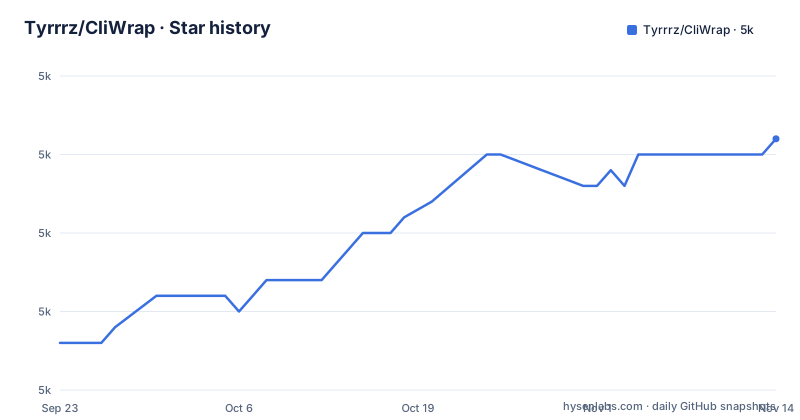
Star history
- Tyrrrz/CliWrap5,011 ★ · +13
| Repository | 2026-09-23 | 2026-11-14 |
|---|---|---|
| Tyrrrz/CliWrap | 5k | 5k |
13 Stars in the last 52 days, measured from the daily GitHub snapshot. Compare with other projects
Editorial analysis
The unit of work is a command, and validation is on by default
The base unit is a command object that encapsulates instructions for running a process, closer to a shell line than to a process handle. You build one with `Cli.Wrap(...)` and the executable path, configure it through the fluent interface, then run it with `ExecuteAsync()`:
using CliWrap;

var result = await Cli.Wrap("/path/to/cli")
    .WithArguments(["--foo", "bar"])
    .WithWorkingDirectory("/work/dir/path")
    .ExecuteAsync();

// Result contains:
// -- result.ExitCode        (int)
// -- result.IsSuccess       (bool)
// -- result.StartTime       (DateTimeOffset)
// -- result.ExitTime        (DateTimeOffset)
// -- result.RunTime         (TimeSpan)
The awaited task resolves to a `CommandResult` holding the exit code and timings. The behaviour to know before you write the first call is that a non-zero exit code throws, because it usually indicates an error. For tools where an exit code is information rather than failure, that default has to be undone with `WithValidation(CommandResultValidation.None)`, and forgetting it turns a normal result into an exception.
Unattached streams go to a null device, so output disappears quietly
By default the process's standard input, output and error streams are routed to the equivalent of a null device, which is an empty source and a target that discards everything written to it. Nothing is written to your console and nothing is captured, and nothing warns you about it. Attaching a pipe is the only way to see what the process printed:
using CliWrap;

var stdOutBuffer = new StringBuilder();
var stdErrBuffer = new StringBuilder();

var result = await Cli.Wrap("/path/to/cli")
    .WithArguments(["--foo", "bar"])
    .WithWorkingDirectory("/work/dir/path")
    // This can be simplified with `ExecuteBufferedAsync()`
    .WithStandardOutputPipe(PipeTarget.ToStringBuilder(stdOutBuffer))
    .WithStandardErrorPipe(PipeTarget.ToStringBuilder(stdErrBuffer))
    .ExecuteAsync();
The matching calls exist for input, output and error. The short form is `ExecuteBufferedAsync()` from the `CliWrap.Buffered` namespace, which sets up in-memory string buffers for you and puts `StandardOutput` and `StandardError` on the result. Its own warning is about memory: programs can write arbitrary data, including binary, to those streams, so buffering is impractical for large or binary output and the lower level piping options are there for that case.
Commands are immutable, so configuration builds rather than edits
The feature list describes the library as designed with strict immutability in mind, and the configuration section states that `Command` is an immutable object. Every option in the fluent chain therefore produces a command rather than editing one, which is why the examples read as a single expression from `Cli.Wrap` to `ExecuteAsync`.
The practical effect is on how you reuse configuration. A base command with a fixed executable and shared arguments cannot be re-pointed at a different working directory or a different argument later; you build the variant instead. That is a good trade when a command object is shared across threads or stored in a field, because there is no window in which another caller sees a half-configured command. It costs you the shortcut of mutating a prepared command, and it means a helper that takes a `Command` and tweaks it has to return the new one.
Cancellation is graceful, and lifetime ownership is the caller's
Four claims in the feature list describe how the library treats the child process: a fully asynchronous and cancellation-aware API, graceful cancellation using interrupt signals, complete ownership of the underlying process's lifetime, and safety against typical deadlock scenarios.
Two of those deserve a careful reading. Graceful cancellation means the request to stop is delivered as an interrupt signal. And deadlock safety is stated against typical scenarios, which is a claim about pipe handling rather than a promise about every program you launch.
One package, four target frameworks, and an option to vendor it
The package has no external dependencies, which is unusual for a library of this size and is stated as a feature rather than an accident. It targets .NET Standard 2.0+, .NET Core 3.0+ and .NET Framework 4.6.2+, and it is tested on Windows, Linux and macOS. Installing it is a single command:
dotnet add package CliWrapThe wide target range is what makes one package usable from old and new projects.
The solution carries benchmarks, a signaler and a dummy app
The repository is more than the library. The top level holds `CliWrap/` for the library itself, `CliWrap.Tests/` for the test suite, `CliWrap.Benchmarks/` for performance work, `CliWrap.Tests.Dummy/` as a small application used as a test target, and `CliWrap.Signaler/` as a separate component. Packaging and build configuration sit alongside them in `Directory.Build.props`, `Directory.Packages.props`, `global.json` and `NuGet.config`, with the solution file named `CliWrap.slnx`.
Distribution happens through NuGet rather than GitHub releases as the primary channel, and the version numbers show a steady patch cadence: 3.10.3 on 2026-07-24, 3.10.4 on 2026-07-29 and 3.10.5 on 2026-08-19. The default branch is `prime`, the last push was on 2026-11-01, and the repository is not archived. For a consumer that means you install a version rather than tracking a branch, and the source tree you would fork includes test and benchmark infrastructure you did not ask for.
Using the library is framed as agreeing to four statements
The readme carries a terms of use section that is unusual for a package of this kind. It states that using the project or its source code comes with the implicit agreement that you condemn Russia's war of aggression against Ukraine, recognise Russia as a terrorist state, and support Ukraine's territorial integrity. A link is offered for background on the war.
The code itself is MIT licensed, so the licence question and the terms of use question are separate. An organisation that reviews open source dependencies by licence alone will not see this section, and a team that cannot accept those statements has to decide whether the package is usable at all. Development is funded by the community through a donation link, with a Discord server linked for questions.
Editorial conclusion
CliWrap fits a .NET codebase that shells out often and wants one place to build command lines, capture output and reason about exit codes. It does not fit code that treats a non-zero exit code as data without noticing, that streams large or binary output, or that has to clear its dependency list first. Before adopting, decide whether you want validation on, check the terms of use against your organisation's open source policy, and pin a NuGet version rather than tracking the default branch.
Frequently asked questions
What does CliWrap do in a .NET project?
CliWrap is a library for interacting with command-line interfaces. It provides a model for launching processes, redirecting input and output streams, awaiting completion and handling cancellation, built as an abstraction over System.Diagnostics.Process with a fluent configuration interface.
How do I install CliWrap?
Add the NuGet package with `dotnet add package CliWrap`. The package targets .NET Standard 2.0+, .NET Core 3.0+ and .NET Framework 4.6.2+, has no external dependencies, and is tested on Windows, Linux and macOS.
Why does CliWrap throw when the command exits with a non-zero code?
Result validation is on by default, and a non-zero exit code usually indicates an error, so CliWrap throws an exception. You can override that with `WithValidation(CommandResultValidation.None)` when the exit code is expected and carries information rather than failure.
How do I capture the output of a command with CliWrap?
By default the standard input, output and error streams go to a null device, so you must attach a pipe: `WithStandardInputPipe(...)`, `WithStandardOutputPipe(...)` and `WithStandardErrorPipe(...)`, for example with `PipeTarget.ToStringBuilder`. The `ExecuteBufferedAsync()` extension in the `CliWrap.Buffered` namespace does this with in-memory string buffers, which is impractical for large or binary output.
Official sources
Add this badge to your README
If you maintain this project, the badge below links readers to this analysis and shows its maintenance status from the daily GitHub snapshot. Paste the markdown into your README; add ?metric=license or ?metric=stars to the image URL for a different field.

[](https://hysenlabs.com/projects/tyrrrz-cliwrap)Star history chart for your README
[](https://hysenlabs.com/projects/tyrrrz-cliwrap)Was this useful?