RIBs: Uber's Router, Interactor and Builder, where business logic need not have a view
Uber's cross-platform mobile architecture framework - Android Repository
At a glance
- What is it?
- RIBs is Uber's mobile architecture framework, and the part that distinguishes it from an MVVM or VIPER pattern is that a RIB does not have to have a view, so business logic drives the hierarchy while the view tree stays shallow. Its iOS half has moved to a separate repository, and its install snippet pins one version in three places.
- Who is it for?
- Adopt RIBs when you have the problem it was built for, which is a large number of engineers and deeply nested states on one mobile codebase, because the deep business tree and shallow view tree split is the actual contribution and no MVVM pattern gives it to you. Do not expect to adopt it piecemeal, since hierarchical dependency injection scoping and the rule that a RIB need not have a view are load-bearing rather than optional.
- Can I use it commercially?
- Yes. Apache-2.0 is a permissive licence: you can use, modify and sell software built on it, as long as you keep its copyright and licence notices.
- Is it still maintained?
- Yes. The repository last received commits 23 days ago.
- What is it written in?
- Mainly Kotlin, according to GitHub's language statistics.
Answers come from the project's GitHub data, last synced on November 14, 2026, and from our analysis. They are not legal advice.
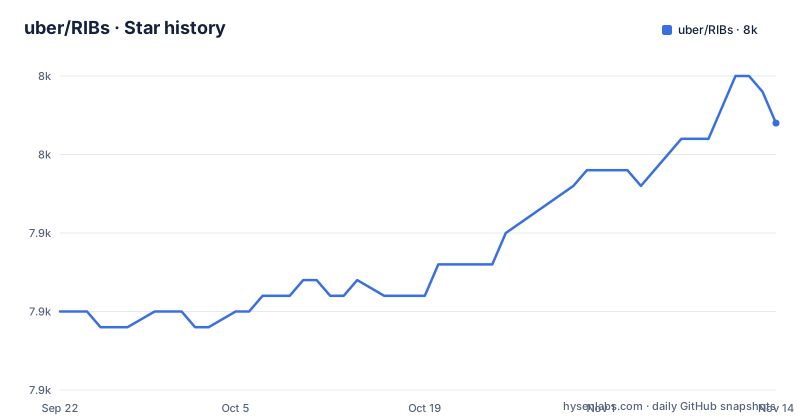
Star history
- uber/RIBs7,952 ★ · +12
| Repository | 2026-09-22 | 2026-11-14 |
|---|---|---|
| uber/RIBs | 7.9k | 8k |
12 Stars in the last 53 days, measured from the daily GitHub snapshot. Compare with other projects
Editorial analysis
A RIB does not have to have a view
The README draws one distinction more sharply than anything else in it, and it is the reason to care about this framework.
MVC, MVP, MVI, MVVM and VIPER are architecture patterns. RIBs is a framework.
The first differentiator follows directly. Business logic drives the app, not the view tree. Unlike with the MV and VIPER family, a RIB does not have to have a view, which means the application hierarchy is driven by business logic rather than by the view tree.
That is a stronger statement than it looks. In a pattern where a screen or a view controller is the organising unit, the number of things you can nest is bounded by what a view hierarchy can express. Remove the view from the unit and the tree can be shaped by whatever the domain actually is.
The RIB name itself names the three pieces: Router, Interactor and Builder, described as core components of the architecture.
The consequence is that a RIB is not a screen. If you are mapping RIBs onto your existing screen-based mental model, that mapping will be wrong in a way that is hard to debug later, and the framework is designed for apps with a large number of engineers and nested states rather than for a single-activity application.
A deep business tree and a shallow view tree, on purpose
The second differentiator is the structural consequence of the first, and it is stated with a rationale attached.
RIBs decouples how the business logic scopes are structured from view hierarchies. This allows the application to have a deep business logic tree, isolating business logic nodes, while maintaining a shallow view hierarchy, making layouts, animations and transitions easy.
So the asymmetry is intentional rather than incidental. Business structure gets the nesting it needs; the presentation side stays flat so that the things that are genuinely hard to get right on mobile, transitions and animations, do not accumulate depth.
The isolation claim is stated separately and is about testing rather than layout. Individual RIB classes have distinct responsibilities, listed as routing, business, view logic and creation, and most RIB logic is decoupled from child RIB logic, which the README says makes RIB classes easy to test and reason about independently.
The consequence is a testing story that depends on the decoupling. If your child RIBs reach into each other, you lose the property the framework is claiming, and the hierarchy depth that buys you isolation is exactly what you would be undoing.
The iOS half moved out, so cross-platform spans two repositories
There is an alert at the top of the README, and it changes what the cross-platform claim means today.
RIBs for iOS has been moved to a separate repository.
That sits directly above a feature list whose first item is shared architecture across iOS and Android, described as letting iOS and Android teams cross-review business logic code. So the stated benefit still holds, but the artefact is no longer one repository.
The related projects list confirms the split from the other direction. It opens with a link to RIBs-iOS as the iOS version of RIBs, followed by other Uber projects: a compile-time safe dependency injection framework, an abstract on top of Dagger offering simpler APIs for nested scopes, a set of concurrency utilities inspired by the Java equivalent, a lightweight library for compile-time safe abstract classes, and a set of common libraries shared across them.
So this repository is the Android half, described as such in its own description line, and the cross-platform story is a pairing between two codebases that share a design rather than a codebase.
The consequence is that if your interest is in cross-platform architecture, you are adopting two libraries and tracking two release lines, and a design change on one side can land before the other has a matching implementation.
The install snippet pins one version in three places
The Android integration is three lines long, and the version number appears in all three.
dependencies {
  annotationProcessor 'com.uber.rib:rib-compiler-test:0.17.0'
  implementation 'com.uber.rib:rib-android:0.17.0'
  testImplementation 'com.uber.rib:rib-test:0.17.0'
}
Three artifacts under one group: the runtime as an implementation dependency, a test artifact as a test implementation, and a compiler-test artifact wired to the annotation processor path.
The README calls this the recommended minimum setup. It also notes there are a number of extension packages available, naming Kotlin extensions, Jetpack Compose support and Coroutines support.
The consequence of hardcoding the version three times is the obvious one, and it is worth flagging before you copy the block. There is no version catalog or shared constant in the snippet, so a version bump is three edits, and a partial one produces a build where the runtime and the test artifact disagree. If you are on a version catalog already, express these once and reference it, because this block is a starting point rather than something to paste and forget.
An annotation processor on a Kotlin project, and two Gradle DSLs
Two details in the build setup are worth a reader's attention, and neither is explained in the README.
The first is the annotation processor. The project is written in Kotlin and its primary language is recorded as Kotlin, yet the compiler artifact is wired through the Java `annotationProcessor` configuration rather than through Kotlin's own symbol processing. That is a choice with consequences for anyone whose own build has moved to KSP, because the two do not compose without extra configuration.
The second is at the repository root. There is a `build.gradle.kts` and a `settings.gradle`, so the build uses the Kotlin DSL for the root project file and the Groovy DSL for settings. Both are supported, and both are present.
Around those sit five directories that map onto the README's claims: `libraries/` for the runtime artifacts, `tooling/` for the IDE plugins the README describes, plus `demos/`, `tutorials/` and a `config/` directory, along with a `conventions/` module for sharing build configuration across subprojects.
Release tooling is a shell script and a document rather than a Gradle task, with `releasing.sh` sitting beside `RELEASING.md` at the top level.
The consequence is that integrating RIBs means accepting a build shape rather than just adding three lines. The annotation processor path in particular is the one most likely to need adjusting for a modern Android build.
Hierarchical DI is the third opinion, and it is opinionated
The README lists what RIBs offers that the MV and VIPER patterns do not, and the third item is the one that will shape your code most.
It calls this strong opinions about how state should be communicated, using dependency injection and Rx. Then it explains the mechanism.
Each RIB defines its dependencies and what dependencies it needs from its parent. Parent components that fulfil a child's parent dependencies are provided to child Builders as a constructor dependency, which is what allows hierarchical DI scoping. The README's conclusion is that information is communicated via these dependencies up and down the tree.
So state is not communicated by a shared store, an event bus, or a binding object. It is communicated by construction, with a Builder receiving what its parent resolved, scoped at each level.
That is a coherent design and it is the reason the isolation claim works: if a child can only receive what its parent hands it, the coupling is visible in a constructor signature rather than discovered at runtime.
The consequence is that this is the part of the framework with no escape hatch. You are not picking up a tree-walking helper, you are adopting a rule about how dependencies reach every RIB, and the other two differentiators depend on it holding.
What RIBs cannot do, and what it leaves you owning
Five limits, and they follow from the framework-versus-pattern framing.
It cannot be adopted as a pattern. The README is explicit that the MV and VIPER family are patterns while RIBs is a framework, so there is no partial adoption. If hierarchical DI scoping is not something you want in your codebase, the framework is the wrong shape rather than a heavier option.
It cannot serve as a single cross-platform codebase any more. The iOS implementation lives in another repository with its own release line, so keeping the two architectures in sync is coordination work rather than a shared directory.
It cannot tell you the tooling is finished. The README describes IDE tooling around code generation, memory leak detection, static analysis and runtime integrations, and its own phrasing is that these improve developer productivity for large teams or small, which is not a claim you can evaluate. The tooling section is in the wiki, not in the repository.
It cannot keep the three artifacts in step for you. The install block hardcodes the version three times with no shared constant, so the version skew is yours to prevent.
And its scale claims are Uber's, not measured. The README says the architecture has proven to scale to hundreds of engineers on the same codebase and to apps with hundreds of RIBs. That is a statement about one company's experience, with no engineering detail about what had to change as it grew.
Editorial conclusion
Adopt RIBs when you have the problem it was built for, which is a large number of engineers and deeply nested states on one mobile codebase, because the deep business tree and shallow view tree split is the actual contribution and no MVVM pattern gives it to you. Do not expect to adopt it piecemeal, since hierarchical dependency injection scoping and the rule that a RIB need not have a view are load-bearing rather than optional. Before you start, check three things. The iOS half has moved to a separate repository, so cross-platform now means coordinating two codebases rather than one. The install snippet pins the version in three places at once, and editing one without the others gives you mismatched artifacts. And the build wires an annotation processor on a Kotlin project, so if your own build has moved to KSP you are mixing toolchains from the first line you add.
Frequently asked questions
What is RIBs?
Uber's cross-platform mobile architecture framework, short for Router, Interactor and Builder, which are its core components. It is designed for mobile apps with a large number of engineers and nested states, and this repository is the Android half of it.
How is RIBs different from MVVM or VIPER?
The README says MVC, MVP, MVI, MVVM and VIPER are patterns while RIBs is a framework. A RIB does not have to have a view, so business logic drives the hierarchy rather than the view tree, which allows a deep business logic tree while keeping the view hierarchy shallow so layouts, animations and transitions stay easy.
How do I add RIBs to an Android project?
Add three coordinates to your build.gradle under the com.uber.rib group at the version you want: rib-android as an implementation dependency, rib-test as a test implementation dependency, and rib-compiler-test on the annotation processor. The README also notes extension packages for Kotlin, Jetpack Compose and Coroutines.
Where is the iOS version of RIBs?
It has been moved to a separate repository, uber/ribs-ios, and an alert at the top of this README says so directly. The related projects list links it as the iOS version, alongside Uber's Needle dependency injection framework and Motif.
Which other Uber open source projects relate to RIBs?
The README lists RIBs-iOS, Needle as a compile-time safe Swift dependency injection framework, and Motif as an abstract on top of Dagger offering simpler APIs for nested scopes, alongside Swift Concurrency, Swift Abstract Class and Swift Common.
Official sources
Add this badge to your README
If you maintain this project, the badge below links readers to this analysis and shows its maintenance status from the daily GitHub snapshot. Paste the markdown into your README; add ?metric=license or ?metric=stars to the image URL for a different field.

[](https://hysenlabs.com/projects/uber-ribs)Star history chart for your README
[](https://hysenlabs.com/projects/uber-ribs)Was this useful?