PdfPig: minor versions break the public API, and the version is still zero
Read and extract text and other content from PDFs in C# (port of PDFBox)
At a glance
- What is it?
- An Apache 2.0 C# library for reading text and content out of PDF files, ported from a Java project, with enough document creation to write a one-page file and a warning that it will not modify an existing one. The documentation tells you the property you would reach for first is the wrong one, flags that embedding a font redistributes it, and serves its own logo from a different repository.
- Who is it for?
- This is worth using if you need reliable text extraction with word positions rather than a string, and you can pin a version and rebuild when the API moves. Three things decide whether it fits your use.
- Can I use it commercially?
- Yes. Apache-2.0 is a permissive licence: you can use, modify and sell software built on it, as long as you keep its copyright and licence notices.
- Is it still maintained?
- Yes. The repository last received commits 2 days ago.
- What is it written in?
- Mainly C#, according to GitHub's language statistics.
Answers come from the project's GitHub data, last synced on November 24, 2026, and from our analysis. They are not legal advice.
Star history
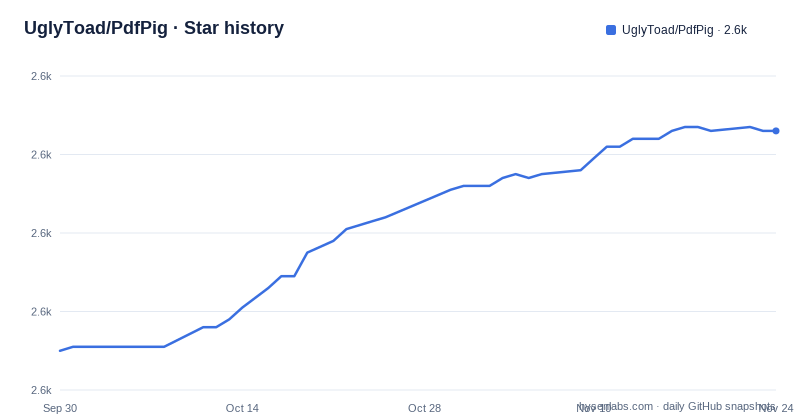
- UglyToad/PdfPig2,626 ★ · +56
| Repository | 2026-09-30 | 2026-11-24 |
|---|---|---|
| UglyToad/PdfPig | 2.6k | 2.6k |
56 Stars in the last 55 days, measured from the daily GitHub snapshot. Compare with other projects
Editorial analysis
Minor versions break the public API, and the line is still zero
The installation section carries a compatibility warning that more finished projects would not need to state. While the version is below 1.0.0, minor versions will change the public API without warning, and semantic versioning will not be followed until 1.0.0 is reached. The three most recent releases are all in the zero series, at three different minor versions, so the project is inside that window right now and intends to stay in it for a while. The practical consequence is that a floating version reference is not safe here: a consumer who upgrades a patch-level dependency may find compile errors, and the fix is to pin an exact version and read the change history before moving. It is a blunt warning, but it is better than discovering the rule after a dependency update breaks a build in a release you cannot easily roll back.
The property you reach for first is the one the documentation warns against
The reading example opens by showing a layout analysis extractor walking the pages and returning text:
using (PdfDocument document = PdfDocument.Open(@"C:\Documents\document.pdf"))
{
    foreach (Page page in document.GetPages())
    {
        string text = ContentOrderTextExtractor.GetText(page);
        IEnumerable<Word> words = page.GetWords(NearestNeighbourWordExtractor.Instance);
    }
}
Then, in bold, the documentation tells you not to use the page's text property directly unless you know what you are doing. The reason is given: that property preserves the internal content order stored in the file, which is rarely the order a human would read. A PDF records glyphs in whatever order the generating program emitted them, often by font or by drawing operation rather than by reading order, so the naive property is correct about content and wrong about sequence. The recommended path costs more: it segments the page into blocks, works out a reading order, and can produce bounding boxes for each word. There is a separate section on advanced extraction that creates a copy of a document with bounding boxes and reading order added, which is the honest way to check whether extraction produced the order you wanted.
Three creation limitations are listed, and the first is forms
The document creation section is enthusiastic for about two paragraphs and then stops. It supports basic creation, with a builder that starts empty, pages added at a chosen size, and text, lines and rectangles drawn on them. Then it says support for changing existing documents is very limited, and enumerates three exclusions: editing forms, copying or changing annotations, metadata or document structure data, and adding or removing text that uses existing fonts. Those three are the entire editing surface. It means the library is a reader with a writer attached, and the writer writes new files rather than revising old ones. The examples directory makes the same point from the other side, since one of them reads form contents while none of them modifies one.
Embedding a font redistributes it, and the API hands you the reasons
Only two font formats can be used when creating a document: the Standard 14 fonts the specification provides, and TrueType files. There is a method that takes the bytes of a font file and asks whether it can be embedded, and instead of returning a boolean it returns the list of reasons it cannot, which is a better interface than the alternative and suggests the failure modes are varied. Then comes the sentence that matters commercially: check the licence for a font before using it, because the compressed font file is embedded in and distributed with the resulting document. Embedding a font is redistribution, so a font you were licensed to use on your own machine may not be one you may ship inside a document you generate. The documentation raises this itself, and it sits directly beside the technical API rather than in a licence section.
The logo is served from a different repository
The first line of the page is an image tag pointing at a raw file hosted under a different repository name in the same organisation, ending in the name of the Java project this one is ported from rather than its own. So the one piece of artwork on the page is not stored in this repository, and the path names the upstream project the code came from. It is a small thing, and the same organisation owns both paths, but it is the kind of detail that matters when someone forks the project and asks where the logo comes from. The repository root is otherwise unusually crowded for a library: a notices file beside the licence, a design review document for one of the extractors, a document of font notes, a site configuration file, and three separate documentation directories.
Three documentation directories, two build systems, two design notes in the root
The top-level listing contains three directories that all appear to hold documentation, plus a build description directory and a developer tools directory, and the wiki linked from the readme is a fourth location. Documentation for a project this size is usually in one place, and here it is spread across at least four, with no indication from the readme of which is current. The build is likewise doubled: a GitHub Actions workflow for building and testing, and a separate pipeline description file for a different continuous integration service. Two design documents sit in the repository root rather than in any documentation directory, one of them a review of a specific word extractor's approach and one a set of font notes, which suggests both are working notes that were never filed.
Encryption takes a list of passwords, and page numbers start at one
Two details in the usage section are worth knowing before you write code against this. First, encrypted documents can be opened, and the parsing options accept either a single password or a list of passwords to try in turn. That second form is the practically useful one, because documents in the wild frequently have both an owner password and a user password, and trying a list removes the need to branch on which one applies. Second, page numbers start at one rather than zero, which the example comments explicitly, and the document type also exposes the version of the specification the file complies with. The document object implements the disposable interface and is documented as belonging in a using statement, which for a library that opens a file handle per document is the expected shape rather than a surprise.
The examples read forms, and the creation path cannot touch them
The examples solution holds nine programs, and their names describe the intended surface better than the readme does: advanced merging, advanced text extraction, image extraction, text extraction with newlines preserved, generating a form file, reading form contents, merging documents, and opening a document to extract words. Reading form contents and generating a form file sit side by side, which is a good illustration of the library's actual boundary. It can read the fields of a form that already exists, and it can write a form into a new document, and it cannot edit the fields of a form that already exists, because adding or removing text against existing fonts is on the exclusion list. If your requirement is a form workflow rather than a text extraction, that boundary is the thing to check first, and the examples directory is where you will find out which side of it your task falls on.
Editorial conclusion
This is worth using if you need reliable text extraction with word positions rather than a string, and you can pin a version and rebuild when the API moves. Three things decide whether it fits your use. Read the pre-1.0 warning literally, because the library states that minor versions change the public API without warning and the current line is still zero, so an unpinned reference will break on upgrade. Use the layout analysis path rather than the page text property, since the documentation explicitly warns against the property most people try first. And if you are creating documents rather than reading them, check the font story first, because only two font formats are supported and embedding a font file distributes it, which makes the font's own licence your problem.
Frequently asked questions
what is pdfpig
PdfPig is a C# library for reading text and other content out of PDF files, described as a port of the Java PDFBox project. It also supports basic creation of new PDF documents, and it is published as a package under the Apache 2.0 licence with the getting-started material hosted on a project wiki.
is pdfpig free for commercial use
The project is licensed Apache 2.0, which permits commercial use. One caveat the documentation raises itself: when you create a document, the compressed font file is embedded in and distributed with the result, so you should check that font's own licence before using it.
How do I install pdfpig?
From the .NET package feed, or from the repository's releases tab, or from the package manager console with a single command naming the package. There is nothing to build, and no separate runtime dependency is listed on the page.
Can PdfPig edit an existing PDF?
Barely. Creating a new document works with the Standard 14 fonts and TrueType fonts, but changing an existing document is explicitly limited: form editing is unsupported, as are copying or changing annotations, metadata and document structure data, and adding or removing text that uses existing fonts.
How do I get the text out of a PDF in reading order with PdfPig?
Not through the page's Text property. The documentation says you should not use it unless you know what you are doing, because it preserves the internal content order of the file rather than the order a human reads. Use the layout analysis extractors, which segment the page, determine reading order and can emit word bounding boxes.
Official sources
Add this badge to your README
If you maintain this project, the badge below links readers to this analysis and shows its maintenance status from the daily GitHub snapshot. Paste the markdown into your README; add ?metric=license or ?metric=stars to the image URL for a different field.

[](https://hysenlabs.com/projects/uglytoad-pdfpig)Star history chart for your README
[](https://hysenlabs.com/projects/uglytoad-pdfpig)Was this useful?