Pageboy, a UIPageViewController wrapper whose examples disagree with its signatures
📖 A simple, highly informative page view controller
At a glance
- What is it?
- Pageboy puts a data source, a delegate and an auto scroller in front of UIKit's UIPageViewController for iOS 14 and tvOS 14 apps. It is a small and precise library, and its own documentation contradicts itself on how pages are inserted.
- Who is it for?
- Pageboy earns its place when your pages are view controllers you already build in an array and you need trustworthy position callbacks on iOS 14 or tvOS 14. It is the wrong choice when pages must be generated on demand, when a data source `PageIndex` sitting next to a delegate index typed as Int will not suit your code, or when SwiftUI is the real target, since nothing in the documentation covers it.
- Can I use it commercially?
- Yes. MIT is a permissive licence: you can use, modify and sell software built on it, as long as you keep its copyright and licence notices.
- Is it still maintained?
- Yes. The repository last received commits 43 days ago.
- What is it written in?
- Mainly Swift, according to GitHub's language statistics.
Answers come from the project's GitHub data, last synced on November 7, 2026, and from our analysis. They are not legal advice.
Star history
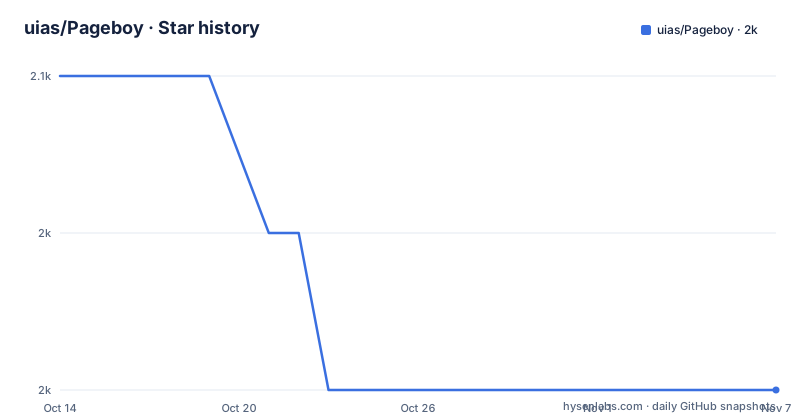
- uias/Pageboy2,048 ★ · -2
| Repository | 2026-10-14 | 2026-11-07 |
|---|---|---|
| uias/Pageboy | 2.1k | 2k |
-2 Stars in the last 24 days, measured from the daily GitHub snapshot. Compare with other projects
Editorial analysis
The wrapper Pageboy places over UIPageViewController
Pageboy is a Swift package that puts a data source and a delegate in front of UIKit's UIPageViewController, the system view controller whose own callbacks leave an app guessing where a transition actually landed. The tagline is 'A simple, highly informative page view controller', and the informative half of that claim has no counterpart in what the documentation shows: no label, no badge and no position readout is drawn anywhere in the documented API. What Pageboy adds is certainty about where the pager sits and where it is headed next. The surface stays small, one view controller class, one data source protocol, one delegate protocol and a separate auto scroller object. Pageboy 5 requires iOS 14 and tvOS 14, and it is compatible with Swift 6 on Xcode 16 or newer.
Adding the package through Xcode and wiring the first page
The installation section is two sentences long. It states that Pageboy is compatible with Swift Package Manager and can be integrated via Xcode, then stops: no package URL, no version rule and no terminal command appear anywhere on the page, so there is nothing to paste into a shell. What the repository root does show is `Package.swift` next to `Pageboy.xcworkspace/`, `Pageboy.xcconfig` and a `fastlane/` directory, which describes the library's own development setup rather than how a consuming app attaches it. Once the package resolves, the first step is a subclass and a single assignment:
class PageViewController: PageboyViewController, PageboyViewControllerDataSource {

    override func viewDidLoad() {
        super.viewDidLoad()

	self.dataSource = self
    }
}
Adopting `PageboyViewControllerDataSource` in the class declaration and pointing `self.dataSource` back at the instance inside `viewDidLoad` is the whole minimum. A controller in that state has a data source and no pages yet, so the next thing worth reading is what that data source has to hand back.
Three data source methods and the unexplained defaultPage hook
Three methods make up the data source. `numberOfViewControllers` answers with an Int count, a second method hands back the `UIViewController?` stored at a `PageboyViewController.PageIndex`, and a third, `defaultPage`, returns an optional `Page`:
func numberOfViewControllers(in pageboyViewController: PageboyViewController) -> Int {
    return viewControllers.count
}

func viewController(for pageboyViewController: PageboyViewController,
                    at index: PageboyViewController.PageIndex) -> UIViewController? {
    return viewControllers[index]
}

func defaultPage(for pageboyViewController: PageboyViewController) -> PageboyViewController.Page? {
    return nil
}
The gap sits in that third method, and the signatures around it make the gap visible. The page returned for an index is typed `UIViewController?`, while `defaultPage` returns `PageboyViewController.Page?`, a different type nested in the view controller class, and no documented data source signature ever hands Pageboy a `Page` at all. The page shows the method returning nil and does not state when a non-nil value is expected or what is done with it, so an app that depends on that hook has to read the library source rather than guess.
Four delegate callbacks and two different index types
Delegation is where the wrapper justifies itself, because one transition is split into before, during and after. `willScrollToPageAt` fires before a move begins and carries a `NavigationDirection` plus an `animated` flag. `didScrollTo` reports a `CGPoint` partway along the way, the same direction and the same flag, while `didScrollToPageAt` confirms the index that was reached. `didReload` is the odd one out: it fires after child view controllers have been reloaded and returns the new `UIViewController` alongside `currentPageIndex: PageIndex`.
That last signature is the detail worth checking before you wire anything up. `willScrollToPageAt` and `didScrollToPageAt` both take `index: Int`, yet `didReload` takes a `PageIndex`, and the data source receives `PageIndex` as well. Two types for one concept means a reload path and a scroll path disagree about what an index is, and the conversions land in your code rather than in the library. No note anywhere explains whether one of the two is an alias of the other, so treat the reload index as its own type until you have read the declaration.
Everything the controller exposes for state, motion and timing
Movement is driven from code as well as from touch, and the same controller exposes the state you read back afterwards. `scrollToPage()` takes a destination and an animation flag:
pageViewController.scrollToPage(.next, animated: true)`.isInfiniteScrollEnabled` turns infinite scrolling on, `.isScrollEnabled` governs interactive scrolling only, and `.navigationOrientation` picks a horizontal or vertical stack. For state, `.currentIndex` gives the index of the visible page, `.currentPosition` gives the relative position between pages, `.currentViewController` returns the visible controller if one exists, and `.parentPageboy` reaches the immediate parent controller from any child. `reloadData()` reloads the view controllers from the data source and fires the reload callback.
Two further features are opt-in. `.transition` is nil by default, which leaves the standard animation from `UIPageViewController` in place, and assigning a value replaces it:
pageboyViewController.transition = Transition(style: .push, duration: 1.0)Timer-driven movement lives on a separate object, `PageboyAutoScroller`, started with:
pageboyViewController.autoScroller.enable()The documentation states that custom intermission duration and other scroll behaviours are available on that scroller, and it prints no further property or method names for them.
Insertion and deletion contradict their own declared signature
Two mutation methods are documented:
func insertPage(at index: PageIndex, then updateBehavior: PageUpdateBehavior)
func deletePage(at index: PageIndex, then updateBehavior: PageUpdateBehavior)
Both signatures declare a `then updateBehavior:` parameter with no default value shown, yet the worked example in the same document calls the insert method with a single argument:
let index = 2
viewControllers.insert(UIViewController(), at: index)
pageViewController.insertPage(at: index)
Either the parameter carries a default that the signature block omits, or the example predates the signature, and nothing on the page settles which is true. What both blocks do agree on is the ordering. Your own array is mutated first, the `insertPage` call follows, and a delete reverses the order. The documentation compares this with inserting rows in `UITableView`, which is the right model to hold on to, since your array is the source of truth and Pageboy only mirrors it. After the change, the default is to scroll to the update location, and passing a `PageUpdateBehavior` other than `.scrollToUpdate` alters that.
Why generated or lazy pages sit outside this library
This is the wrong library when pages do not already exist as view controllers. Every documented data source hands Pageboy something that has already been built: the sample returns an element of a `viewControllers` array, and the insertion example puts `UIViewController()` into that array before calling `insertPage`. Nothing documented here covers constructing a page at the moment it is asked for.
Infinite scrolling shows the same boundary from the other side. `.isInfiniteScrollEnabled` is one boolean, the sample data source still indexes a finite array, and no text states which index the controller requests past the last element or what it does with the answer. With no `UIViewController` to show at that position, the loop has nothing to display, so content pulled from a feed has to be built and cached by the app before it is passed in.
Accessibility is the quieter gap. `.navigationOrientation` sets the axis, and the documentation says nothing about VoiceOver page announcements, focus moving between child controllers, or how a page is named when the scroll is driven by a timer instead of a finger.
Tag dates, signature churn and the cost of a major jump
The library is MIT licensed, its last push was on 2026-09-26, and the newest three tags sit close together: 5.0.0 on 2025-12-26, 5.0.1 the following day and 5.0.2 on 2026-04-12.
A major tag and its first patch one day apart is the shape of an API still settling after a rename, and the page gives no itemised account of what moved in 5.0.0. The visible consequence sits in the requirements line: Pageboy 5 needs iOS 14 and tvOS 14 plus Swift 6 on Xcode 16 or newer, so a project pinned to an older toolchain cannot take that tag without raising its own minimums first. Repository tooling points the same way, with `Dangerfile`, `.codecov.yml`, `Gemfile`, `Gemfile.lock` and `fastlane/` at the root, which is a review bot and a scripted publishing pipeline standing in for manual steps. For an adopter that matters in one concrete place: the type name is part of every argument label in both protocols, so a signature change is a call-site change across an app rather than a drop-in swap.
Editorial conclusion
Pageboy earns its place when your pages are view controllers you already build in an array and you need trustworthy position callbacks on iOS 14 or tvOS 14. It is the wrong choice when pages must be generated on demand, when a data source `PageIndex` sitting next to a delegate index typed as Int will not suit your code, or when SwiftUI is the real target, since nothing in the documentation covers it. Before adopting, diff the installed `insertPage` signature against the one-argument example above and confirm your build already runs Swift 6 on Xcode 16 or newer.
Frequently asked questions
What are the minimum iOS and tvOS versions for Pageboy?
Pageboy 5 requires iOS 14 and tvOS 14, and it is compatible with Swift 6 on Xcode 16 or newer.
How do you install Pageboy in an Xcode project?
The installation section states that Pageboy is compatible with Swift Package Manager and can be integrated via Xcode. It prints no package URL, version rule or terminal command, so the Xcode package picker is the only route the page documents.
Does Pageboy work with SwiftUI?
Nothing in the documentation or the repository layout covers SwiftUI. Every documented type is built on `UIViewController`, and the sample data source returns stored view controllers rather than views.
How does infinite scrolling work when my data source has a fixed array?
Enabling `.isInfiniteScrollEnabled` is all that is documented. No text explains which index the controller asks for past the last element, so the behaviour at both ends of the array has to be read from the library source.
How do I configure the automatic page transitions?
`PageboyAutoScroller` is switched on through `autoScroller.enable()` on the controller. Custom intermission duration and other scroll behaviours are stated to be available, but no further property or method names are given.
Official sources
Add this badge to your README
If you maintain this project, the badge below links readers to this analysis and shows its maintenance status from the daily GitHub snapshot. Paste the markdown into your README; add ?metric=license or ?metric=stars to the image URL for a different field.

[](https://hysenlabs.com/projects/uias-pageboy)Star history chart for your README
[](https://hysenlabs.com/projects/uias-pageboy)Was this useful?