Music Presence claims 100% twice and measures nothing
The Discord music status that works with any media player
At a glance
- What is it?
- A tray application that puts whatever your media player is playing into your Discord status, where the page asserts album covers are correct 100% of the time in two places without a figure behind either, the Linux artifacts for the current release are x86_64 only while the macOS ones cover both architectures, and one of the two package managers is labelled unofficial.
- Who is it for?
- Music Presence is the right tool if you want one status that follows your player instead of a separate integration for each one, and the two things that decide whether you can live with it are the per-application sharing controls and what happens when you pause a track. Three points to check first.
- Can I use it commercially?
- Check first. The repository uses a licence we do not classify automatically, so read its LICENSE file before any commercial use.
- Is it still maintained?
- Yes. The repository last received commits 4 days ago.
- What is it written in?
- Mainly C++, according to GitHub's language statistics.
Answers come from the project's GitHub data, last synced on November 15, 2026, and from our analysis. They are not legal advice.
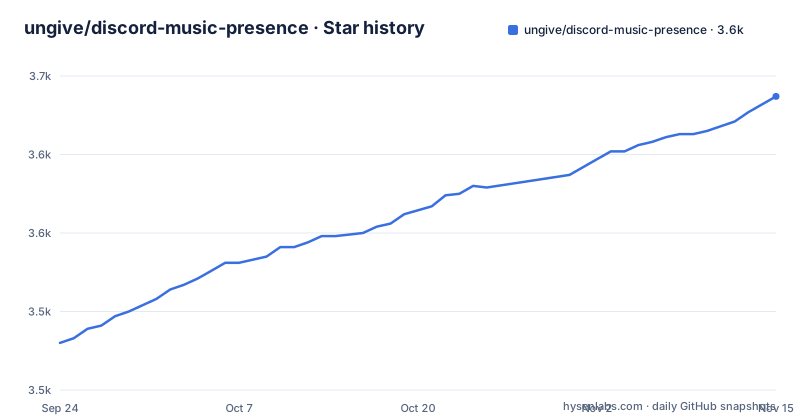
Star history
- ungive/discord-music-presence3,637 ★ · +157
| Repository | 2026-09-24 | 2026-11-15 |
|---|---|---|
| ungive/discord-music-presence | 3.5k | 3.6k |
157 Stars in the last 52 days, measured from the daily GitHub snapshot. Compare with other projects
Editorial analysis
Two 100% claims and a player count, with no figures behind them
The features summary says it shows the correct album cover 100% of the time for every media player, no missing covers. The features section says it again, that it shows the correct album cover image 100% of the time, and adds that this works with any media player and is achieved without the use of external image sources. A third number sits next to them: currently 100+ different players are supported. None of the three comes with a test set, a failure count, a definition of correct, or a link to a measurement, and the page does not say how the covers are obtained if not from external image sources. That combination of an absolute claim and no evidence is the first thing to discount when you read the rest of the page.
Always shows the position, if the player supports it
One bullet manages to cancel its own guarantee in a single sentence: always shows the exact playback position with a progress bar, if the media player supports it. The conditional is doing real work, and it applies elsewhere too, since the summary repeats it in the same form. The tray icon is the more interesting state machine. It changes and reflects the current state of Music Presence, meaning whether it is currently sharing media in your status, whether it is waiting for media playback, or if it has been disabled by you entirely. Three distinguishable states, one icon, and no text label, so the difference between paused, idle and off is carried entirely by the icon you have to know.
A paused track can be pinned to your profile indefinitely
The feature list has a paragraph about it in plain language: you can also show paused media in your status for as long as you want, and the recipe given is to play it once, pause it, and sticky pin it to your profile card. So the status continues to advertise a track that is not playing, for as long as the app is left running with it paused. That is a deliberate feature and the page presents it as one, but it is also the single behaviour that will most surprise someone who reads your profile card and assumes the state is live. Whether that is a feature or a small lie about your listening habits is a judgement the reader has to make, and the setting that governs it is buried among the other per-player options.
The play button may not appear because of API rate limiting
One feature is explicitly conditional in two ways at once. It shows a Play on Apple Music button or similar for supported players, currently available for Apple Music, TIDAL, Deezer and Spotify only, and the button may not always show due to API rate limiting. On top of that, the status can load and show additional artists, not just the main one, which means the presence payload grows with what the player reports. The page also spells out a division of labour with the official Spotify integration: podcasts can be shown with the title Listening to a Podcast, while the official Spotify integration does not show podcasts, and the suggested arrangement is to use Music Presence for Spotify podcasts and the official integration for music.
Eight artifacts, and Linux is the only x86_64 only platform
The download block for version 2.3.6 lists eight files. Windows gets two, an x64 installer executable and an x64 zip. macOS gets two disk images, arm64 and x86_64. Linux gets four, all x86_64: an AppImage, a deb, an rpm and a tarball. So the platform with the most formats is the one with the fewest architectures, while the Apple platform covers both. The block is delimited in the source by marker comments, a begin and an end, and the links are written with v2.3.6 spelled out in every one of them, which means the version in the page is a literal that has to move when a release moves. The macOS images are also unsigned disk images with no notarisation step mentioned anywhere on the page.
One of the two package managers is flagged unofficial in place
Two package routes are offered and they are labelled differently. On macOS, Homebrew with `brew install music-presence`. On Arch, the AUR with `yay -S music-presence-bin`, carrying the parenthetical that it is unofficial and to verify before installing. The package names differ as well as the trust levels, `music-presence` against `music-presence-bin`, which is the usual AUR convention for a binary package but is worth noticing since nothing on the page explains it. The verification advice points at a documentation page, so the warning is actionable rather than decorative, and that page is the same one reached from the Verifying your download link in the footer.
The app updates itself and the repository documents verification
Automatic updates are a listed feature, framed as in-app and automatic updates of Music Presence so you do not have to install new versions by downloading them manually, and there is an informational popup so you are informed about changes and additions. That is a self-updating binary, which makes the rest of the trust surface the interesting part. The footer carries a Verifying your download link pointing at `documentation/automatic-updates.md#verifying-releases`, so the project does publish something to check a release against. A `PRIVACY.md` sits at the root. And the license situation is unresolved: the repository records no recognised license while a `LICENSE.md` file sits beside the changelog, so the file has to be read rather than the metadata trusted.
One developer, four donation links, two roadmaps
The donations section states the situation without dressing it up: the development of this project solely depends on the effort of a single developer. Four distinct places then ask for money across the page. The badge row links Patreon and Buy me a coffee, the donations section links Patreon, Buy me a coffee and GitHub Sponsors, and the footer adds a bio.site page. The roadmap is also split in two, with a `documentation/roadmap.md` in the footer and, in the features section, an offer to check the Timeline section of musicpresence.app for scrobbling, browser support and listening along, described as big plans for the future. The visible top level of the repository holds only documentation, governance files, an assets directory and a documentation directory, with no source directory among them.
Editorial conclusion
Music Presence is the right tool if you want one status that follows your player instead of a separate integration for each one, and the two things that decide whether you can live with it are the per-application sharing controls and what happens when you pause a track. Three points to check first. The claims on the page are its weakest part, since three percentages appear with no measurement behind any of them. The Linux artifacts for the current release are x86_64 only while the macOS ones cover both architectures, so confirm there is a build for your machine before installing. And the repository records no recognised license while a LICENSE.md sits at its root, so read that file before redistributing anything.
Frequently asked questions
Is music presence safe?
The repository ships a PRIVACY.md at the root and a documentation page reached from a Verifying your download link, anchored on verifying releases. The README makes no security claim of its own; the only warning in it is on the Arch package, marked unofficial with a note to verify before installing.
How to use music presence on Discord?
Download the artifact for your platform, run it, and it detects media players automatically and appears in the tray menu; play something and the status appears on your profile. The tray icon reflects whether it is sharing media, waiting for media playback, or has been disabled by you.
Does musicpresence work with any media player?
The page says 100+ different players are currently supported and that adding a missing one is trivial, linking to a troubleshooting page for players that are still not detected. The full list is kept separately in documentation/supported-media-players.md.
What does musicpresence show on Discord?
You choose what appears after the Listening to text: the artist name, the song title, the player name or the media type, with examples like Listening to Billie Eilish or Listening to Spotify. There is fine-grained control over which applications are shared and which are not, including per media player overrides.
Does musicpresence replace the official Spotify integration?
No, the page describes them as complementary. Podcasts can be shown with the title Listening to a Podcast, which the official Spotify integration does not show, and the suggested arrangement is to use Music Presence for Spotify podcasts and the official integration for music.
How does musicpresence update itself?
It updates in app and automatically, and shows an informational popup about changes and additions. The repository also carries a documentation page for verifying releases, and CHANGELOG.md at the root. Releases themselves ship as installers, disk images and Linux packages.
Official sources
Add this badge to your README
If you maintain this project, the badge below links readers to this analysis and shows its maintenance status from the daily GitHub snapshot. Paste the markdown into your README; add ?metric=license or ?metric=stars to the image URL for a different field.

[](https://hysenlabs.com/projects/ungive-discord-music-presence)Star history chart for your README
[](https://hysenlabs.com/projects/ungive-discord-music-presence)Was this useful?