Uniwind: Tailwind-Style Styling for React Native
From the creators of Unistyles: The fastest Tailwind bindings for React Native
At a glance
- What is it?
- Uniwind adds Tailwind CSS concepts to React Native components and computes styles at build time. It suits React Native and Expo developers who want class-based styling, themes, dark mode, pseudo-classes, and responsive rules.
- Who is it for?
- React Native and Expo developers should consider Uniwind when Tailwind-style class names and build-time styling match their preferred component workflow. Developers who need documented rollback procedures, migration guidance, or offline confirmation of a complete first application should check the external quickstart and class-name documentation before adoption.
- Can I use it commercially?
- Yes. MIT is a permissive licence: you can use, modify and sell software built on it, as long as you keep its copyright and licence notices.
- Is it still maintained?
- Yes. The repository last received commits 2 days ago.
- What is it written in?
- Mainly TypeScript, according to GitHub's language statistics.
Answers come from the project's GitHub data, last synced on November 6, 2026, and from our analysis. They are not legal advice.
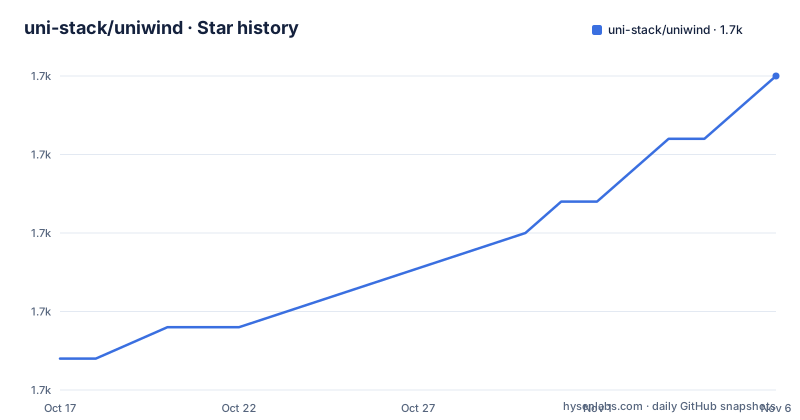
Star history
- uni-stack/uniwind1,745 ★ · +9
| Repository | 2026-10-17 | 2026-11-06 |
|---|---|---|
| uni-stack/uniwind | 1.7k | 1.7k |
9 Stars in the last 20 days, measured from the daily GitHub snapshot. Compare with other projects
Editorial analysis
Why Uniwind targets React Native styling
Uniwind addresses the styling gap between familiar Tailwind CSS workflows and React Native's component model. Its README promises out-of-the-box `className` bindings for every React Native component. That makes it relevant to developers moving from Tailwind-oriented web development, or teams that want style declarations to sit beside JSX rather than in separate stylesheet objects. The intended audience is explicit in the repository topics, which include React Native, Expo, Expo Go, iOS, and Android.
The project describes itself as "The fastest Tailwind bindings for React Native," but that wording is a project claim rather than a benchmark reported by the README. No benchmark data or test procedure accompanies it. The concrete capability is the binding layer itself: components receive Tailwind-style class names, and the associated styling system turns those classes into React Native styling behavior.
Uniwind also presents themes as a first-class concern instead of treating colors as fixed utility values. The documentation links cover theming basics, supported class names, and the `use-uniwind` API. That scope goes beyond converting one class into one style. It covers dark mode, custom themes, state-based pseudo-classes, media queries, and CSS properties. The trade-off is added build and styling machinery compared with keeping every declaration in native component props or React Native stylesheets.
How Uniwind converts class names into native styles
According to the README, Uniwind computes styles at build time. This is the central architectural choice. A class name such as a spacing or color utility can therefore be resolved before the application executes rather than assembled repeatedly during a render. The repository includes `tailwindcss` in its workspace catalog, and the installation command adds both `uniwind` and `tailwindcss`, confirming that Tailwind CSS is part of the styling toolchain.
The component-facing contract is the `className` property. Uniwind says this binding works with every React Native component, rather than requiring a library-specific component wrapper for ordinary styling. Additional behavior is expressed through supported class names. The README lists `focus`, `active`, and `disabled` among the pseudo-classes, while media queries cover responsive design. Custom CSS properties can also be used directly in React Native.
The build-time design carries an important constraint. Styling correctness depends on the build pipeline recognizing and compiling the relevant class names. The README does not expose the Babel, Metro, Vite, or Expo configuration steps, so it would be unsafe to invent them. It instead directs users to the external quickstart. The monorepo contains application and package workspaces, but their filenames alone do not establish what every consumer must configure.
Installing Uniwind with Bun
The README gives one installation command, and it installs Uniwind together with Tailwind CSS:
bun add uniwind tailwindcssAfter that command succeeds, both packages should be present in the application's dependency set. The README does not provide an npm, pnpm, or Yarn command, so those workflows cannot be confirmed from the repository. It also does not show version selection flags or an Expo-specific installer.
The next required step is less explicit. Uniwind sends users to its installation guides at `https://docs.uniwind.dev/quickstart`, where the remaining configuration is expected to be documented. The repository's own `package.json` identifies Bun as `[email protected]`, but that is a repository development setting rather than proof that consumers must use precisely that Bun release. No post-install application setup can be reproduced safely from the README excerpt.
For a first real use, readers should finish that quickstart and then consult the supported class-name list. Applying an unsupported web utility may produce different behavior in React Native, so checking the documented class set is more dependable than translating arbitrary Tailwind CSS from memory. The README does not supply a verified application snippet, component file, theme file, or Metro configuration, so it does not support a fuller first-use example here.
Themes, dark mode, states, and responsive rules
Theming is the clearest reason to evaluate Uniwind beyond basic utility syntax. The README describes fully customizable themes and dark mode, while the documentation includes a dedicated "Theming Basics" page. This indicates that theme values are intended to be managed as a system rather than scattered across each component. The README does not show the theme declaration syntax, token names, or persistence behavior, so those details cannot be reproduced.
Uniwind also maps interaction states through pseudo-classes. The named examples are `focus`, `active`, and `disabled`, with "and more" indicating broader support. Their practical value is direct: a button or input can express state styling in the same class-oriented vocabulary rather than requiring a separate conditional style object for each case. The exact platform behavior of focus states is not explained by the README.
Responsive design uses media queries. In a React Native context, these rules are relevant to varying device characteristics and available space, but the README does not define the query dimensions, breakpoints, orientation syntax, or platform differences. That omission matters during adoption. A team migrating an existing web design system needs to verify which media-query forms and Tailwind utilities Uniwind actually supports.
Custom CSS properties are another useful bridge from CSS conventions. The README says they can be used directly in React Native, but it does not provide syntax or enumerate support for dynamic values. These features make Uniwind more than a thin class-name converter, while also making the supported class-name reference a necessary part of any design-system migration.
React Native and Expo fit, with configuration questions
The repository topics establish React Native as the primary target and include both Android and iOS. Expo and Expo Go also appear, and the monorepo catalog includes `expo`, `react-native`, and `react-native-web`. Those entries support evaluating Uniwind in applications built around the Expo toolchain. They do not, by themselves, prove that every Expo workflow works without extra configuration.
Build-time style generation is most relevant when an application already accepts a compiled asset or code-generation phase. However, this review must distinguish repository evidence from architectural inference. The README confirms build-time computation, but it does not document native linking, cache invalidation, hot reload behavior, Metro cache handling, or release-build differences. Those are real adoption checks for a native styling layer.
Expo Go may also impose constraints that cannot be resolved from the README. It does not say whether style changes require rebuilding Expo Go, whether development builds are needed, or how Uniwind behaves in a production binary. The installation guide is the stated source for those details. Until it confirms them, an Expo team should treat its normal development and release workflow as unverified rather than assuming transparent compatibility.
The MIT license is permissive in general terms, but license classification does not answer technical compatibility. Teams still need to inspect their existing React Native and Expo versions, deployment pipeline, and build environment.
Maintenance, releases, and the cost of adopting the build step
The repository is not archived. Its last push was on 2026-10-14, and the listed releases include v1.12.2 on 2026-10-05, v1.12.1 on 2026-10-01, and v1.12.0 on 2026-09-04. These facts indicate recent repository activity and several releases inside a short period, but they do not establish API stability or backward-compatibility guarantees.
Adopting a build-time styling system adds a maintenance surface. The application team must keep `uniwind` and `tailwindcss` compatible with its React Native or Expo toolchain, follow Uniwind's configuration changes, and account for generated styles during native builds. The repository has workspace scripts named `build`, `check:typescript`, `check:format`, `test`, and `circular:check`, but these are scripts for working in the `uniwind-monorepo` itself. The root package is private, so copying those commands into a consuming application would not be a documented installation path.
The README does not document a release cadence, support policy, migration guide, rollback procedure, or changelog policy. It does link to a "Pro Version," but the repository excerpt does not explain licensing, feature, support, or pricing implications. The MIT designation covers the repository shown here; it should not be treated as evidence about commercial terms for features outside the documented project scope.
A genuine alternative is to keep React Native's built-in `StyleSheet` and component prop styling. That approach avoids introducing Uniwind's class compiler and Tailwind dependency, but teams give up its documented themes, pseudo-class classes, media queries, and CSS-property model. The decision is therefore about workflow and styling architecture, not simply syntax preference.
Editorial conclusion
React Native and Expo developers should consider Uniwind when Tailwind-style class names and build-time styling match their preferred component workflow. Developers who need documented rollback procedures, migration guidance, or offline confirmation of a complete first application should check the external quickstart and class-name documentation before adoption. Its MIT license permits reuse and modification, subject to the license text. The last push was on 2026-10-14, so the immediate maintenance check is whether the installed release and its React Native or Expo dependencies align with the application build configuration.
Frequently asked questions
How do I install Uniwind in a React Native project?
The README gives `bun add uniwind tailwindcss`. It then directs users to the installation guides at `https://docs.uniwind.dev/quickstart` for the remaining setup.
Does Uniwind support Tailwind CSS themes and dark mode?
The README lists dark mode, customizable themes, pseudo-classes, media queries, and direct use of CSS properties as supported features. It links to dedicated theming and supported class-name documentation but does not show their configuration syntax.
Does Uniwind work with React Native and Expo?
The repository topics include React Native, Expo, Expo Go, Android, and iOS, while the monorepo catalog includes `expo` and `react-native`. The README does not document Expo-specific setup, Expo Go constraints, or release-build behavior, so it points users to the external quickstart instead.
Official sources
Where developers are discussing it
Posts on Hacker News, dev.to and Lobsters that link to this repository, found by our scan of those communities. 1 in the last 30 days; newest first.
- This Week In React #302 : Next.js, React Router, DevTools, Security | RN 0.88, Expo 58, Navigation | TypeScript, PHP, CrUXdev.to · Oct 23, 2026 · 2 points · 0 comments
Add this badge to your README
If you maintain this project, the badge below links readers to this analysis and shows its maintenance status from the daily GitHub snapshot. Paste the markdown into your README; add ?metric=license or ?metric=stars to the image URL for a different field.

[](https://hysenlabs.com/projects/uni-stack-uniwind)Star history chart for your README
[](https://hysenlabs.com/projects/uni-stack-uniwind)Was this useful?