Universal Ctags: .ctags.d, kinddef rules, and the four install routes
A maintained ctags implementation
At a glance
- What is it?
- Universal Ctags continues the Exuberant Ctags line after that project stalled, and two of its documented incompatibilities decide whether an older setup keeps working: config files move to .ctags.d, and kind letters get stricter. It also adds optlib, where a language parser is defined on the command line instead of in C.
- Who is it for?
- Adopt Universal Ctags if you are setting tags up from scratch, or if you want optlib parser definitions and the new extended C/C++ parser. The work is current, with the last push on 2026-11-02 and version 6.2.1 tagged on 2025-10-25.
- Can I use it commercially?
- Yes, with conditions. GPL-2.0 is a copyleft licence: if you distribute software that includes it, you must release that software's source code under the same licence. Running it internally without distributing it does not trigger that obligation.
- Is it still maintained?
- Yes. The repository last received commits 6 days ago.
- What is it written in?
- Mainly C, according to GitHub's language statistics.
Answers come from the project's GitHub data, last synced on November 13, 2026, and from our analysis. They are not legal advice.
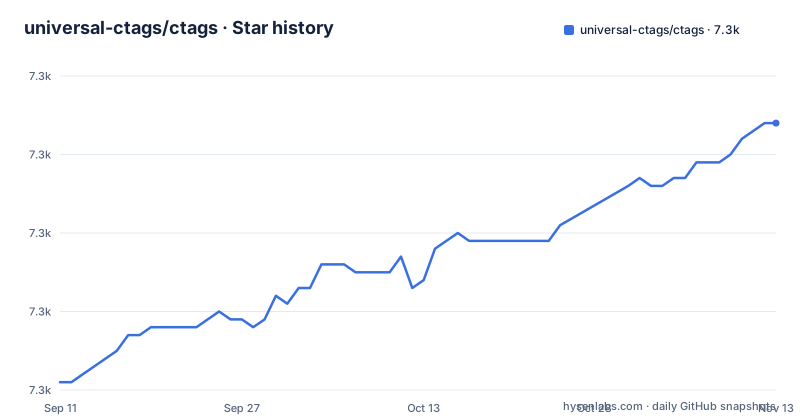
Star history
- universal-ctags/ctags7,314 ★ · +33
| Repository | 2026-09-11 | 2026-11-13 |
|---|---|---|
| universal-ctags/ctags | 7.3k | 7.3k |
33 Stars in the last 63 days, measured from the daily GitHub snapshot. Compare with other projects
Editorial analysis
Startup reads .ctags.d, not the ~/.ctags file
At startup Universal Ctags reads directories. It loads ~/.ctags.d/*.ctags and ./.ctags.d/*.ctags, and it does not load ~/.ctags or ./.ctags, the two files Exuberant Ctags used. The repository even carries its own .ctags.d/ entry at the top level, so the expected shape is a directory of files with a .ctags suffix rather than one dotfile. The consequence for anyone arriving with an older setup is silence rather than an error: the old file stays on disk, still named .ctags, still full of kind letters and regex definitions, and none of it reaches the tag generator. Nothing in the project's own compatibility notes describes a fallback read of the old locations. Two things follow. Per-project settings now need a .ctags.d directory committed beside the sources, and a single dotfile that once held every language override has to be spread across one or more files matching the *.ctags glob. Before you debug a kind that stopped appearing, check where the file lives. A configuration that no longer applies is often a configuration in the wrong place rather than a broken regex.
Stricter kind letters reject what Exuberant Ctags accepted
Universal Ctags is stricter than Exuberant Ctags about the characters allowed in kind letters and kind names. A kind letter must be an alphabetical character in the range [a-zA-EG-Z], and F is reserved for the file kind, so F cannot be handed to your own parser. A kind name must begin with an alphabetic character and continue with alphanumerics only, which is the pattern [a-zA-Z][a-zA-Z0-9]*. The background for that decision is written up in pull request 1737. If you want to reuse a .ctags file written for Exuberant Ctags, the guidance is concrete: review the kind letters and names that were defined with --regex-<LANG>=... options, and use --kinddef-<LANG>=... when you update the definitions. That migration step belongs to you, not to the tool. A definition that put a digit in the first position, or borrowed the reserved file kind letter, does not quietly degrade into something close enough; it has to be corrected before your tags come out the way you expect. The same naming rules apply to parsers you define through optlib on the command line, so it pays to check them once and reuse the pattern for every language you add.
optlib defines a language parser from the command line
Exuberant Ctags introduced the ability for a user to define new languages searched by regular expressions, and Universal Ctags calls that feature optlib and extends it. Optlib means adding a language to the tag generator without writing and compiling a C parser: the definition arrives on the command line, next to the --regex-<LANG>=... and --kinddef-<LANG>=... style options. The repository keeps the two worlds in separate directories. parsers/ holds the built-in language support, optlib/ holds the optlib machinery, and peg/ sits beside them along with dsl/, extra-cmds/, libreadtags/ and main/. The project counts optlib among its major features and pairs it with a new extended C/C++ language parser and an interactive mode that it labels experimental. What optlib does not give you is a safety net. A parser made of regular expressions finds only what those expressions match, so a pattern that is too greedy merges two symbols into one tag and a pattern that is too narrow drops an object without a word of complaint. Nothing in the project's documentation tells you which of the two happened.
Five commands from a fresh clone to /usr/local
The source path is Autotools on GNU/Linux, OSX or Windows 10 WSL, and it is five commands: clone the repository, generate the build system, configure, make, install.
$ git clone https://github.com/universal-ctags/ctags.git
$ cd ctags
$ ./autogen.sh
$ ./configure  # use --prefix=/where/you/want to override installation directory, defaults to /usr/local
$ make
$ make install # may require extra privileges depending on where to install
GNU make is assumed as the make command, so on a system where make is something else you need a GNU make before this runs. Configure installs into /usr/local by default, and the prefix decides whether your binary lands on the default search path or somewhere you have to export yourself. make install may need extra privileges depending on where you point it, which is the step people stop at. The build notes live in docs/autotools.rst for the Autotools path, docs/windows.rst for a native Windows build, and docs/osx.rst for OSX; configure.ac, Makefile.am and autogen.sh sit at the top of the tree, next to mk_mingw.mak and mk_mvc.mak for the Windows makefiles. What this path does not give you is a package record. You end up with an unmanaged binary under a prefix you chose, and the next upgrade is whatever your system does with the files already there.
Four routes to a binary, each with a different freshness
Universal Ctags reaches users through four separate channels, and they are not the same build. On Windows, daily builds are published in the ctags-win32 project, where you download zip packages from its releases page. On Unix-like systems, nightly builds are published in the ctags-nightly-build project as tarball archives on its releases page. On Mac, builds arrive through the universal-ctags Homebrew formula. The snap route is different again: clone the ctags-snap repository, follow that repository's instructions to build the snap package, and Snapcraft fetches the source code from GitHub for you, so the snap is compiled locally rather than downloaded ready to run. Tagged releases sit behind all of that. Version 6.2.1 was released on 2025-10-25, 6.2.0 on 2025-06-01, and 6.1.0 on 2023-12-28, while the last push was on 2026-11-02. The choice for a reader is a trade between a version you can name in a bug report and a build carrying newer parser fixes. The project's documentation does not say which channel to trust for a given language, so check the tag you are installing before you regenerate a tag file around it.
The tag file is the whole contract with your editor
ctags generates an index, or tag, file of language objects found in source files, and that index is what makes it easy for text editors and other tools to locate the indexed items. The project stops at that boundary. Its described surface is the generator, the configuration files and the man pages. The consequence lands on you at the editor boundary. Whether your editor watches the tag file, how it resolves a jump, and what it does after you rename a function are questions your editor answers, not this project, and the front page sends you to ctags(1) for options instead of to an integration guide. The same limit shapes what the index holds. An object appears in the file because some parser matched it, so a gap in the language support you depend on shows up as a tag that is simply missing, with no error attached to it. That is also why a silent config move, covered earlier, and a silent parser miss produce the same symptom from opposite directions.
Man pages first, experimental details in the Hacking Guide
The primary documents of Universal Ctags are man pages, and the reading order is explicit: consult ctags(1) first and the other man pages when you need them. The Universal Ctags Hacking Guide also carries the man pages, but it is aimed primarily at developers and adds information the man pages do not, including experimental features. That split is the practical consequence for a reader who only wants tags. Interactive mode is listed among the major features and marked experimental, so it belongs to the developer documentation, while the option reference belongs to ctags(1). Each part of the repository also keeps its own README in a subdirectory, listed on the front page as */README.md, for detail the man pages skip. Differences from Exuberant Ctags have their own home in the ctags-incompatibilities(7) man page and in the Introduced changes notes, which is where you look up whether a behaviour you relied on was kept, changed or dropped between the two projects. Before blaming a parser for something that vanished, that pair of pages is the cheapest check available.
Editorial conclusion
Adopt Universal Ctags if you are setting tags up from scratch, or if you want optlib parser definitions and the new extended C/C++ parser. The work is current, with the last push on 2026-11-02 and version 6.2.1 tagged on 2025-10-25. Do not treat it as a drop-in replacement if your setup depends on ~/.ctags or on Exuberant Ctags kind letters, because the project documents both changes as incompatible. Before switching, move your config into ~/.ctags.d, review the kind letters and names defined with --regex-<LANG>=... options, using --kinddef-<LANG>=... when you update them, and read ctags(1) for the options the front page leaves out.
Frequently asked questions
What is the difference between ctags and Universal ctags?
Universal Ctags continues the development of Exuberant Ctags, the implementation maintained by Darren Hiebert whose activity stalled. Its most significant incompatible changes are that it no longer loads ~/.ctags or ./.ctags at startup but loads ~/.ctags.d/*.ctags and ./.ctags.d/*.ctags, and that it is stricter about the characters allowed in kind letters and kind names.
How do I install Universal Ctags in Linux?
Build it from source with Autotools on GNU/Linux, OSX or Windows 10 WSL: clone the repository, run ./autogen.sh, then ./configure, make and make install, with GNU make as the make command. Nightly builds are also published as tarball archives in the ctags-nightly-build project.
How do I use Universal Ctags?
It writes an index, or tag, file of language objects found in source files, which editors and other tools use to locate the indexed items. Configuration belongs in ~/.ctags.d/*.ctags and ./.ctags.d/*.ctags, and optlib lets you define a new language parser from a command line.
How do I use ctags in Vim?
Universal Ctags only produces the tag file, so how Vim consumes it comes down to Vim's own configuration. The README does not cover editor setup; the option reference for the generator is the ctags(1) man page, and the Hacking Guide is written primarily for developers.
How do I install Universal Ctags in Windows?
Daily Windows builds are published in the ctags-win32 project: go to its releases page and download zip packages. To build on Windows yourself, the project points you at docs/windows.rst, and Windows 10 WSL can run the same Autotools sequence as GNU/Linux and OSX.
Official sources
Add this badge to your README
If you maintain this project, the badge below links readers to this analysis and shows its maintenance status from the daily GitHub snapshot. Paste the markdown into your README; add ?metric=license or ?metric=stars to the image URL for a different field.

[](https://hysenlabs.com/projects/universal-ctags-ctags)Star history chart for your README
[](https://hysenlabs.com/projects/universal-ctags-ctags)Was this useful?