unjs/destr for safer JSON parsing in Node.js and Deno
🚀 Faster, secure and convenient alternative for JSON.parse for arbitrary inputs
At a glance
- What is it?
- unjs/destr is a TypeScript JSON parsing library for inputs that may be strings, built-in values, or malformed text. It offers permissive `destr` parsing, throwing `safeDestr` parsing, and filtering of `__proto__`, with a documented performance trade-off for valid JSON.
- Who is it for?
- Adopt unjs/destr when Node.js or Deno code receives request bodies, configuration strings, or other mixed inputs where malformed text and `__proto__` properties matter. Do not replace every `JSON.parse` call automatically, because the README documents that `destr` can be slower for valid JSON strings.
- Can I use it commercially?
- Yes. MIT is a permissive licence: you can use, modify and sell software built on it, as long as you keep its copyright and licence notices.
- Is it still maintained?
- Yes. The repository last received commits 2 days ago.
- What is it written in?
- Mainly TypeScript, according to GitHub's language statistics.
Answers come from the project's GitHub data, last synced on November 7, 2026, and from our analysis. They are not legal advice.
Star history
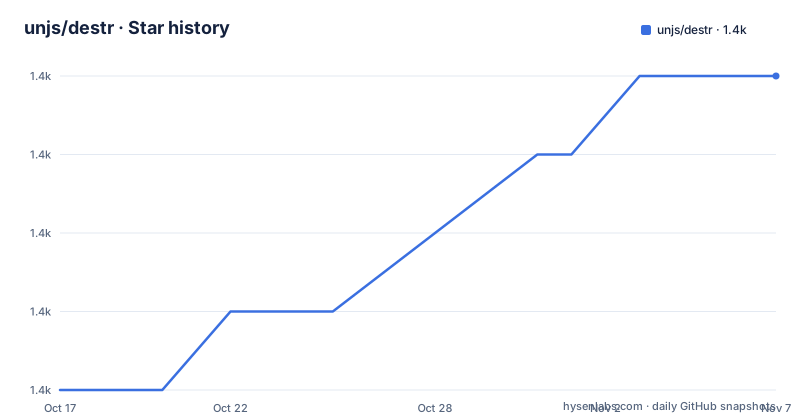
- unjs/destr1,385 ★ · +4
| Repository | 2026-10-17 | 2026-11-07 |
|---|---|---|
| unjs/destr | 1.4k | 1.4k |
4 Stars in the last 21 days, measured from the daily GitHub snapshot. Compare with other projects
Editorial analysis
Why unjs/destr exists for mixed JavaScript inputs
unjs/destr addresses a specific gap around `JSON.parse`. JavaScript code often receives a value that is not guaranteed to be a JSON string. It may be an object, a number, a boolean, `undefined`, or a plain string such as an environment value. Calling `JSON.parse()` on those values can throw or produce an error unrelated to the application's actual intent. The README describes `destr` as a faster, secure, and convenient alternative for arbitrary inputs.
The central design choice is permissive handling. `destr()` returns non-string inputs unchanged, recognizes some built-in string values, and returns the original string when parsing fails. That behavior fits boundary code, such as code that reads a request body or accepts configuration supplied in several forms. The library is intended for engineers who need one parsing entry point for heterogeneous values, not only for code with a guaranteed JSON payload.
The package is written primarily in TypeScript. The README shows that the default return type is `unknown`, while a caller can supply a type parameter such as `MyInterface`. That is a meaningful difference from `JSON.parse`, whose result is typed as `any` in the examples. Type annotations can improve review discipline, although they do not validate the runtime shape of the parsed value.
How `destr` and `safeDestr` handle parsing
The library exposes two parsing modes. `destr` is permissive. It returns non-string values as they arrive, recognizes built-in values such as `TRUE`, and attempts to parse JSON strings. If a string is not valid JSON, it returns the original string. This means that malformed input does not automatically become an exception. The README gives `destr("[foo")` as an example that returns `"[foo"`.
`safeDestr` is the strict counterpart for cases where malformed JSON should not be silently accepted. According to the README, it throws an error when input is not a valid JSON string or parsing fails. The documentation also states that non-string values and built-ins are still returned as-is. In other words, strictness applies to the parsing of string input, not to every possible input type.
The security-related mechanism targets prototype pollution. The README demonstrates parsing an object containing a `__proto__` property with an `isAdmin` value. `JSON.parse` produces a structure that includes that property, while `destr` produces `{ user: {} }`. This filtering can matter when parsed data is later merged, copied, or interpreted by application code. The package description calls the library secure, but the documented protection is specifically about avoiding prototype pollution, not a blanket claim that every possible parsing risk is solved.
Installing unjs/destr and making a first parse
For a Node.js project, the README lists installation with npm, Yarn, and pnpm. The following is the npm command documented for adding the package:
npm i destrThe package can then be imported as either an ES module or CommonJS. The README shows these two forms:
import { destr, safeDestr } from "destr";

const { destr, safeDestr } = require("destr");
Use the import syntax that matches the project's module setup. For a Deno project, the documented import comes from the `deno.land` URL rather than npm:
import { destr, safeDestr } from "https://deno.land/x/destr/src/index.ts";

console.log(destr('{ "deno": "yay" }'));
That example should produce a parsed object containing the `deno` property. A first real decision is whether the application wants `destr` or `safeDestr`. Use `destr` for an input boundary where returning the original value is acceptable. Use `safeDestr` when accepting malformed JSON silently would make the failure harder to detect.
The performance trade-off in valid JSON parsing
unjs/destr does not promise to beat `JSON.parse` on every workload. The README states that `destr` is generally faster for arbitrary inputs, but can be somewhat slower when parsing a valid JSON string. The stated reason is the transform that avoids prototype pollution. That transform adds work compared with the native parser's direct path.
This changes how the library should be evaluated. For valid JSON that does not require mixed-type handling or pollution filtering, native `JSON.parse` remains a relevant baseline. For untrusted request bodies or values that may already be objects and booleans, the convenience and fallback behavior may be more useful than the parser's raw speed. The README points to `BENCH.md` for benchmark results and provides commands for running Node.js and Bun benchmarks.
The repository defines these benchmark commands in `package.json`:
pnpm run bench:node
pnpm run bench:bun
The README says the Node.js benchmark script builds the project before running the benchmark. The README does not provide benchmark numbers, so performance claims should remain tied to the workload categories described by the project rather than assigned a general speed advantage.
TypeScript usage, package exports, and maintenance signals
The package metadata identifies `destr` version `2.0.5`, marks the package as side-effect free, and exposes separate ESM and CommonJS entry points. The `exports` map points import consumers to `./dist/index.mjs`, require consumers to `./lib/index.cjs`, and types to `./dist/index.d.ts`. This layout is relevant when a project has mixed module requirements or checks generated declarations during installation.
The README's TypeScript examples distinguish `unknown` from `any`. The default result is unknown, and callers can supply an interface when they already know the expected structure. The documentation does not describe a runtime schema validator, so a generic type parameter should not be treated as proof that the input matches that interface. TypeScript syntax communicates an expectation to the compiler, but the library still needs to receive the corresponding runtime JSON.
The repository is not archived. Its last push was on 2026-10-15, so the repository metadata shows a recent code update at that date. The listed releases are `v2.0.5` and `v2.0.4` on 2025-04-03, plus `v2.0.3` on 2024-02-20. The repository includes `CHANGELOG.md`, tests, build scripts, lint scripts, and a release script, which indicate defined maintenance and release processes. The README does not document a supported upgrade policy or compatibility matrix, so those remain unverified. The package is licensed under MIT; that identifies the license, not the operational cost of reviewing upgrades.
Limits of permissive parsing and strict parsing
The largest limitation is behavioral ambiguity. `destr` can return the original string after a parse failure, so a caller cannot always tell the difference between a successfully parsed string value and an unparsed configuration token without checking the result type or applying additional application rules. That convenience is useful for optional settings, but it can hide malformed input in code that expects structured data.
`safeDestr` addresses that failure mode by throwing, but it retains the documented exception that non-string values and built-ins are returned as-is. Therefore, it is not equivalent to a validator that rejects every unexpected runtime type. It is also not a schema-validation library. The README gives no instructions for validating required fields, rejecting arrays, or checking application-specific constraints after parsing.
There is another operational consideration: security filtering adds a transformation step, and the README notes that this can make valid JSON parsing slower than `JSON.parse`. A project with strict performance targets should not infer suitability from the package description alone. The README does not document memory limits, maximum input size, parser recursion behavior, or denial-of-service handling.
How `destr` compares with direct `JSON.parse` and strict JSON tooling
The direct alternative is the platform's `JSON.parse`. It is a strict native operation: the README shows it throwing for missing input, `TRUE`, and malformed text such as `salam`. It also returns `any` in the TypeScript example. `destr` changes that contract by accepting arbitrary inputs, falling back for strings that fail parsing, recognizing built-in string forms, and filtering prototype-pollution keys.
Another possible approach is parsing with a schema or validation library after `JSON.parse`. That can provide application-specific checks, but it does not provide `destr`'s fallback behavior for non-string values, and the supplied documentation does not describe a specific comparison with any such library. A strict JSON parser is therefore a better conceptual alternative when valid JSON is the requirement and rejection of malformed input is desirable.
The choice is workload-specific. Use native `JSON.parse` for known, valid JSON where simplicity and direct parsing matter. Use `destr` for mixed input boundaries where returning existing values is intentional. Use `safeDestr` when malformed strings must throw. The project does not document a setting for disabling prototype-pollution filtering, so that behavior is part of the documented `destr` path.
Editorial conclusion
Adopt unjs/destr when Node.js or Deno code receives request bodies, configuration strings, or other mixed inputs where malformed text and `__proto__` properties matter. Do not replace every `JSON.parse` call automatically, because the README documents that `destr` can be slower for valid JSON strings. Verify first whether your application needs fallback behavior or strict failure, then test the exact input shapes and prototype-pollution cases handled by `destr`.
Frequently asked questions
What is unjs/destr used for?
It is a TypeScript alternative to `JSON.parse` for inputs that may be JSON strings, other JavaScript values, built-in string values, or malformed strings. `destr` returns non-string values as-is and falls back to the original string when parsing fails.
How do I install destr in Node.js?
The README documents `npm i destr`, with Yarn and pnpm alternatives. After installation, import `destr` and `safeDestr` from `destr` using the module format required by the project.
Does safeDestr throw when JSON parsing fails?
Yes. According to the README, `safeDestr` throws when a string is not valid JSON or parsing fails. The documentation says non-string values and built-ins are still returned as-is.
Official sources
Add this badge to your README
If you maintain this project, the badge below links readers to this analysis and shows its maintenance status from the daily GitHub snapshot. Paste the markdown into your README; add ?metric=license or ?metric=stars to the image URL for a different field.

[](https://hysenlabs.com/projects/unjs-destr)Star history chart for your README
[](https://hysenlabs.com/projects/unjs-destr)Was this useful?