pv-migrate: moving Kubernetes volume data with five strategies, two of them opt-in
CLI tool to easily migrate or backup/restore Kubernetes persistent volumes
At a glance
- What is it?
- A Go CLI and kubectl plugin that copies persistent volume data inside the cluster with rsync or rclone, where the maintainer opens the file by warning that this is a spare-time project, and two of the five connection strategies are disabled by default.
- Who is it for?
- pv-migrate fits anyone who has hit the wall this tool exists for: the Kubernetes object is only metadata, so resizing, changing storage class or crossing clusters means copying bytes, and Kubernetes offers no way to do it. Read four things first.
- Can I use it commercially?
- Yes. Apache-2.0 is a permissive licence: you can use, modify and sell software built on it, as long as you keep its copyright and licence notices.
- Is it still maintained?
- Yes. The repository last received commits 1 day ago.
- What is it written in?
- Mainly Go, according to GitHub's language statistics.
Answers come from the project's GitHub data, last synced on November 21, 2026, and from our analysis. They are not legal advice.
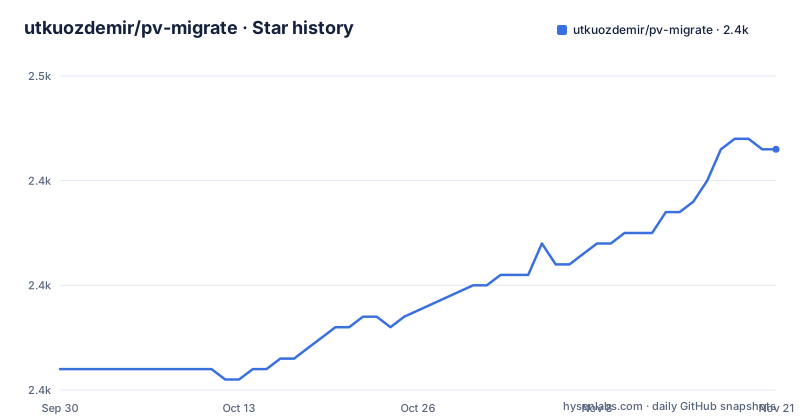
Star history
- utkuozdemir/pv-migrate2,443 ★ · +21
| Repository | 2026-09-30 | 2026-11-21 |
|---|---|---|
| utkuozdemir/pv-migrate | 2.4k | 2.4k |
21 Stars in the last 52 days, measured from the daily GitHub snapshot. Compare with other projects
Editorial analysis
The maintainer opens with a warning about response times
The second block of the file is a warning callout, and it is the most consequential line in the README. The project is described as a side project maintained in spare time, and the maintainer says plainly that it might take a long time to look at issues or pull requests, or might not get to them at all, with an apology in advance.
That is unusual to find at the top of a tool that people run against production volumes, and it should shape your adoption decision more than any feature list. Nothing is archived and the last commit landed on 2026-10-01, so the code is being worked on, but responsiveness is explicitly not promised.
The tool's shape is otherwise simple to state. It is a command line tool and a kubectl plugin that moves the data of persistent volume claims, copying from one claim to another in the same namespace, across namespaces, or across clusters, and it can also back a claim up to bucket storage and restore it later.
A claim cannot be renamed the way a Deployment can
The problem statement is the best part of the file. On Kubernetes, renaming a resource like a Deployment is a manifest change: you create the same object under a new name or namespace, apply it, and move on. Persistent volume claims are different, because the Kubernetes object is only the metadata while the data lives in the storage backend, and there is no built-in way to move it.
The use case list is a catalogue of consequences of that one fact. A database has a 50Gi claim and needs more room, but the storage class does not support volume expansion, so you make a bigger claim and copy. A claim has to move between namespaces, so you create the same manifest in the target namespace and copy the contents. A workload moves between cloud providers and the data has to follow it. A volume needs a different storage class, for instance from a read-write-once local path class to a read-write-many NFS one, because the storage class on an existing claim is not editable.
The bucket workflow covers the cases where direct connectivity does not exist, including scheduled backups run from a CronJob with retention left to bucket lifecycle rules.
Five connection strategies, tried in order, two of them disabled
The migration strategies are listed in the order they are attempted, and the copy tries the cheapest one first. Mounting both claims in a single pod is the first. A ClusterIP service is second, then a LoadBalancer service, then a NodePort service marked opt-in, and finally port forwarding through your local machine, also marked opt-in.
The two opt-in entries matter more than the list order suggests. A NodePort and a port forward are the strategies you would reach for when the source sits behind something that will not expose an ordinary service, and if neither is enabled the tool will not find a way on its own. There is a companion flag for the mirror-image problem: a push mode, `--rsync-push`, for when the source side cannot expose a service at all, such as behind a firewall or NAT.
The order is customizable rather than fixed, so an operator who knows their network can put the working strategy first and skip the probing. And `--detach` exists for transfers large enough that you do not want the job tied to your terminal; without it, the copy stops when the CLI exits.
A fresh key pair per run, and nothing flows through your machine by default
The transport detail is specific: rsync over SSH using a freshly generated Ed25519 or RSA key pair for every run. There is no long-lived credential in a file for you to manage, and no key to rotate, because the key exists for the duration of the migration.
The other architectural decision is that a proven data mover runs inside the cluster, and the file is explicit that nothing is copied through your machine unless you ask for it. For an in-cluster or in-namespace copy that means the bytes go straight from one mount to another over the cluster's own network, with your laptop only orchestrating.
For the cross-cluster case the same statement becomes a caveat: the copy goes over the internet, encrypted with SSH. That is a defensible choice, since the alternative is shipping the volume through an intermediate machine, but it means bandwidth and transfer time are governed by the wide area link between two data centres rather than by local disk speed.
A failure report is three things, one of them borrowed
When a migration fails, the output is designed rather than raw, and the README describes the three parts.
First, the exit code the data mover returned, paired with the meaning that mover's own documentation attaches to it. That is a deliberate choice: the tool does not invent its own error taxonomy, it tells you rsync or rclone returned something and points at the manual for that tool. The cost is that you need the second tool's documentation to interpret the first tool's failure, and the benefit is that you are never translating between two vocabularies.
Second, the last lines of the failed pod's log. That is the part that usually ends the investigation, and it is only there because the work runs in a pod whose log the cluster can show.
Third, what the cluster reported about the resources involved, which covers the cases where the copy itself never started, such as a claim that is bound, pending or missing its volume.
Four published images, and the CLI one is built from nothing
Distribution is unusually broad. There is a CLI image on Docker Hub and on GHCR, and beside it three data mover images, one for rsync, one for sshd and one for rclone. That second one is the reason an SSH daemon exists in the data path at all, since the transport is rsync over SSH.
The CLI image itself is built from scratch. The Dockerfile copies only a certificate bundle out of an Alpine image and then the platform-specific binary, and sets the binary as the entrypoint. There is no shell, no package manager and no base distribution in that image, which is the right posture for a tool whose job is to create pods in your cluster.
The shortest documented install is one line:
brew install utkuozdemir/pv-migrate/pv-migrateEverything else is signed. Releases carry archives and checksums for Linux, macOS and Windows, the install documentation has verification commands, and the binary is also available through a Homebrew tap, a Scoop bucket and the krew plugin index. Binaries and images cover amd64, arm64 and arm32v7, which is how the same tool runs on a Raspberry Pi.
Helm is compiled in, and a YAML library is still a release candidate
The module file explains more about the implementation than the prose does. Helm version 4 is a direct dependency, not an optional extra, which is what makes the documented Helm values overrides possible: images, affinity, resource requests and everything else the chart exposes are configurable because the chart machinery is inside the binary rather than applied afterwards.
Two other dependency details are worth flagging. A YAML library is pinned to a version that is a release candidate, four series with a pre-release suffix, in the runtime dependency list rather than the development one. And a pet name generator is a direct dependency, which is how the transient pods and jobs get readable random names instead of generated identifiers.
The repository layout is a good indicator of how the project is run as well as written. There are agent instruction files for three different assistants, a Taskfile, a release configuration, a lint configuration, a krew plugin manifest, a Renovate configuration, and a demo directory containing scripted terminal recordings that produce the failure and success clips in the README.
Editorial conclusion
pv-migrate fits anyone who has hit the wall this tool exists for: the Kubernetes object is only metadata, so resizing, changing storage class or crossing clusters means copying bytes, and Kubernetes offers no way to do it. Read four things first. The maintainer states up front that this is a spare-time side project and that issues or pull requests may go unattended for a long time, which is the single most important fact for a tool you might depend on operationally. Two of the five strategies, node port and local port forwarding, are opt-in, so the default path may not reach a source you can only reach one of those ways. Cross-cluster copies travel over the internet encrypted with SSH, using a key pair generated fresh for each run, so think about what that means for very large volumes before starting one. And the transfer continues after the CLI exits only if you ask for it with the detach flag, otherwise closing your terminal ends the job.
Frequently asked questions
What does pv-migrate actually copy?
The data of Kubernetes PersistentVolumeClaims, not the objects. It copies one claim to another in the same namespace, across namespaces or across clusters, and it can back a claim up to bucket storage and restore it later.
How do I install pv-migrate?
The shortest documented route is `brew install utkuozdemir/pv-migrate/pv-migrate`. Releases also provide signed archives and checksums for Linux, macOS and Windows, images on Docker Hub and GHCR, and entries in the krew index and a Scoop bucket.
Which connection strategies does pv-migrate try?
In order and with fallback: mounting both claims in one pod, a ClusterIP service, a LoadBalancer service, a NodePort service marked opt-in, and port forwarding through your machine, also opt-in. The order is customizable, and `--rsync-push` covers a source that cannot expose a service.
Does pv-migrate copy data through my own computer?
Not by default. A proven data mover runs inside the cluster, so an in-cluster copy goes over the cluster network directly. Across clusters the copy travels over the internet encrypted with SSH, using an Ed25519 or RSA key pair generated for that run.
Can I use pv-migrate on a storage class change or a larger volume?
Yes, and those are the listed use cases. Create the new claim with the storage class or size you want and copy the data over, since the storage class on an existing claim is not editable and volume expansion depends on the class supporting it.
Official sources
Add this badge to your README
If you maintain this project, the badge below links readers to this analysis and shows its maintenance status from the daily GitHub snapshot. Paste the markdown into your README; add ?metric=license or ?metric=stars to the image URL for a different field.

[](https://hysenlabs.com/projects/utkuozdemir-pv-migrate)Star history chart for your README
[](https://hysenlabs.com/projects/utkuozdemir-pv-migrate)Was this useful?