UTM: why iOS gets UTM SE while macOS gets Hypervisor
Virtual machines for iOS and macOS
At a glance
- What is it?
- UTM is a QEMU based system emulator that ships as two very different products: on iOS, dynamic code generation needs a jailbreak or a version-specific workaround, so UTM SE swaps JIT for a threaded interpreter and gives up speed. On macOS the same codebase can use Hypervisor.framework and can boot macOS guests outright.
- Who is it for?
- UTM fits an Apple device that genuinely needs a guest: a Mac or an iPad with disk space and patience for emulation, or an iPhone that mostly needs a terminal, where UTM SE sideloads as a regular app. Skip it if the guest must run fast on iOS, because the Hypervisor.framework acceleration path and the Virtualization.framework path for booting macOS guests are both macOS only.
- Can I use it commercially?
- Yes. Apache-2.0 is a permissive licence: you can use, modify and sell software built on it, as long as you keep its copyright and licence notices.
- Is it still maintained?
- Yes. The repository received new commits within the last day.
- What is it written in?
- Mainly Swift, according to GitHub's language statistics.
Answers come from the project's GitHub data, last synced on November 15, 2026, and from our analysis. They are not legal advice.
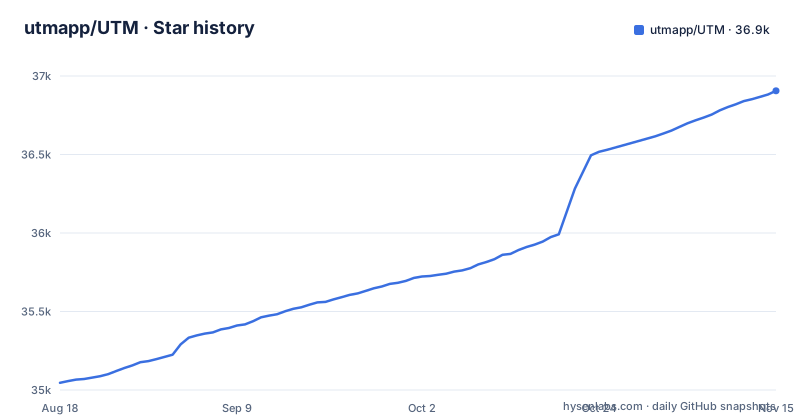
Star history
- utmapp/UTM36,906 ★ · +1,860
| Repository | 2026-08-18 | 2026-11-15 |
|---|---|---|
| utmapp/UTM | 35k | 36.9k |
1,860 Stars in the last 89 days, measured from the daily GitHub snapshot. Compare with other projects
Editorial analysis
QEMU does the emulation and a Swift frontend does the rest
The project's own summary is that UTM is a full featured system emulator and virtual machine host for iOS and macOS, based off of QEMU, so you can run Windows, Linux and more on a Mac, an iPhone or an iPad. What the repository root shows is how much sits around that core. There is a QEMUHelper, a QEMULauncher, a QEMURenderServer and an iOSHelper directory, which points to a multi-process design rather than one binary, plus Renderer, Remote, Services, Intents and Scripting directories and a UTM.xcodeproj. The README states the frontend was designed from scratch for macOS 12+ and iOS 15+, which sets a floor for both platforms. Graphics arrive in two forms, VGA mode through SPICE and QXL, and a text terminal mode, and USB devices are supported. The practical consequence for anyone evaluating it: this is an app with guest operating systems inside it, so the storage and memory you give the guest come off the same machine that runs the emulator.
For anyone planning to build the thing, the root also shows the paperwork. Thirteen translated READMEs sit next to README.md, covering German, Japanese, Russian, French, Spanish, Czech, Bengali, Korean, Ukrainian, Polish and three Chinese variants, while the repository root holds the zh-HK.lproj, zh-Hans.lproj and zh-Hant.lproj localisation folders. CodeSigning.xcconfig.sample is a sample signing configuration, and the two developer guides are in the tree as Documentation/MacDevelopment.md and Documentation/iOSDevelopment.md, with the README summing up neither.
Dynamic code generation is what UTM SE gives up
QEMU accelerates with TCG, and TCG needs dynamic code generation. On iOS, dynamic code generation requires either a jailbroken device or one of the workarounds that exist for specific iOS versions, so the fast path is largely closed off. UTM SE, the slow edition, replaces the JIT with a threaded interpreter that performs better than a traditional interpreter but slower than JIT, and the README says the technique is similar to what iSH does for dynamic execution. The payoff is that UTM SE needs no jailbreaking and no JIT workaround, so it can be sideloaded as a regular app. The cost lands on every instruction the guest executes. Choose SE when the guest is a terminal or a lightweight Linux and speed does not matter. Choose the JIT build only where JIT is actually reachable.
Thirty plus processors on the Mac, four architectures on iOS
Processor coverage differs sharply between the two editions, and the README gives the numbers. The full build claims 30+ processors including x86_64, ARM64 and RISC-V. UTM SE, in order to optimise for size and build times, includes only ARM, PPC, RISC-V and x86, each in both 32-bit and 64-bit variants. So an iOS user is not choosing a slower path through the same product, they are choosing a smaller catalog. A guest that needs a processor outside that list cannot be built on the SE path at all, so check the exact processor your guest needs before committing. Two more lines from the README matter for the same decision: the emulator claims VGA graphics through SPICE and QXL, and a text terminal mode is available as well.
Hardware acceleration and macOS guests are macOS only
The Mac build gets two capabilities the iOS build cannot have, and they are listed separately in the README under additional macOS features. The first is hardware accelerated virtualization using Hypervisor.framework together with QEMU, which is the path that turns a Mac into a fast host. The second is booting macOS guests with Virtualization.framework, so a Mac can run macOS inside macOS. Both of these are Apple platform facilities that iOS does not expose, and the README does not offer a substitute for either on iPhone or iPad. That is the single most useful thing to know before choosing a device: on a Mac you can run an accelerated hypervisor, while on an iPad the README points to UTM SE and its interpreter unless you have a jailbroken device or a JIT workaround for your iOS version. The practical test is the guest, not the host: anything that depends on a full graphics stack or on real CPU speed belongs on the Mac.
Two download pages, and no install command anywhere
The Install section of the README is two lines long and contains no commands at all. For iOS it names one address, https://docs.getutm.app/installation/ios/, and labels it UTM (SE) for iOS, which tells you the SE build is the one the project points iPhone and iPad owners at. For the Mac it names a second address, https://docs.getutm.app/installation/macos/, and the same section states that UTM is also available for macOS. So there is no command to copy and no package manager entry to add: the README points to those two documentation pages, and sideloading is the documented route for the SE build on iOS. The README does not describe disk image formats, disk creation, or how a downloaded image gets attached to a guest. Getting a bootable image into a guest is left entirely to the linked sites. The project does state that VMs can be created, managed and run directly from the device, so the application itself is meant to handle that, but the mechanics live on those pages rather than in the repository.
Apache 2.0 over (L)GPL pieces and statically linked gstreamer
The licence story has a second layer, and the README is direct about it. UTM itself is distributed under the permissive Apache 2.0 licence. It also uses several (L)GPL components, most of which are dynamically linked, but the gstreamer plugins are statically linked and parts of the code are taken from qemu. The project asks redistributors to be aware of that, and that request is the whole message. If you only run the app, the mix does not affect you. If you intend to redistribute it, whether as a fork, a bundled image, or a build inside another product, then the copyleft terms of the linked and statically linked components come with it, and the README does not enumerate which components fall in which category, so you would have to work that out from the build itself. The frontend pulls in four MIT or BSD licensed libraries, IQKeyboardManager, SwiftTerm, ZIP Foundation and InAppSettingsKit, and those are the permissive part of the tree. This is not legal advice, just the boundary the project draws for itself.
Three releases in a row tagged Beta
The version history is the thing to read before deploying anything. The three most recent releases are v5.0.6 on 2026-09-24 and v5.0.7 on 2026-10-16, both tagged Beta in their names, and v5.0.8 on 2026-10-17, which is not tagged Beta. The last push to the repository was on 2026-11-01, so the tree is being worked on rather than parked. Whether a given build counts as stable is a decision to make from its release notes rather than from the tag string. Pin an exact version and read the diff between the two you currently run and the one you want, especially if you keep disk images, since the README says nothing about image compatibility between versions.
iSH and a-shell are named next to it, and they solve smaller problems
The README names two related projects, and the difference in approach is worth being precise about. iSH emulates a usermode Linux terminal interface for running x86 Linux applications on iOS, which means it interprets user space code rather than booting a guest operating system with its own kernel, MMU and devices. a-shell goes further in the other direction: it packages common Unix commands and utilities built natively for iOS and reachable through a terminal interface, so there is no emulation layer at all. UTM sits above both of them, and the README says UTM SE's interpreter technique is similar to what iSH does for dynamic execution. The consequence for choosing a tool is a size and scope question rather than a quality one. If what you need on an iPhone is a shell and a handful of Unix commands, either of those is a far smaller download than a virtual machine host. If you need an actual guest system with its own kernel, UTM is what runs it, and on iOS you accept the interpreter to get it.
Editorial conclusion
UTM fits an Apple device that genuinely needs a guest: a Mac or an iPad with disk space and patience for emulation, or an iPhone that mostly needs a terminal, where UTM SE sideloads as a regular app. Skip it if the guest must run fast on iOS, because the Hypervisor.framework acceleration path and the Virtualization.framework path for booting macOS guests are both macOS only. If you plan to deploy the 5.0 line, note that v5.0.6 and v5.0.7 carry a Beta tag while v5.0.8 does not. First, confirm the guest you have in mind needs an architecture inside the ARM, PPC, RISC-V and x86 list that UTM SE builds, because a full UTM install supporting 30+ processors is a different download from what an iPhone can install.
Frequently asked questions
Is UTM or VMware better?
The README does not compare UTM to VMware. It states UTM's own scope: full system emulation through QEMU for iOS and macOS, with hardware accelerated virtualization using Hypervisor.framework on macOS and macOS guests bootable through Virtualization.framework.
What is the UTM app?
A full featured system emulator and virtual machine host for iOS and macOS, based off of QEMU. It lets you run Windows, Linux and more on a Mac, an iPhone or an iPad, with VGA graphics through SPICE and QXL or a text terminal mode.
What is a boot iso image in UTM?
The README does not describe boot images or disk formats, so it gives no answer to that. It does say VMs can be created, managed and run directly from the device, and it points to https://docs.getutm.app/installation/ios/ for iOS and https://docs.getutm.app/installation/macos/ for macOS for the details it leaves out.
Does UTM require a jailbreak?
Not for UTM SE. It uses a threaded interpreter instead of QEMU's JIT, so it needs no jailbreaking and no JIT workaround and can be sideloaded as a regular app, at the cost of running slower than JIT. The full UTM and QEMU build wants dynamic code generation for maximum performance, which on iOS requires a jailbroken device or a workaround for specific iOS versions.
What is the com.utmapp.utm app?
The README does not state the bundle identifier. It describes UTM as a QEMU based system emulator and virtual machine host for iOS and macOS, gives https://docs.getutm.app/installation/ios/ as the iOS route and https://docs.getutm.app/installation/macos/ as the macOS one, and notes that continuous integration hosting is provided by MacStadium.
Official sources
Add this badge to your README
If you maintain this project, the badge below links readers to this analysis and shows its maintenance status from the daily GitHub snapshot. Paste the markdown into your README; add ?metric=license or ?metric=stars to the image URL for a different field.

[](https://hysenlabs.com/projects/utmapp-utm)Star history chart for your README
[](https://hysenlabs.com/projects/utmapp-utm)Was this useful?