v2rayA ships two binaries that must match, and gives up transparent proxy without root
A web client for its own Xray-based core with global transparent proxy on Linux, Windows and macOS.
At a glance
- What is it?
- v2rayA is an AGPL-3.0 Go web client that runs as a service and manages an Xray-based core on Linux, Windows and macOS, importing subscriptions for VMess, VLESS, Shadowsocks, Trojan, Hysteria2, TUIC, Juicity, AnyTLS, WireGuard, SOCKS5 and HTTP(S). The deployment story is well covered per platform, but three requirements constrain it hard: the core binary must match the client version exactly, first start downloads rule data from GitHub or exits, and Docker bridge networking removes transparent proxy altogether.
- Who is it for?
- v2rayA is a good fit when you want transparent proxy on a Linux host you control as root, particularly a router or a NAS, and are content managing two binaries that must be upgraded together. It is a poor fit for an unprivileged container or an offline first start.
- Can I use it commercially?
- Yes, with strict conditions. AGPL-3.0 is a network copyleft licence: if people use a modified version over a network, for example as a hosted service, you must offer them its source code under the same licence.
- Is it still maintained?
- Yes. The repository received new commits within the last day.
- What is it written in?
- Mainly Go, according to GitHub's language statistics.
Answers come from the project's GitHub data, last synced on November 14, 2026, and from our analysis. They are not legal advice.
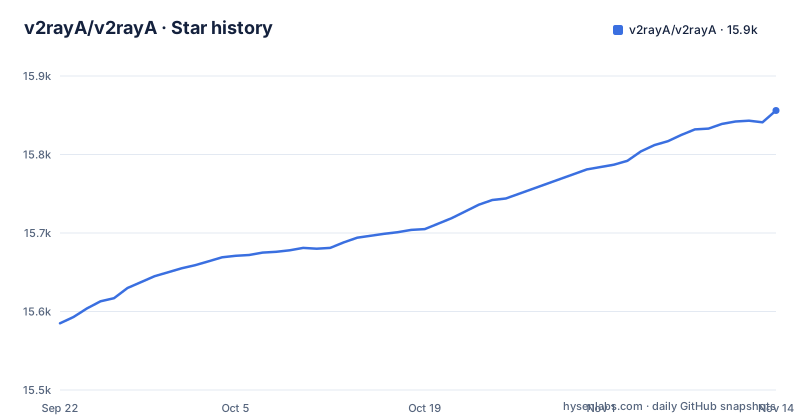
Star history
- v2rayA/v2rayA15,856 ★ · +271
| Repository | 2026-09-22 | 2026-11-14 |
|---|---|---|
| v2rayA/v2rayA | 15.6k | 15.9k |
271 Stars in the last 53 days, measured from the daily GitHub snapshot. Compare with other projects
Editorial analysis
The core binary is version locked to the client
The first line of the requirements table is the one that causes trouble. The core, named v2raya_core, has to be the same version as v2raya itself, placed next to it or on the PATH. The table is explicit that the packages and installers ship both together, and that a hand-installed pair must match.
So this is not a single program. It is a web interface and a proxy core that are version coupled.
The PATH option deserves a second look, because it is the loose one. Because the core may sit next to v2raya or in PATH, a stray copy of v2raya_core on the PATH is worth checking for a version match. On a machine that has had several install methods applied over the years, that is a real possibility.
The install paths avoid it by construction. The APT, DNF, zypper and AUR packages all ship the pair together, the Windows installer registers both binaries as a service, and the manual OpenRC instructions install the two files with the same VERSION variable:
sudo install -m755 "v2raya_linux_x64_${VERSION}" /usr/bin/v2raya
sudo install -m755 "v2raya_core_linux_x64_${VERSION}" /usr/bin/v2raya_core
That last snippet is also why the instructions tell you to set VERSION to the release number without the leading v. Two files, one variable, no room for a mismatch.
First start downloads rule data from GitHub and exits if it cannot
Routing rules depend on two data files, geoip.dat and geosite.dat, expected in /usr/share/v2raya or /usr/local/share/v2raya. The packages ship them. A hand install does not, and this is where the deployment story gets a sharp edge:
> a hand install downloads them from GitHub on the first start and exits if that fails.
Exit, not warn and continue. So a first start has a hard outbound dependency on GitHub, and a machine that cannot reach it does not come up in a degraded state you can configure, it does not come up at all.
That rules out a few deployments outright. An isolated network, an egress firewall with a narrow allowlist, or a region where GitHub is unreachable will all produce the same failure, and the message will point at a download rather than at your proxy configuration.
The workaround is unglamorous and worth doing in advance: place the two files in one of those two directories before the first start, taken from an archive you already hold. Every package-managed install avoids the problem entirely, which is the practical argument for using a repository package rather than hand-installing binaries.
Docker bridge networking removes transparent proxy
The documented container run gives the container the host network and full privileges, because transparent proxy needs both:
docker run -d --restart=always --privileged --network=host --name v2raya \
  -e V2RAYA_LOG_FILE=/tmp/v2raya.log \
  -v /lib/modules:/lib/modules:ro \
  -v /etc/resolv.conf:/etc/resolv.conf \
  -v /etc/v2raya:/etc/v2raya \
  ghcr.io/v2raya/v2raya
Note what that costs. Host networking means the container shares the host's network namespace, and privileged means it is not isolated from the host's devices, which is what the tun mode needs.
The alternative is spelled out and it is not equivalent. With bridge networking you publish port 2017 and whichever inbound ports you use, you turn on port sharing in the settings, and the inbounds listen on the container's loopback otherwise. Then the sentence that matters: transparent proxy is not available in that setup.
So the container configuration most deployments would prefer, a bridge network with published ports and no host privileges, is precisely the one that cannot do transparent proxy. It is worth deciding which of the two you actually need before you write the compose file, because the choice determines your networking model rather than being a detail you can revisit later.
Without root you get lite mode, which is a different product
The requirements table describes a fallback for unprivileged systems, and it is worth reading precisely because the fallback is not a smaller version of the same thing.
On Windows, the requirement is Windows 10 build 14393 or later, and an administrator account is needed for tun. Started without elevation it runs in lite mode, and the table adds that it can still set the current user's system proxy. macOS is the same shape: root for tun, and started as a user it runs in lite mode with the system proxy instead. The Homebrew instructions make the distinction operational, with one command commented for root and tun and another for the user and the system proxy.
What you give up is the transparent proxy, which is the feature most people install this for. What you keep is system proxy settings, which only affects applications that honour those settings, which is not all of them.
On Linux the requirement is starker: root, plus iptables or nftables for redirect and tproxy, plus /dev/net/tun and the ip command from iproute2 for tun. Those are four separate prerequisites before transparent proxy will work at all, and each one is a thing that can be missing on a minimal container image.
The OpenWrt package feeds are many versions behind and pair a separate core
OpenWrt gets its own section in the install documentation, and the news there is not good. The v2raya-openwrt feed and the official packages feed currently package 2.2.7.x with a separate xray-core, explicitly noted as not the release described in the rest of the document.
Compare that against the top of the requirements table, which demands a core of the same version as the client. A feed shipping 2.2.7.x alongside an independently versioned xray-core does not satisfy that rule, so the convenient install on the most common consumer router platform conflicts with the project's own stated requirement.
The documented workaround is manual. Until the feeds are updated, you install the mips32, mips32le, arm64 or x64 release binaries by hand, using the init script of your choice, following the same pattern as the OpenRC instructions elsewhere in the document.
That is real work on a router, where you are usually managing the filesystem over a limited shell. If OpenWrt is your target, check what version the feed actually has before you plan the upgrade path, and do not assume a package upgrade will keep the core in step.
Editing the packaged systemd unit loses your changes on upgrade
The APT section gives a short warning that saves an afternoon somewhere else. The instruction for changing the service is:
sudo systemctl edit --full v2raya.serviceAnd the reason is stated directly: an edit of the installed file is overwritten by the next upgrade.
That is the standard behaviour of a package-managed unit, and it is easy to run into the wrong way round. Editing the installed unit file in place feels like the obvious approach and it works perfectly, right up to the next package upgrade, at which point your changes are gone and the service reverts to defaults without telling you why it behaved differently after an update.
The documented path is the durable one, because systemd keeps the override separately from the packaged file.
The same reasoning applies on the other platforms with their own quirks. Homebrew warns that the upgrade or uninstall of a root-started formula needs sudo rm of the paths it names, and a service started with sudo is stopped with sudo brew services stop v2raya. Read those warnings before your first upgrade rather than during it.
One popular protocol is excluded by name
The protocol list is long. v2rayA imports subscriptions and share links for VMess, VLESS, Shadowsocks, Trojan, Hysteria2, TUIC, Juicity, AnyTLS, WireGuard, SOCKS5 and HTTP(S). It groups nodes and selects either the member with the lowest measured latency or a pinned one, and it splits traffic with rules written in RoutingA.
Then a single sentence covers the exception: ShadowsocksR is not supported.
This is stated in a way that is easy to skim past, because the surrounding sentence is a list of everything that is supported. But ShadowsocksR is still in circulation, and subscriptions that bundle it alongside supported protocols contain nodes v2rayA does not support.
So if you are migrating an existing setup, check what your subscription actually contains before you rely on the import.
The rest of the feature set, node grouping with automatic latency selection and rule-based splitting, is where the project's actual differentiation sits, and both of those are client-side concerns rather than protocol support.
Editorial conclusion
v2rayA is a good fit when you want transparent proxy on a Linux host you control as root, particularly a router or a NAS, and are content managing two binaries that must be upgraded together. It is a poor fit for an unprivileged container or an offline first start. Before you deploy, confirm the core and client versions agree, check that the machine can reach GitHub on first start, and if you are on OpenWrt plan to install release binaries by hand, because the package feeds there are well behind and pair the client with a separate core.
Frequently asked questions
how to install v2raya
On Debian and Ubuntu the packages come from the Dae Universe repository, added as a sources or list file depending on your APT version, with the key placed in /usr/share/keyrings, then apt install v2raya followed by systemctl enable --now v2raya. Fedora, openSUSE, Arch, Gentoo, Docker, Windows and macOS each have their own documented path.
how to install v2raya on ubuntu
The APT route applies. Install curl, add the Dae Universe repository using the .sources file for APT 3.0 and later or the .list file for older APT, add the archive key, then run apt install v2raya and enable the service with systemctl enable --now v2raya.
how to install v2raya on openwrt
The project states the v2raya-openwrt feed and the official packages feed currently package 2.2.7.x with a separate xray-core, not the release described in its documentation. Until they are updated, it directs you to install the mips32, mips32le, arm64 or x64 release binaries by hand with the init script of your choice.
how to use v2raya
v2rayA runs as a service and is used from a browser, either on the machine itself or on a router or NAS. You import subscriptions or share links, group the nodes, and let it select the member with the lowest measured latency or one you pin, then split traffic with rules written in RoutingA. A current Chrome, Edge, Firefox or Safari is required.
v2raya vs passwall
v2rayA describes itself as a web client for its own Xray-based core with transparent proxy on Linux, Windows and macOS, importing subscriptions for a listed set of protocols, with ShadowsocksR explicitly not supported.
Official sources
Add this badge to your README
If you maintain this project, the badge below links readers to this analysis and shows its maintenance status from the daily GitHub snapshot. Paste the markdown into your README; add ?metric=license or ?metric=stars to the image URL for a different field.

[](https://hysenlabs.com/projects/v2raya-v2raya)Star history chart for your README
[](https://hysenlabs.com/projects/v2raya-v2raya)Was this useful?