vant-ui/vant-demo: eight Vant 4 examples and one React folder
Collection of vant demos.
At a glance
- What is it?
- The official example repository for Vant holds eight Vue 3 and Vant 4 projects under vant/, plus single starters for Vant Weapp, React Vant and Vant Cli. It is a wiring reference rather than a library, and its README counts three tracks while its own tree holds four.
- Who is it for?
- vant-demo is worth an afternoon for one job: copying a proven Vant 4 wiring for Rsbuild, Vite, Nuxt 3 or a CDN page, and nothing beyond that. Teams already settled on a build tool, or anyone who needs component behaviour rather than a mounting example, should leave it alone, since no prop or event reference lives here.
- Can I use it commercially?
- Yes. MIT is a permissive licence: you can use, modify and sell software built on it, as long as you keep its copyright and licence notices.
- Is it still maintained?
- Yes. The repository last received commits 171 days ago.
- What is it written in?
- Mainly Vue, according to GitHub's language statistics.
Answers come from the project's GitHub data, last synced on October 23, 2026, and from our analysis. They are not legal advice.
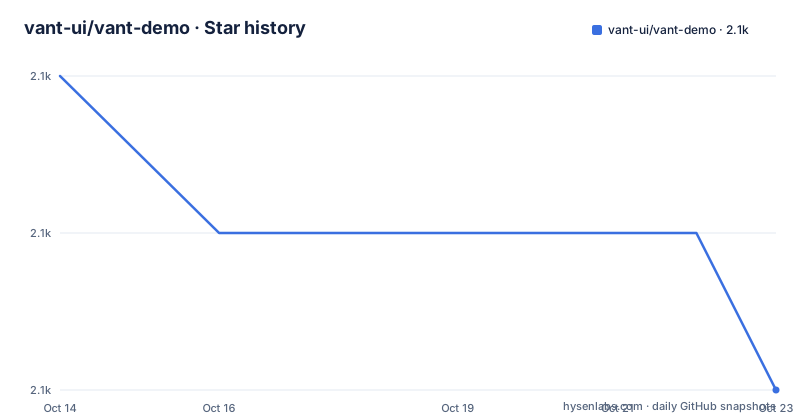
Star history
- vant-ui/vant-demo2,061 ★ · -2
| Repository | 2026-10-14 | 2026-10-23 |
|---|---|---|
| vant-ui/vant-demo | 2.1k | 2.1k |
-2 Stars in the last 9 days, measured from the daily GitHub snapshot. Compare with other projects
Editorial analysis
What vant-ui/vant-demo is: a folder of build examples
`vant-ui/vant-demo` ships no application you can install. Its one-line description reads `Collection of vant demos`, and the tree under `vant/` is the entire product: eight directories, each a complete but tiny project. Developers arrive with one concrete question, which bundler or framework should carry Vant in a new app, and this repository answers by wiring the same library eight different ways.
The audience is narrow by design. Someone who only needs a button and already has a Vue build tool gains nothing from these folders, because each one duplicates a manifest the reader is expected to own. Someone choosing between Rsbuild, Vite and Nuxt 3, or who needs a mobile layout that survives a narrow screen, gets that wiring for free.
Only four directories sit at the top level, beside `.github/`, `.gitignore`, `README.md` and `README.zh-CN.md`. No workspace manifest appears among them, so the whole repository cannot be installed in one step, which is precisely why the walkthrough tells you to change directory before running `npm i`.
Clone first, then pick one folder
The walkthrough runs four steps, and only two of them teach you anything: an SSH clone, a directory change, an install and a dev server. The clone form carries no directory argument, so the checkout lands in a folder named after the repository and the path that follows is relative to that folder. No HTTPS variant appears anywhere in the README, so readers without SSH keys must edit the URL themselves.
git clone [email protected]:vant-ui/vant-demo.gitChoose the example before installing anything. Step two names the Rsbuild project example as the sample choice and links out to Rsbuild on GitHub, the only external link in the README.
cd vant/rsbuildStep three covers the rest, naming npm or other package managers, so these two commands are the documented pair.
npm i
npm run dev
After the second command the README documents neither the port the server binds nor a line of output to expect, so the first check is simply that a dev server starts and a demo page renders. Nothing further is documented: no test script, no lint command and no production build for any of the eight examples. Step four closes with how to reuse the work, either fork the project or copy a folder's code into your own app.
Eight vant folders, three build tools, three config topics
Read the tree closely and the eight folders under `vant/` are not eight peers. Three of them pick a bundler: `rsbuild` for Vue 3 with Vant 4, `vite` for the same pair, and `vue3-ts` for Vue 3, Vant 4, TypeScript and Vite. `nuxt3` is the odd one out, because its comment names Nuxt 3 and Vant 4 and stops there, with no Vue 3 line, since the framework supplies the Vue version itself.
Three more folders carry no tool name at all. The rem folder is labelled only as configuring rem adaptation, `viewport` only as configuring viewport settings, and `typescript` only as configuring TypeScript and importing on demand. That is the detail the tree comment hides: from the name alone you cannot tell whether the rem example runs on Vite or on Rsbuild, because the comment states the topic and drops the toolchain. Opening the folder is the only way to learn it, and the README never lists the files inside any example.
The eighth folder, cdn, imports Vant through a CDN, which removes the build step and puts the load order in your HTML instead of in a bundler config. Note that `vue3-ts` and `typescript` both claim TypeScript. The difference the comment records is on-demand import rather than typing, so the two folders are not alternatives to each other.
The README names three tracks, the tree holds four
The README's summary sentence says the repository covers Vant, Vant Weapp, and Vant Cli. Three tracks. The tree printed directly below that sentence lists four directories, and the fourth is `react-vant`, carrying a single `rsbuild` example for React Vant. The top-level listing agrees with the tree, so the summary undercounts its own contents by one.
That gap matters for anyone arriving with a React project in hand, because the repository's primary language is recorded as Vue and its topics are demo, mobile, ui, vant, vant-demo and vue. Nothing in that record points a React developer at the `react-vant` folder, and the README text does not mention React at all.
Depth is uneven, and the same tree shows it. Under `vant/` there are eight subfolders. Under `vant-weapp`, under `react-vant` and under `vant-cli` there is exactly one apiece, each named `base`, covering a mini program, a React app and a component library scaffold. The README promotes that scaffold to its own track name while giving the mini program and React builds a single starter each.
Version numbers stop at Vue 3 and Vant 4
Every version claim in this repository is a major number: Vue 3, Vant 4 and Nuxt 3, with TypeScript named but never numbered. No example manifest is reproduced in the README, and no lockfile appears at the top level, so nothing records which Vant 4 point build or which Node version the folders were written against. Copy a folder into a project pinned to a different Vant 4 patch version and you inherit whatever that difference means, with no compatibility note to check first.
The maintenance facts are thin as well. The last push was on 2026-05-05, and the repository is not archived. The licence is MIT and there are no GitHub releases at all, so there is no tagged version to pin to, no changelog to read before an upgrade, and no history that would tell you when an example was last fixed against a Vant change. For a demo repository that is a defensible choice. For code you intend to fork and own, it means recording resolved dependency versions is the first task you inherit.
The default branch is `master`, not `main`, which matters for any automation that guesses a branch name.
CDN, bundler, or Nuxt 3: three ways to load Vant
The eight folders are really four approaches, and each one gives something up. The cdn folder imports Vant through a CDN: no install step, no bundler resolution, no build, and the load order in your HTML decides what arrives. That suits a prototype or a static page, and it gives up bundling and on-demand import entirely.
Rsbuild, Vite and the TypeScript folders go the opposite way. Vant 4 arrives through npm, the bundler resolves it, and `typescript` adds importing on demand, the only on-demand wording in the tree. The catch is that the README reproduces none of those configurations. It names the folder and leaves the mechanism inside the folder, so copying the label does not copy the config.
`nuxt3` is a third approach, because Nuxt 3 brings its own directory conventions and server rendering, and that example is as much a Nuxt demo as a Vant one. `vant-cli` and its `base` folder are a fourth, and not an application at all: the tree describes them as building component libraries using Vant Cli, which is what you copy if you intend to publish components rather than consume them.
Copying a folder means owning the versions yourself
This is the right place to copy from when the question is wiring, and the wrong place when the question is behaviour. No prop table, no event list and no accessibility note for any component appears in this repository. The folders demonstrate that a component renders under a chosen build tool, nothing more, so a team deciding whether a component fits its use case needs the component's own documentation rather than a demo that mounts it.
It is also the wrong tool for anything that needs a single install. With no workspace manifest at the root there is no way to compare the eight examples inside one dependency tree, and eight separate installs mean eight separate sets of resolved versions. For a benchmark, a vulnerability sweep or a monorepo migration, this layout is friction rather than help.
Four checks are worth doing before you copy a folder: which Vant 4 point version it pins, whether the rem or viewport example matches your target devices, whether the CDN example still points at a version you intend to ship, and whether the React folder has moved since 2026-05-05.
Editorial conclusion
vant-demo is worth an afternoon for one job: copying a proven Vant 4 wiring for Rsbuild, Vite, Nuxt 3 or a CDN page, and nothing beyond that. Teams already settled on a build tool, or anyone who needs component behaviour rather than a mounting example, should leave it alone, since no prop or event reference lives here. Before forking a folder, record the resolved Vant 4 version and check the rem or viewport setup against your own devices, because nothing in the README pins either one. Start from the Rsbuild folder if your app is already Vue 3 and only needs the wiring copied across.
Frequently asked questions
How do I run one vant-ui/vant-demo example locally?
Clone with `git clone [email protected]:vant-ui/vant-demo.git`, change into the example you want with `cd vant/rsbuild`, then run `npm i` and `npm run dev` inside that folder. There is no workspace install at the root, so the install must happen after the directory change.
Which examples does vant-ui/vant-demo ship and what does each one change?
Eight folders sit under vant: rsbuild, vite, nuxt3, vue3-ts, cdn, rem, viewport and typescript. Three of them choose a build tool, three cover configuration topics such as rem adaptation and viewport settings, and cdn imports Vant through a CDN instead of a bundler.
Does vant-ui/vant-demo cover React as well as Vue?
Yes, the tree contains a react-vant folder with an rsbuild example. The README summary line names only Vant, Vant Weapp and Vant Cli, and the repository's primary language is recorded as Vue, so a React developer has to read the tree to find it.
How do I pin the Vant version used by a vant-ui/vant-demo example?
Nothing in the README states it. Version references stop at major numbers such as Vue 3, Vant 4 and Nuxt 3, and the repository has no GitHub releases to check, so resolve the installed version yourself after `npm i` and write it down.
Can I use vant-ui/vant-demo examples in a CI pipeline?
The README documents no test, lint or production build command for any of the eight examples; it stops at starting a dev server. No port is documented either, so an automated check has nothing to wait for until you inspect the folder yourself.
Official sources
Add this badge to your README
If you maintain this project, the badge below links readers to this analysis and shows its maintenance status from the daily GitHub snapshot. Paste the markdown into your README; add ?metric=license or ?metric=stars to the image URL for a different field.

[](https://hysenlabs.com/projects/vant-ui-vant-demo)Star history chart for your README
[](https://hysenlabs.com/projects/vant-ui-vant-demo)Was this useful?