vczh-libraries/Release: Choosing and Setting Up GacUI
Release folder of all projects, mainly for GacUI: Native C++ UI library, cross-platform, MVVM and data binding, XML description, multi-language, core/renderer cross-process separation, etc
At a glance
- What is it?
- vczh-libraries/Release is the release and source repository for GacUI, a cross-platform C++ UI framework with MVVM, XML, native rendering, and remote renderer options. It suits C++ teams that need UI deployment across Windows, Wayland Linux, macOS, or browsers and can work with a custom licence and repository-driven release structure.
- Who is it for?
- Adopt a public GacUI release when the application is primarily C++, needs several rendering targets, and benefits from XML plus MVVM. Do not adopt it when a standard third-party licence, one self-contained platform repository, or a fully native view model without RPC integration is required.
- Can I use it commercially?
- Check first. The repository uses a licence we do not classify automatically, so read its LICENSE file before any commercial use.
- Is it still maintained?
- Yes. The repository last received commits 1 day ago.
- What is it written in?
- Mainly C++, according to GitHub's language statistics.
Answers come from the project's GitHub data, last synced on November 7, 2026, and from our analysis. They are not legal advice.
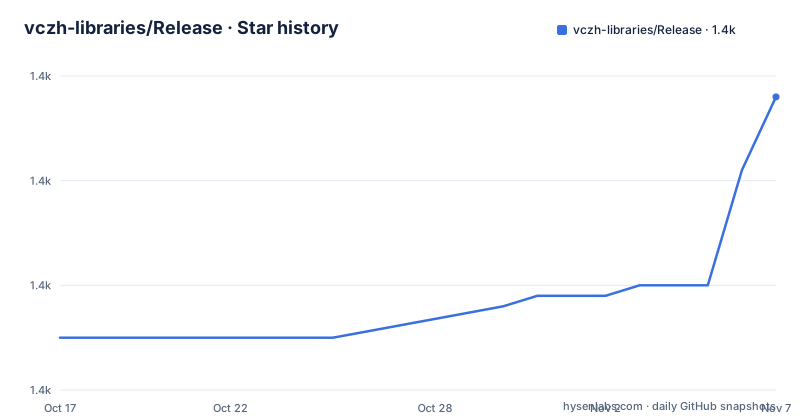
Star history
- vczh-libraries/Release1,408 ★ · +23
| Repository | 2026-10-17 | 2026-11-07 |
|---|---|---|
| vczh-libraries/Release | 1.4k | 1.4k |
23 Stars in the last 21 days, measured from the daily GitHub snapshot. Compare with other projects
Editorial analysis
What the vczh-libraries Release Repository Contains
This repository is not a standalone application or a conventional framework package with one universal installer. It is described as the release folder for all projects, mainly GacUI. The framework addresses the cost of maintaining different user-interface implementations across operating systems and rendering environments. A C++ application can target native renderers on Windows, Wayland Linux, and macOS, while GacJS provides a browser path built around WebAssembly, HTML5, and optionally TypeScript view models.
GacUI also targets applications that need more than immediate-mode drawing. The documented feature set includes data binding, MVVM, XML UI descriptions, multilingual support, built-in text processing libraries, native and TUI renderers, and hosted mode. XML can contain Workflow script code. It may be loaded dynamically with C++ reflection, or generated into XML, Workflow, and C++ source files for static linking.
That choice affects who can use the project comfortably. The primary language is C++, and the static source generation path assumes an application built around GacUI's generation tools. Browser support does not turn GacJS into a general-purpose JavaScript UI package. According to the README, GacJS primarily runs the GacUI core as WebAssembly in a browser worker and connects HTML5 rendering or a TypeScript view-model host to that core.
The repository also contains `Import/`, `Import-Test/`, `SampleForDoc/`, `Tutorial/`, and `Tools/` directories at its top level. That layout makes this a release, sample, tool, and tutorial hub rather than only a tagged binary distribution. The project directs users to `LICENSE.md` before using the code.
GacUI XML, MVVM, and Remote Renderer Data Flow
GacUI's application model has two paths for UI definitions. Dynamic loading allows foreign UI with complex behaviour to be loaded at runtime, but requires opting into C++ dynamic reflection. The README presents the opposite path for performance-sensitive or statically linked applications: `GacGen` or `GacBuild.ps1` can generate XML and Workflow into C++ source files. With dynamic reflection opted out, the README says this significantly improves performance and reduces binary size. Those are project claims, not independent measurements.
The separation between core and renderer is optional. A native renderer receives UI work through GacUI Remote Protocol, allowing the core and rendering side to operate in separate processes. Repository samples include `RemotingTest_Core`, `RemotingTest_Rendering_Win32`, and `RemotingTest_RvmHost`, with corresponding Wayland and macOS renderer tests in `wGac` and `iGac`.
A view model can also be marked with `@rpc:interface` and `@rpc:ctor`. Metadata for that interface is then emitted by `GacGen` or `GacBuild.ps1`. GacJS uses this route to host a TypeScript view model in the browser. Workflow RPC connects that host to the GacUI core. The README identifies test cases in the Workflow repository and a GacUI instruction file for debugging a real TypeScript-backed application, but this is integration work rather than a claim that arbitrary cross-language bindings work automatically.
GacJS offers WebAssembly and HTTP as alternative transports. WebAssembly is the primary browser path. HTTP is described mainly as a way to test HTML5 rendering against a native core without building WebAssembly. This distinction matters when planning browser development because the two paths do not produce the same deployment architecture.
Installing GacUI and Selecting the Correct Platform Source
The README does not give a package-manager installation command, a single universal installer command, or a dependency bootstrap script. For a stable acquisition, it directs users to the public releases and provides platform-specific release links for version `1.5.0.0`. Windows source is linked from the `1.5.0.0` release, macOS source from `iGac`, Wayland Linux source from `wGac`, and browser integration from `GacJS`.
A first real setup therefore begins by choosing the release artifact that matches the target. Use the Windows entry for a Windows build, the `iGac` release for macOS, or the `wGac` release for Linux Wayland. A browser target requires the `GacJS` source. The documentation also provides a GacJS WebAssembly guide with current demos and Linux build instructions.
The next documented step is to inspect `Tools/README.md` for building tools. The repository no longer commits executables to `Tools`, which means checking out `master` alone does not produce a ready-to-use GacUI toolchain. The application setup must account for building or obtaining the required tools and following the platform documentation.
The repository also warns that code on `master` is usable but not promised, and that releases are cut when the maintainer considers the code ready. This makes the tagged release the more conservative starting point for a production application. `GacUI`, `wGac`, `iGac`, `GacJS`, and `Workflow` are named as components or references, so the release links should be followed rather than assuming that the top-level repository alone contains every buildable target.
Static Generation, Dynamic Loading, and Their Trade-offs
The XML and Workflow toolchain creates an explicit deployment decision. Dynamic loading enables runtime UI composition and uses C++ dynamic reflection. That flexibility is relevant when foreign UI contains substantial behaviour and the application already accepts reflection costs. The README does not document a hot-reload workflow, a production packaging procedure for dynamically supplied UI, or a compatibility policy for externally authored XML.
Static generation produces source files that can be linked into the C++ application. The README recommends this route and states that opting out of dynamic reflection improves performance and reduces binary size. It is the better fit when the interface changes with application releases, because the resulting source can participate in the normal build. Its trade-off is reduced runtime flexibility. Changes to XML or Workflow require the generation and C++ compilation path rather than only loading a replacement interface file.
Hosted mode offers a separate choice. It can render all windows within one native window, which may simplify presentation for applications that do not need independent operating-system windows. This is optional, not a mandatory deployment model. The framework also has TUI renderers, but the README does not describe their feature parity with native rendering. That omission prevents treating TUI as an automatic substitute for every native application.
Repository Split Alternatives and Platform Boundaries
The clearest repository-level alternative to downloading the unified Windows release is to use the component repository for the actual target: `iGac` for Cocoa rendering on macOS, `wGac` for Wayland rendering on Linux, and `GacJS` for the WebAssembly and HTML5 path. The difference is distribution and implementation, not a change to GacUI's XML, MVVM, Remote Protocol, or Workflow RPC model. Native repositories contain native renderer implementations and sample remoting applications. GacJS contains browser demos and TypeScript RPC code generation.
For Linux, the README gives an explicit boundary. The `1.2.11.0` listing points Linux XWindow to a fixed commit and says that version is stopped maintaining. It directs users to `Linux Wayland` instead. An application whose Linux dependency chain still requires XWindow should therefore treat adoption as a compatibility and maintenance decision, not simply a platform choice.
A second implementation alternative is architectural rather than competitive: keep the view model in C++ within the application, or move it to another process and connect it through GacUI Remote Protocol and Workflow RPC. The first arrangement reduces process and transport work while staying within the main language. The second permits another programming language but adds interface generation, callbacks, process boundaries, and debugging across repositories. The documentation gives metadata and TypeScript examples, but it does not promise support for every host language without a corresponding code generator.
Licence, Release Activity, and Upgrade Exposure
The repository is not archived, and its last push was on 2026-10-14. Recent release entries include `1.5.0.0` on 2026-10-06, `1.4.1.3` on 2026-09-27, and `1.4.1.2` on 2026-09-11. This recent activity does not define an upgrade contract, but it shows that tagged GacUI versions are still being issued.
The licence is listed as a custom GitHub licence that it cannot classify. The README repeatedly instructs users to read `LICENSE.md`, and it separately says that Workflow and GacUI may serve reading and debugging purposes under their licence. It also treats `wGac`, `iGac`, and `GacJS` as part of the release for licence purposes. A team therefore cannot make a licensing decision from the repository's language classification alone. It needs to read the actual file and check the component repositories it plans to use. No legal interpretation of the custom terms is made here.
An upgrade can involve more than changing one source tree. Native target changes may pull in `wGac` or `iGac`, while TypeScript integration points to `GacJS`, RPC definitions point to Workflow conventions, and code generation depends on the `Tools` directory. The documentation does not publish a compatibility matrix, automated migration guide, or rollback procedure. Teams upgrading an application should compare each component's tagged source rather than assuming that the newest `Release` tag aligns every external repository automatically.
Editorial conclusion
Adopt a public GacUI release when the application is primarily C++, needs several rendering targets, and benefits from XML plus MVVM. Do not adopt it when a standard third-party licence, one self-contained platform repository, or a fully native view model without RPC integration is required. Verify `LICENSE.md`, the selected platform repository, the required `GacGen` or `GacBuild.ps1` path, and whether your Linux target is Wayland rather than the discontinued XWindow version before committing the project.
Frequently asked questions
Which repository should I use for GacUI on macOS or Linux Wayland?
The README links macOS releases through `iGac` and Linux Wayland releases through `wGac`. The unified repository remains the main entry point for GacUI information and Windows release links.
Can GacUI run in a browser with a TypeScript view model?
GacJS primarily runs the GacUI core as WebAssembly in a browser worker. Its HTML5 renderer and optional TypeScript view-model host communicate with the core through exposed functions, callbacks, GacUI Remote Protocol, and Workflow RPC.
Should I build GacUI from master or use a public release?
The README says code on `master` is usable but carries no promise, while stable code is available through public releases. It also notes that new releases are created only when the maintainer considers the code ready to update.
Official sources
Add this badge to your README
If you maintain this project, the badge below links readers to this analysis and shows its maintenance status from the daily GitHub snapshot. Paste the markdown into your README; add ?metric=license or ?metric=stars to the image URL for a different field.

[](https://hysenlabs.com/projects/vczh-libraries-release)Star history chart for your README
[](https://hysenlabs.com/projects/vczh-libraries-release)Was this useful?