codexfast: session-scoped runtime patches for Codex.app on macOS
codexfast: enable Fast mode, /fast, Speed menu, and update controls in OpenAI Codex.app for custom API users on macOS
At a glance
- What is it?
- codexfast does not modify the Codex.app bundle. It launches it with a local DevTools endpoint, attaches before renderer JavaScript runs, and patches the remaining gates in memory, which means the process has to stay alive for the session. The alternative is a config.toml with OAuth login and a custom provider.
- Who is it for?
- codexfast suits a macOS user on a custom API who wants the Fast controls, the composer slash command and a way to stop automatic updates, and who is willing to leave a launcher process running in a terminal. It does not suit a Windows or Linux user, since the package declares darwin only, and it is not a permanent modification, so it has to be relaunched every session.
- Can I use it commercially?
- Yes. MIT is a permissive licence: you can use, modify and sell software built on it, as long as you keep its copyright and licence notices.
- Is it still maintained?
- Yes. The repository last received commits 25 days ago.
- What is it written in?
- Mainly TypeScript, according to GitHub's language statistics.
Answers come from the project's GitHub data, last synced on October 22, 2026, and from our analysis. They are not legal advice.
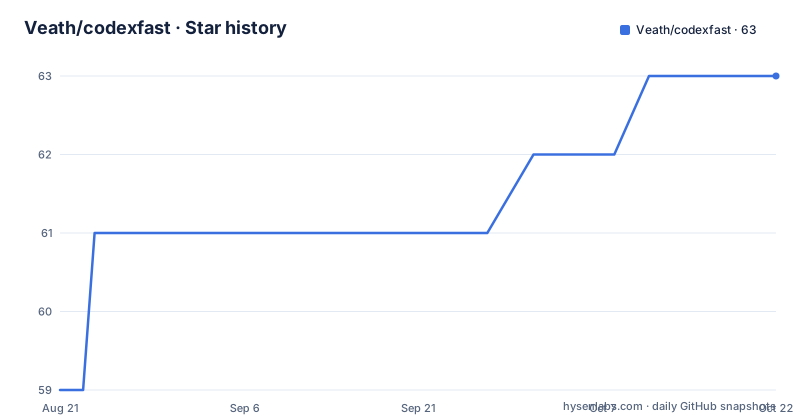
Star history
- Veath/codexfast63 ★ · +4
| Repository | 2026-08-21 | 2026-10-22 |
|---|---|---|
| Veath/codexfast | 59 | 63 |
4 Stars in the last 62 days, measured from the daily GitHub snapshot. Compare with other projects
Editorial analysis
A launcher, not a patch to the app bundle
The premise is narrow and worth stating precisely. codexfast is a macOS runtime launcher for OpenAI Codex.app that re-enables hidden custom API features on verified compatible builds without modifying the installed app bundle. The original `app.asar`, `Info.plist`, the bundle itself and the app signature are all left untouched, and the patches last only for the current session. The reasoning is that the UI already exists: Codex.app already contains the Fast, `/fast`, Speed and updater UI paths in its packaged frontend bundle, so what is missing are the local gates, and codexfast patches only the gates still needed for a verified build. It adds no backend service and calls no private OpenAI API. The whole thing is one command:
npx codexfast launchThe version that produced this description is 0.79.0, released on 2026-08-31, with 0.78.0 and 0.77.0 in the preceding week, and the last push to the default branch main is dated 2026-08-31 as well.
The interceptor has to stay attached
The mechanism is a debugging protocol attachment, and it has a consequence for how you use it. `codexfast launch` starts Codex with a local Chrome DevTools Protocol endpoint, attaches through the browser-level CDP target before renderer JavaScript runs, intercepts matching renderer JavaScript responses for that launched session, and applies narrow patch rules in memory. Because the interception happens on responses, and because Settings and the patched feature chunks can load lazily, the runtime interceptor has to remain attached after the first window appears. The README is explicit: keep the `codexfast launch` process running while you use Codex. In practice that means the terminal is part of the session, and closing it removes the patched behaviour until you launch again.
Five things the patches restore
The feature list is short enough to enumerate. There is a Fast settings control in Settings, a `/fast` slash command in the composer, and a Speed submenu in the composer. The fourth item is model catalog compatibility for GPT-5.5 and GPT-5.6 custom API users, and it is split by build age: Sol, Terra and Luna metadata is injected on older supported builds, while current builds use the official GPT-5.6 path. The fifth is a Disable automatic updates switch under Settings > General, which is the one most likely to matter to someone who does not want the app replacing itself mid-session. Plugins, the README notes, remain on official app paths rather than being patched.
The update switch is read before every Sparkle check
The mechanism behind the fifth feature is the most technical part of the project. The Disable automatic updates switch is stored in Codex desktop configuration as `[desktop].disableAutomaticUpdates`, and codexfast injects a process-local main-process hook that discovers the updater and desktop-settings modules by source signature across `.vite/build/*.js`. From there it reads the latest configuration before each Sparkle background update check and each automatic forced install scheduling pass. Two things follow from that design. The switch has to be set while the launcher session is running for the hook to act on it, and the modules are found by signature rather than by a fixed file path, which is why a renamed renderer or rebuilt chunks do not automatically break the patch.
Build compatibility is listed build by build
Because the modules are matched by source signature, supported builds are enumerated rather than assumed. The latest verified local build is ChatGPT.app / Codex.app `26.825.51511`, build 7377, where the renamed renderer and `.vite/build` chunks retain the existing Fast, `/fast`, settings-schema and source-signature updater compatibility, and the current General Settings row shape is still covered by the generic automatic-update target. Below it sit `26.825.41651` (build 7345), `26.820.60940` (7119), `26.818.61809` (7019) and `26.818.41509` (6962) with the same compatibility, and a long tail of older builds, including `26.814.41407` (6720) and `26.810.52044` (6662), continues down to `26.415.40636`, build 1799. One build is called out differently: `26.818.31338`, build 6892, has a renamed General Settings module that receives the dedicated runtime patch restoring the Disable automatic updates row while keeping the hook and settings schema. The declared feature scope lives in `docs/feature-scope.md`, and a script named for supported version drift is part of the test chain, which is how a build that stops matching is meant to be noticed.
The published package is one launcher script
The npm artefact is deliberately small. The `files` list contains `bin/codexfast`, LICENSE, README.md and README.zh-CN.md, and the `os` field is `darwin` alone, so the package will not install on Windows or Linux by design. Node 18.12.0 or newer is required, the repository is pinned to pnpm 10.33.0, and the development dependencies are small and current: tsx, typescript and the Node types. The scripts show how the project keeps its own claims honest. `build:check` and `prepack` run the build in check mode, `check:version-drift` runs a dedicated version drift script, `inspect:bundle-targets` inspects bundle targets, and `test` chains the build check, the drift check and a shell script called `test/re-sign-flow.sh`. The top level also carries AGENTS.md, CHANGELOG.md, a `src/` tree and a `docs/` directory.
An OAuth config route avoids the launcher entirely
The README opens with a different approach that it says can replace codexfast while keeping the full Codex feature set on a custom API. You sign in to the Codex CLI or Codex.app with any ChatGPT account and add a block to `~/.codex/config.toml`:
model = "gpt-5.6-sol" # Or gpt-5.6-terra, gpt-5.6-luna, or any other supported model
model_provider = "custom"

model_reasoning_effort = "xhigh"
plan_mode_reasoning_effort = "xhigh"
With `requires_openai_auth = true`, Codex stays authenticated through the official ChatGPT OAuth flow while model requests go to the configured custom provider, which avoids the capability restrictions of pure API login mode. No manual edit to `~/.codex/auth.json` is needed. The published block also carries two settings that are commented out and labelled dangerous and not recommended for new Codex users, `approval_policy = "never"` for running commands without confirmation and `sandbox_mode = "danger-full-access"` for unrestricted sandbox access, plus a WebRTC base URL on a local port because Codex.app voice chat requires WebRTC.
Editorial conclusion
codexfast suits a macOS user on a custom API who wants the Fast controls, the composer slash command and a way to stop automatic updates, and who is willing to leave a launcher process running in a terminal. It does not suit a Windows or Linux user, since the package declares darwin only, and it is not a permanent modification, so it has to be relaunched every session. Before relying on it, check that your Codex build is on the verified list, since the patches are matched by source signature rather than applied universally, and read the config.toml route first if you would rather not run an interceptor at all.
Frequently asked questions
What is codexfast?
It is a macOS runtime launcher for OpenAI Codex.app that re-enables hidden custom API features on verified compatible builds without modifying the installed app bundle. The original app.asar, Info.plist, bundle and app signature are left untouched, and the patches apply only to the launched session.
How do I use codexfast fast mode?
Run npx codexfast launch and keep that process running while you use Codex, because the runtime interceptor must stay attached after the first window appears. The patched session adds a Fast control in Settings, a /fast slash command in the composer and a Speed submenu.
How is a codexfast session different from a normal Codex session?
Codex.app already ships the Fast, /fast, Speed and updater UI paths in its packaged frontend bundle, so the difference is which local gates are open. codexfast patches only the gates still needed for a verified build, in memory, and adds no backend service and calls no private OpenAI API.
What are the requirements to run codexfast?
macOS and Node 18.12.0 or newer, because the package declares darwin as its only supported operating system. The launcher script is published in the package along with the licence and both README files, and the repository is pinned to pnpm 10.33.0.
Does codexfast work with GPT-5 models?
The stated scope is GPT-5.5 and GPT-5.6 model catalog compatibility for custom API users. Sol, Terra and Luna metadata is injected on older supported builds, while current builds use the official GPT-5.6 path, and Plugins stay on official app paths rather than being patched.
Official sources
Add this badge to your README
If you maintain this project, the badge below links readers to this analysis and shows its maintenance status from the daily GitHub snapshot. Paste the markdown into your README; add ?metric=license or ?metric=stars to the image URL for a different field.

[](https://hysenlabs.com/projects/veath-codexfast)Star history chart for your README
[](https://hysenlabs.com/projects/veath-codexfast)