opensrc prints a path and lets your shell do the searching, and that is the whole design
Fetch source code for npm packages to give AI coding agents deeper context
At a glance
- What is it?
- A command line tool that materialises a package's source code into a local cache and prints the directory, so ordinary tools do the rest. It ships as a Rust binary installed with the Node package manager, resolves four source hosts behind one prefix syntax, and leaves full usage to a per-package document.
- Who is it for?
- opensrc suits someone giving a coding agent real source to read instead of a type stub or a bundled build, particularly when the agent already shells out to search tools and would rather be handed a directory than a new command to learn. Before adopting it, check four things.
- Can I use it commercially?
- Yes. Apache-2.0 is a permissive licence: you can use, modify and sell software built on it, as long as you keep its copyright and licence notices.
- Is it still maintained?
- Yes. The repository last received commits 60 days ago.
- What is it written in?
- Mainly Rust, according to GitHub's language statistics.
Answers come from the project's GitHub data, last synced on November 15, 2026, and from our analysis. They are not legal advice.
Star history
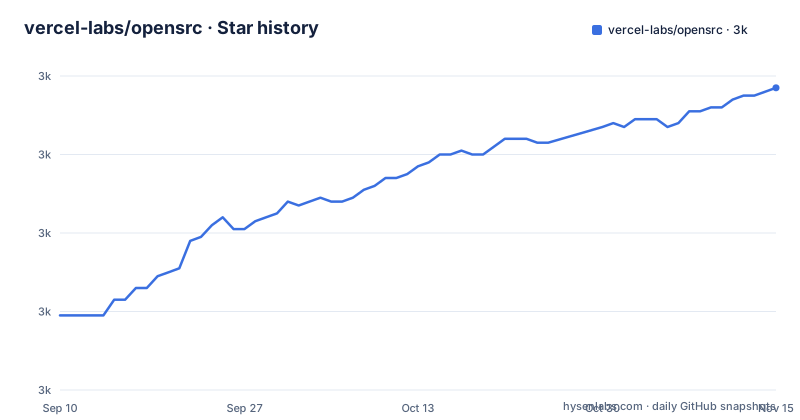
- vercel-labs/opensrc3,037 ★ · +58
| Repository | 2026-09-10 | 2026-11-15 |
|---|---|---|
| vercel-labs/opensrc | 3k | 3k |
58 Stars in the last 66 days, measured from the daily GitHub snapshot. Compare with other projects
Editorial analysis
The tool prints a path and the shell does the searching
The quick start is one install line and three examples, and the three examples share a shape that is the entire design.
The command prints a directory. The shell substitutes that directory into a command you already know:
# Search a package's source
rg "parse" $(opensrc path zod)

# Read a specific file
cat $(opensrc path zod)/src/types.ts

# Works with any registry
find $(opensrc path pypi:requests) -name "*.py"
So the tool does not implement search, does not implement reading, and does not implement globbing. It fetches source into a cache and prints where it landed, and everything after that is a standard tool being handed a path.
That has a real consequence for how you would use it with a coding agent. An agent that already knows how to run a recursive grep and a file read does not need a new capability taught to it; it needs a directory. Handing it one is a much smaller interface than teaching it a query language, and it means the same source tree works with whichever search tool happens to be installed.
The caching is what makes the pattern cheap enough to use casually. The command fetches on first use and afterwards returns the cached path immediately, so the cost is paid once per package rather than once per query.
The readme is also clear about its own limits here: it points to the per-package CLI document for full usage rather than pretending the three examples are the whole surface.
A prefix picks the source host, and one registry is the default
The addressing scheme is a bare name for one host and a prefixed name for the others. In the first two examples the package is written with no prefix at all, which means the default host. In the third it is written with a prefix naming a different language's registry.
The packages table gives the full set of hosts the tool knows about: a Node package registry, a Python one, a registry for compiled languages, and a code hosting site. Four sources behind one command.
The default is the first one, which is why the Node examples need no prefix and the Python example does. That is a small design decision with a visible consequence: a bare name is ambiguous in principle and resolved by convention in practice, and the readme does not say what happens when you write a bare name for a package that exists on more than one of the four hosts.
The prefixed form is also what the third example is demonstrating. Its comment says it works with any registry, and the example it picks is the one that most needs saying, because a Python package name would otherwise be looked for on a Node registry.
For an agent being pointed at a dependency, the practical consequence is that the prefix is part of the contract. Anything generating these commands has to know which host each package comes from, and getting it wrong produces an empty directory rather than an error, because there is nothing on the wrong host by that name.
The documented pattern breaks if the command prints anything else
The three examples all capture the command's output through shell substitution, which means everything the command writes to standard output becomes part of the argument list of the tool after it.
That works only while the output is a single filesystem path and nothing else. A progress line, a warning about a deprecated name, or a fetch message written to standard rather than standard error would all be captured too. In the first example, where the captured text is a prefix for a recursive search, extra words would be interpreted as additional directories to search. In the second, where the captured text is joined to a filename, any extra line would break the path entirely.
This is not an argument against the design. Command substitution around a path-printing command is a common and readable idiom, and it is what makes the tool compose with tools the user already has. It is a constraint on the command's output contract that happens to be unstated.
The second example has a second fragility of a different kind. It appends an internal path inside the package to whatever the command returns, which means it depends on the layout of that particular package's source tree rather than on anything the tool guarantees. If the package reorganises its files, the example breaks in a way that has nothing to do with the cache.
Both are properties of the examples rather than bugs, and both are the kind of thing worth knowing before you build automation on top of the pattern rather than calling the tool directly.
A Rust binary installed with the Node package manager
The install line uses the Node package manager's global install flag, and the project is written in a compiled language. Those two facts sit together without comment in the readme, and the repository layout explains why.
The tool is not the repository root. It is a package inside it, and the development section shows that the tool's own manifest is nested under that package rather than at the top level. So what the install line fetches is a package whose payload is a compiled binary, and the Node package manager is being used as the distribution channel for a program written in a systems language.
The two ecosystems then have their own toolchains. The Node side of the repository is a workspace driven by a task runner, and the tool side is built, tested and linted with the Rust toolchain. The readme gives the commands for both, separately.
There is a second package in the workspace as well, a documentation site under the scoped name, and it is the only other thing published from this repository. So the repository holds a command line program, a documentation site, and the workspace glue, with the program's own manifest sitting inside the package that ships it rather than beside the documentation site.
That layout is why the install command and the build commands look nothing like each other, and why a contributor needs both toolchains to work on the whole thing.
Every Rust command repeats the same manifest path
The development section gives four Rust commands for building, testing, formatting and linting. Each one is the ordinary command with a manifest path pointing into the nested package.
The repetition is the finding. Because the tool's manifest is not at the workspace root, the flag is required, and because it is required it appears four times in a row, once per command. A contributor copying a single command gets the right behaviour; a contributor writing a script has four places to keep in step if the crate ever moves.
The lint command is the strictest of the four. It passes a flag that turns warnings into errors, so the lint is a gate rather than a report. Combined with the formatting command in the same block, the Rust side has both a formatter and a warning-as-error linter invoked the same way.
The test command runs the same manifest's tests, and there is no separate integration-test invocation, which for a tool whose behaviour is mostly filesystem layout and cache management suggests the tests live inside the crate.
The Node side is organized the opposite way. Build, development, test, lint and type checking are all single-word delegations to the task runner, which means the actual commands are defined per package rather than in the root manifest. So a contributor working on the tool runs four explicit commands, and a contributor working on the site runs one.
The Node version is stated in four places and the package manager in two
The runtime floor for the JavaScript side of this repository is stated more than once, in three different forms, and the package manager floor is stated twice in two different styles.
The root manifest declares a node engine field with a lower bound, and separately declares a package manager field pinned to one exact patch release. The repository also carries a version-manager file naming a node version, and the readme's development section says which node and package manager versions to use in prose. That is four places for the node version and two for the package manager.
The two package manager declarations are complementary rather than contradictory, which is the correct pattern: one names the exact release the repository is developed against and pins it, the other states the range a consumer or a contributor's environment may use. A contributor with a different patch release inside that range will be fine; one outside it will be asked to move.
The node declarations are less carefully separated. A version-manager file and an engine range can drift without anything noticing, and the prose in the readme can drift from both, because nothing checks it. That is a small thing, but it is the kind of duplication that shows up as a confusing error from the package manager rather than as a clear message.
The root manifest also marks the workspace private and declares the module type, which together mean the root package is never published and its files are always interpreted as modules.
Three root dev dependencies and six scripts that only delegate
The root manifest is short, and what it contains is worth reading as a description of how much logic lives at the top.
It has three development dependencies: a formatter, the task runner, and the TypeScript compiler. There is no linter, no test framework, and no assertion library. Since the root also defines a lint task and a test task, and neither has a tool behind it, both must resolve inside the individual packages.
Of the eight scripts, six are a single word delegating to the task runner, and they delegate under the same name they are given: build, development, test, lint, lint-and-fix, and type checking. The remaining two invoke the formatter directly, once to write and once to check.
So the root manifest is a switchboard rather than a build definition. That is the normal shape for a workspace this age and it means adding a package is mostly a matter of naming its tasks the same way, but it also means there is no single place to see what the repository actually runs.
Two root entries point beyond the build. There is a skills directory, matching the way the tool is described as being for coding agents, and there is an agent instructions file. Neither is mentioned in the readme, and there is no build or test status badge anywhere in it, despite a test task and a coverage-free setup. The four badges that do exist are a link to the host's experiments listing, the licence, and the same package page listed twice.
Editorial conclusion
opensrc suits someone giving a coding agent real source to read instead of a type stub or a bundled build, particularly when the agent already shells out to search tools and would rather be handed a directory than a new command to learn. Before adopting it, check four things. Read the per-package CLI document rather than the root readme, because the root deliberately covers only the quick path and points elsewhere for everything else. Pick the right source host, since a bare name implies one registry and other hosts need an explicit prefix. Notice that the documented pattern depends on the command printing exactly one path, so any diagnostic output on stdout will be captured by the shell rather than shown. And if you contribute, note that the CLI crate lives inside the Node package rather than at the workspace root, which is why every build command repeats a manifest path.
Frequently asked questions
how to use opensrc
Install it globally with the Node package manager, then use its path command with a package name. It fetches the source on first use, prints the cached directory, and you pass that to any other tool. A prefix names a non-default host, such as a Python registry.
Where does opensrc fetch source from?
Four hosts: a Node package registry, a Python one, a registry for compiled languages, and a code hosting site. The packages table lists them, and the readme notes that the path command works with any of them.
Is opensrc written in Rust or JavaScript?
The command line tool is Rust, and the repository is a Node workspace that also contains a documentation site. The tool is installed with the Node package manager even though it is compiled, and its own manifest is nested inside the package that ships it.
Does opensrc have its own search command?
No. It prints a path to the cached source and the readme's examples pass that path to a recursive grep, a file read and a find invocation. Any tool that accepts a directory can be used against the cache.
What are the build requirements for opensrc?
Node 24 or newer and pnpm 11 for the workspace, driven by a task runner, plus the Rust toolchain for the command line program. The root manifest pins one exact package manager release and declares a range for the version above it.
Does the opensrc readme document all of its options?
No, and it says so. The quick start covers the install and three examples, then points to the per-package CLI document for full usage. The repository root readme runs to about a hundred words of description.
Official sources
Add this badge to your README
If you maintain this project, the badge below links readers to this analysis and shows its maintenance status from the daily GitHub snapshot. Paste the markdown into your README; add ?metric=license or ?metric=stars to the image URL for a different field.

[](https://hysenlabs.com/projects/vercel-labs-opensrc)Star history chart for your README
[](https://hysenlabs.com/projects/vercel-labs-opensrc)Was this useful?