release: change types come out of commit messages, and npm test runs a linter
Generate changelogs with a single command
At a glance
- What is it?
- A command line tool that turns your commit history into a hosted release, where the categorisation of each change is read from parentheses in the commit message itself and the version is derived from a type you pass in. Its authentication flow lives in a second repository, its manifest gives the test script to the linter, and its newest release is four years older than its last commit.
- Who is it for?
- This is the right tool if your team already writes commit messages carefully, because the whole categorisation mechanism is a keyword in the message and a release becomes a single command with no manual editing. Two things to know first.
- Can I use it commercially?
- Yes. MIT is a permissive licence: you can use, modify and sell software built on it, as long as you keep its copyright and licence notices.
- Is it still maintained?
- No. The owners have archived the repository on GitHub, so it is read-only and no longer receives changes.
- What is it written in?
- Mainly JavaScript, according to GitHub's language statistics.
Answers come from the project's GitHub data, last synced on November 13, 2026, and from our analysis. They are not legal advice.
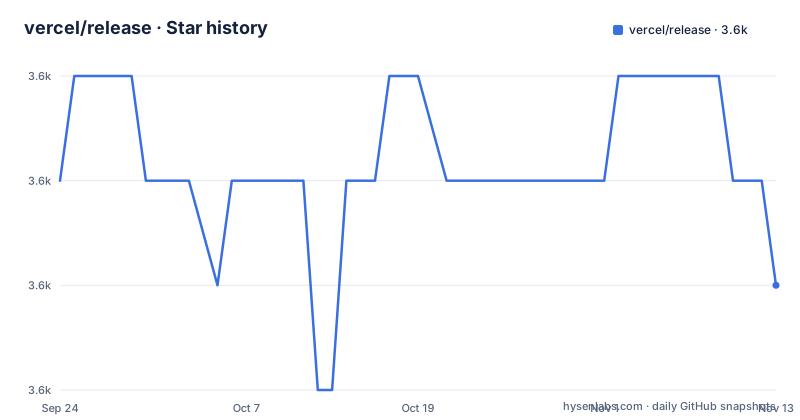
Star history
- vercel/release3,583 ★ · -1
| Repository | 2026-09-24 | 2026-11-13 |
|---|---|---|
| vercel/release | 3.6k | 3.6k |
-1 Stars in the last 50 days, measured from the daily GitHub snapshot. Compare with other projects
Editorial analysis
The change categories are parsed out of the commit messages
The interesting mechanism is that the tool does not ask you to categorise anything. You end a commit title or description with a type in parentheses, the way you would write a conventional commit subject, and the tool picks it up from there. If you have done that, the tool will not stop to ask you for a type when you get to the release, which the README presents as making the process faster. There is a second keyword doing the opposite job: a commit message ending with a marker tells the tool to leave that commit out of the notes entirely. So the shape of your release notes is decided by what your commit history says, which is a much better answer than a prompt you click through once a month.
A bare invocation still creates a release
The usage is one command inside your project directory, with a type argument. The three values follow the semantic versioning spec: incompatible changes, added functionality that stays compatible, and compatible fixes. There is a fourth form for pre-releases, which produces a suffixed version with an incrementing counter, and you can replace the default suffix with your own word, so a beta pre-release is a different invocation of the same tool. And if you leave the argument out entirely, the tool creates a release from the most recent commit and tag rather than refusing. That last behaviour is convenient for a repository you tag by hand, and it is also the one worth knowing about before you run the command on autopilot, since it does not ask first.
The authentication flow is documented in a second repository
The contributing section opens with a single sentence: the authentication flow is described elsewhere, in a separate repository. That is the whole of it. So the part of this tool that touches your code hosting account, which is the part with the interesting failure modes, is not described in the repository that publishes the tool. Everything else about contributing is spelled out in four steps, including the slightly awkward requirement to uninstall the globally installed copy before linking your local checkout, which is the standard dance and the reason the next line tells you the command is then available. The README closes that section by pointing you at the test script, which is where the second finding is.
The test script runs the linter, so the README's advice does not do what it says
The contributing section says you can run the test command to run the tests and see whether your changes broke anything. The manifest says the test script runs the lint script, and the lint script runs one linter over every JavaScript and JSX file in the tree. So the command the README offers as a safety net performs a syntax and style check and executes zero tests. The repository layout is consistent with that reading: a bin directory, a lib directory, a configuration file for the linter inlined in the manifest, a commit hook wired to the same linter, and no test directory at all. For a tool whose job is parsing text, that may well be the right trade, but the README sentence should not have said tests.
Twenty-two pinned runtime dependencies and a linter from 2018
The dependency list is the other surprise. Twenty-two runtime packages, every one of them pinned to an exact version, for a program whose job is to read a git history and print markdown. Among them: a client for the hosting API at a version from 2019, a local configuration store, a spinner, a prompt library, a version checker that will phone home, a package that opens a browser, and three separate git inspection packages, which is a reasonable set of small duties rather than one good library. On the development side there are three packages and one of them is a linter from 2018, with a shared configuration package also from that year, published under the company name the project later adopted. The pinned-everything style is the same in both lists, which is consistent, if unfashionable.
A hook gets the finished string and four pieces of metadata
The extension point is a small module at the project root, exporting a function of two arguments and returning a string:
module.exports = async (markdown, metaData) => {
	// Use the available data to create a custom release
	return markdown;
};
The first argument is the notes as generated; the second is a metadata object with four properties, the change types and their descriptions, the commits since the last release, those same commits grouped by type, and the usernames of the people credited on the release. So the hook can prepend an introduction, reorder the sections, drop a category or rewrite a line, which covers everything the section above it promises. The path is configurable with a flag taking a location relative to the working directory, which is the one concession to running it from somewhere other than the project root.
Four years between the newest release and the last commit
The version in the manifest and the newest release are both six point three point one, from March 2022. The two releases before it came a day apart in July 2020. The most recent commit on the default branch is dated 2026-05-21, four years after the release that would carry it. So the published package and the source have been apart for a long time, and the version number in the manifest still agrees with the release record, which is unusual for a tool in that state. Nothing in the README suggests the project is finished, and nothing in it says to expect new releases either.
It exists because a company stopped keeping a changelog file
The last section explains the origin in two sentences and it is the best argument for the tool. The team moved all of their repositories from keeping a history file in the repository to using the hosting provider's release feature, and needed a way to generate those releases from their own machines instead of opening a page in a browser and pasting the notes by hand for every change. That is a real migration constraint, and it explains the design choices: the tool works from the commit history because that is what the migration left behind, the type keyword exists because the team already wrote commits that way, and the browser-opening dependency exists because the fallback used to be manual. It is also the clearest warning: this was built for one company's workflow, and its defaults assume that workflow.
Editorial conclusion
This is the right tool if your team already writes commit messages carefully, because the whole categorisation mechanism is a keyword in the message and a release becomes a single command with no manual editing. Two things to know first. If your commit style does not carry a type marker, every change lands in one bucket, so the tool's value depends on the convention rather than on the tool. And the credentials story is not in this repository at all: the authentication flow is documented in a separate project, so read that before wiring the tool into a release pipeline that runs unattended.
Frequently asked questions
What does the release command line tool do?
It creates a hosted release on your code host and fills it with the commits made since the previous release. You pass a change type, or none at all, and the version and the notes are derived from your commit history.
How do I mark a commit's change type for release?
Put the type in parentheses in the commit title or description, for example ending a message with the word for a compatible fix. A commit message ending with the marker that means ignore is left out of the release notes entirely.
What can a release hook change?
The hook receives the generated notes as a string, plus metadata holding the change types, the commits since the last release, those commits grouped by type, and the usernames of the credited collaborators. It must return the final string, and by default it is looked for in a file at the project root.
How do I install the release tool?
Globally from the package registry with the package manager of your choice, then run it from inside your project directory. For development the README asks you to uninstall the global copy and link your local checkout into the global module directory.
Does the release tool have a test suite?
The repository does not show one: there is no test directory, and the manifest's test script runs the linter over the JavaScript sources instead. The README nevertheless tells contributors to use that command to see whether their changes broke anything.
Official sources
Add this badge to your README
If you maintain this project, the badge below links readers to this analysis and shows its maintenance status from the daily GitHub snapshot. Paste the markdown into your README; add ?metric=license or ?metric=stars to the image URL for a different field.

[](https://hysenlabs.com/projects/vercel-release)Star history chart for your README
[](https://hysenlabs.com/projects/vercel-release)Was this useful?