Turborepo builds its own binary with cargo before its own script runs
Build system optimized for JavaScript and TypeScript, written in Rust
At a glance
- What is it?
- Turborepo is a Rust build system for JavaScript and TypeScript monorepos, and its repository is unusual in requiring you to compile the tool before the package scripts can use it. The README is 175 words and points to the website for everything else.
- Who is it for?
- Turborepo is worth evaluating if you already run a JavaScript or TypeScript monorepo and want a build system written in Rust for JavaScript and TypeScript. Two costs come with it.
- Can I use it commercially?
- Yes. MIT is a permissive licence: you can use, modify and sell software built on it, as long as you keep its copyright and licence notices.
- Is it still maintained?
- Yes. The repository last received commits 1 day ago.
- What is it written in?
- Mainly Rust, according to GitHub's language statistics.
Answers come from the project's GitHub data, last synced on November 13, 2026, and from our analysis. They are not legal advice.
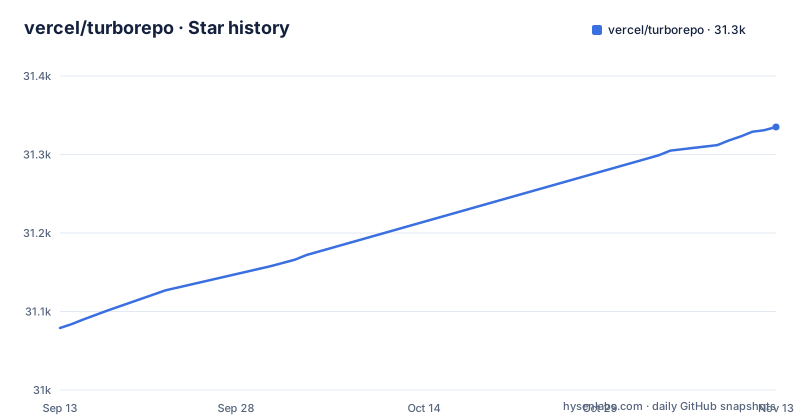
Star history
- vercel/turborepo31,335 ★ · +256
| Repository | 2026-09-13 | 2026-11-13 |
|---|---|---|
| vercel/turborepo | 31.1k | 31.3k |
256 Stars in the last 61 days, measured from the daily GitHub snapshot. Compare with other projects
Editorial analysis
Two different one-line descriptions, and the README leads with the newer one
The positioning of this project is stated twice and the two statements are not the same. The repository description calls it a build system optimized for JavaScript and TypeScript, written in Rust. The README, by contrast, opens with a single line calling it the build system for coding agents. That is a different claim: the first describes what kind of software it is and what it targets, the second describes who it is for. Everything else the README says is support material around that line, and the README itself is short at 175 words. After the tagline it has six short sections, covering getting started, contributing, community, who is using it, updates, and security. There is no feature list, no installation command, and no configuration example in the file.
The turbo script compiles the binary and then runs the compiled copy
The most concrete thing in the repository is the package.json script list, and two entries there define how a contributor actually runs the tool. One script builds the Rust binary for a single package called turbo. The other runs that build first and then invokes the resulting binary from the target directory. Written out, the pair is:
"build:turbo": "cargo build --package turbo",
"turbo": "pnpm run build:turbo && ./target/debug/turbo"
So the turbo entry point is not the published npm package. It is a locally compiled debug binary. This is why the root package.json is marked private and carries the placeholder version 0.0.0: it exists to drive development of the tool rather than to be installed. The npm distribution is separate, and the badges at the top of the README point at the turbo package on npm.
Node 24 and pnpm 12 are declared in engines, not merely suggested
The root package.json pins its toolchain in two fields. The engines field requires Node 24.x, and the packageManager field declares pnpm at version 12.0.0. Both are machine-readable constraints rather than prose, so a mismatched environment is caught by the package manager rather than by a person reading documentation. The lockfile and workspace file match that choice: a pnpm-lock.yaml and a pnpm-workspace.yaml sit at the root. That said, the examples directory deliberately covers other package managers too, with separate directories for npm and for berry. So the tool requires pnpm to develop itself while still being testable against the alternatives. The same devDependencies block also pins exact versions of most tooling, including a formatter, a linter, a TOML formatter, and a hook installer.
Two TypeScript compilers are aliased under different names
The devDependencies include two entries that both resolve to a TypeScript compiler but are installed under different names. One is declared as an alias to the scoped package @typescript/typescript6, and the other is aliased to typescript 7.0.2. This sits alongside an entry that types Node itself, and a formatter and linter pair, plus a configuration file for the formatter and a separate one for the linter at the repository root. Formatting is enforced through a staged hook that routes file extensions to different tools, sending most web and config files to the formatter and TOML files to a separate TOML formatter.
Workspace lints deny unwrap and expect across the Rust crates
The Cargo workspace sets lint policy at the top level rather than per crate, and two of the rules are denials rather than warnings. Unwrapping an Option or a Result with the unwrap method is denied, and calling the expect method is denied as well. The workspace also sets an unexpected configuration flag check with its own list of accepted keys. Members are declared as a glob for the main crate family, plus two individually named crates and a Rust directory inside the repository package. The edition is 2024, and the workspace carries a name used as a package name in task keys and filters.
Three release profiles, and the language server one optimizes for size
The Cargo configuration defines separate profiles rather than one release build. The dev profile is configured with debug information off and an optimization level of zero. The release profile uses thin link time optimization and a single codegen unit, and a comment explains the trade: thin LTO delivers some small runtime gains while cutting binary size substantially, and pairing it with one codegen unit lets work be distributed to crate level builds. Two named profiles then inherit from it. One for the language server adds symbol stripping and sets the optimization level to the smallest size setting rather than the default. One for the main binary only adds stripping. So the tool ships differently optimized artifacts depending on whether they are the command line binary or the editor integration.
A blame-ignore file means the project rewrites its own history
The repository root contains a .git-blame-ignore-revs file; by convention such a file lists revisions that git blame should skip. Other root files support the same operational picture. A release document and a separate version file handle shipping, a socket.yaml file sits at the root, and a skills directory is checked in beside the packages. Two test directories exist for lockfile behavior and for codemods, and the examples directory holds per-integration samples covering Angular, Gatsby, Nest, Next, Prisma, Rollup, changesets, Biome, Docker, microfrontends, and OpenTelemetry, including one for a non-monorepo.
Editorial conclusion
Turborepo is worth evaluating if you already run a JavaScript or TypeScript monorepo and want a build system written in Rust for JavaScript and TypeScript. Two costs come with it. The README is 175 words and hands you to the website, so the documentation lives outside the repository. And contributing to the repository requires Node 24.x and pnpm 12.0.0, declared in the root package.json.
Frequently asked questions
What is Turborepo used for?
Turborepo is a build system, optimized for JavaScript and TypeScript and written in Rust. The README describes it as the build system for coding agents. It is published on npm as the turbo package.
What problem does Turborepo solve?
It provides the build and task orchestration layer for a JavaScript or TypeScript monorepo. The repository ships example directories for specific integrations, including Next, Angular, Nest, Gatsby, Prisma, Rollup, Biome, and Docker.
how to install turborepo
The README does not include an install command and instead directs readers to https://turborepo.dev. The npm distribution is the turbo package. Developing the repository itself requires Node 24.x and pnpm at version 12, and building the binary with cargo before running the local script.
how to use turborepo
Configuration lives in a turbo.json file at the repository root, and task keys can address the Cargo workspace by name as a package, for example a test task keyed to the crate group. The root package.json drives development of the tool itself rather than installing it.
Official sources
Add this badge to your README
If you maintain this project, the badge below links readers to this analysis and shows its maintenance status from the daily GitHub snapshot. Paste the markdown into your README; add ?metric=license or ?metric=stars to the image URL for a different field.

[](https://hysenlabs.com/projects/vercel-turborepo)Star history chart for your README
[](https://hysenlabs.com/projects/vercel-turborepo)Was this useful?