Serein: a native Discord client in Rust that downloads from a repo called rustcord
Tiny, Performant & 100% Native client for Discord made in Rust
At a glance
- What is it?
- Serein is a Rust rewrite of a Discord desktop client on egui and wgpu, packaged for three platforms with four separate Linux install paths. Two things in the repository deserve attention before anything else: every download link points at a differently named repository, and the warning at the top says automating a normal account violates Discord's terms.
- Who is it for?
- Use Serein if you want a Discord client that is a native binary rather than an Electron wrapper, and if you can accept the account risk the project states plainly. Do not point it at an account you would not lose.
- Can I use it commercially?
- Yes. Apache-2.0 is a permissive licence: you can use, modify and sell software built on it, as long as you keep its copyright and licence notices.
- Is it still maintained?
- Yes. The repository received new commits within the last day.
- What is it written in?
- Mainly Rust, according to GitHub's language statistics.
Answers come from the project's GitHub data, last synced on November 25, 2026, and from our analysis. They are not legal advice.
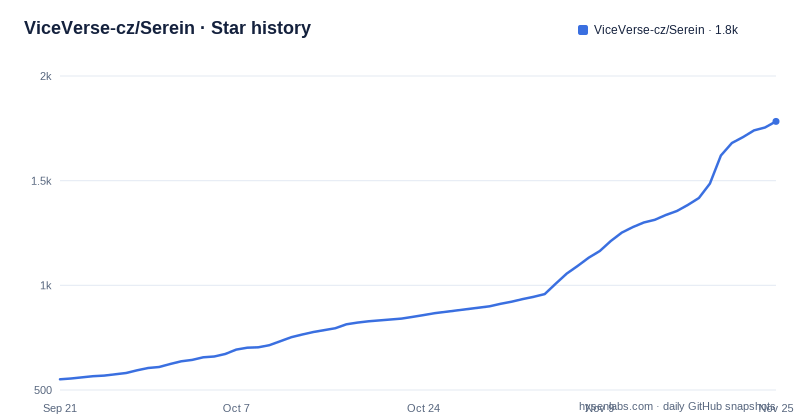
Star history
- ViceVerse-cz/Serein1,783 ★ · +1,232
| Repository | 2026-09-21 | 2026-11-25 |
|---|---|---|
| ViceVerse-cz/Serein | 551 | 1.8k |
1,232 Stars in the last 65 days, measured from the daily GitHub snapshot. Compare with other projects
Editorial analysis
Every download link points at a repository named rustcord
The badge at the top of the README and every Releases link inside it resolve to `https://github.com/ViceVerse-cz/rustcord/releases`. The repository you are reading is `ViceVerse-cz/Serein`. The Flatpak offline bundle, the AppImage, the Windows setup executable and the macOS zip are all fetched from that other page.
Nothing in the documents explains the relationship between the two names, so a reader who starts at Serein and follows any download instruction leaves for a repository called rustcord. The homepage field in repository metadata is not a website either; it is a Discord invite link for the project's community server, which is also where the README says to go for updates.
The last push to the repository was on 2026-10-02 and it is not archived, so the code is moving, but the naming mismatch means the release page and the source page are not the same place.
Release tags read 1.0.0-nightly while the workspace manifest reads 0.1.0
The three most recent releases are all nightly builds with a numeric counter in the tag: `v1.0.0-nightly.20261001.53`, `v1.0.0-nightly.20261001.52` and `v1.0.0-nightly.20260928.49`. The first two are an hour apart on 2026-10-01, at 23:07 and 22:06 UTC, and the third is from three days earlier.
The workspace manifest in `Cargo.toml` declares `version = "0.1.0"` for the whole workspace. So the tag line and the manifest disagree by a full major version, and the build counter inside a tag cannot be derived from the manifest at all.
There are no stable tags among the three most recent releases, which means anything that resolves a version by reading the manifest will not match what users download, and anything that parses tag names has to handle the nightly counter and the date segment together. The manifest does agree with the repository on the other axes: edition 2024, a minimum Rust of 1.98, and the licence field set to MIT OR Apache-2.0.
The warning says automating a normal account violates Discord's terms
The README opens with a warning block that is more direct than most projects manage to be. Serein is unofficial and not endorsed by Discord. It communicates directly with Discord's public gateway and REST endpoints for an existing account. Automating normal accounts outside the official OAuth2 and bot API violates Discord's Terms of Service and carries a risk of account termination. The final sentence is the one to sit with: technical interoperability does not imply platform approval.
The document points at two files before you proceed, a compatibility matrix at `docs/discord-compatibility.md` and an authentication guide at `docs/authentication.md`.
This sits awkwardly next to the repository description, which claims a tiny, performant and fully native client, and next to a README section on measured performance against the official Discord client. The tension is real, and the way the project handles it is by stating the risk rather than leaving it for you to discover. Nobody reading the first screen should be surprised later.
macOS is arm64 only, Linux is x86_64 only, Windows is the only platform with both
The downloads table gives three rows and they are not symmetrical. Windows offers a `-Setup.exe` and a `.zip` for both `x86_64` and `aarch64`, with a per-user NSIS installer described as the recommended route and a portable archive as the alternative. macOS offers a Homebrew Cask and a `.zip` for Apple Silicon `aarch64` only, as a signed and notarised `.app` bundle. Linux offers Flatpak, repositories for `apt`, `dnf`, `zypper` and `pacman`, a Gentoo ebuild and an AppImage, for `x86_64` only.
Two consequences follow. There is no Intel macOS build, which is a larger exclusion than it was a few years ago but still a real one. And there is no arm64 Linux build, so an Apple Silicon Linux machine has no entry in that row.
Windows gets the most careful treatment as well: the installer writes to `%LOCALAPPDATA%\Programs\Serein` without needing administrator elevation, registers Start Menu shortcuts, configures an AppUserModelID of `cz.viceverse.serein` so Windows toast notifications work natively, appears in Installed Apps with a working uninstall, and keeps its registered version in step with in-app updates.
Four Linux install paths, and four different update mechanisms
The Linux story is the longest part of the README, and each route updates differently. Flatpak is the recommended one, with sandbox isolation, bundled GNOME and WebKit runtimes and automatic background updates, installed from a repository reference:
flatpak install --user https://viceverse-cz.github.io/Serein/flatpak/serein.flatpakrefAn offline bundle is also published, installed with `flatpak install --user ./Serein-linux.flatpak` and launched with `flatpak run cz.viceverse.serein`.
The second route configures a signed repository with a piped script:
curl -fsSL https://viceverse-cz.github.io/Serein/setup.sh | shPiping a script into a shell is a pattern that invites suspicion, and the README answers it by stating what the script does: it detects Ubuntu and Debian, Fedora, openSUSE and Arch, verifies the GPG signing key cryptographically, and then leaves updates to your normal system upgrade command. The third route is a third-party Gentoo overlay offering a source ebuild that needs Rust 1.98.1 or newer and a binary ebuild that needs amd64 with glibc 2.43 or newer. The fourth is an AppImage that relies on host GTK4 and WebKitGTK 6.0 and must sit in a writable directory to receive in-app updates through Settings and Updates.
egui is pinned to a git commit and three crates are pinned exactly
The workspace manifest is unusually explicit about what it depends on. Members are `apps/desktop`, `crates/*` and `tools/*`, with the desktop app as the only default member and resolver version 3. The path dependencies are named after responsibilities rather than numbered: `client-core`, `discord-protocol`, `discord-api`, `discord-gateway`, `session-cache`, `discord-voice`, `model`, `platform`, `local-store`, `extensions`, `ui` and `test-support`.
Splitting the gateway from the REST API from the protocol from the session cache is the architectural decision here, and it is what makes the client more than a single binary.
Two pinning styles coexist. `eframe` and `egui` come from a git repository at one specific commit, `fe6d63ef`, with default features switched off and wgpu, fonts, accesskit, wayland and x11 enabled by hand, so the render path is deliberate rather than inherited. Three crates are pinned with an exact version, `reqwest` at 0.13.5, `rasterlottie` at 0.2.2 and `tokio-tungstenite` at 0.30.0, while `tokio` sits at 1.50 with an explicit feature list covering the runtime, sync, time, net and filesystem.
Thirty-one root entries, including a cask, a deny policy, fuzz targets and three agent files
For a desktop client the repository root is large. It holds 31 entries: `apps/`, `crates/`, `tools/`, `assets/`, `extensions/`, `docs/`, `packaging/`, `scripts/`, `tests/`, `examples/`, `fuzz/`, `vendor/`, `.cargo/` and `.agents/`, alongside `Cargo.lock`, `Cargo.toml`, `rust-toolchain.toml` and `rustfmt.toml`.
Several of those deserve a note. `Casks/` is the Homebrew Cask definition referenced by the macOS install row. `deny.toml` is a cargo-deny policy, which is how a project checks licences and advisories across its dependency tree, and `THIRD_PARTY_NOTICES.md` is its human-facing counterpart. `fuzz/` means the gateway and protocol parsers are fuzzed rather than only unit tested. `vendor/` means the dependency tree can be built without reaching a registry, which is what makes the build reproducible.
Then there are the instruction files: `AGENTS.md`, `CLAUDE.md` and `.agents/`, three separate places telling coding agents how to work in this repository. For a client whose authors also write Rust, that is a reasonable thing to find, and it is one more sign of how the project is maintained.
Editorial conclusion
Use Serein if you want a Discord client that is a native binary rather than an Electron wrapper, and if you can accept the account risk the project states plainly. Do not point it at an account you would not lose. Before installing, read docs/discord-compatibility.md and docs/authentication.md, confirm your architecture is covered since macOS is arm64 only and Linux is x86_64 only, and fetch binaries from the rustcord releases page the README links rather than assuming the Serein repository is where they live.
Frequently asked questions
Is Serein safe to use with my Discord account?
The project's own warning says to treat it as a risk. Serein is unofficial and not endorsed by Discord, it talks directly to Discord's public gateway and REST endpoints for your existing account, and automating normal accounts outside the official OAuth2 or bot API violates Discord's Terms of Service and carries a risk of account termination. It points at `docs/discord-compatibility.md` and `docs/authentication.md` for the details.
How do I install Serein on Linux?
Flatpak is the recommended route, installed with `flatpak install --user https://viceverse-cz.github.io/Serein/flatpak/serein.flatpakref` or from an offline bundle. There are also signed apt, dnf, zypper and pacman repositories configured by `curl -fsSL https://viceverse-cz.github.io/Serein/setup.sh | sh`, a third-party Gentoo overlay, and a portable AppImage that needs host GTK4 and WebKitGTK 6.0.
Is there a Serein build for Intel Macs?
No. The macOS row lists Apple Silicon `aarch64` only, as a Homebrew Cask or a `.zip` containing a signed and notarised `.app`. Windows is the only platform published for both `x86_64` and `aarch64`, and Linux is `x86_64` only.
What licence is Serein released under?
The workspace manifest sets the licence field to MIT OR Apache-2.0, and the repository root carries both `LICENSE-MIT` and `LICENSE-APACHE` along with a `THIRD_PARTY_NOTICES.md`. Repository metadata records the licence as Apache-2.0 alone.
Where do I download Serein binaries from?
Pre-compiled releases for macOS, Linux and Windows are published on a GitHub Releases page, and the README links that page under the `ViceVerse-cz/rustcord` name rather than `ViceVerse-cz/Serein`. The most recent tags are nightly builds such as `v1.0.0-nightly.20261001.53`.
Official sources
Add this badge to your README
If you maintain this project, the badge below links readers to this analysis and shows its maintenance status from the daily GitHub snapshot. Paste the markdown into your README; add ?metric=license or ?metric=stars to the image URL for a different field.

[](https://hysenlabs.com/projects/viceverse-cz-serein)Star history chart for your README
[](https://hysenlabs.com/projects/viceverse-cz-serein)Was this useful?