AnyLabeling: one environment variable, twelve execution providers
Effortless AI-assisted data labeling with AI support from YOLO, Segment Anything (SAM+SAM2/2.1+SAM3), MobileSAM!!
At a glance
- What is it?
- AnyLabeling is an image annotation tool with auto-labeling from YOLO and Segment Anything, and its packaging is the most instructive part of it. The GPU wheel ships its own CUDA runtime, the accelerated runtime package carries an upper bound for that reason, PyQt6 is deliberately excluded on macOS, and one environment variable selects between twelve execution providers and five NPU aliases.
- Who is it for?
- AnyLabeling fits a labelling task that is mostly boxes and polygons with an occasional mask, and someone who wants segmentation models available in the same window rather than in a notebook. Two things to check before you commit to it.
- Can I use it commercially?
- Yes, with conditions. GPL-3.0 is a copyleft licence: if you distribute software that includes it, you must release that software's source code under the same licence. Running it internally without distributing it does not trigger that obligation.
- Is it still maintained?
- Yes. The repository last received commits 77 days ago.
- What is it written in?
- Mainly Python, according to GitHub's language statistics.
Answers come from the project's GitHub data, last synced on November 15, 2026, and from our analysis. They are not legal advice.
Star history
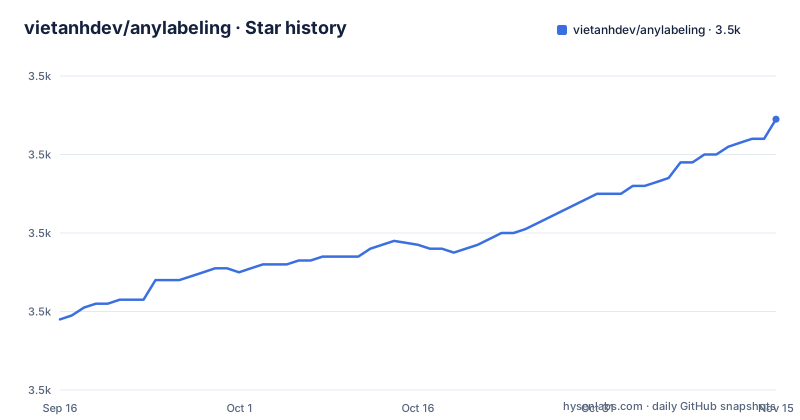
- vietanhdev/anylabeling3,529 ★ · +51
| Repository | 2026-09-16 | 2026-11-15 |
|---|---|---|
| vietanhdev/anylabeling | 3.5k | 3.5k |
51 Stars in the last 60 days, measured from the daily GitHub snapshot. Compare with other projects
Editorial analysis
LabelImg plus Labelme plus auto-labeling, stated as an equation
The header of this project is an equation, and it is the most useful sentence in the readme.
It says the tool is the sum of two older annotation tools, an improved interface, and auto-labeling. So the annotation behaviour is inherited rather than invented, and what the project adds is the third term.
The shape of the annotation surface follows from that. The tool handles polygon, rectangle, circle, line and point shapes, so it is not limited to the box-plus-polygon pair of the tools it grew out of. Alongside that there is text detection, recognition and key information extraction labelling, which is a different job again: reading text out of an image rather than outlining objects.
The applications table at the bottom of the readme places the same claim differently. It lists object detection, recognition, facial landmark detection, two-dimensional pose estimation, two-dimensional lane detection, optical character recognition, medical imaging, instance segmentation, image tagging and rotation, followed by an invitation to add your own.
That list is a description of what people have used it for rather than a set of supported modes, and it is worth reading as such.
One environment variable selects between twelve providers
Acceleration in this project is handled by a single environment variable, and the number of possible values is the surprising part.
By default the tool selects CUDA on Linux and Windows GPU builds and CoreML on the macOS GPU build, and it falls back to the CPU for model operations the selected backend does not support. So in the ordinary case you configure nothing.
When you need to override it, the documented values are twelve execution providers, several of which name a specific vendor's inference stack, plus a hardware-accelerated browser path. Then there are five NPU aliases, which are the same thing with the vendor spelled out.
The readme even gives the Windows PowerShell syntax for setting it, which tells you that the audience includes people on every one of those platforms.
The design choice worth noting is that this is a runtime selection inside one binary rather than separate builds per backend. That is why the download page offers one accelerated artifact per platform rather than one per accelerator, and why the same executable can fall back to the CPU mid-inference for an operation the chosen backend rejects.
The GPU wheel ships its own CUDA, which is why the runtime has a ceiling
This is the packaging detail that ties two files together, and it is a good example of a constraint propagating.
First, the GPU distribution. The readme states that it includes the CUDA and cuDNN runtime libraries managed by the package manager, so a compatible NVIDIA driver is sufficient and a system CUDA toolkit is not required. That is a distribution decision: instead of asking you to install a toolkit, the wheel carries the runtime libraries it needs.
Second, the dependency declaration. The optional GPU dependency pins the accelerated runtime package with a lower bound of 1.20 and an upper bound below 1.27, and the comment beside it explains why: version 1.27 and later require CUDA 13, and the project keeps broad driver compatibility on CUDA 12.
So the two facts are consistent. The wheel ships CUDA 12, therefore the runtime package must be one that still works with CUDA 12, therefore the upper bound exists. If the project ever moved the wheel to CUDA 13, that bound would have to move with it, and the comment is what tells the next maintainer that the number is load-bearing rather than conservative.
That is a level of traceability in a manifest that is rarer than it should be.
NPU support is per vendor, and it depends on operator coverage
The NPU section is the most candid part of the readme, because it says plainly where support stops.
NPU execution requires the matching vendor runtime package, installed in a fresh, dedicated environment. Two examples are given. A recent Intel processor generation uses the vendor's OpenVINO runtime with the Intel NPU alias set. A Qualcomm Snapdragon system on Windows ARM64 uses the Qualcomm runtime package with the Qualcomm NPU alias set.
The instruction that matters is the reason you cannot combine them: replace the default runtime package, because the runtime requires only one variant in an environment. So every accelerator is its own environment, and a machine with two kinds of NPU is two environments.
Then the limits. Qualcomm's hardware target generally requires the models to be quantized in a particular format before they will run, and support, in the readme's own words, still depends on the operator coverage of the selected model.
That last clause is the important one. It means the question is not whether the tool supports the hardware, but whether the model you have contains only operators that backend implements. A model that fails on one NPU and works on a GPU is the expected case, not a bug.
PyQt6 is deliberately excluded on macOS
One line in the dependency list is easy to miss and explains an odd instruction elsewhere in the readme.
The GUI toolkit dependency carries a marker that excludes macOS. So on Linux and Windows the toolkit comes from the package index with everything else, and on macOS it does not.
The consequence shows up in the installation instructions, which have a step marked as being for macOS only: installing the toolkit through the conda package channel rather than through the package manager. That is why the readme recommends a conda distribution in the first place and then gives a conda command for creating the environment before the ordinary install command runs:
conda create -n anylabeling python=3.12
conda activate anylabeling
and then, on macOS only, a conda-forge install of the toolkit itself.
Two other entries in the same list are worth noting for what they imply. The computer vision dependency is the headless build, so it brings no GUI plugins of its own. And there is a library for detecting whether the system is in dark mode, which is what a desktop tool needs to pick a theme without asking.
There is also a dependency whose only job is a tokenizer, with a comment saying it is for the text encoder in the newest segmentation model. That is the open-vocabulary feature, and it arrives as one extra package rather than as a model plugin.
Six requirements files at the root, one of them a single line
The root of the repository has six files whose names all start the same way, and their contents tell two different stories.
The default one is a single line. It is an editable install of the project itself, with a comment saying that for the default CPU installation all dependencies come from the package manifest rather than from this file.
So the single source of truth is the manifest, which declares the runtime dependencies, three optional groups for GPU, macOS and developer tooling, and a Python floor. And yet beside it sit five more files with the same naming pattern, covering the GPU, the macOS variants and their developer counterparts.
Nothing in the readme explains what those five contain or when you should reach for them. They are the kind of artefact that survives a migration: a project moves its dependencies into a manifest, keeps the old files for a release cycle, and the readme stops mentioning them.
The rest of the root is more explicable. There is a packaging specification file for the executable build, a desktop entry file for Linux, a directory of hooks for the bundled resources, a directory of sample images, a test directory, and a scripts directory.
Six shipped artifacts and one release workflow
The download table is the clearest statement of what this project considers a platform.
There are two artifacts for Linux on x64, one plain and one for NVIDIA GPUs. Two for Windows on x64, the same split, both as executables. Two for Apple Silicon macOS, both as zip archives, one plain and one using the platform's own acceleration path.
Six artifacts from one codebase, and the readme adds a macOS-specific warning: preserve the archive's symbolic links while extracting it. That is a real constraint rather than advice, because an archive extracted without link preservation loses whatever those links pointed at.
The release workflow explains how those six stay honest. It tests three Python versions across three operating systems, then builds and launch-smoke-tests all six CPU and accelerated artifacts on runners native to each platform. Launch smoke-testing is the part worth noting: it means each artifact is started after being built, which catches a packaging failure that a build-only check would miss.
The newest release is a bug-fix release rather than a feature release, and the readme describes its contents at that level of detail.
The newest release is a bug list, and one tag is marked superseded
Version 0.4.43 is described as the current stable release, and its contents are four fixes.
It fixes recovery after a model download or load failure. It skips invalid images during the preload step of the segmentation models. It persists grouped shapes with undo support. And it closes label files reliably after saving and loading.
Three of those four are data integrity issues, which is what you would expect from a tool whose output is a file people then spend days annotating. The fourth is the interesting one: if a download or a model load fails, the tool recovers rather than leaving the session in a broken state.
That fix is the direct consequence of the design choice mentioned earlier, that model weights are downloaded automatically on first use. A first run therefore depends on the network and on disk space, and the most likely failure is exactly the one this release addresses.
One more detail in the release history: the third newest tag carries the word superseded in its title. The maintainer marks releases that something else replaced, which is a small courtesy that makes the release list readable and is not universal practice.
Editorial conclusion
AnyLabeling fits a labelling task that is mostly boxes and polygons with an occasional mask, and someone who wants segmentation models available in the same window rather than in a notebook. Two things to check before you commit to it. Model weights are downloaded on first use, so the first run needs network access and disk space for the checkpoint, and the newest release is largely about recovering when that download fails. And acceleration is opt-in per environment rather than a single install: the GPU wheel, the macOS extra and each NPU vendor all need their own fresh environment, because the runtime allows only one variant of its inference package per environment. If your hardware is an NPU rather than a GPU, read that section first, because support depends on the operator coverage of the specific model you plan to run.
Frequently asked questions
how to use anylabeling
Install Python 3.11 or newer, with 3.12 recommended, create an environment, then install the package and run the anylabeling command. Alternatively download a CPU or accelerated executable for your platform from the download page. Required model weights are downloaded automatically on first use.
What is AnyLabeling?
An image annotation tool whose own header describes it as LabelImg plus Labelme plus an improved interface plus auto-labeling. It supports polygon, rectangle, circle, line and point shapes, plus text detection, recognition and key information extraction labelling.
Which models does AnyLabeling support?
Several sizes of the original Segment Anything models, the lightweight MobileSAM variant, two generations of the newer segmentation family in four Hiera sizes each, the newest one with text prompts for open-vocabulary segmentation, and five sizes of a detection model for auto-labelling.
Do I need a CUDA toolkit installed to use AnyLabeling on a GPU?
No. The GPU distribution includes the CUDA and cuDNN runtime libraries managed by the package manager, so a compatible NVIDIA driver is sufficient. Its GPU extra also caps the accelerated runtime package below the version that would require CUDA 13.
Can AnyLabeling run on an Intel or Qualcomm NPU?
Yes, in a dedicated environment with the matching vendor runtime package replacing the default one, since only one runtime variant may exist per environment. Qualcomm hardware generally needs models quantized in a specific format, and support still depends on the operator coverage of the model you choose.
Official sources
Add this badge to your README
If you maintain this project, the badge below links readers to this analysis and shows its maintenance status from the daily GitHub snapshot. Paste the markdown into your README; add ?metric=license or ?metric=stars to the image URL for a different field.

[](https://hysenlabs.com/projects/vietanhdev-anylabeling)Star history chart for your README
[](https://hysenlabs.com/projects/vietanhdev-anylabeling)Was this useful?