copilot-mcp is a registry front end with a service pitch built into it
A VSCode extension that lets you find and install Agent Skills and MCP Apps to use with GitHub Copilot, Claude Code, and Codex CLI.
At a glance
- What is it?
- A VS Code extension for finding and installing MCP servers and agent skills, published under GPL-3.0 while promoting a hosted commercial service at four separate points. Its most interesting engineering is the daily vendored provider sync.
- Who is it for?
- Install this if you want one place to browse and install MCP servers and skills across Copilot, Claude Code and Codex CLI, and prefer the extension over hand-editing configuration.
- Can I use it commercially?
- Yes, with conditions. GPL-3.0 is a copyleft licence: if you distribute software that includes it, you must release that software's source code under the same licence. Running it internally without distributing it does not trigger that obligation.
- Is it still maintained?
- Yes. The repository last received commits 153 days ago.
- What is it written in?
- Mainly TypeScript, according to GitHub's language statistics.
Answers come from the project's GitHub data, last synced on November 15, 2026, and from our analysis. They are not legal advice.
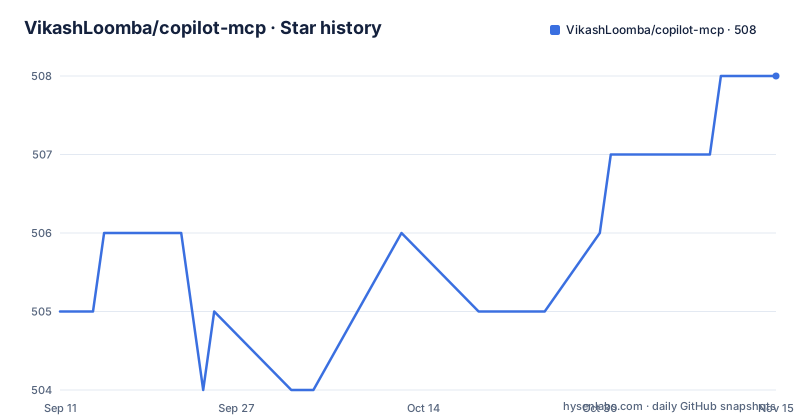
Star history
- VikashLoomba/copilot-mcp508 ★ · +3
| Repository | 2026-09-11 | 2026-11-15 |
|---|---|---|
| VikashLoomba/copilot-mcp | 505 | 508 |
3 Stars in the last 65 days, measured from the daily GitHub snapshot. Compare with other projects
Editorial analysis
A paid service is promoted in four separate places
The first block a reader meets is a pitch for a hosted service, not a description of the extension. It advertises remote MCP in about thirty seconds, paste a URL, OAuth, done, works with Copilot and Claude with no keys and no terminal, and it links to cloudmcp.run carrying three campaign parameters: utm_source set to copilot-mcp, utm_medium set to marketplace, and utm_campaign set to readme. The same service reappears as an Optional Remote MCP section explaining that you can skip running servers locally by pasting an MCP URL into Copilot or Claude. It appears a third time as a Deploy via Cloud MCP option inside the Server Discovery panel, offered when a server supports npx or uvx. And it appears a fourth time as the author's own website, since the author field in the manifest points at cloudmcp.run and the repository homepage field is a Discord invite named for it. The extension itself is GPL-3.0, which is worth holding in mind while reading a README that markets a commercial service four times.
A maintainer section that documents a vendored dependency
One section of the README is not about the product at all. It is titled Vendored Copilot Provider Sync, and it exists because the repository copies a Copilot provider from a different project, anomalyco/opencode, into vendor/opencode-copilot/src. Two npm scripts maintain that copy. One writes the sync:
npm run sync:copilot-providerand the other reports drift without touching the working tree:
npm run sync:copilot-provider:checkA scheduled workflow at .github/workflows/sync-opencode-copilot.yml opens the daily pull requests that run it. This is a sensible setup for a fork-derived provider, but it means the Chat integration that this extension exposes to users is downstream of another repository's release cadence, and the copy inside vendor/ is the authoritative artefact for anyone trying to understand why Copilot behaves a certain way. The check variant is the one to run first in a pull request, since it answers whether a change came from upstream without producing a diff you then have to review twice.
Copilot Chat is a requirement in prose and absent from the manifest
The requirements section names two things: VS Code, and the GitHub Copilot Chat extension. The manifest agrees about the first and not about the second. The engines block asks for a specific floor, with vscode pinned at ^1.104.0. The extensionDependencies array is present and empty, so the Copilot Chat dependency is documentation rather than something the editor enforces. VS Code will therefore let you install and activate this extension on a machine with no Copilot Chat, and the failure appears at the point of use rather than at install time. Activation is unconditional as well: the single activation event is onStartupFinished, so the extension loads on every window open whether or not you touch it. Everything else about the surface is declared in the manifest, including a displayName of Copilot MCP plus Agent Skills Manager, the publisher AutomataLabs, a bundled icon of logo.png, and categories of AI, Chat and Other.
The extension registers a chat participant, which is why @mcp counts as input
The manifest contributes a chat participant rather than only a view. Its id is copilot.mcp-agent, its short name is mcp, its full name is MCP Finder, its description is Find and install MCP servers for VSCode, and it is marked sticky so it stays available in the picker. The participant exposes a command called search, described as searching for MCP servers to install, and it carries a disambiguation table with a category of mcp_search, a plain-language description of wanting to search for Model Context Protocol servers, and worked example phrasings. That declaration explains a detail in the telemetry policy. Because discovery runs through a chat participant, prompts typed at it are ordinary chat input, and the policy states that those prompts are among the search terms collected and truncated to 100 characters. A sidebar search and an @mcp prompt are treated as the same class of thing.
Telemetry names its own redaction rules
The telemetry section is unusually specific about what leaves the machine. What is collected: anonymous event names with a small set of properties, being the search terms you type in the extension for both sidebar search and @mcp chat prompts truncated to 100 characters, public GitHub repository names and URLs along with skill source locators for items you search for or act on, your OS platform and architecture plus the extension version, and error messages and diagnostics when something fails, also truncated. What is never collected: file contents, workspace or repository contents, and account identifiers, with no emails, usernames or tokens, and account-shaped properties are stated to be stripped out before anything is sent. The extension honours the editor's own telemetry.telemetryLevel setting, so turning telemetry off in VS Code means nothing is sent, and that is also the documented opt-out. The residual exposure is the one the section itself names: your search terms are still search terms, and a truncated query can still contain a company name.
Two skills surfaces, one external index and one local spec
MCP servers and agent skills are two different registries handled by two different surfaces, and the repository layout shows it. Skills are discovered through skills.sh, which the README names as the source, with a dedicated TypeScript client at skills-client.ts. Servers are discovered automatically and installed through the Server Discovery panel and the MCP Servers view, which opens from the Activity Bar or can be configured in Settings. Alongside both sits a registry_api_spec.yaml, a REGISTRY_INSTALL_IMPLEMENTATION_PLAN.md, and a web/ directory, so the extension carries its own view of a registry contract rather than only consuming someone else. Uninstalled skills can be managed with agent-level controls, which matters when the same skill is installed for more than one agent. The build is a single bundle: main points at dist/extension.js and esbuild.js sits at the repository root next to eslint.config.mjs and .prettierrc.
Version 0.0.97 with two tags three minutes apart
The release history explains the 0.0.x numbering rather than the versioning itself. The newest tag is v0.0.97 at 2026-06-15, and two releases sit three minutes apart on 2026-06-12, v0.0.96 and v0.0.95, which is the signature of an automated publish rather than a hand cut release. The manifest version matches the newest tag exactly at 0.0.97. The last push to the repository was 2026-06-15, the same day as that tag, so nothing has landed in roughly three and a half months, and there is a CHANGELOG.md and a WHATS_NEW.md recording what changed between those builds. A version below 1.0 with a daily vendor sync running in parallel means the extension is expected to change shape underneath you, and the two changelog files are the place to look before assuming a behaviour is a bug rather than a recent change.
Editorial conclusion
Install this if you want one place to browse and install MCP servers and skills across Copilot, Claude Code and Codex CLI, and prefer the extension over hand-editing configuration. Before trusting it, read the telemetry policy closely and decide whether your search terms are yours to share, note that Copilot Chat is required but not declared as a dependency so failures surface late, and remember that the Copilot provider it exposes is a vendored copy of another project refreshed daily. If you are put off by a GPL-3.0 extension that markets a hosted service in its own README, that tension is real and worth weighing before adopting it.
Frequently asked questions
what is copilot mcp
A VS Code extension published as AutomataLabs.copilot-mcp that lets you discover, install and manage open source MCP servers and agent skills. It contributes a chat participant named mcp with full name MCP Finder, plus an MCP Servers view in the Activity Bar.
how to use copilot mcp
Open the MCP Servers view, connect or search for servers, switch to the Skills tab to search and install skills and manage what is installed, then use Copilot Chat with the tools and skills you added.
how to setup github copilot mcp
Install from the VS Code Marketplace, then open MCP Servers in the Activity Bar or configure it in Settings. The manifest requires VS Code ^1.104.0, and the listed requirements are VS Code plus the GitHub Copilot Chat extension.
how to use github copilot mcp server
Servers are discovered through the Server Discovery panel and connected through the MCP Servers view. When a discovered server supports npx or uvx, the panel offers a Deploy via Cloud MCP option to run it remotely without a local install.
Does Office 365 have an MCP?
The README does not discuss Office 365 or any Microsoft 365 surface. Its entire scope is a VS Code extension for Copilot, Claude Code and Codex CLI, plus an optional remote option offered through a separate hosted service.
what is github copilot mcp server
A Model Context Protocol server that gives Copilot standardised tools. This extension manages several such servers at once and exposes their tools directly to your agents, alongside agent skills discovered from skills.sh.
Official sources
Add this badge to your README
If you maintain this project, the badge below links readers to this analysis and shows its maintenance status from the daily GitHub snapshot. Paste the markdown into your README; add ?metric=license or ?metric=stars to the image URL for a different field.

[](https://hysenlabs.com/projects/vikashloomba-copilot-mcp)Star history chart for your README
[](https://hysenlabs.com/projects/vikashloomba-copilot-mcp)Was this useful?