vim-autoformat: formatter order, chaining, and the Vim fallback
Provide easy code formatting in Vim by integrating existing code formatters.
At a glance
- What is it?
- vim-autoformat is a Vim Script plugin that hands buffers to external formatters you install yourself. When no formatter matches a file type it falls back to Vim's own reindenting, and a Python-enabled Vim is required before any of that runs.
- Who is it for?
- Adopt vim-autoformat when you already run formatters outside the editor and want one command for a whole buffer, one key binding, and a fallback that tidies files no binary claims. Leave it alone if your build answers 0 to `has("python3")` and `has("python2")`, or if your language has no entry in the formatter list, because formatting then stops at reindenting.
- Can I use it commercially?
- Yes. MIT is a permissive licence: you can use, modify and sell software built on it, as long as you keep its copyright and licence notices.
- Is it still maintained?
- Yes. The repository last received commits 120 days ago.
- What is it written in?
- Mainly Vim Script, according to GitHub's language statistics.
Answers come from the project's GitHub data, last synced on October 23, 2026, and from our analysis. They are not legal advice.
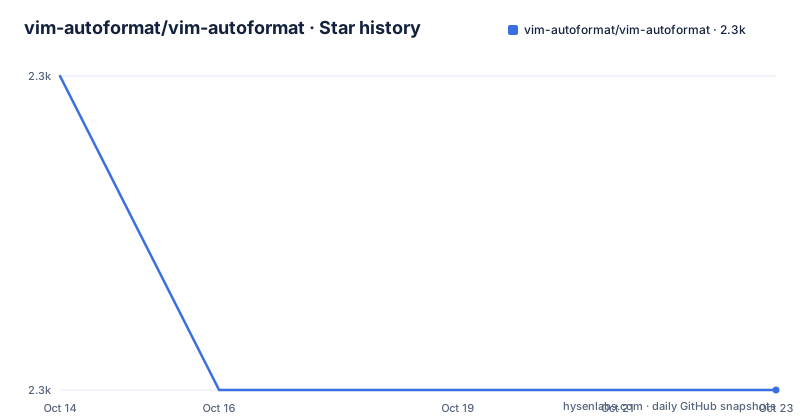
Star history
- vim-autoformat/vim-autoformat2,268 ★ · -1
| Repository | 2026-10-14 | 2026-10-23 |
|---|---|---|
| vim-autoformat/vim-autoformat | 2.3k | 2.3k |
-1 Stars in the last 9 days, measured from the daily GitHub snapshot. Compare with other projects
Editorial analysis
`:Autoformat` hands the buffer to an external binary
vim-autoformat is a Vim Script plugin that connects your editor to code formatters you install separately, and nothing ships inside it, so the promise of formatting with a single key press only holds once a matching binary sits on your system. It is aimed at developers whose teams have already settled on a formatter per language and who want one entry point inside Vim rather than a keymap per tool.
Typing `:Autoformat` sends the whole buffer to a formatter registered for that file type, and appending a type bypasses detection entirely, as in `:Autoformat json`. A visual selection turns the same command into a range operation, though only programs that accept a range benefit, and exactly two are credited with that ability: `clang-format` and `autopep8`. The narrower `:AutoformatLine` handles the line under the cursor when a full pass would rewrite more than you intended.
Most formatter definitions obey editor settings such as `textwidth` and `shiftwidth()`, which keeps line length and indent width under Vim's control rather than the tool's own defaults. That coupling suits anyone who has already tuned indent settings, and it is a reason to read a formatter's own options before pointing the plugin at code you share with a team.
Vundle turns the plugin into one vimrc line
Plugin managers are the documented route, and Vundle is the one walked through first. Declare the plugin in your `.vimrc` and a manager command fetches it:
Plugin 'vim-autoformat/vim-autoformat'Restart Vim and run `:PluginInstall`, or reload the configuration with `:source $MYVIMRC` and skip the restart. Pathogen is the manual alternative: download the source and extract it in the bundle directory, which leaves updating to your own hands, and a plain zip unpacked into your `.vim` folder works the same way.
If a formatter lives somewhere that is not on the global path, absolute directories in `g:formatterpath` let the plugin find it, and each entry names a folder rather than a binary:
let g:formatterpath = ['/some/path/to/a/folder', '/home/superman/formatters']The plugin is distributed under the MIT licence, the repository publishes no GitHub releases, and `:PluginUpdate` is the documented upgrade path, moving your checkout to the newest state of master. The last push landed on 2026-06-25, on the default branch that plugin managers follow, so there is no numbered version series to track.
Neovim needs a Python host before any formatter runs
Before any formatter runs, the editor itself must carry Python, and the requirement accepts python 2 or python 3. Two command mode checks cover that pair, one for python 3 and one for python 2, and a build satisfying neither falls outside what this plugin supports. The queries read `:echo has("python3")` and `:echo has("python2")`.
Neovim is the harder case, because it does not come with python support by default and needs pynvim plus a pointer to an interpreter:
python3 -m pip install pynvimThen set the host in your `.vimrc`, replacing the path below with your own executable:
let g:python3_host_prog="/path/to/python/executable/"One asymmetry is easy to miss. The requirement covers python 2 as well, yet every Neovim instruction concerns python 3, so a Neovim build wired to python 2 has no documented route through this setup and no error message is offered for that case.
The per-filetype formatter list is tried in order
Each filetype owns an ordered list, and the plugin walks that list until one formatter finishes the job successfully, so the order of definitions decides which binary actually rewrites your file. `:CurrentFormatter` prints the current pick, and `:NextFormatter` and `:PreviousFormatter` rotate the selection, which the README frames as mostly useful for debugging rather than ordinary editing. What happens when every candidate in the list fails is not documented, so the error path stays undefined for readers.
Composite file types get a second rule that plain names never need. For something like `django.python` or `php.wordpress`, the plugin tries the exact original filetype first and then works through the supertypes from left to right, separated by dots, so a template with an embedded language reaches the Python or PHP formatter without needing a dedicated entry of its own.
The documented default formatters stop at autopep8
The supported binaries are declared in one file, `plugin/defaults.vim`, and the README links it as https://github.com/Chiel92/vim-autoformat/blob/master/plugin/defaults.vim even though the project is published under the vim-autoformat account. An older path inside a current README is a detail to check against your own checkout before treating it as a reference for upgrades.
Three entries appear in the default-programs section: `asmfmt` for Assembly, installed with `go get -u github.com/klauspost/asmfmt/cmd/asmfmt`; `astyle` for C#, C++, C and Java; and `autopep8` for Python, where range formatting is supported. The `astyle` entry carries a floor at version 2.0.5, because earlier builds do not handle piping and are not considered stable for it.
Coverage beyond those three is not visible in the documentation, yet the `samples/` directory carries fourteen fixture files spanning Fortran, Perl, Ruby, SQL, CSS, HTML, XHTML, XML and JSON. Their prefixes are inconsistent, mixing `sample.css` with `test.json` and `js.js` with `js2.js`, so there is no naming convention to grep across when you want to reproduce a change.
Chaining formatters needs an explicit opt-in flag
One pass is not always enough for markup that embeds scripts and styles, so the plugin can apply a chain instead of picking a winner. Setting `g:run_all_formatters_<identifier>` makes the formatters registered under that identifier apply to the file one after another, and once one of them finishes successfully the Vim-based fallback is skipped entirely.
The Vue sample shows both lines involved:
let g:formatters_vue = ['eslint_local', 'stylelint']
let g:run_all_formatters_vue = 1
Here is the inconsistency a skim passes straight over. The surrounding text names the source list `g:formatdef_<identifier>`, while the sample meant to populate it assigns `g:formatters_vue`, a different variable name for what reads as the same option. Nothing in the README settles which spelling the code actually consumes, so one of those two lines may sit unused, and the only way to know is to watch a formatter fire on a real file.
The fallback reformats files that no formatter claims
When no formatter exists for a filetype, or none is installed on the machine, the plugin falls back to three operations Vim performs natively: running the filetype's indentfile, retabbing, and removing trailing whitespace. That fallback explains why `:Autoformat` still changes something in a language no tool covers.
All three steps can be switched off, each through its own global variable:
let g:autoformat_autoindent = 0
let g:autoformat_retab = 0
let g:autoformat_remove_trailing_spaces = 0
The buffer-local variants `b:autoformat_autoindent`, `b:autoformat_retab` and `b:autoformat_remove_trailing_spaces` narrow that decision to one buffer, which is the route given for filetypes with poor indent files:
autocmd FileType vim,tex let b:autoformat_autoindent=0The save hook is where the fallback turns risky. Written as `au BufWrite * :Autoformat`, it matches every buffer regardless of type, so reindenting, retabbing and space stripping run on files you never meant to format, and buffer-local overrides are the only documented escape hatch. The same command applies a formatter you may not want in a specific buffer, so the autocmd above is worth adding before you enable the hook on a mixed codebase.
Manual vim commands are the no-dependency alternative
The plugin names its own manual equivalents for the three fallback actions: `gg=G` reindents, `:retab` converts tabs, and `:RemoveTrailingSpaces` strips trailing blanks. Running those yourself reproduces the fallback without a key binding or a save hook.
The difference is reach, not convenience. Editor commands like these follow the indentfile's rules and never leave Vim, which also means they need neither an external binary nor a Python-enabled build, while a formatter definition can wrap a long expression, realign a table or rewrite constructs that indentation never touches. Switching to a different installed binary for the same filetype is the other option the plugin offers, through `:NextFormatter` and `:PreviousFormatter`, and it changes the output because a different program does the rewriting, with no configuration edit involved.
Editorial conclusion
Adopt vim-autoformat when you already run formatters outside the editor and want one command for a whole buffer, one key binding, and a fallback that tidies files no binary claims. Leave it alone if your build answers 0 to `has("python3")` and `has("python2")`, or if your language has no entry in the formatter list, because formatting then stops at reindenting. Before committing, run `:CurrentFormatter` on one file to see which binary is picked, and check whether that formatter accepts a range before you rely on visual selections.
Frequently asked questions
Does vim-autoformat work with Neovim out of the box?
No, because Neovim does not come with python support by default. You install pynvim with `python3 -m pip install pynvim` and point `g:python3_host_prog` at the interpreter in your `.vimrc`.
How do I install vim-autoformat with Vundle?
Add `Plugin 'vim-autoformat/vim-autoformat'` to your `.vimrc`, restart Vim, then run `:PluginInstall`. `:source $MYVIMRC` reloads the configuration without a restart, and `:PluginUpdate` moves the plugin to the latest version.
What happens when no formatter is installed for a file type?
The plugin falls back to indenting with Vim's auto indent, retabbing, and removing trailing whitespace. Setting `g:autoformat_autoindent`, `g:autoformat_retab` and `g:autoformat_remove_trailing_spaces` to 0 disables those steps, and buffer-local variants scope the change.
Can vim-autoformat run several formatters over one file?
Yes, when `g:run_all_formatters_<identifier>` is set, the formatters registered for that identifier apply one after another. As soon as one finishes successfully, the Vim fallback is not used.
How do I see which formatter vim-autoformat will use?
Run `:CurrentFormatter` to print the current selection. `:NextFormatter` and `:PreviousFormatter` move through the list attached to the filetype, which is described as useful mostly for debugging.
Official sources
Add this badge to your README
If you maintain this project, the badge below links readers to this analysis and shows its maintenance status from the daily GitHub snapshot. Paste the markdown into your README; add ?metric=license or ?metric=stars to the image URL for a different field.

[](https://hysenlabs.com/projects/vim-autoformat-vim-autoformat)Star history chart for your README
[](https://hysenlabs.com/projects/vim-autoformat-vim-autoformat)Was this useful?