TuiCss for ASCII-style web interfaces
Text-based user interface CSS library
At a glance
- What is it?
- TuiCss is an MIT-licensed CSS library for building browser applications with the visual language of MS-DOS and Turbo Vision interfaces. It suits developers who need a preset retro style, but it does not document component behavior or accessibility conformance.
- Who is it for?
- Developers should consider TuiCss when an ASCII table interface is part of the product concept and static HTML and CSS are sufficient. Projects that require documented JavaScript widgets, accessibility guarantees, or frequent package releases should first inspect the wiki and `CHANGELOG.md`.
- Can I use it commercially?
- Yes. MIT is a permissive licence: you can use, modify and sell software built on it, as long as you keep its copyright and licence notices.
- Is it still maintained?
- Yes. The repository last received commits 141 days ago.
- What is it written in?
- Mainly SCSS, according to GitHub's language statistics.
Answers come from the project's GitHub data, last synced on November 7, 2026, and from our analysis. They are not legal advice.
Star history
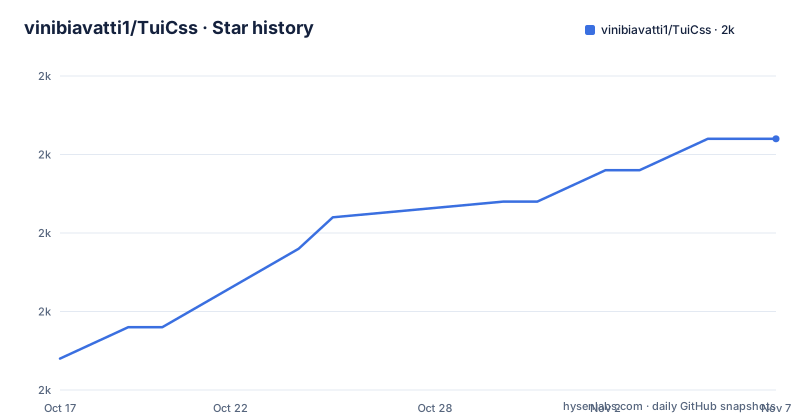
- vinibiavatti1/TuiCss1,991 ★ · +14
| Repository | 2026-10-17 | 2026-11-07 |
|---|---|---|
| vinibiavatti1/TuiCss | 2k | 2k |
14 Stars in the last 21 days, measured from the daily GitHub snapshot. Compare with other projects
Editorial analysis
TuiCss styles browser applications around ASCII tables
TuiCss solves a presentation problem for web applications that should resemble the text-based interfaces of old MS-DOS software. It is intended for frontend developers who want panels, buttons, inputs, tables, and windows to share a recognizable retro appearance without defining the complete visual treatment in each project. The source is primarily SCSS, while the npm package presents a minified CSS file for direct consumption by a browser.
The README says the visual foundation comes from the Turbo Vision Framework. The project also considers features from curses, ncurses, and Newt. This history places the library within the design tradition of text-mode user interfaces, but TuiCss does not install a terminal emulator or provide terminal input handling. It remains a browser CSS library. Its ASCII table structure, high-contrast colors, and reduced component effects are intended to make that interface legible.
That distinction matters when comparing TuiCss with a terminal UI library. TuiCss changes the presentation of an HTML application that should look like a character-based desktop. Teams choosing between the two are making an environment decision, not merely selecting two CSS themes.
TuiCss compiles SCSS into static distribution files
The repository separates editable source from distributable assets. The top-level `src/` directory contains the source side of the library, `dist/` contains distribution files, and `gulpfile.js` drives the build. `package.json` defines a single package script, `build`, which runs Gulp. Its development dependencies include `gulp-sass`, `sass`, `gulp-copy`, `gulp-clean-css`, `gulp-minify`, `gulp-rename`, and `gulp-clean`.
This is a conventional static CSS build. Contributors can edit source styles, compile them, and place the resulting files under `dist/`. Consumers do not need the SCSS build chain if they use the published stylesheet. The package entry is `dist/tuicss.min.css`, which means a bundler resolving the package main field can load that file as the package's primary CSS asset.
The README also describes a repository-file workflow. Users may download the repository content and import files from `dist/` through HTML directives. This route can be useful for a plain HTML project that does not use npm. Neither route changes the underlying design: TuiCss remains a set of styles rather than a component runtime.
The build process also creates an upgrade consideration. A project loading the minified file consumes generated output, while a project maintaining SCSS needs to account for changes to source files, the Gulp configuration, and the checked-in distribution assets. The README does not document semantic versioning or a detailed compatibility policy for the CSS selectors.
Installing tuicss and locating a first working example
The README gives one package-manager command for adding TuiCss to an existing npm project. This assumes the project already has a `package.json` and a way to serve or build its HTML. The library does not present an application generator or scaffolding command.
Install the package with:
$ npm install tuicssThe package then points to this primary CSS entry:
dist/tuicss.min.cssThe README directs new users to the repository wiki's `Getting Started Page` for the full setup procedure. It does not show an exact HTML link tag or a local server command, so the exact integration depends on the structure of the consuming project. The examples directory already contains pages such as `examples/buttons.html`, `examples/input.html`, and `examples/window-and-panels.html`.
For a first use, inspect one of those files and its stylesheet references in a browser. The wiki's `Showcase` and examples pages are also documented routes for seeing TuiCss compositions. Contributors should not edit `dist/` without checking `src/` and the build process. A source change must be compiled before it appears in the published distribution file.
TuiCss examples range from controls to composed applications
The example directory indicates that the library is intended for both isolated components and larger interface compositions. `examples/bios.html` and `examples/forecast.html` appear intended for information-heavy pages. `examples/register.html` and `examples/input.html` cover form-oriented content, while `examples/buttons.html`, `examples/tabs.html`, and `examples/progress-bar.html` represent smaller interface elements.
The README also links to a showcase page, and the repository includes `examples/pc-startup.html`, `examples/turbo-vision.html`, and `examples/scandisk.html`. Those names suggest application-like compositions rather than isolated component galleries. They can help an adopter judge whether the ASCII style remains coherent when several controls and panels are combined.
`examples/chart.html` is another useful boundary for evaluation. Its presence indicates that a chart can appear inside the TuiCss visual language, but the repository listing does not reveal whether the chart itself comes from TuiCss, custom CSS, an external script, or static markup. Teams should inspect the example instead of assuming that every element shown is a library component.
The `examples/resources/` directory is significant for a similar reason. An example may include page-specific assets or code beyond `dist/tuicss.min.css`. Before attributing a behavior to TuiCss, check whether the HTML contains local styles, scripts, images, or markup intended only for that demonstration.
Static CSS leaves interaction and accessibility responsibilities with the adopter
The clearest limitation is TuiCss's scope as a CSS library. `package.json` identifies a CSS entry point and a Gulp build script, but the README does not describe a JavaScript API for dialogs, tabs, progress indicators, or input controls. An application that needs interactive state must therefore use normal HTML and separate JavaScript or another framework.
This limitation is reasonable for a styling package, although it changes what it means to adopt TuiCss. A team expecting ready-made widgets with event handling, focus management, and documented state APIs will not find those capabilities in the documented package surface. A team that already controls application behavior may prefer the separation because it can keep presentation and runtime logic independent.
Accessibility requires similar scrutiny. The README describes TuiCss as legible because it uses high-contrast colors and reduced effects, but it does not claim WCAG conformance. It does not document contrast values for every component, keyboard behavior, screen-reader semantics, or reduced-motion support. `examples/mobile.html` indicates an intent to cover smaller screens, but the README does not list breakpoints or supported browsers. Those omissions make accessibility and responsive verification part of an adopter's evaluation rather than a documented guarantee from the project.
TuiCss differs from terminal UI and component frameworks
ncurses is a direct architectural alternative when the intended output is a terminal-native application. TuiCss instead supplies CSS for an HTML page loaded in a browser. Choosing ncurses changes the runtime and input environment, while choosing TuiCss preserves the web application architecture and changes its presentation.
A frontend component framework is another alternative. Component frameworks commonly bundle markup, styling, state handling, and JavaScript behavior. That can provide more documented interaction semantics for buttons, tabs, inputs, and dialogs. TuiCss offers a narrower visual direction centered on ASCII tables and old terminal interfaces, but its README does not document matching component APIs.
The repository references curses, ncurses, and Newt as influences. It does not document an integration with those libraries. Installing `tuicss` therefore does not configure a terminal session or connect HTML controls to ncurses. These projects should be compared by delivery architecture and target environment, not treated as interchangeable libraries with different visual presets.
MIT terms and maintenance signals affect adoption decisions
TuiCss uses the MIT license, as declared in `package.json` and `LICENSE.md`. The license permits use, modification, distribution, and inclusion in other software under its stated conditions. Those conditions are defined by the license text and are not expanded into legal advice here.
The repository is not archived. Its last push was on 2026-06-19, which is more recent than the latest listed package release. The releases listed in the repository record are v2.1.2 from 2023-07-19, v2.1.1 from 2021-10-05, and v2.1.0 from 2021-06-04. A recent push can include work that has not yet produced a new release, so it should not be treated as proof of a new npm package.
The release gap is relevant when selecting dependencies, although it does not establish that the project is unusable. Projects based on `dist/tuicss.min.css` must check for selector or markup changes before upgrading. Projects that maintain SCSS must also review the Gulp and Sass toolchain in `package.json` and any generated-file changes. `CHANGELOG.md` should be checked for release-specific notes, while `CONTRIBUTING.md` is the repository's stated source for contribution requirements.
Editorial conclusion
Developers should consider TuiCss when an ASCII table interface is part of the product concept and static HTML and CSS are sufficient. Projects that require documented JavaScript widgets, accessibility guarantees, or frequent package releases should first inspect the wiki and `CHANGELOG.md`. The latest published release is v2.1.2 from 2023-07-19, while the last push was on 2026-06-19, so package installation alone does not establish that the components satisfy current browser and accessibility requirements.
Frequently asked questions
How do I install TuiCss?
Run `npm install tuicss` in an existing npm project. The package declares `dist/tuicss.min.css` as its main entry point.
What kind of applications is TuiCss designed for?
TuiCss is designed for web applications that use a text-based interface resembling old MS-DOS software. Its visual model is based on Turbo Vision and ASCII table layouts.
Does TuiCss include JavaScript behavior for components?
The documented package identifies `dist/tuicss.min.css` as its main entry point and does not describe a JavaScript component API. Interactive behavior remains outside the package surface described by the README.
Official sources
Add this badge to your README
If you maintain this project, the badge below links readers to this analysis and shows its maintenance status from the daily GitHub snapshot. Paste the markdown into your README; add ?metric=license or ?metric=stars to the image URL for a different field.

[](https://hysenlabs.com/projects/vinibiavatti1-tuicss)Star history chart for your README
[](https://hysenlabs.com/projects/vinibiavatti1-tuicss)Was this useful?