Violentmonkey: userscripts behind a WebExtensions requirement, an MV3 build flag and a login wall
Violentmonkey provides userscripts support for browsers. It works on browsers with WebExtensions support.
At a glance
- What is it?
- A userscript manager for Chrome, Firefox and Edge that refuses to install outside pnpm, builds both manifest generations from one source with an environment variable, and gates every test build behind a GitHub sign-in that nightly.link is documented to work around.
- Who is it for?
- Violentmonkey suits someone who wants to install or write userscripts and is on Chrome, Firefox or Edge, and who would rather have a manager built on WebExtensions than one that reaches into older browser internals. It does not suit anyone who needs Presto-era Opera or Maxthon support, since those are maintained as separate repositories, or anyone wanting a test build without a GitHub account or the nightly.link workaround.
- Can I use it commercially?
- Yes. MIT is a permissive licence: you can use, modify and sell software built on it, as long as you keep its copyright and licence notices.
- Is it still maintained?
- Yes. The repository received new commits within the last day.
- What is it written in?
- Mainly JavaScript, according to GitHub's language statistics.
Answers come from the project's GitHub data, last synced on November 14, 2026, and from our analysis. They are not legal advice.
Star history
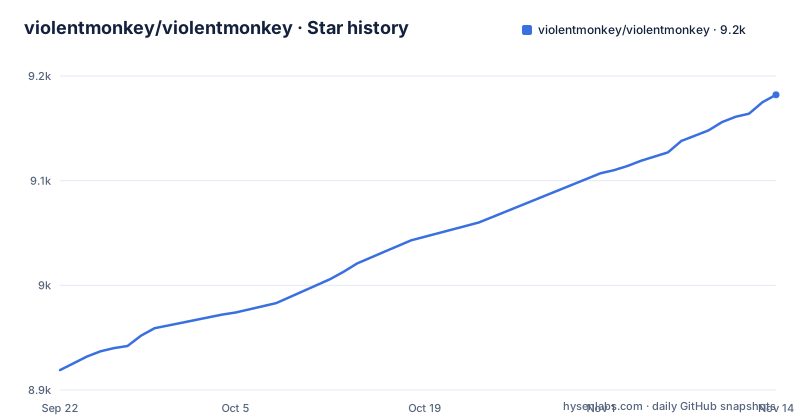
- violentmonkey/violentmonkey9,182 ★ · +263
| Repository | 2026-09-22 | 2026-11-14 |
|---|---|---|
| violentmonkey/violentmonkey | 8.9k | 9.2k |
263 Stars in the last 53 days, measured from the daily GitHub snapshot. Compare with other projects
Editorial analysis
WebExtensions is the requirement, and it decides which browsers qualify
The product statement is two sentences long and the second one is the constraint that matters. Violentmonkey provides userscripts support for browsers, and it works on browsers with WebExtensions support. That single requirement is what shapes the whole distribution picture, and the store badges make it concrete: the Chrome Web Store, Firefox Add-ons and the Microsoft Edge add-ons site are the three primary destinations. Everything not on that list is handled elsewhere, and the related projects section points at separate repositories for Opera Presto and Maxthon. So the reason those two have their own forks is not fragmentation for its own sake, it is that they predate or sit outside the WebExtensions surface this extension is written against.
Manifest V3 is a build flag, not a separate branch
Both manifest generations are produced from the same source tree, and the switch is an environment variable rather than a checkout. The plain dev and build scripts call gulp directly, while dev:mv3 and build:mv3 prefix the same gulp invocation with cross-env setting MV3 to 1 alongside NODE_ENV. Nothing in the repository layout separates the two targets, because there is nothing to separate. The practical consequence is on the developer side rather than the user side: a bare local dev command gives you whichever generation is the default, and if the browser you are testing against needs the other manifest you have to remember to pass the flag. It also means a bug reproduced without MV3 set may not reproduce on a target that requires it, which is worth knowing before you file anything.
The dev loop ends with loading dist/ by hand
Getting a working copy is four steps and the last one is manual. You install Node.js and PNPM, with the Node version expected to match the node key in package.json rather than whatever your machine happens to have. Then dependencies and the watch compile:
# Install dependencies
$ pnpm ci

# Watch and compile
$ pnpm dev
After that you load the extension from dist/ yourself. Two details in the manifest make the workflow stricter than it looks. There is a preinstall script that runs npx only-allow pnpm, so an npm or yarn install aborts before anything else happens. And there is a prepare script that installs husky, so a git hook gets wired up as a side effect of installing. Neither is surprising if you have worked on a pnpm repository, but both mean the install is not a passive operation and there is no supported path through another package manager.
pnpm run ci runs lint and test concurrently, and gates the version bump
The single entry point for verification is deliberately composed rather than monolithic. The ci script runs lint and test in parallel with run-p, and lint in turn runs two checks in sequence, an eslint pass over .js and .vue files with a cache flag, and a gulp check that validates YAML. The test script runs jest with BABEL_ENV and TEST both set and caps workers at half the available count. What makes this more than a convenience is where it sits in the release chain, since bump runs ci and only then commits the version change, preversion runs ci again, and version runs gulp bump with a reset. So a broken lint rule or a failing test blocks the version bump itself, which means the same command that developers run locally is the gate the release depends on.
The self-hosted target forces the BETA flag on
Two build targets exist and they differ in more than output location. The normal build sets NODE_ENV to production and is the one used when releasing to the web stores. The self-hosted build sets TARGET to selfHosted and BETA to 1, then chains into the same build, and the README describes it as being for a self-hosted release that has an update_url. Forcing the beta marker on a self-hosted build is the detail worth pausing on, because it means the project treats a self-hosted distribution as a different product from a store build rather than as the same one repackaged. If you run your own update URL you are therefore taking a build made with BETA set to 1.
Test builds need a GitHub login, and nightly.link is the documented way around it
The tester section is candid about its own rough edges. A test build is generated automatically for changes between beta releases, and it installs as an unpacked extension in Chrome and Chromium-based browsers or as a temporary extension in Firefox. The project warns it is likely to have bugs and tells you to do an export from Violentmonkey settings first, which is a strong hint that your installed scripts can be lost. The access path is the awkward part. The CI workflow table is only visible to signed-in github.com users, and the zip is available only when logged in, with the instruction to open an entry and click the Violentmonkey link at the bottom. The stated workaround is nightly.link, where you replace github.com with nightly.link in the artifact URL to fetch any other build.
The manifest version lags the beta tags on purpose
If you try to identify a running build from the repository you will get a misleading answer. The version field in package.json reads 2.49.0, while the recent releases are v2.50.0, BETA v2.49.6 and BETA v2.49.5. The release machinery is visible in the scripts: bumpVersion delegates to gulp bump, the bump script runs ci before calling gulp bump with a commit flag, and the version script calls gulp bump with a reset. Two consequences follow for anyone tracking releases: the tag list is the reliable source for what exists, and a beta tag tells you a build was cut for that commit without telling you it is fit for daily use.
Editorial conclusion
Violentmonkey suits someone who wants to install or write userscripts and is on Chrome, Firefox or Edge, and who would rather have a manager built on WebExtensions than one that reaches into older browser internals. It does not suit anyone who needs Presto-era Opera or Maxthon support, since those are maintained as separate repositories, or anyone wanting a test build without a GitHub account or the nightly.link workaround. Before installing a nightly, export your scripts as the project advises, and check whether you need the default build or the MV3 one.
Frequently asked questions
What is Violentmonkey used for?
It provides userscripts support for browsers, and it works on browsers with WebExtensions support. The primary destinations are the Chrome Web Store, Firefox Add-ons and the Microsoft Edge add-ons site, with separate repositories covering Opera Presto and Maxthon, which sit outside that WebExtensions surface.
Is Violentmonkey safe to use?
It installs from the official extension stores and works through the normal extension permission model rather than modifying browser binaries. The project's own caution is about test builds rather than stable releases: it says a test build is likely to have bugs and tells you to export your scripts from settings first, because an install can cost you your existing scripts.
How do I install Violentmonkey?
From the Chrome Web Store, Firefox Add-ons or the Microsoft Edge add-ons site, whichever matches your browser. It requires a browser with WebExtensions support, which is also why Opera Presto and Maxthon have their own separate repositories.
How do I install Violentmonkey from GitHub?
On github.com itself there is no anonymous route to the test builds. The CI workflow table and the resulting zip are only available when logged in on GitHub, where you open an entry and click the Violentmonkey link at the bottom. The documented workaround is nightly.link, replacing github.com with nightly.link in the artifact URL.
Official sources
Add this badge to your README
If you maintain this project, the badge below links readers to this analysis and shows its maintenance status from the daily GitHub snapshot. Paste the markdown into your README; add ?metric=license or ?metric=stars to the image URL for a different field.

[](https://hysenlabs.com/projects/violentmonkey-violentmonkey)Star history chart for your README
[](https://hysenlabs.com/projects/violentmonkey-violentmonkey)Was this useful?