VisoMaster Fusion: a Windows face-swap tool wrapped in one batch file
Powerful & Easy-to-Use Video Face Swapping and Editing Software
At a glance
- What is it?
- VisoMaster Fusion is a desktop application for face swapping and enhancement on images, video and live webcam feeds, distributed under the GPL. Its distinctive structure is a single portable batch file that installs an entire GPU stack into one folder, and its most interesting files are the ones that document the compromises: a CUDA version mismatch between the requirements and the package config, a type checker that crashes on Windows, and a lint index strategy that lets a nightly feed serve any package.
- Who is it for?
- VisoMaster Fusion fits a Windows user with a recent Nvidia card who wants face work across images, video and webcam without assembling a machine-learning environment. Four things to check before you commit disk space.
- Can I use it commercially?
- Yes, with conditions. GPL-3.0 is a copyleft licence: if you distribute software that includes it, you must release that software's source code under the same licence. Running it internally without distributing it does not trigger that obligation.
- Is it still maintained?
- Yes. The repository last received commits 19 days ago.
- What is it written in?
- Mainly Python, according to GitHub's language statistics.
Answers come from the project's GitHub data, last synced on November 25, 2026, and from our analysis. They are not legal advice.
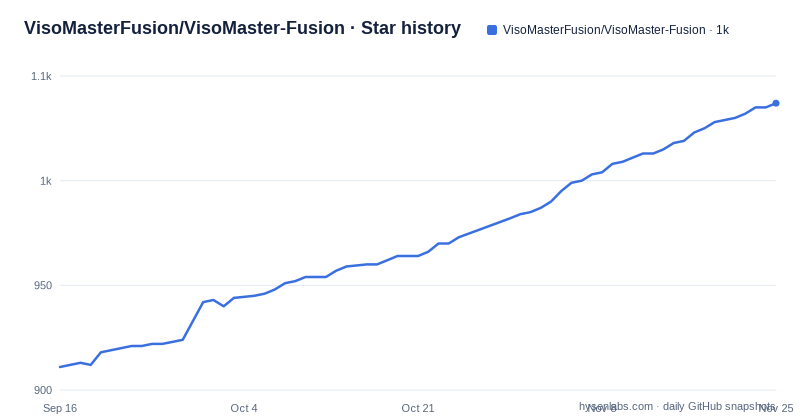
Star history
- VisoMasterFusion/VisoMaster-Fusion1,037 ★ · +126
| Repository | 2026-09-16 | 2026-11-25 |
|---|---|---|
| VisoMasterFusion/VisoMaster-Fusion | 911 | 1k |
126 Stars in the last 70 days, measured from the daily GitHub snapshot. Compare with other projects
Editorial analysis
The caution box and the licence do not say the same thing about third parties
The repository is licensed under the GPL, and near the top of the file there is a caution box that says the software is only distributed through this repository, that you should not download or pay for it from third-party websites, and that two named domains are not affiliated with the maintainers. Read strictly, the GPL does not forbid someone else charging money for a copy, so the caution cannot be a licence restriction. It is about impersonation and about a specific pair of lookalike domains, which is a real problem for a project whose name is a generic phrase and whose repository has no project page of its own at all. The notice is the right response to that, and naming the two domains is more useful than a generic warning. What is missing is any positive way to tell a legitimate redistribution from an impersonating one beyond the repository itself.
One batch file installs Python, Git, FFmpeg, PyTorch, CUDA, TensorRT and cuDNN
The quick start is three steps and the second one is download a single file.
git clone https://github.com/VisoMasterFusion/VisoMaster-Fusion
cd VisoMaster-Fusion
That is the non-portable route. The portable route is simpler: create a folder, download only a batch launcher into it, and run it. The file then downloads a portable runtime, dependencies, FFmpeg and model files, and the installation notes spell out what that means in practice: Python 3.12, Git, FFmpeg, PyTorch, the CUDA toolkit, TensorRT, cuDNN, a GPU build of the ONNX runtime and the required models, all installed into that one folder. After that you start the application the same way every time, by running the same launcher, because the environment lives in that directory. It is a genuinely good packaging decision for the target audience and an unusual one: a single file that provisions a full GPU development stack into a user-chosen directory.
The requirements say one CUDA level and the package config points at another
The system requirements ask for a driver of 576.57 or newer specifically so that CUDA 12.9 is supported. That is a very recent driver floor, which means a machine with an older but perfectly capable card will run the application slowly on the CPU path instead. The package configuration points somewhere else. The pip index list names a CUDA 13 build of PyTorch and, more tellingly, a nightly ONNX runtime build for CUDA 13 hosted on a Visual Studio package feed rather than on a public index. And the requirements file itself is named for CUDA 13. So the driver note in the requirements describes the previous generation while the dependency graph is built against the next one, with a nightly component in the middle. It is the kind of drift that happens when a project upgrades its stack and the prose in the requirements section does not get revisited.
macOS has two files in the repository and no documentation
The top level of the repository carries a Windows batch launcher, a macOS shell launcher, a requirements file for macOS, and a PDF in the root whose filename is a step-by-step guide to installing Conda and the application for a specific graphics card generation. Everything documented, however, is Windows. The non-portable instructions use a Windows activation path for the environment, install FFmpeg through the Windows package manager with a pinned version, tell you to add a directory to a Windows path variable, and end with running a batch file or invoking the entry point. The supported operating systems line lists only two versions of Windows at 64-bit. So the two macOS files are a partial port rather than a supported platform, and the documentation does not claim otherwise. Worth knowing before you spend time on it: the machine-learning dependency set for that platform exists, and the instructions do not.
The type checker crashes on Windows and the config documents the workaround
The Python project file here is not a package manifest. It exists to configure three tools, and the first of them is the dependency resolver. The second is the type checker, and its configuration opens with a heading about crash prevention. The comment explains that the type-checking hook runs in an isolated environment that does not have the deep learning library, the Qt bindings or the image library installed, and that without two specific settings the checker follows every import recursively and eventually crashes on Windows with a specific access-violation exit code. The two settings are ignoring missing imports and following imports silently. That is an unusually good piece of documentation: it names the failure, gives the exact exit code, explains why the naive configuration causes it, and states the cost of the fix, which is that the checker no longer descends into untyped packages.
The main window module sits in the type-check exclusion list next to a generated file
Four paths are excluded from type checking and the comments give a reason for three of them. One directory holds vendored third-party processor code. One file is an auto-generated Qt resource file, which is the obvious case. One directory holds standalone benchmark and utility scripts that are not application code. The fourth is the main window module, and it shares an exclusion line with the generated resource file without a separate explanation. Since the resource file is auto-generated and the main window is not, that pairing suggests the exclusion was widened at some point to get a clean run. It is also the module a reviewer would most want typed, because it is where the application shell lives. There is a separate block of per-package overrides below, which is the cleaner mechanism for the same problem, so the question is why the main window was excluded instead.
The resolver is set to let the least popular index win
The first tool in the project file sets the index strategy to a value whose name contains the word unsafe, and lists four package indices: the NVIDIA index, a CUDA 13 build of PyTorch, a nightly ONNX runtime feed on a Microsoft-hosted Visual Studio package endpoint, and the public index. The strategy setting is the one to read carefully. Best-match resolution normally prefers the index that is configured with most authority, but this setting removes that ordering, so a package can be served by whichever index offers the best version match. That is a deliberate trade: it is what makes it possible to use NVIDIA nightly and CUDA 13 builds that are not on the public index at all. The cost is that the guarantee that your deep learning framework came from its official feed no longer holds, since any of the four could answer for any package name.
The tests run without a GPU or Qt, in an environment of their own
The test suite covers core pipeline logic including virtual-reality camera maths, face masks, face detectors, serialisation, job validation, recording, the scanning tools and widget logic. The sentence that makes that suite usable is the next one: the tests run without a GPU and without Qt installed. For an application whose entire value depends on a graphics pipeline and a desktop interface, testing the logic without either is the right call, and it also means the suite cannot catch anything that only breaks on a real card or a real window. The setup then does something slightly awkward. It creates a second virtual environment named for tests rather than reusing the main one, and installs a GPU build of the deep learning framework from the CUDA 13 index into it. So running the tests on a laptop pulls a CUDA build, in a second environment, to exercise code that is documented as not needing one.
Editorial conclusion
VisoMaster Fusion fits a Windows user with a recent Nvidia card who wants face work across images, video and webcam without assembling a machine-learning environment. Four things to check before you commit disk space. The driver floor is high, since the requirements ask for a very recent driver to get the stated CUDA level, and the application is Windows-only in practice despite two macOS files in the repository. Decide whether the portable route is acceptable to you, because it means a batch file installs and owns your Python, FFmpeg, CUDA runtime and inference libraries inside one folder. Read the index strategy in the package configuration if you care where your wheels come from, since it is set to let the least-popular index win on a version match. And note the type-check exclusions, which include the main window module.
Frequently asked questions
What is VisoMaster Fusion?
A desktop application for face swapping, enhancement and editing across images, videos and live webcam feeds. It combines a graphical workflow with model controls, batch processing, virtual-reality camera support and GPU-accelerated inference, and it builds on earlier VisoMaster work by two named contributors plus wider community contributions.
What are the system requirements for VisoMaster Fusion?
Windows 10 or Windows 11 at 64-bit, an Nvidia GPU recommended, 6 GB of video memory as a minimum and 8 to 12 GB or more for heavier workflows, an Nvidia driver of 576.57 or newer recommended for CUDA 12.9 support, internet access on first run to fetch dependencies and models, and 20 to 30 GB of free disk space.
How do I install VisoMaster Fusion?
Most users download only the portable launcher from the release page, put it in a new folder and run it; the first launch fetches the runtime, dependencies, FFmpeg and models, and you start the app with the same launcher afterwards. The manual route is to clone the repository, create a Python 3.12 environment, run `uv pip install -r requirements_cu13.txt`, run `python download_models.py`, install FFmpeg 7.1.1, then run `python main.py` or the batch launcher.
Do I need a GPU to run VisoMaster Fusion?
No, but it is much slower. The application can run on the processor, and the inference providers available are CUDA, TensorRT, a TensorRT engine path and CPU, with TensorRT as the default. The documentation recommends an Nvidia GPU and 6 GB of video memory as the floor for basic use.
Can I run VisoMaster Fusion on macOS?
The repository carries a macOS requirements file and a macOS start script, but the supported platform line lists only Windows, and every documented install step is Windows-specific: batch launchers, a package-manager install of FFmpeg and a Windows path variable. Treat macOS as a partial port rather than a supported platform.
Official sources
Add this badge to your README
If you maintain this project, the badge below links readers to this analysis and shows its maintenance status from the daily GitHub snapshot. Paste the markdown into your README; add ?metric=license or ?metric=stars to the image URL for a different field.

[](https://hysenlabs.com/projects/visomasterfusion-visomaster-fusion)Star history chart for your README
[](https://hysenlabs.com/projects/visomasterfusion-visomaster-fusion)Was this useful?