LiteIDE: a Go IDE still shipping Qt4 builds and a command line with four flags
LiteIDE is a simple, open source, cross-platform Go IDE.
At a glance
- What is it?
- LiteIDE is a small cross-platform Go IDE whose feature list is a Go toolchain inventory: generics, go.work, modules, vendor and GOPATH, gocode, guru, GDB and Delve. Its release artefacts tell you how old it is, with Windows, Linux and macOS builds split between Qt4 and Qt5, and the last tagged release was x38.4 in May 2025 while the last push landed in October 2026.
- Who is it for?
- LiteIDE suits someone who wants a small IDE that shells out to the standard Go toolchain rather than reimplementing it, on a machine where a larger editor is unnecessary, and who is content to manage the toolchain versions by hand. It does not suit you if you want modern language-server completion, a maintained plugin ecosystem, or a build that already matches your Go version.
- Can I use it commercially?
- Yes, with conditions. LGPL-2.1 is a weak copyleft licence: you can use it inside commercial and closed-source software, but if you distribute changes to its own files, you must publish those changes under the same licence.
- Is it still maintained?
- Yes. The repository last received commits 1 day ago.
- What is it written in?
- Mainly C++, according to GitHub's language statistics.
Answers come from the project's GitHub data, last synced on November 15, 2026, and from our analysis. They are not legal advice.
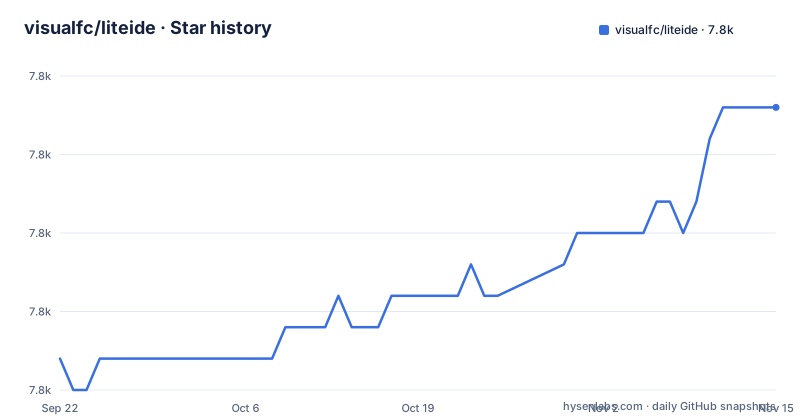
Star history
- visualfc/liteide7,774 ★ · +8
| Repository | 2026-09-22 | 2026-11-15 |
|---|---|---|
| visualfc/liteide | 7.8k | 7.8k |
8 Stars in the last 54 days, measured from the daily GitHub snapshot. Compare with other projects
Editorial analysis
The feature list is an inventory of Go toolchain eras
The most informative thing in the README is the Golang support section, because it lists the Go features by the version that introduced them.
- Support Go1.18 to Go1.21 generics - Support Go1.18 go.work - Support Go1.11 Go modules - Support Go1.5 Go vendor - Support Go1 GOPATH
Five eras in one list. An IDE that still enumerates GOPATH alongside go.work is an IDE whose author has tracked the language rather than rewritten around each release, which is a reasonable way to build a small tool and a fair way to date it.
The surrounding entries are equally concrete: Golang build environment management, compile and test using standard Golang tools, custom GOPATH support at the system, IDE and project level, custom project build configuration, a Golang package browser, class view and outline, doc search and API index, find usages, refactoring with revert, an integrated clone of gocode, integrated gomodifytags, support for guru, and debugging with GDB and Delve.
Two of those are integrations with named third-party projects, which is the pattern this IDE uses throughout.
The release artefacts split Qt4 from Qt5, and that dates the project
The latest-release section lists eight archives, and the Qt version is in every filename except the Arch Linux PKGBUILD.
For Windows there are two: `liteide-latest.windows-qt5.zip` for Windows XP, 7, 8 and 10, and `liteide-latest.windows-qt4.zip` for XP and 7 only. For macOS there is `liteide-latest.macosx-qt5.zip` for 10.8 or higher. For Linux there are four, x64 and x32 each in a Qt4 and a Qt5 tarball, all built on Ubuntu 16.04. And there is `liteide-latest.archlinux-pkgbuild.zip`, an Arch Linux PKGBUILD.
So the platform matrix is wide and the Qt matrix is the constraint. A Qt4 build for an older machine and a Qt5 build for everything else is a fork in the road the project took at a particular moment, and the Windows rows show the cost, since the Qt4 build covers two operating system generations less.
The dates line up with that. The releases are x38.4 from 2025-05-19, x38.3 from 2023-08-13 and x38.2 from 2023-02-13, and the last push was on 2026-10-26.
The X in the version, X38.4, is the project's own line, not a Go version and not a Qt version.
Five command line flags, and two of them are about settings
The command line is short enough to print in full:
liteide [files|folder] [--select-env id] [--local-setting] [--user-setting] [--reset-setting]with the flags described as `--select-env [system|win32|cross-linux64|...]` to select an init environment id, `--local-setting` to force use of local setting, `--user-setting` to force use of user setting, and `--reset-setting` to reset the current setting, clearing the setting file.
Two observations. The positional argument accepts files or a folder, so the IDE can be launched on a specific project. And the settings flags imply there are two scopes, a local one and a user one, which is what `--local-setting` and `--user-setting` select between, with `--reset-setting` clearing the file for whichever scope is active.
That is a small thing that matters when an IDE misbehaves: knowing whether it is reading the project configuration or your own is usually the difference between a five-minute fix and a reinstall.
Tooling updates are a manual step, not a bundled version
There is a section titled Update liteide tools for support new Golang Version, and it is two commands plus a copy instruction:
go install github.com/visualfc/gotools@latest
go install github.com/visualfc/gocode@latest
Then: on Windows and Linux, copy `GOPATH/bin` gotools and gocode to `liteide/bin`; on macOS, copy them to `LiteIDE.app/Contents/MacOS`.
So the IDE's language tooling is two separate binaries that you install with the Go toolchain and then copy into the application's own directory, by hand, per platform. Both belong to the same author, visualfc, and the Links section points at their source repositories alongside the IDE's own.
This is the design consequence of the previous section. Compile and test use the standard Golang tools, so the IDE is not shipping a Go compiler; and the completion and navigation layers are separate binaries rather than a bundled analysis engine.
The cost is that keeping up with a new Go release is a documented manual procedure rather than something the application does for you.
Plugins and a terminal are the core features, which sets expectations
The core feature list is short: system environment management, MIME type management, configurable build commands, support files search replace and revert, quick open for file, symbol and commands, a plug-in system, and an integrated terminal.
Two of those say something about the shape of the tool. Configurable build commands means the build is whatever you define rather than a fixed model. And a plug-in system is listed among the core features rather than as an extension, which says the extension model was part of the design from the start rather than bolted on.
The advanced code editor section is where the scope is defined: the editor supports Golang, Markdown and Golang Present, with rapid code navigation, syntax highlighting and a colour scheme, code completion, code folding, display save revision, and reload file by internal diff way.
Three languages and not four is the boundary. This is a Go IDE with Markdown support for documentation, not a polyglot editor, and the Golang Present support is for slide decks written in Go.
Downloads come from three places including a SourceForge mirror
The Links section lists release downloads from three places: the GitHub releases page, a SourceForge project page, and a Baidu netdisk share with a password given in the text.
Three mirrors for a desktop application is not unusual, and for a project with users in China a netdisk mirror alongside GitHub is the practical arrangement rather than an odd one.
What is worth knowing is which is which. The GitHub releases link points at the latest release explicitly. The SourceForge link is a project files page, which is a mirror that may not track a version the same way. The netdisk entry is a link with a password beside it, so it is not self-describing.
If you are pinning a version for a team, the GitHub releases page is the one to pin against.
Support and history are also linked from the same place: a Google group for development discussion, and a changes document inside the repository for the release history.
Install and FAQ documentation lives inside the source tree
The Documents section does not link to a documentation site. It links to four files in the repository:
- How to Install, at `liteidex/deploy/welcome/en/install.md` - FAQ, at `liteidex/deploy/welcome/en/guide.md` - and the same two in Chinese, under `liteidex/deploy/welcome/zh_CN/`
The path is the interesting part. Documentation lives under `deploy/welcome/`, which is a directory layout for application content, which suggests the install guide and the FAQ are bundled with the application.
That has an obvious benefit and an obvious cost. The documentation is versioned with the code and cannot drift from the build, and it is available offline in an installer that is itself an archive you unzip. The cost is that there is no single URL to link to, and the documentation is only as current as the release you downloaded.
The repository root is consistent with that: `.github/`, `.gitignore`, `CONTRIBUTORS`, `ISSUE_TEMPLATE.md`, `LICENSE.LGPL`, `README.md`, `build/` and `liteidex/`. The LGPL 2.1 licence file is present at the root, and the project is a C++ codebase with a Qt-based front end, which is what the Qt4 and Qt5 build matrix in the release list reflects.
Editorial conclusion
LiteIDE suits someone who wants a small IDE that shells out to the standard Go toolchain rather than reimplementing it, on a machine where a larger editor is unnecessary, and who is content to manage the toolchain versions by hand. It does not suit you if you want modern language-server completion, a maintained plugin ecosystem, or a build that already matches your Go version. Verify three things before you rely on it: which Go version your project needs against the documented range of Go 1.18 to 1.21 generics and Go 1.11 modules, whether a Qt5 build exists for your platform, and which of the two settings scopes the IDE reads, since the command line has flags to force local or user settings and to reset them.
Frequently asked questions
how to install liteide
Download a prebuilt archive for your platform from the GitHub releases page, SourceForge, or the netdisk mirror the README lists. Windows has a Qt5 build for XP through 10 and a Qt4 build for XP and 7, macOS has a Qt5 build for 10.8 or higher, and Linux has x64 and x32 tarballs in both Qt versions plus an Arch Linux PKGBUILD. To use current Go language tooling, run `go install github.com/visualfc/gotools@latest` and the same for gocode, then copy both binaries into liteide/bin, or into LiteIDE.app/Contents/MacOS on macOS.
What is a lightweight IDE?
In the context of this repository, LiteIDE describes itself as a simple, open source, cross-platform Go IDE. Its feature list is core features such as system environment management, configurable build commands, a plug-in system and an integrated terminal, plus an editor for Golang, Markdown and Golang Present, with completion, folding, code navigation and debugging through GDB and Delve. It compiles and tests using the standard Golang tools rather than bundling its own.
liteide vs golang
They are not alternatives: Golang is the language and the standard toolchain, and LiteIDE is an editor that drives those tools. The README states compile and test using standard Golang tools, so the compiler, the test runner and the module tooling come from your Go installation rather than from the IDE, while the IDE supplies the editing, navigation, build configuration and the GDB and Delve debugging integration.
Official sources
Add this badge to your README
If you maintain this project, the badge below links readers to this analysis and shows its maintenance status from the daily GitHub snapshot. Paste the markdown into your README; add ?metric=license or ?metric=stars to the image URL for a different field.

[](https://hysenlabs.com/projects/visualfc-liteide)Star history chart for your README
[](https://hysenlabs.com/projects/visualfc-liteide)Was this useful?