firemark stamps your message and a filigrane onto a document you are about to leak
Stop sending naked documents. Firemark watermarks images & PDFs in one command. Optimized to tackle AI watermark removal. Written in Rust.
At a glance
- What is it?
- firemark is a single-binary Rust CLI that lays a chosen message and a banknote style filigrane pattern over images and PDFs, recursively for whole folders. The whole interface is flags, and the finish is deliberately different on every run.
- Who is it for?
- Adopt firemark if your routine involves handing copies of identity documents or pay stubs to someone outside your household and you want each copy to carry a message of your own. Skip it if you need signed PDFs, a library API, a configuration file, or output that repeats exactly.
- Can I use it commercially?
- Yes. MIT is a permissive licence: you can use, modify and sell software built on it, as long as you keep its copyright and licence notices.
- Is it still maintained?
- Yes. The repository last received commits 103 days ago.
- What is it written in?
- Mainly Rust, according to GitHub's language statistics.
Answers come from the project's GitHub data, last synced on October 4, 2026, and from our analysis. They are not legal advice.
Star history
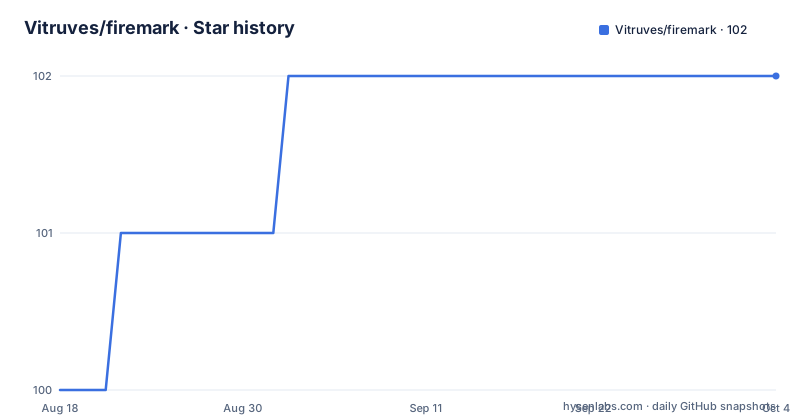
- Vitruves/firemark102 ★ · +2
| Repository | 2026-08-18 | 2026-10-04 |
|---|---|---|
| Vitruves/firemark | 100 | 102 |
2 Stars in the last 47 days, measured from the daily GitHub snapshot. Compare with other projects
Editorial analysis
A visible overlay carrying your own line of text
The project opens on a rental application: a prospective tenant sends a copy of an ID to someone posing as a landlord, and the copy later gets used to open bank accounts or forge identities. The answer firemark offers is a visible overlay holding text you choose, not a hidden forensic mark buried in the pixels. That decision is the design. A page reading Sent to Agency X, March 2026 is worthless to anyone who receives it by accident, and it tells you where a leaked copy came from. You supply the primary line with `-m` and an optional second line with `-s`:
# Watermark a PDF
firemark tax_notice.pdf -m "CONFIDENTIAL" -s "Do not distribute"
The input file is never modified. By default firemark writes a sibling file named `{name}-watermarked.{ext}`, `-o` sets an explicit path, and `-S` changes the suffix. `-n` renders a preview and writes nothing at all, which is the flag to reach for while you are still choosing a style.
Three install paths, and Windows gets none of them
The routes are not equivalent. On Linux and macOS, for x86_64 and arm64, one line pulls the latest release into `~/.local/bin`:
curl -fsSL https://raw.githubusercontent.com/Vitruves/firemark/main/install.sh | shThat pipes a remote script straight into a shell. The repository ships `install.sh` at its root, so reading it before running it costs one command. crates.io is the second route:
cargo install firemarkThe third compiles the crate locally and needs a Rust toolchain present:
git clone https://github.com/Vitruves/firemark.git
cd firemark
cargo install --path .
Windows has no installer line; binaries are attached to each release page instead. All three paths end at one optimized binary of roughly 5 MB, which the release profile explains: opt-level 3, fat link time optimisation, one codegen unit, strip turned on, and panic set to abort. MIT licence, no account, no daemon to leave running.
Seventeen values for -t, from a centred stamp to near invisible ghost text
Seventeen values are accepted by `-t`, and `diagonal`, a full page of repeating diagonal text, is what you get if you pass nothing. Two carry official weight: `stamp`, a large centred mark with a double border, and `seal`, a circular notary style emblem. `ghost` is the opposite bet, ultra subtle embossed text for when the page has to stay readable underneath. `redacted` paints full width black bars, and `halftone` renders the message as a dot grid. Stencil, typewriter, handwritten, badge, ribbon, frame, tile, mosaic, weave, watercolor and noise fill out the rest of the table.
firemark doc.pdf -t stamp -m "CONFIDENTIAL" --border --color red`--border` and `--color` show up in that one example only, so treat the colour syntax as demonstrated rather than specified. The value passed is the CSS colour name red, and csscolorparser sits in the dependency list. No size flag and no opacity flag appear in the documented set, and nothing states how a very long message or an unreadable one is handled.
--filigrane stacks a second banknote layer under the text
The pattern layer is separate from the message. `--filigrane` overlays fine geometric work borrowed from banknote security features, and `guilloche`, a band of sinusoidal wave envelopes, is the default. Named styles run from `rosette` (spirograph curves with corner roses) and `moire` (concentric circle interference) to `mesh` (a hexagonal honeycomb) and `constellation` (star nodes joined by a fine web). Two values are special: `full` combines every pattern, `none` switches the layer off entirely.
firemark id.png -m "Rental application" --filigrane moire
firemark id.png -m "Rental application" --filigrane none   # disable
Spell the flag as `filigrane`, not `filigree`, or the argument parser will reject the line. The two tables also share vocabulary without explaining the overlap: `-t` has `frame` and `weave`, the filigrane table has `border` and `mesh`, and nothing describes how the layers interact when both are active on the same page.
Every render is non-deterministic, and no flag makes it repeatable
This is what the release named v0.1.2, AI-Removal Hardening, is about. Each render differs by default, and after drawing, firemark perturbs the output: alpha jitter, sub-pixel color noise, edge micro-dots, sparse ghost pixels. The stated aim is to raise the cost of stripping the watermark with an image editor or an AI removal model, and the mechanism is plain: no two copies of the same file end up with the same pixels.
That has a cost worth planning around. Two runs over one input produce different bytes, so you cannot diff them, checksum them, or later prove the file you sent is the file you generated. No seed, no fixed mode and no manifest of the perturbation parameters is documented, so there is no route back to an earlier render other than keeping the file. Nothing in the documented claims is a detection guarantee either, so treat the layer as friction against reuse rather than as evidence in a dispute.
-R walks a folder and writes suffixed copies beside each input
Point it at a directory and it recurses:
firemark ./documents/ -R -m "Sent to Agency X" -t stamp

# Preview without writing files
firemark id_card.jpg -m "Draft" -n
Every input gets its own marked sibling, so a folder of scans becomes a folder of marked scans in one pass. The crate depends on `walkdir` for traversal and `rayon` for parallel work, which fits a fan out across a directory, with `image` and `imageproc` on the raster path and `lopdf` on the PDF path. Nothing states what happens to a file in that folder that is neither image nor PDF, whether an existing `-watermarked` file is overwritten on a second pass, or whether the walk follows symlinks. A scratch directory answers those faster than reading about them.
A config directory and a CLI reference the documentation never explains
Two artefacts sit unexplained. `examples/` contains a `config/` directory and `Cargo.toml` depends on `toml` and `serde`, yet every documented input is a flag. No key name, no file name and no precedence rule appears anywhere. The second is a top-level `CLI.md` that the README never points at, so the full flag list is one click away for anyone who goes looking for it.
[dependencies]
clap = { version = "4", features = ["derive", "string"] }
toml = "0.8"
image = "0.25"
lopdf = "0.34"
That block shows the argument parser and the accepted formats in one view: `clap` derives the CLI, `image` and `lopdf` decide which files can be read. Only command line use is documented, so embedding firemark in a service means invoking the binary and parsing what it prints. The release cadence is young and fast. v0.1.2 shipped on 2026-03-09, v0.1.3 on 2026-03-10, and v0.1.4 on 2026-07-11, with the last push on 2026-07-11. Pin the version you test against, because changes land within weeks at this stage.
Where a general image toolchain pulls the other way
firemark is a specialist with a fixed catalogue. If you control the drawing tool, a general image stack such as ImageMagick or a PDF library will place marks too, and you write the geometry, the colour and the repeat interval yourself in exchange for a pipeline you can bend toward unrelated jobs. The trade runs both ways. The general tool carries a large dependency footprint and no opinion about documents; firemark carries 17 marks, 13 filigrane values and a randomised finish, and nothing outside them.
It is the wrong choice in three clear situations. A certificate workflow, because nothing documented here touches PDF digital signatures. A product that needs an API instead of a process, because the crate is filed under `command-line-utilities`. And any pipeline that needs identical output from identical input, for the reason above. On the other side, for one person sending scans of identity documents to landlords, agencies and employers, one command and a 5 MB binary cover the entire job.
Editorial conclusion
Adopt firemark if your routine involves handing copies of identity documents or pay stubs to someone outside your household and you want each copy to carry a message of your own. Skip it if you need signed PDFs, a library API, a configuration file, or output that repeats exactly. Before rolling it into anything real, run one -R pass over a scratch folder that holds a non-image file and a multi-page PDF, then open the result in the viewer your recipients actually use, because the overlay and the filigrane are the two things you are trusting and nothing states which viewers preserve them.
Frequently asked questions
Does firemark work on Windows?
Windows binaries are attached to each release page, and the one line installer covers only Linux and macOS on x86_64 and arm64, dropping the binary into ~/.local/bin. There is no Windows equivalent of the curl command.
What does firemark call the file it writes?
By default it writes a sibling file named {name}-watermarked.{ext} next to the input and leaves the original untouched. Use -o for an explicit path, -S for a different suffix, or -n to preview and write nothing.
Can firemark watermark a multi-page PDF?
The quick start examples pass a PDF straight to the tool with no page flag, which suggests every page is marked. No per-page selector and no page range option appear in the documented set of flags.
Does firemark read a configuration file?
examples/ ships a config/ directory and the crate depends on toml and serde, but no key, file name or precedence rule is documented anywhere. A top-level CLI.md holds the flag reference without being linked from the README.
Does firemark produce the same output for the same input?
No. Every render is non-deterministic by default, and post-render perturbation includes alpha jitter, sub-pixel color noise, edge micro-dots and sparse ghost pixels. No seed or fixed mode is documented, so keep the file if you need the exact bytes again.
Official sources
Add this badge to your README
If you maintain this project, the badge below links readers to this analysis and shows its maintenance status from the daily GitHub snapshot. Paste the markdown into your README; add ?metric=license or ?metric=stars to the image URL for a different field.

[](https://hysenlabs.com/projects/vitruves-firemark)Star history chart for your README
[](https://hysenlabs.com/projects/vitruves-firemark)