Aizen: a macOS workspace that gives every branch its own terminal, browser, and agent session
Bring order to your projects, environments, and day-to-day work.
At a glance
- What is it?
- Aizen is a Swift workspace app for macOS that wraps each project or branch in its own environment with a private terminal, file browser, built-in browser, and agent session, and it ships a CLI that can attach to sessions started in the app. Its own roadmap says the 1.0.x line ends at v1.0.83 and that 2.0.0 will not be backward-compatible, and Intel Macs are excluded outright since 1.0.71, so it fits Apple Silicon developers who want parallel branches more than it fits general tooling.
- Who is it for?
- Adopt Aizen if you run several branches at once on an Apple Silicon Mac and want agent chat, terminal, and browser state bound to a branch instead of to your home folder. Skip it if you need an Intel Mac, need a stable configuration contract across upgrades, or want a terminal emulator that installs from a package manager.
- Can I use it commercially?
- Yes, with conditions. GPL-3.0 is a copyleft licence: if you distribute software that includes it, you must release that software's source code under the same licence. Running it internally without distributing it does not trigger that obligation.
- Is it still maintained?
- Yes. The repository last received commits 106 days ago.
- What is it written in?
- Mainly Swift, according to GitHub's language statistics.
Answers come from the project's GitHub data, last synced on November 15, 2026, and from our analysis. They are not legal advice.
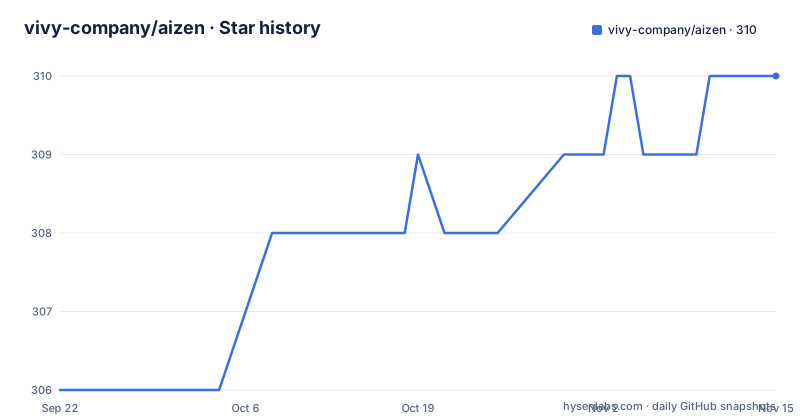
Star history
- vivy-company/aizen310 ★ · +4
| Repository | 2026-09-22 | 2026-11-15 |
|---|---|---|
| vivy-company/aizen | 306 | 310 |
4 Stars in the last 54 days, measured from the daily GitHub snapshot. Compare with other projects
Editorial analysis
The 1.0.x line closes at v1.0.83 and 2.0.0 drops backward compatibility
Aizen labels itself Early Access in its own banner and warns that updates arrive near daily with breaking changes, which frames every other claim on the page. The roadmap note is blunter: v1.0.83 is the final release in the 1.0.x series, the project is being reimagined and repositioned, and the next release is 2.0.0 with no backward compatibility with 1.0.x. That makes v1.0.83 a natural pin point rather than a normal latest version.
The shipped history is dense and short. v1.0.81 landed 2026-04-16, v1.0.82 on 2026-05-22, and v1.0.83 on 2026-07-25, and the last push to the main branch was 2026-08-01. So the cadence is roughly monthly for releases and much tighter for commits, which matches the near daily claim. Nothing on the page dates the 2.0.0 work, so there is no way to judge how long the gap will be, only that the current build is the last of its kind. Version pins written into your own scripts against Aizen will need review before then.
Intel Macs lost support at 1.0.71 and the app never worked on Windows or Linux
The stated requirements are macOS 13.5 or newer on Apple Silicon only. Intel Macs are described as intentionally unsupported starting with 1.0.71, with the reason given as a better user experience rather than a missing capability. This is a deliberate product decision, not an open bug, and it is the kind of narrowing that explains why a Swift codebase with Xcode build integration is not offered on other systems.
Two consequences follow for anyone evaluating it. First, the install path is a signed and notarized binary downloaded from aizen.win rather than a package manager entry, so there is no Homebrew formula to pin and no way to script the install the way you would install a CLI tool. Second, the source build assumes the same hardware: Xcode 16.0 or newer, Swift 5.0 or newer, and Zig for the terminal framework. A team that still standardizes on Intel Macs cannot test against this workspace at all, and the boundary is stated rather than discovered at runtime.
Building from source means producing a vendored terminal framework first
The terminal is not a dependency Xcode resolves on its own. Aizen links GhosttyKit, an xcframework that has to be compiled ahead of time, and the script pins that build to a version recorded under Vendor. Zig is required for that step, which is the one part of the toolchain the project does not vendor.
git clone https://github.com/vivy-company/aizen.git
cd aizen

# Build GhosttyKit.xcframework (pinned to Vendor/libghostty/VERSION by default)
./scripts/build-libghostty.sh

# Open in Xcode and build
open aizen.xcodeproj
A specific libghostty commit can be rebuilt by passing it as an argument, which is useful when a terminal regression needs isolating from the app code.
./scripts/build-libghostty.sh <commit-sha>The rest of the stack is external libraries with separate licenses: libghostty for the terminal emulator, libgit2 for native Git operations, VVDevKit from the same vendor for editor, markdown, timeline, diff, and Tree-sitter highlighting, and Sparkle for auto-updates. Read those licenses before redistributing a build of your own.
Environments can be worktrees, folders, or copies, and Aizen decides which
The central promise is that every project or branch gets its own environment with its own terminal, files, browser, agents, and state. The mechanism underneath is flexible by design: Aizen can use Git worktrees, folders, or copies depending on the setup. That flexibility is also the sharpest edge, because you do not choose the isolation strategy, the app does. A repository with uncommitted changes, ignored build output, or node_modules will behave differently under a worktree than under a plain folder copy.
Organization happens one level up. Workspaces group active projects into color-coded sets, so the same branch can be reached from a shared color rather than a directory path. Per-project environments then carry the terminal, file tree, browser, and chat together, and Git context plus review state stay attached to that environment. If you rely on Aizen for parallel branches, the first thing to verify on a real repository is which of the three modes it picked and whether your build artifacts are being duplicated per environment, because that choice changes disk usage and cache behaviour without any setting exposed in Settings.
Agents come from the ACP registry first, and custom agents need a command path
Agent setup has moved to ACP registry agents as the default path. The seeded defaults are Claude Code, Codex, and OpenCode, so a fresh install has three agents wired to common coding tools without any manual configuration. More agents are added from Settings > Agents, and an MCP server can be attached per agent from the marketplace built into the app.
A custom agent is brought in by giving a command or an executable path, which means the integration contract is the process invocation rather than a built in protocol adapter. That keeps unusual agents possible, but it also puts the responsibility on you: if your agent writes prompts to a different stream or expects a different working directory, nothing in Aizen will normalise it.
Session state is bound to the environment rather than the app, so chat, tool calls, and context follow the project you are working in. Rich input covers file attachments and on device voice input with waveform visualisation, and the keyboard map routes agent control directly: ESC interrupts the running agent and shift tab cycles chat mode.
The CLI is installed from Settings > General, not from a package manager
Aizen ships a companion CLI that is installed from inside the application, under Settings > General, where the same panel also reports installation status. That is the only install route described, so scripting a fresh machine means driving the GUI first. Once installed, the commands cover opening projects, listing tracked workspaces, creating persistent terminals, and attaching to sessions.
aizen open .
aizen workspace list
aizen terminal . --attach
aizen attach
The scope of `aizen attach` is narrower than it looks. It attaches to tmux backed sessions that were created in the app, so a tmux session you started by hand in another terminal is outside what the command can take over. The same tmux backing appears in Settings > Terminal as optional session persistence, which means restore behaviour is a toggle rather than the default, and an environment without it starts with a clean terminal after a restart.
Apple project builds are wired to Xcode instead of a generic task runner
The delivery features are organised around the two things a branch actually needs: moving code and seeing what changed. Git operations including stage, commit, push, pull, merge, and branch all run from the UI on top of libgit2 rather than shelling out. Diffs are syntax highlighted, comments attach to them, and pull request and merge request detail views are part of the same surface, so review stays inside the branch you are working in.
Continuous integration is visible from the worktree sidebar, where GitHub Actions and GitLab CI runs appear next to the environment instead of in a separate dashboard. For Apple targets the integration goes one step further and offers a build for `.xcodeproj` and `.xcworkspace` projects, exposed as an optional build button in Settings > General. That is the clearest statement of intent in the feature list: Aizen is not trying to be a general build runner, it is trying to be the place where an Apple project branch is checked.
State lives in Core Data and the concurrency story is actor based
The source tree separates concerns by domain rather than by screen. App holds the entry point, Models holds data models plus ACP, Git, MCP, Tab, and Terminal types, and Views keeps the interface. Everything with side effects is grouped under Services, split into Agent for the ACP client, registry, installers, and session management, Git for worktree, branch, staging, diff, review, and hosting, Audio for voice recording and transcription, MCP for server management, Workflow for the GitHub Actions and GitLab CI integration, and Xcode for builds and device work.
The stated patterns are MVVM with observable models, actor based services for concurrency sensitive work, Core Data for persistence, and SwiftUI with async/await and AsyncStream. Actor isolation matters for a workspace that runs several terminal and agent sessions at once, and the Audio service is the reason on device voice input is a feature rather than a stub. Top level entries also include a nightly Info plist alongside the main app, plus cli, docs, scripts, Vendor, and web directories, so the CLI and the marketing site sit in the same repository as the Swift app. Licensing is GPL-3.0, copyright 2026 Vivy Technologies Co., Limited.
Editorial conclusion
Adopt Aizen if you run several branches at once on an Apple Silicon Mac and want agent chat, terminal, and browser state bound to a branch instead of to your home folder. Skip it if you need an Intel Mac, need a stable configuration contract across upgrades, or want a terminal emulator that installs from a package manager. Before relying on it, check whether the worktree mode fits your Git layout, since Aizen chooses between worktrees, folders, and copies on your behalf, and remember that the next major release breaks 1.0.x compatibility.
Frequently asked questions
What does an Aizen environment contain for a project or branch?
Each environment keeps its own terminal, files, browser, agent sessions, Git context, and review state, and Aizen can back it with a Git worktree, a folder, or a copy depending on the setup.
Can Aizen run on an Intel Mac?
No. Aizen requires macOS 13.5 or newer on Apple Silicon, and Intel Macs have been intentionally unsupported since 1.0.71.
How do you build Aizen from source?
Install Zig with brew install zig, clone the repository, run ./scripts/build-libghostty.sh to produce GhosttyKit.xcframework pinned to Vendor/libghostty/VERSION, then open aizen.xcodeproj in Xcode 16.0 or newer. Passing a commit SHA to the script rebuilds libghostty at a specific revision.
Which agents does Aizen set up by default?
The ACP registry path seeds Claude Code, Codex, and OpenCode. More agents are added from Settings > Agents, a custom agent is registered by command or executable path, and MCP servers are attached per agent from the built in marketplace.
What breaks when Aizen moves to 2.0.0?
The roadmap states that v1.0.83 is the final 1.0.x release and that the next release will be 2.0.0, which will not be backward compatible with 1.0.x. The README labels the project Early Access with near daily updates and warns to expect breaking changes.
Official sources
Add this badge to your README
If you maintain this project, the badge below links readers to this analysis and shows its maintenance status from the daily GitHub snapshot. Paste the markdown into your README; add ?metric=license or ?metric=stars to the image URL for a different field.

[](https://hysenlabs.com/projects/vivy-company-aizen)Star history chart for your README
[](https://hysenlabs.com/projects/vivy-company-aizen)Was this useful?