utao: an Android TV browser built from a Firefox add-on
Youtao TV, a TV browser for watching live streams from major satellite channels and CCTV without a TV VIP subscription, compatible with mainstream platforms like iQiyi.
At a glance
- What is it?
- VonChange/utao is a third-party browser for Android TVs and set-top boxes that opens CCTV live streams and the web versions of iQiyi, Tencent Video and Bilibili on the big screen. The README says it needs a reasonably capable box and stalls on weak hardware.
- Who is it for?
- Adopt utao on an Android 9 or newer box when you hold a phone or PC membership and want it on the television, and treat the platform smoothness order in the README as your real test: if the Tencent Video page is your target and the box is weak, nothing else here saves you. Do not adopt it as a general-purpose TV browser, since search is unimplemented and the general-build cursor work is still a todolist item.
- Can I use it commercially?
- Yes, with conditions. GPL-3.0 is a copyleft licence: if you distribute software that includes it, you must release that software's source code under the same licence. Running it internally without distributing it does not trigger that obligation.
- Is it still maintained?
- Yes. The repository last received commits 86 days ago.
- What is it written in?
- Mainly JavaScript, according to GitHub's language statistics.
Answers come from the project's GitHub data, last synced on November 15, 2026, and from our analysis. They are not legal advice.
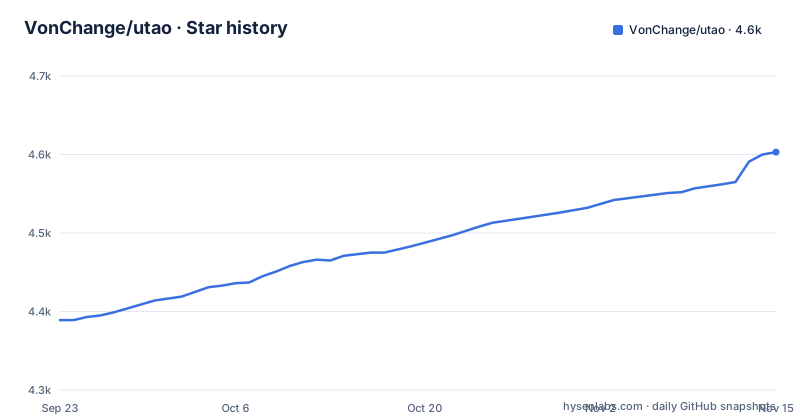
Star history
- VonChange/utao4,603 ★ · +214
| Repository | 2026-09-23 | 2026-11-15 |
|---|---|---|
| VonChange/utao | 4.4k | 4.6k |
214 Stars in the last 53 days, measured from the daily GitHub snapshot. Compare with other projects
Editorial analysis
The problem is the television membership tier, not streaming quality
iQiyi and Tencent Video charge a separate fee for the television client. A subscriber who pays ten or twenty yuan a month on a phone or laptop still gets a locked-down screen on the big display unless they open the mobile web page instead, where the same account plays 1080P video. utao is built around that gap: it is a browser whose home screen carries CCTV and the satellite channels, and which opens the web versions of video sites so an ordinary account plays on the television; the README now notes that platform video playback and arbitrary-site browsing need the browser remote in the developer's 土拨鼠遥控 app.
The project frames this in plain terms rather than as a research tool. The stated audience is someone with an Android TV or an Android set-top box at home who already pays for a phone or PC membership and does not want to pay again for the television tier. The homepage is utao.tv, and the developer keeps a QQ group, 1034639982, for users. The README also states a boundary on its own use: the platforms it adapts are licensed distribution services, and the code must not be repurposed for unlicensed ones.
That last clause matters when judging the project. utao is not trying to break authentication. It renders the page a browser can already render, and it grants no tier the account does not already carry.
One codebase, three browser kernels, and an assets packaging step
The repository root holds a small set of directories: android, web, util, img, plus the README and a licence file. The README names two of them directly. android/x5 is the build for Tencent's X5 browser engine, and web/tv-web holds the main logic, written as a Firefox add-on and adapted down to a simplified implementation that runs on the X5 engine and on a plain WebView.
So there is no single rendering path. A user on an old X5 box and a developer running the Firefox version in a desktop browser are executing the same JavaScript logic through different engines, which is where most of the failure modes in this project live.
The Android debug loop is documented as well, and it is manual. To run the app on a device during development you have to package web/tv-web into the assets directory first, following the notes in util/util.md. That is the step that connects the two halves of the repository, and it is easy to miss.
Live channels hold up; on-demand video pages stall on the same hardware
The README ranks platforms by tested smoothness on a television: CCTV equals BesTV, then Mango, Youku, Xigua, Bilibili, iQiyi, and last Tencent Video. That ordering is the most useful line in the document. It says the feature works everywhere but degrades steadily as the video pages get heavier, because iQiyi and Tencent issue very large numbers of requests and a modest box cannot keep up.
The project's own difficulty notes go further. On the Firefox build running on a Tmall Magic Box, CCTV live has an audio problem, Xigua Video will not open at all, and Tencent Video audio does not start on its own. On the X5 engine under Android 4, the README says the build is basically limited to live channels and CCTV Video, with BesTV throwing an error and Jiangsu Satellite TV reporting a missing replaceAll() call.
Read the two sections together and the shape of the tool is clear. Live TV is dependable. Everything with a recommendation feed behind it is where you will lose your evening.
The Android 4.1 support claim contradicts the same README three sections later
The features section claims support for Android 4.1 and above. Later, the known issues section says the X5 engine under Android 4 can manage little beyond live channels, and the limitations section says that low browser kernel versions on Android 4 cannot open BesTV or some Jiangsu local channels, while recommending Android 9 or above for the scheme.
This is not a subtle edge case. The two statements are not compatible, and the compatibility failure is a hard one, since the page either errors out or is missing a JavaScript method the code expects. Anyone reading the features list alone will believe an old box is supported. Read the minimum version advice instead, and treat 4.1 as the floor for the launcher rather than for the video sites.
The device requirement is a hardware one as much as a software one. The README states that the approach needs reasonable television or box performance, and that Android 9 or newer is the better version. That is the single most important thing to check before installing anything from this project.
Running the source in a desktop browser, one fresh profile per launch
There is no package manager command in the README. The project points to utao.tv for the shipped builds and to a Lanzou download link for the Firefox kernel version. For development it points at the Mozilla documentation on building a cross-browser extension, and gives one command to run from the project root:
web-ext runExpect a new browser instance every time, with an empty profile.
That single line has consequences. Automatic playback does not work on any platform, so each run needs manual handling: open iqiyi.com, let the login QR code appear, press Q to get into the main page. Nothing persists between sessions, which makes the loop fine for checking a page change and useless for testing anything that depends on a saved login or a warm cache.
Directional pad navigation is the design centre, and searching is still missing
Everything about the interface assumes a remote control. Playback enters fullscreen automatically to cut down on steps, and arrow keys, the confirm key, progress adjustment and quality switching are the controls that matter. The todolist says more: the UI is unfinished, the search feature has not been implemented in either the mobile web page or the in-app remote, the general-build cursor control is unfinished, and the Firefox engine is no longer compatible because X5 was given priority during development.
That last item is the honest catch. The mechanism is a Firefox add-on, but the shipped work went to X5 first, so the Firefox path described in the source layout is behind the one most users get.
Remote navigation also has a practical edge. The author says it plainly: the general-build air-mouse cursor still has to be built, because moving through a page one remote press at a time is too hard to use. Search and pointer control are the two things that would make a television browser comfortable, and both sit in the todolist.
How it differs from a general Android TV browser
An off-the-shelf TV browser, such as the kind shipped inside a set-top box firmware, renders whatever URL you type and leaves the platform problem to you.
utao takes a different approach. It ships a curated home screen of CCTV, satellite and local channels, so live viewing needs no URL at all, and it steers users toward the web versions of the commercial platforms rather than the television clients. The README attributes this to the browser extension mechanism: because the logic lives in an add-on, the same code can also be packaged for desktop browsers or Electron, which is how a PC host connected to a television is meant to be driven.
The trade is control. You get a first-run experience aimed at Chinese television viewing, automatic fullscreen, and remote-friendly keys, in exchange for a browser that is not trying to be general and whose search does not exist yet.
Editorial conclusion
Adopt utao on an Android 9 or newer box when you hold a phone or PC membership and want it on the television, and treat the platform smoothness order in the README as your real test: if the Tencent Video page is your target and the box is weak, nothing else here saves you. Do not adopt it as a general-purpose TV browser, since search is unimplemented and the general-build cursor work is still a todolist item. Before installing anything, confirm the target site opens on that specific box, because the Firefox and X5 builds fail on different platforms.
Frequently asked questions
What is the VonChange/utao app?
It is a third-party browser for Android televisions and projector boxes, built to watch CCTV live streams and to open the web versions of video platforms such as iQiyi, Tencent Video, Bilibili and Youku on a large screen using an ordinary account. The source lives in web/tv-web as a Firefox add-on, with an X5 engine build under android/x5.
Which Android version does utao need?
The README states support for Android 4.1 and above, but also says the X5 build under Android 4 is limited to live channels and CCTV Video, and recommends Android 9 or above. BesTV throws an error and Jiangsu Satellite TV reports a missing replaceAll() call on the older engine.
Does utao work without a separate TV membership, and how is it developed?
It is designed so a phone or PC membership is used on the television rather than a separate television-tier subscription, though the platform's own adverts may still appear. Development runs from the project root with a single web-ext run command, which starts a fresh browser each time, so autoplay does not work and each platform needs manual login handling.
Official sources
Add this badge to your README
If you maintain this project, the badge below links readers to this analysis and shows its maintenance status from the daily GitHub snapshot. Paste the markdown into your README; add ?metric=license or ?metric=stars to the image URL for a different field.

[](https://hysenlabs.com/projects/vonchange-utao)Star history chart for your README
[](https://hysenlabs.com/projects/vonchange-utao)Was this useful?