Two packages, a v5 branch that is the default, and a release script that tags next
🚀 Apollo/GraphQL integration for VueJS
At a glance
- What is it?
- vuejs/apollo is the Apollo and GraphQL integration for Vue, published as two npm packages from one pnpm monorepo. The default branch is v5, which is still an alpha line, so the repository you clone is the prerelease and the stable code sits on a different branch.
- Who is it for?
- Use vuejs/apollo when you want Apollo wired into Vue and you have decided which of the two APIs you want, because the components package is built on the composables package rather than replacing it, so you install one or both and accept the layering.
- Can I use it commercially?
- Yes. MIT is a permissive licence: you can use, modify and sell software built on it, as long as you keep its copyright and licence notices.
- Is it still maintained?
- Yes. The repository last received commits 10 days ago.
- What is it written in?
- Mainly TypeScript, according to GitHub's language statistics.
Answers come from the project's GitHub data, last synced on November 15, 2026, and from our analysis. They are not legal advice.
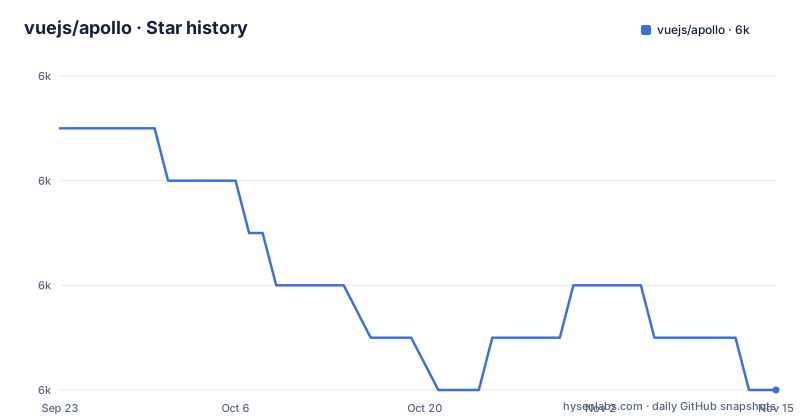
Star history
- vuejs/apollo6,024 ★ · -5
| Repository | 2026-09-23 | 2026-11-15 |
|---|---|---|
| vuejs/apollo | 6k | 6k |
-5 Stars in the last 53 days, measured from the daily GitHub snapshot. Compare with other projects
Editorial analysis
Two published packages, and the second one sits on the first
The monorepo table has two rows. `@vue/apollo-composable` is the Composition API. `@vue/apollo-components` is the Components API, and the table adds the detail that matters: it is built on the composables. That is a dependency, not a peer relationship or a parallel implementation. A project that reaches for the component form still pulls the composable form underneath, and the Components API is described in terms of the Composition API rather than the other way round.
So the choice between the two is not a choice between a small and a large package. It is a choice of surface. The composable package is the base layer, and the components package adds a template-friendly wrapper on the same base. There is no third entry and no separate package for the schema link or the cache, so anything beyond those two public names has to come from Apollo's own packages rather than from this repository.
The default branch is v5, so a fresh clone is the prerelease
The first thing in the file is a callout box rather than a description: you are browsing the code for the next version, v5, and the current stable version is v4, which lives on its own branch. The repository default branch is v5, so `git clone` gives you the line that is not stable. The documentation link in the same file points at a versioned host, v5.apollo.vuejs.org, which is consistent with that and inconsistent with the stable branch.
The release list says the same thing with dates. Two v5 alphas shipped on the same day, v5.0.0-alpha.3 and v5.0.0-alpha.4, twenty-five minutes apart on 2026-08-06. The last stable release before them is v4.2.3 from 2026-07-06. The last push to the v5 branch was 2026-10-03, two months after the most recent tag. What the file does not give you is a migration note from v4 to v5, and it does not say whether alpha.4 is close to a release or the start of another cycle.
The release script is one line, and it tags next
Releases run through a tool called sheep, and the whole procedure is a single script entry: build, test, then publish. The build and test are the same scripts you would run by hand, and the publish step names the branch and the dist-tag explicitly.
pnpm run build && pnpm run test && sheep release -b v5 --tag next`-b v5` pins the source branch, so a release cannot accidentally be cut from the stable branch. `--tag next` is the part to notice: published builds land under the `next` dist-tag rather than `latest`, which is how the alpha line stays off the path an unqualified install takes. The command has no dry-run flag, no changelog argument and no version argument. There is a CHANGELOG.md at the root.
Every devDependency is catalog:, so no version number appears here
The root manifest is unusual in a way that costs an afternoon if you do not expect it. It pins the package manager to an exact version with an integrity hash, `[email protected]+sha512.4787...`, so a contributor with a different pnpm gets a hard failure rather than a subtly different install. Then it lists ten devDependencies and not one of them carries a version. Every entry is the string `catalog:`.
That protocol means the versions live in the workspace definition, and `pnpm-workspace.yaml` sits at the root next to the lockfile. The ten entries cover the toolchain: `@akryum/sheep` for releases, `@antfu/eslint-config` for linting, `@microsoft/api-extractor` and `@microsoft/api-extractor-model` plus `@microsoft/tsdoc`, `@parcel/watcher`, `eslint`, `jiti`, `nodemon` and `typescript`. So bumping the TypeScript version for the whole monorepo is a change to one file other than the manifest everyone reads. Reading the manifest to find out what the project builds with gets you names and nothing else.
api-extractor sits between the build and the documentation package
Two scripts run api-extractor, and they are not the same operation. `api:extract` builds first and then runs the extractor with `--local`, which writes the report to your working copy instead of failing on a difference. `api:generate` builds, then descends into `packages/docs` with `-C` to run that package's own generate step. The order is not cosmetic: the API surface has to exist as built output before either command can do anything.
The config file for this is `api-extractor.json` at the root, and the extractor packages are in the catalog list. What this arrangement buys you is a checked API surface. An extractor setup like this exists to catch a public signature change as a diff rather than letting it ship, and the `--local` flag in the extract script says that checking is a developer action rather than something wired into the test run. The `test` script does not call it, so CI running `pnpm run test` will not tell you the public API moved.
Build, test and typecheck filter by package name and skip the docs
Three scripts share one shape: `pnpm run -r` followed by two `--filter` arguments, `vue-apollo*` and `@vue/apollo*`. The `vue-apollo*` pattern catches the unprefixed packages by their internal names, and the `@vue/apollo*` pattern catches the two published ones. Everything the monorepo does to its own source goes through that filter.
The documentation package does not match either pattern, and it has its own filter instead: `private-vue-apollo-docs`, which appears in the dev script and the build script for the docs site. That private prefix is why it stays out of the published set and out of the default recursive run. `docs:build` also runs the main build first, then the docs build, so the docs consume compiled output rather than source.
The practical effect is that `pnpm run build` at the root is not the whole repository. It is the two Apollo packages, and the docs site is a second step you have to ask for by name.
Tests run one at a time while everything else fans out
Look at the difference between the scripts. Build and typecheck use `pnpm run -r` with no extra flag, which is the recursive, parallel form. The test script is `pnpm run -r --sequential test`. One flag, and the entire monorepo's tests run one package after another instead of concurrently.
The manifest does not say why, and the obvious guesses are all plausible: tests that share a port, a fixture directory, a database, or a port number would collide under parallelism. Treating that as the reason is speculation, so treat it as an observation instead. What you can rely on is the behaviour. Adding a package that is safe to test in parallel will not get you parallelism, because the flag is at the top of the recursion and applies to everything below it.
Lint sits outside the recursion entirely. It is `eslint . --cache` at the root, driven by `eslint.config.ts` and `@antfu/eslint-config`, so it lints the whole tree including the docs package in one pass.
The root manifest declares no dependencies, so the peer requirements are invisible
Here is the gap worth knowing before you start. There is no `dependencies` key and no `peerDependencies` key in this file. All ten entries are devDependencies. For a package whose whole job is to wrap Apollo inside Vue, the manifest at the root therefore tells you nothing about which versions of vue or of the Apollo client it expects, or whether it has any opinion at all.
That information is not wrong, it is elsewhere: peer requirements belong in the individual package manifests under `packages/`, and this repository is a monorepo whose root file is private. The root manifest is also marked `"private": true`, so it is never published. Reading it as the package manifest is the mistake, and it is an easy one to make because it carries the version `5.0.0-alpha.4`, which matches the newest release tag.
The continuous build channel has a similar shape. Builds from any commit on the main branch, and from any pull request, are published to a nightly host under the author's own domain rather than to npm. Useful for testing a change.
Editorial conclusion
Use vuejs/apollo when you want Apollo wired into Vue and you have decided which of the two APIs you want, because the components package is built on the composables package rather than replacing it, so you install one or both and accept the layering. Do not start from the default branch expecting stable code: the branch is v5, the last two releases were v5.0.0-alpha.3 and v5.0.0-alpha.4 on the same day, and the release script publishes under the next tag, so nothing on that path is marked stable. Three things to check before you depend on it. Where the version numbers live, because every devDependency in the root manifest is written as `catalog:` and the actual pins are in pnpm-workspace.yaml. Whether the docs you read match your branch, since the documentation link points at v5.apollo.vuejs.org while stable lives on the v4 branch. And where the runtime dependencies come from, because the root manifest declares no dependencies at all and every entry is a devDependency, so the peer requirements on vue and apollo client are not visible in the file that looks like the entry point.
Frequently asked questions
What is @vue/apollo-composable and how does it differ from @vue/apollo-components?
The monorepo publishes two packages: @vue/apollo-composable is the Composition API, and @vue/apollo-components is the Components API built on the composables. The components package is a layer over the composable one, not a replacement for it.
How do I get the latest build of vuejs/apollo?
Builds from any commit on the main branch, and from any pull request, are published to a nightly host under the maintainer's own domain rather than to npm. Published releases go out under the next dist-tag via a script that runs sheep release with the v5 branch and the next tag.
Is vuejs/apollo on a stable release?
The default branch is v5 and it is an alpha line: v5.0.0-alpha.3 and v5.0.0-alpha.4 were both published on 2026-08-06. The current stable version is v4, available on the v4 branch, and its most recent release is v4.2.3 from 2026-07-06.
How do I build and test the Apollo Vue packages?
Run pnpm run build and pnpm run test from the root. The build script recurses with the filters vue-apollo* and @vue/apollo*, while the test script is pnpm run -r --sequential test with no filter, so packages are tested one at a time. The docs package is excluded from the build filter and is built separately.
Which Vue and Apollo versions does apollo require?
The root manifest does not say. It has no dependencies or peerDependencies key, and every one of its ten entries is a devDependency, including the build toolchain. Peer requirements sit in the individual package manifests under packages/, and the root file is marked private so it is never published.
Official sources
Add this badge to your README
If you maintain this project, the badge below links readers to this analysis and shows its maintenance status from the daily GitHub snapshot. Paste the markdown into your README; add ?metric=license or ?metric=stars to the image URL for a different field.

[](https://hysenlabs.com/projects/vuejs-apollo)Star history chart for your README
[](https://hysenlabs.com/projects/vuejs-apollo)Was this useful?