wanderers-guide: a character builder you can self-host, minus the hardening
A character builder and digital toolbox for Pathfinder and Starfinder Second Edition.
At a glance
- What is it?
- An open source builder and toolbox for Pathfinder 2e and Starfinder 2e, split into a web app, a serverless API on Supabase, and a separate legacy repository. The Docker stack calls itself a skeleton and lists what it deliberately leaves out.
- Who is it for?
- Use wanderers-guide if you want a full Pathfinder and Starfinder toolbox you control, and read the Docker page first because the compose stack ships as a skeleton with TLS, secrets, backups, OAuth and SMTP out of scope. Do not deploy it as-is on a public host, and treat the scripts named around release as the part most likely to change under you.
- Can I use it commercially?
- Yes, with conditions. GPL-3.0 is a copyleft licence: if you distribute software that includes it, you must release that software's source code under the same licence. Running it internally without distributing it does not trigger that obligation.
- Is it still maintained?
- Yes. The repository last received commits 3 days ago.
- What is it written in?
- Mainly TypeScript, according to GitHub's language statistics.
Answers come from the project's GitHub data, last synced on October 22, 2026, and from our analysis. They are not legal advice.
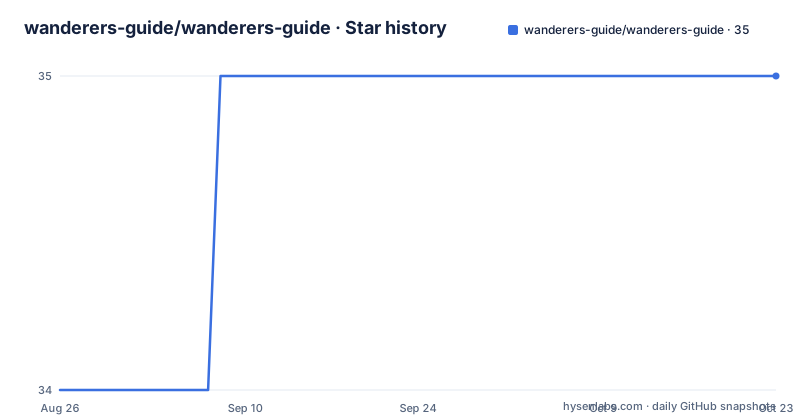
Star history
- wanderers-guide/wanderers-guide35 ★ · +1
| Repository | 2026-08-26 | 2026-10-22 |
|---|---|---|
| wanderers-guide/wanderers-guide | 34 | 35 |
1 Stars in the last 57 days, measured from the daily GitHub snapshot. Compare with other projects
Editorial analysis
The self-host stack calls itself a skeleton
The compose file opens with an admission that is worth reading before anything else. It calls itself a minimal self-host stack, a skeleton, and names what is intentionally out of scope: TLS, real secrets management, backups, OAuth providers, SMTP and observability. What it does bring up is the frontend plus the Supabase services needed to run end to end. That framing sets the expectation correctly. This is a way to get your own instance running with one compose file, not a production deployment profile, and the documentation it points to is where the hardening decisions belong. The frontend service itself takes its Supabase URL, anonymous key and environment name as build arguments, so changing which backend you point at happens at image build time rather than at container start.
Kong sits in front, and a sed pass makes its config work
The gateway is Kong 2.8.1, and the interesting part is a workaround rather than a setting. Kong's declarative config does not substitute environment variables, so the compose file mounts a template read-only and runs a shell pass with `sed` before Kong starts, substituting the anonymous and service role keys into the rendered file and then execing the entrypoint. The same pattern the Supabase reference self-host stack uses. Plugins enabled include the request transformer, cors, key auth, acl and basic auth, with Kong's database turned off, meaning configuration is fully declarative and nothing is stored in Kong itself.
Three deployable pieces, not one application
The repository is split into parts you can adopt separately. The web app is the frontend, the API is described as serverless and lives under `supabase/`, and the legacy application lives in its own repository rather than in this tree. That split matters for anyone upgrading: the legacy app is a separate history with its own release cadence, so moving off it is not a matter of pulling a branch. There is also a `data/` directory holding two shell scripts used during a Docker reset, one that creates the database and one that seeds a test user, which tells you what state a fresh self-hosted instance expects.
Reset is destructive, and it re-seeds a test user
The npm scripts expose the operational surface, and one is worth reading carefully. `docker:reset` runs `docker compose down -v` and then brings the stack back up with a wait flag before invoking the database creation script and the test user seed script. The `-v` flag removes volumes, so everything in the database goes with it. For a development machine that is the fastest way back to a known state; pointed at an instance holding real data, it is a data loss event behind a friendly name. The sibling scripts are `docker:start`, `docker:stop`, and `docker:rebuild`, the last of which rebuilds only the frontend service.
Four test layers, each running something different
Testing is split by kind rather than by one runner. API tests use the Deno runtime invoked from inside the `supabase` directory with explicit permissions for net, env and read, and with type checking turned off. A separate boundaries target runs two Node scripts that check API and account handler boundaries. Release tests run Node's built-in test runner over two script files, one for release logic and one for production health. Authorization tests are the odd one out: they pipe a SQL file into a running Postgres container through `psql` with `ON_ERROR_STOP` set, so that layer needs the stack up before it can run.
Release tooling has its own check, manifest and verify
One script drives the whole release path through subcommands rather than flags. `release:check` runs a local check, `release:manifest` produces a manifest, and `release:verify` runs a remote check, all pointed at the same script. That shape suggests the release process has a defined contract that can be validated without publishing, which is why there is a matching test target running the release and production health scripts under Node's test runner. The docs scripts are handled separately under their own prefix, with dev, build and a broken links check, since the documentation site is a separate npm project rather than part of the app build.
Agent configuration files sit in the repository root
Alongside the usual source directories there are files aimed at coding agents rather than humans: an `AGENTS.md`, an `agents/` directory, a `codex/` directory and a `.mcp.json`, plus a Discord invite badge in the readme. The presence of a Model Context Protocol configuration in a repository with a serverless API suggests the project is set up for agent-driven development against its own tooling. `.env.docker.example` sits next to `docker-compose.yml` for the same reason, since the self-host path needs environment values and the example file is where they are enumerated. A stray `.DS_Store` in the root is the one artifact that has no business being there.
Editorial conclusion
Use wanderers-guide if you want a full Pathfinder and Starfinder toolbox you control, and read the Docker page first because the compose stack ships as a skeleton with TLS, secrets, backups, OAuth and SMTP out of scope. Do not deploy it as-is on a public host, and treat the scripts named around release as the part most likely to change under you.
Frequently asked questions
Is Wanderers' Guide free?
The repository is licensed under the GPL and describes itself as an open source character builder and toolbox for Pathfinder 2e and Starfinder 2e. No pricing or subscription details appear in it; the project description, licence and source are the only terms stated.
What is the best character builder for Pathfinder 2e?
The repository does not compare itself against other builders. What it states is scope: an open source character builder and digital toolbox covering both Pathfinder 2e and Starfinder 2e, with a web app, a serverless API and a self-host path.
Is there a guide for Starfinder 2e?
Starfinder 2e is one of the two rulesets the project covers alongside Pathfinder 2e, per its own description. Nothing further on Starfinder specifics is documented in the repository.
Official sources
Add this badge to your README
If you maintain this project, the badge below links readers to this analysis and shows its maintenance status from the daily GitHub snapshot. Paste the markdown into your README; add ?metric=license or ?metric=stars to the image URL for a different field.

[](https://hysenlabs.com/projects/wanderers-guide-wanderers-guide)Star history chart for your README
[](https://hysenlabs.com/projects/wanderers-guide-wanderers-guide)