Yoji keeps its memory on your machine and its chat on someone else's
An AI desktop companion with emotions — privacy-first, voice wake, office assistance, and MCP extensibility
At a glance
- What is it?
- An Electron desktop companion with file management, shell execution, an emotion engine, a Live2D avatar and MCP extensibility, described as local-first and private. The memory, the snapshots and the vector store are local, and the model, the web search and the MCP servers are not, which the same page explains in different places.
- Who is it for?
- Yoji fits someone who wants a desktop assistant with memory, a visible character and a tool surface they can extend with MCP, and who is comfortable with a local data directory and a cloud model key. It does not fit anyone reading privacy-first as a promise about the conversation, because the chat goes to the provider you configure and the page is not careful about that distinction.
- Can I use it commercially?
- Yes. MIT is a permissive licence: you can use, modify and sell software built on it, as long as you keep its copyright and licence notices.
- Is it still maintained?
- Yes. The repository last received commits 95 days ago.
- What is it written in?
- Mainly TypeScript, according to GitHub's language statistics.
Answers come from the project's GitHub data, last synced on November 15, 2026, and from our analysis. They are not legal advice.
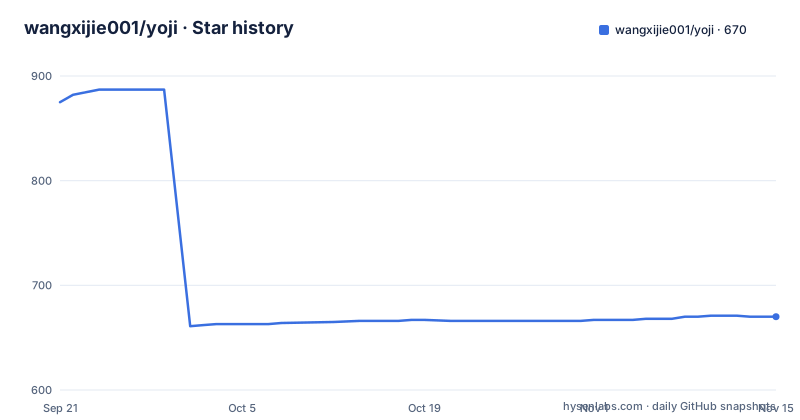
Star history
- wangxijie001/yoji670 ★ · -205
| Repository | 2026-09-21 | 2026-11-15 |
|---|---|---|
| wangxijie001/yoji | 875 | 670 |
-205 Stars in the last 55 days, measured from the daily GitHub snapshot. Compare with other projects
Editorial analysis
The memory is local, the conversation is not
The privacy claim is specific in one place and loose in another. The specific version is a three-layer memory table, and every row is on your disk: the user profile with your preferences and habits in an `AGENTS.md` file loaded at startup, the full conversation context of each chat in a SQLite checkpoint, and long-term summaries with vector retrieval in a sqlite-vec database. The design principle line says no data is uploaded and no cloud service is depended on. Both are true of the memory. They are not true of the conversation, because model setup is a page where you paste an API key for DeepSeek or Qwen and pick a model, and the dependency list carries LangChain adapters for OpenAI, DeepSeek and Tavily, which is the web search. Web search, MCP servers reached over SSE or HTTP, and the WeChat bridge all leave the machine as well. So the accurate reading is local-first storage with a cloud model, and the page uses one phrase for both.
Both voice features are macOS only, and the entry hides itself elsewhere
Two separate features are limited the same way, and the limitation is stated rather than implied. Speech output uses the system voice chosen in macOS system settings under Accessibility and spoken content, streams the reply as it arrives instead of waiting, strips markdown so it never reads an italic or a bold marker aloud, and can be stopped mid-sentence with one control. Voice wake uses the platform's own speech recogniser, which the page names as SFSpeechRecognizer and describes as fully offline, based on the same engine as Siri, with no network, no latency and no cost. You press the microphone to start listening, say the wake word, talk, pause for two seconds and the message sends itself, then it returns to listening for continuous conversation. On Windows the wake feature is not supported, and the renderer process hides the entry rather than showing a control that cannot work. Worth knowing before you install on a Windows machine, since both features are prominent in the description.
The async agent scheduler is written from scratch to avoid a server
The sub-agent story starts with a complaint about the official one: the built-in sub-agents are blocking, and the official asynchronous version depends heavily on a cloud server. The project states it implemented its own local factory and scheduler instead. The factory is a workshop page where you create a sub-agent with a name, a description, a system prompt and an MCP tool set. A synchronous agent is called through a `task` tool and returns its result inline; an asynchronous one is dispatched with `push_async_task` and does not block the conversation. The scheduling engine is described in enough detail to be checked: a hand-written event loop with three queues for pending, running and finished tasks, at most five sub-agents running at once, mutual exclusion inside a single agent, cancellation from the interface or by the AI itself through `abort_async_task`, an MD5 hash of the configuration and MCP versions so unchanged agents are reused in seconds, a separate thread per task keyed by UUID with the checkpoint cleared afterwards, and results in SQLite that expire after seven days. The claim that the sub-agent architecture keeps conversation quality intact however many tools you install is not backed by a measurement on the page.
It operates the computer, and an approval dialog is the boundary
The file and shell features are the part with real reach, and the page is clear that this is not simulated clicking. It creates, edits, searches and organises files and folders, runs shell commands and Python scripts, looks things up on the web when it does not know, and calls external APIs. The safety boundary stated for this is a confirmation dialog for sensitive operations such as executing a command, with the approval routed through the agent framework's interrupt mechanism. Document handling is similarly concrete: PDF text layers are detected and extracted, .docx files are converted to text, and formats the tools cannot use, images and audio and video, are intercepted with a message instead of an error, all of it transparent behind a `read_file` call. Two details are easy to miss. The memory tools are shared across synchronous agents through one multiplexed client that dispatches tools per configuration, so the tool surface grows without opening a connection per tool. And any change in the workshop, the MCP list or the model triggers an automatic rebuild of the agents, which is convenient and also means a misconfiguration takes effect immediately.
Eight simulated neurotransmitters, and sixteen expressions
The emotional system is presented as a running engine rather than a persona description. Eight neurotransmitters are simulated, with dopamine for happiness, cortisol for anxiety and serotonin for calm, and time, weather and what you say all feed into the state. The claim is that the tone, style and wording of replies differ by state and that the interface background changes with it, so you can see the mood. The Live2D avatar carries the same state into a visible body: expressions per emotion including starry eyes when happy and tears when sad, mouth movement synchronised with the speech output, reactions when you poke her, and clothing that changes with the time of day, sunglasses at midday and a pyjama outfit with cat ears in the evening. The roadmap counts sixteen emotion mappings behind the avatar. The avatar is draggable and resizable from the corner of the home window. One feature in this area is not available: the fully autonomous proactive chat mode, which the page says is withheld because of running cost, with the interval-based version of proactive conversation available instead.
MCP is the extension surface, and the assistant can install it
The extension story is Model Context Protocol, and the page draws a line worth repeating: MCP is not a plugin system, it is an open industry standard, so any service that speaks it can be attached and the boundary of what the assistant can do is yours to set. Adding one is a form with a name, a URL and a transport choice between SSE and HTTP, and the connection is tested on save, so a bad URL fails immediately rather than at first use. You can also skip the form and ask for it in conversation, asking it to add a weather tool, in which case it finds a server, tests it and installs it with your approval. The examples given are a train ticket server, a recipe server and a fetch tool that converts pages to markdown. The interface is a frameless window with custom drag, selectable and copyable text and Ant Design 6 components, and it covers macOS, Windows and Linux.
pnpm 11, a mirror, and an export that carries its own key
The quick start is short and has one hard requirement:
git clone https://github.com/wangxijie001/yoji.git
cd yoji
pnpm install
pnpm dev
pnpm 11 is required, and the page gives the global install command for it, which the manifest confirms by pinning a package manager version and an engine constraint. There is a note that electron and model downloads are slow and that a package manager config already points at a domestic mirror, which is the kind of detail that tells you where most of the audience is. Builds are per platform, with separate macOS, Windows and Linux targets, and a postinstall step that lets the packaging tool install native dependencies. The repository also carries a development update channel configuration, which is the piece that sits oddly beside a product whose selling point is that nothing leaves your machine: there is a mechanism for shipping updates to a desktop app. Portability, meanwhile, is handled by export and import, packaging memory, emotion state and configuration into one file with its own authentication. The roadmap has seventeen finished items and one open, collaborative office work, with a note that the assistant can already integrate as needed.
Editorial conclusion
Yoji fits someone who wants a desktop assistant with memory, a visible character and a tool surface they can extend with MCP, and who is comfortable with a local data directory and a cloud model key. It does not fit anyone reading privacy-first as a promise about the conversation, because the chat goes to the provider you configure and the page is not careful about that distinction. Five things to check before you rely on it: which provider receives your messages, since setup asks for a DeepSeek or Qwen key and the dependency list also carries OpenAI and Tavily adapters; which voice features you actually get, since both speech output and voice wake are macOS only and the entry is hidden elsewhere; what the local store contains, since the user profile lives in an AGENTS.md file and the snapshots and semantic memory in SQLite; what permission model you want for shell execution, since an approval dialog is the only thing between the model and your terminal; and how you move machines, since export and import package the whole thing into one authenticated file. The repository is MIT, the newest release is v1.6.1 from August 12, 2026, and the last commit is dated the same day.
Frequently asked questions
What is Yoji?
An Electron desktop companion that manages files, runs shell commands and Python scripts, searches the web and calls external APIs, with an emotion engine, a Live2D avatar and MCP extensibility. Its user profile, conversation snapshots and semantic memory are all stored on your own machine.
Does Yoji work on Windows and Linux?
The window and the build do, with separate build targets for macOS, Windows and Linux and an interface described as covering all three. The voice features do not: speech output and voice wake are both macOS only, and the renderer hides the wake entry on Windows.
Which model does Yoji use?
Whichever you configure. The model page asks for an API key for DeepSeek or Qwen and a model selection, and the dependency list also carries LangChain adapters for OpenAI, DeepSeek and Tavily, the last being web search. There is no model bundled.
Can Yoji run agents in the background?
Yes, without a cloud server. Synchronous agents are called through the `task` tool and return inline, asynchronous ones are dispatched with `push_async_task`, at most five run at once, the same agent cannot overlap itself, and a task can be cancelled from the interface or by the AI through `abort_async_task`.
Can I move Yoji to another computer?
There is an export that packages the memory, emotion state and configuration into a single `.ecompanion` file and an import that restores it on a new machine. The page states the file carries its own authentication so that only you can open it.
Official sources
Add this badge to your README
If you maintain this project, the badge below links readers to this analysis and shows its maintenance status from the daily GitHub snapshot. Paste the markdown into your README; add ?metric=license or ?metric=stars to the image URL for a different field.

[](https://hysenlabs.com/projects/wangxijie001-yoji)Star history chart for your README
[](https://hysenlabs.com/projects/wangxijie001-yoji)Was this useful?