Rescript deletes words and the cut follows, and calls itself open source under a licence that forbids commercial use
Project brief: Open source, transcript-based video/audio editor that lives in the browser.
At a glance
- What is it?
- A transcript-first video and audio editor that transcribes locally in a browser worker, cuts media by deleting text, and exports to files or to a timeline other editors can read. Telemetry is on by default, three test scripts exist in the manifest but not in the guide, and the licence changed from MIT to noncommercial.
- Who is it for?
- Rescript suits someone who edits interviews, podcasts or voice notes and thinks of a transcript as the editing surface rather than the media. The word-boundary escape hatches matter more than the headline feature, because speech recognition alignment is wrong often enough that a tool without drag handles would be unusable.
- Can I use it commercially?
- Check first. The repository uses a licence we do not classify automatically, so read its LICENSE file before any commercial use.
- Is it still maintained?
- Yes. The repository last received commits 9 days ago.
- What is it written in?
- Mainly TypeScript, according to GitHub's language statistics.
Answers come from the project's GitHub data, last synced on November 14, 2026, and from our analysis. They are not legal advice.
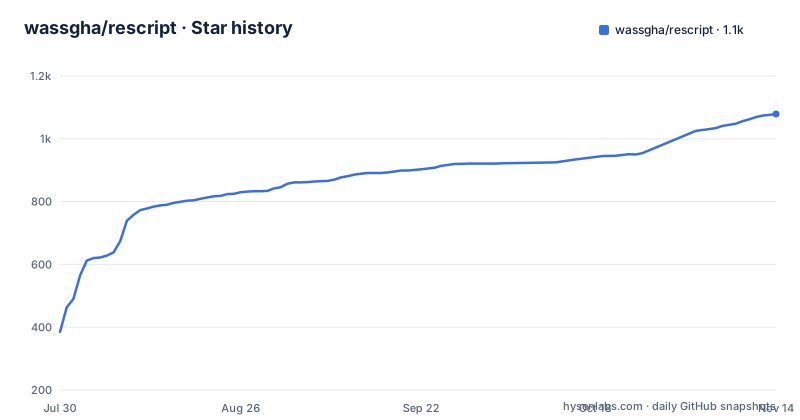
Star history
- wassgha/rescript1,079 ★ · +694
| Repository | 2026-07-30 | 2026-11-14 |
|---|---|---|
| wassgha/rescript | 385 | 1.1k |
694 Stars in the last 107 days, measured from the daily GitHub snapshot. Compare with other projects
Editorial analysis
The document says open source and the licence says noncommercial
The opening line calls the project open source, and the licence section says something narrower. The terms are the PolyForm Noncommercial License 1.0.0, under which you may use, modify and share the software for noncommercial purposes, and must retain the copyright notice. Commercial use is not permitted, and the parenthetical is explicit that this includes reselling or redistributing for a fee. There is a route, stated in one sentence: contact the author for commercial licensing.
There is a second clause that explains how the project arrived here. Prior releases published under the MIT License remain available under MIT, for those versions only. So the licence changed, and the change is dated rather than retroactive.
The manifest agrees with the licence file, declaring a noncommercial licence identifier and marking the package private, which means it is not published to a registry and is installed from source. The repository metadata, though, records no licence name at all, so a tool that reads metadata alone will not tell you what the terms are. Copyright is attributed to the author and contributors with a 2026 year.
Telemetry is on by default, next to a claim of no uploads
The feature list leads with a privacy claim: no authentication, no uploads, and all media processing on device. Two sections later, the telemetry section says that by default the app reports anonymous usage statistics and crash reports, and gives three reasons, which are all about the maintainer learning how many people use it, which features are worth maintaining, and what is breaking.
The scope is stated rather than implied. Crash reports go to a third-party error service and carry a stack trace, the app version, and the platform. Usage statistics are described as anonymous.
The switch is in settings, under a privacy submenu, and the option is worded as helping improve the app. Turning it off is described as taking effect immediately and permanently for that install, which is a per-device setting rather than a server side one. So a new user ships a stack trace and a platform string to a third party before they have agreed to anything, and the control that stops it is two menus deep.
Three test scripts exist in the manifest and none appear in the guide
The manifest defines a development block that is short and specific. There is a dev script, a production build, a start, and a lint. Then there are three separate test scripts, and they are not folded together: one runs an internationalisation test, one runs a timeline serialisation test, and one runs two files in sequence, a watchdog test followed by a core test.
The documented development section lists a different set. Six commands appear there:
npm install     # also copies ffmpeg/onnxruntime WASM into public/vendor
npm run dev     # Next.js web app (http://localhost:3000)
npm run electron:dev   # Electron shell + Next.js dev server
npm run build   # production web build
npm run dist    # unsigned desktop installers into dist/
npm run lint    # eslint
None of the three test scripts is mentioned there, and packaging, signing and cutting releases are delegated to a separate document at the root rather than written out.
That gap matters because the test names tell you what the maintainer considers fragile. An internationalisation test exists, which means the interface is localised, which is not mentioned anywhere else. A watchdog test implies the media pipeline can hang, which matches the multi threaded WebAssembly encoder described later. A serialisation test implies the export format has a round trip worth pinning. None of that is discoverable from the guide.
Installing runs a patcher and copies binary assets into the public directory
The first line of the development section carries a comment that is the whole install step. The install command does two things beyond fetching packages: it runs a patch application tool over a patches directory, and it runs a script that copies assets. The comment says the assets are the WebAssembly builds for the media encoder and the inference runtime, and that they land in a vendor directory under public.
That is a meaningful detail for anyone who vendors or forks this. The install is not a pure package fetch; it modifies installed dependencies in place and copies a hundred megabytes or so of binaries into a directory that gets served. The patches directory at the repository root is the record of what was changed and why.
The desktop build is where this surfaces again. The installer build command passes a configuration flag that disables native module rebuilding, and the release command does the same while also publishing automatically. That flag means the desktop binaries ship the native modules as they were resolved on the build machine rather than recompiled for the target, which is a deliberate trade for build speed and a constraint on which hosts can produce a working build.
Audio is decoded to mono 16 kHz before any model sees it
The pipeline is four steps and the first one fixes the input format. A multi threaded WebAssembly build of the media encoder decodes the audio track down to a mono stream at 16 kHz, which is what the speech model expects. Every later stage therefore works on that signal, not on the original.
Transcription runs in a Web Worker with per word timestamps requested explicitly, streaming text as it decodes, so the transcript fills in while the model runs. A separate speaker segmentation model assigns a speaker to every word, and the transcript is grouped by speaker. Three input choices are offered at the start: a base model, a small model, or no model at all, since an SRT, a WebVTT or a JSON caption file can be imported instead.
Editing then produces cut ranges rather than edits to a media file. Deleting a word in the transcript creates a range in the original, the preview player skips those ranges during playback, and the timeline draws them in red. Two one-click actions exist: a filler remover that cuts detected interjections, and a silence remover that cuts pauses of a third of a second or longer. That threshold is a hard number, and it is the difference between a trim and a chopped mess on a slow speaker.
Export re-encodes with a filter graph, so the cut is real
The export step takes the kept ranges, trims and concatenates them through a filter graph in the encoder, and re-encodes video and audio with the software encoders. That is the whole promise of the word-level model: the output file genuinely lacks the deleted words, it is not a player hiding them.
The deliverables are broader than one video file, and the format list is organised by what you would do next with each one. Video comes out in two containers across a resolution range from 720p to 4K. Audio comes out in three formats. Transcripts and captions come out in seven, including plain text, two markdown shapes, a word processor document and a PDF, with timestamps optionally embedded in the document formats. And there is a separate class of timeline output aimed at other tools: two XML timeline formats, a Final Cut XML flavour, an interchange format for two audio applications, a Reaper project file and a Samplitude edit list.
The timeline output is the one that distinguishes this from a cutter. Handing a Resolve or Premiere XML to a finishing editor means the speech-driven decisions survive the hand-off instead of being rebuilt by hand.
A Chromium browser is required because of one array buffer
The browser support section names a single blocker and one acceleration path. The array buffer in question is a shared one, which is only available to cross origin isolated pages, so the app has to be served with the two headers that grant it. A Chromium based browser is recommended rather than required in wording, but the requirement is the mechanism rather than the vendor.
Inference uses a graphics API when the browser exposes it and falls back to WebAssembly otherwise, which is why the two transcription model sizes are separate downloads and why the Web Worker matters: the model runs off the main thread so the editor stays responsive while it decodes.
The desktop build sidesteps the browser question by bundling its own copy of the same engine and setting the same isolation headers on its own custom protocol scheme. That is why the desktop app behaves identically to the web app rather than slightly differently, and it is also why the installer is large. One platform difference is called out: the Mac build is signed and notarised, and no equivalent claim is made for the Windows or Linux builds.
Five download variants and three hostnames for one application
The download row offers five builds, and the split is finer than platform alone. There is an Apple silicon Mac build and a separate Intel Mac build, a Windows build, a generic Linux build, and a Debian package build. The last two are separate links, so a Linux user has to pick between two artefacts rather than getting one universal binary.
Those links point at a download host with a platform query parameter, while the call to action above them points at a different subdomain of the same domain, and the repository's own recorded home page points at a third location entirely on the project pages domain. Three hostnames for one application is more surface than a project this size needs, and it is the kind of thing that ages badly when one of them lapses.
Releases come from the platform's release page, and the desktop builds update themselves from there. That is the whole distribution story: no package manager entry, no store listing, and a browser option that needs no install at all.
Editorial conclusion
Rescript suits someone who edits interviews, podcasts or voice notes and thinks of a transcript as the editing surface rather than the media. The word-boundary escape hatches matter more than the headline feature, because speech recognition alignment is wrong often enough that a tool without drag handles would be unusable. Three things to check before you adopt it. The licence is noncommercial with a stated route to paid licensing, so read it before this touches anything client facing. Telemetry is enabled out of the box and switched off in settings, which is the opposite of the default most people assume from a no uploads claim. And the web build wants a Chromium browser with cross origin isolation headers, so anything other than a desktop app in a plain page will not work.
Frequently asked questions
What licence is Rescript released under?
The PolyForm Noncommercial License 1.0.0, under which the software may be used, modified and shared for noncommercial purposes, with commercial use including resale or paid redistribution not permitted and a stated route to contact the author for commercial licensing.
Does Rescript upload my media or send my transcript anywhere?
No. Media processing happens on device, the transcription runs in a browser worker, and there is no authentication and no upload. Anonymous usage statistics and crash reports are sent by default, however, and the crash reports include a stack trace, the app version and the platform.
Can I use Rescript without letting Whisper transcribe the file?
Yes. One of the three starting choices is to import a transcript instead, accepting SRT, WebVTT or JSON caption files, which skips speech recognition entirely.
What browser does the Rescript web app need?
A Chromium based browser is recommended, and the requirement is a shared array buffer, which means the app must be served with cross origin isolation headers. Inference uses a graphics API when available and falls back to WebAssembly.
What does the silence remover cut in Rescript?
Pauses and dead air of a third of a second or longer, with the same one-click action also offering to cut detected filler words such as um and uh.
Official sources
Add this badge to your README
If you maintain this project, the badge below links readers to this analysis and shows its maintenance status from the daily GitHub snapshot. Paste the markdown into your README; add ?metric=license or ?metric=stars to the image URL for a different field.

[](https://hysenlabs.com/projects/wassgha-rescript)Star history chart for your README
[](https://hysenlabs.com/projects/wassgha-rescript)Was this useful?