Recordly hides the cursor on mac and Windows, but not on Linux
Create polished demo videos without editing skills. Mac/Windows/Linux
At a glance
- What is it?
- Recordly is an Electron screen recorder and editor whose selling point is finishing the polish in the app: automatic zoom suggestions driven by cursor activity, cursor effects, styled frames, and a `.recordly` project file. The three platforms do not behave the same, and the build pipeline compiles six native helpers before it packages anything.
- Who is it for?
- Recordly fits someone recording product walkthroughs who wants auto-zoom and cursor treatment without commissioning that work elsewhere, and who can accept a Linux build where the cursor never hides and system audio generally requires PipeWire. It does not fit a Linux-first team, or anyone who needs a Windows machine below build 19041 with a properly hidden cursor, because that path falls back to capture where the real OS cursor stays visible in the recording.
- Can I use it commercially?
- Yes, with strict conditions. AGPL-3.0 is a network copyleft licence: if people use a modified version over a network, for example as a hosted service, you must offer them its source code under the same licence.
- Is it still maintained?
- Yes. The repository last received commits 1 day ago.
- What is it written in?
- Mainly TypeScript, according to GitHub's language statistics.
Answers come from the project's GitHub data, last synced on November 14, 2026, and from our analysis. They are not legal advice.
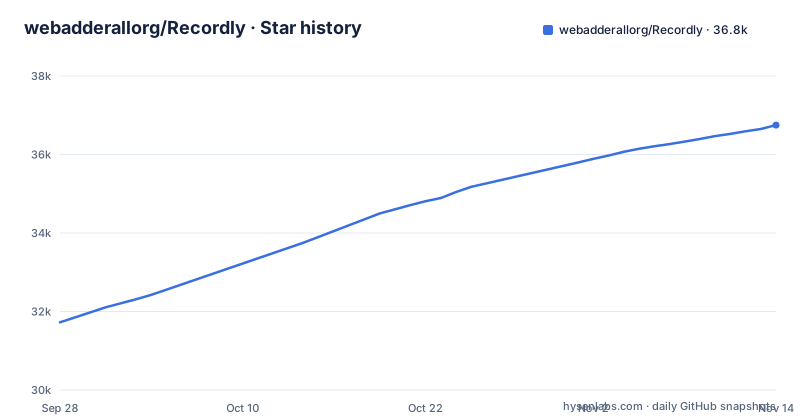
Star history
- webadderallorg/Recordly36,750 ★ · +5,025
| Repository | 2026-09-28 | 2026-11-14 |
|---|---|---|
| webadderallorg/Recordly | 31.7k | 36.8k |
5,025 Stars in the last 47 days, measured from the daily GitHub snapshot. Compare with other projects
Editorial analysis
Three capture backends, three different behaviors
Recordly records through a different native path on each platform, and the differences are not cosmetic. macOS uses ScreenCaptureKit-based capture helpers, and macOS 14.0 Sonoma is the stated minimum because ScreenCaptureKit audio and microphone capture require it. Windows uses a native Windows Graphics Capture helper on supported builds, with native WASAPI audio, and the floor is Windows 10 20H1, build 19041 from May 2020. That build number is not arbitrary. It is where the WGC helper and the best cursor-hiding behavior begin, and below it recording still works through a fallback capture path where the real OS cursor may stay visible in the finished video. Linux records through Electron capture APIs instead, and cursor hiding is not supported there today. System audio on Linux generally requires PipeWire.
Automatic zooms are suggested from cursor activity
The argument for Recordly is doing the polish work in the app rather than sending raw footage to a motion designer to add zooms, cursor treatment, or a styled background. Zoom is the mechanism that carries the most weight, because automatic zoom suggestions are based on cursor activity, and manual zoom regions can be dropped on the timeline beside trims, speed regions, annotations, extra audio regions, and crop-aware edits. Cursor treatment goes deeper than a toggle here: smoothing, motion blur, click bounce, sway, and a loop mode for cleaner looping exports, on top of showing or hiding the rendered overlay and adjusting its size. The README lists macOS-style cursor assets for the rendered overlay. Framing is a separate layer, with built-in and uploaded backgrounds, solid colors, gradients, blur, padding, rounded corners, and drop shadows, plus runtime wallpaper discovery from the wallpapers directory and aspect ratio presets for the final frame.
npm run build compiles six native helpers before electron-builder
Packaging Recordly from source is not a single Vite build, and package.json shows why. The build script runs build:platform-native-helpers first, and that chains six separate helper builds: build:whisper-runtime, build:native-helpers, build:windows-capture, build:windows-gpu-export, build:nvidia-cuda-compositor, and build:cursor-monitor. Only after those does the chain run tsc, then vite build, then normalize:electron-main-cjs and a smoke:electron-main-cjs check, and only then does electron-builder produce the installer. Two of those helpers are named for specific hardware, an NVIDIA CUDA compositor and a Windows GPU export path, which tells you the accelerated paths are platform and GPU specific rather than portable. There is also a rebuild:native script that forces @electron/rebuild against uiohook-napi alone. Development runs separately through vite --config vite.config.ts, and a postinstall hook runs node scripts/postinstall.mjs.
macOS quarantines the app you just built
A locally built Recordly build refuses to open on macOS with an App cannot be opened message, because macOS may quarantine locally built apps. The fix is to strip the quarantine attribute from the installed bundle:
xattr -rd com.apple.quarantine /Applications/Recordly.appThree install routes, and who maintains each one
Prebuilt releases are published on the repository releases page, which is the shortest path for someone who just wants the app. Arch Linux and Manjaro users have a second route through the AUR package recordly-bin:
yay -S recordly-binThat package is maintained outside this repository. The PKGBUILD, the desktop entry, release sync, and optional local-from-source packaging all live in a separate recordly-aur repository, placed there deliberately so this repository stays free of Arch release chores. Building from source is the third route and carries the heaviest prerequisites. macOS needs the Xcode Command Line Tools, installed with xcode-select --install. Ubuntu and Debian need a native toolchain plus four X11 development packages:
sudo apt install build-essential cmake libx11-dev libxtst-dev libxrandr-dev libxt-devWindows needs Visual Studio 2022, or the Build Tools, with the C++ workload and CMake. Once those are in place the clone is short:
git clone https://github.com/webadderallorg/Recordly.git recordly
cd recordly
npm install
npm run dev
npm run dev starts a development build, and npm run build produces packaged builds. Target-specific commands exist for macOS, Windows, and Linux individually when you only want one of the three.
Extensions are governed by a top-level contract
New capabilities arrive through a community-driven extension system rather than through the core application. Extensions can add cursor click sounds, device frames, browser mockups, wallpapers, render hooks, and settings panels, and they are browsable and installable from the Recordly Marketplace. The repository has a top-level EXTENSIONS.md next to CONTRIBUTING.md, and a separate TRANSLATION_GUIDE.md. The README states that PRs are accepted, and a .coderabbit.yaml sits at the top level alongside the translation files.
.recordly files carry editor state, not just footage
Sessions are files rather than exports. Work saves as a .recordly project file, and reopening one restores the editor state, which is why the file is described as resumable from the app rather than as a save format for the finished video. The documented loop is short: launch Recordly, select a screen or a single app window, choose microphone and system audio options, start recording, and stopping hands the footage straight to the editor. From there you add trims, zooms, speed regions, and annotations, tune cursor behavior and preview volume, style the frame, adjust the webcam overlay, add extra audio regions, crop the frame, and choose an aspect ratio. The README lists project persistence for editor preferences. Exports offer MP4 and GIF with quality selection, GIF frame rate, a GIF loop toggle, GIF size presets, and output dimension controls. The webcam overlay offers presets or custom X/Y placement, mirroring, size, margin, roundness, shadow, and optional zoom-reactive scaling.
A Supabase client config sits next to the build files
The repository is shaped like an Electron application with a browser front end, and the top-level entries show it. Vite, TypeScript, and Biome carry the front end through vite.config.ts, tsconfig.json, tsconfig.node.json, biome.json, and postcss.config.cjs, with tests split between vitest.config.ts and playwright.config.ts. Packaging is configured in electron-builder.json5, the main process lives under electron/, and there are build/, scripts/, services/, src/, and tests/ directories beside them. One file deserves a look before you clone. .env.example carries public client configuration and two VITE_SUPABASE variables, with a comment instructing that a Supabase service-role key never belongs there. Both variables use the VITE_ prefix, which is the convention for values compiled into a browser bundle, and the comment exists to keep the privileged key out of that file. Licensing documents sit nearby in LICENSE.md and THIRD_PARTY_NOTICES.md; the repository metadata reports the license as NOASSERTION.
Editorial conclusion
Recordly fits someone recording product walkthroughs who wants auto-zoom and cursor treatment without commissioning that work elsewhere, and who can accept a Linux build where the cursor never hides and system audio generally requires PipeWire. It does not fit a Linux-first team, or anyone who needs a Windows machine below build 19041 with a properly hidden cursor, because that path falls back to capture where the real OS cursor stays visible in the recording. Verify two things before adopting: that your platform clears the floor, macOS 14.0 or Windows build 19041, and what LICENSE.md and THIRD_PARTY_NOTICES.md actually grant, since the repository metadata reports the license as NOASSERTION. Pin a release rather than tracking main.
Frequently asked questions
Is Recordly free to use?
The README says Recordly handles the recording, zooming, cursor polish, and styled background workflow in one place for free, and describes it as an open-source screen recorder.
What are the Recordly system requirements?
macOS 14.0 Sonoma is required for ScreenCaptureKit audio and microphone capture. Windows 10 20H1, build 19041 from May 2020, is required for the native Windows Graphics Capture helper and the best cursor-hiding behavior. Linux needs any modern distro, with system audio generally requiring PipeWire.
Does Recordly hide the cursor on Linux?
No. Cursor hiding is not supported on Linux today, and Linux records through Electron capture APIs. On Windows builds older than 19041, recording can still work through a fallback capture path, but the real OS cursor may remain visible in recordings.
Why does a locally built Recordly app not open on macOS?
macOS quarantines locally built applications, which produces an App cannot be opened error. Remove the quarantine flag with xattr -rd com.apple.quarantine /Applications/Recordly.app.
How do I install Recordly on Arch Linux?
Install it from the AUR package recordly-bin using yay -S recordly-bin. The PKGBUILD, desktop entry, release sync, and optional local-from-source packaging are maintained in a separate recordly-aur repository rather than in the main repository.
Official sources
Add this badge to your README
If you maintain this project, the badge below links readers to this analysis and shows its maintenance status from the daily GitHub snapshot. Paste the markdown into your README; add ?metric=license or ?metric=stars to the image URL for a different field.

[](https://hysenlabs.com/projects/webadderallorg-recordly)Star history chart for your README
[](https://hysenlabs.com/projects/webadderallorg-recordly)Was this useful?