webfactory/ssh-agent for Private Repository Access in GitHub Actions
GitHub Action to setup `ssh-agent` with a private key
At a glance
- What is it?
- webfactory/ssh-agent starts `ssh-agent`, loads one or more private keys, and exposes them to GitHub Actions jobs that need SSH access. It is useful for private Git dependencies and remote servers, but its Windows and Docker support requires verification.
- Who is it for?
- Adopt webfactory/ssh-agent when a GitHub Actions job needs SSH authentication to private repositories or servers and can accept agent-managed keys. Do not adopt it unchanged for an untested Windows or Docker workflow.
- Can I use it commercially?
- Yes. MIT is a permissive licence: you can use, modify and sell software built on it, as long as you keep its copyright and licence notices.
- Is it still maintained?
- Yes. The repository last received commits 58 days ago.
- What is it written in?
- Mainly JavaScript, according to GitHub's language statistics.
Answers come from the project's GitHub data, last synced on November 7, 2026, and from our analysis. They are not legal advice.
Star history
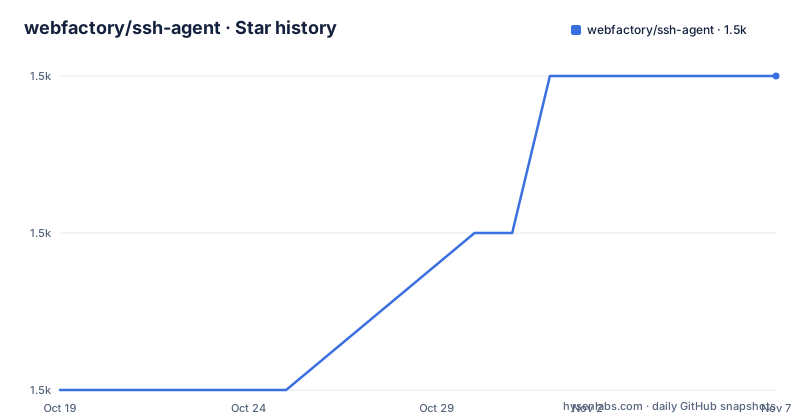
- webfactory/ssh-agent1,487 ★ · +2
| Repository | 2026-10-19 | 2026-11-07 |
|---|---|---|
| webfactory/ssh-agent | 1.5k | 1.5k |
2 Stars in the last 19 days, measured from the daily GitHub snapshot. Compare with other projects
Editorial analysis
Private SSH Access for GitHub Actions Jobs
webfactory/ssh-agent addresses a specific GitHub Actions limitation: a workflow normally has access to the repository that triggered it, but a build, test, or staging job may also need to clone from another private repository or connect to an external server over SSH. The action accepts a private key stored as a GitHub Actions secret, starts `ssh-agent`, exports `SSH_AUTH_SOCK`, and loads the key into the agent. Later `git clone` operations using SSH URLs and other `ssh` commands can then use that key without writing it into each step.
The intended users are maintainers whose workflows fetch private libraries, vendor code, submodules, or other SSH-accessible resources. A dedicated automation key is preferable to a personal key because its permissions can be limited independently and revoked without affecting workstation access. The public half must already be installed as a deploy key on the private repository, or otherwise accepted by the destination SSH server. The action does not create keys, grant GitHub permissions, or install the public key on a remote server.
The README also requires the private key to have no passphrase. A passphrase-protected key cannot simply be loaded into the unattended agent under the documented setup. Its contents belong in a repository secret named by the workflow author, such as `SSH_PRIVATE_KEY`, rather than in the workflow file or repository content. The action operates within one GitHub Actions job because each job receives a fresh virtual environment. It does not establish persistent SSH access for later jobs.
Agent Startup, Key Loading, and Exported State
The documented flow starts with the `ssh-private-key` input. The action starts `ssh-agent`, places the required key material into that agent, and exports `SSH_AUTH_SOCK` and `SSH_AGENT_PID` through the GitHub Actions core module. `SSH_AUTH_SOCK` is the socket path used by programs such as `git` and `rsync`. `SSH_AGENT_PID` records the agent process so the post-job cleanup can terminate it.
One private key is the basic case. The action can also receive a multiline value containing several keys, which it loads in sequence. The README warns that SSH servers can stop an authentication attempt after several unknown keys. If the agent offers enough irrelevant keys before the correct one, the server may never test the final key. This is SSH protocol behavior, not proof that the last key is invalid.
The action provides optional overrides for `ssh-auth-sock`, `ssh-agent-cmd`, `ssh-add-cmd`, and `git-cmd`. Changing `ssh-auth-sock` affects the resulting `SSH_AUTH_SOCK` location. The command inputs can point to custom binary locations when a runner image does not expose the relevant executable on the expected path. Public key information is logged by default to simplify diagnosis, and `log-public-key` can be set to `false` to suppress that output.
The repository layout includes `action.yml`, `index.js`, `cleanup.js`, `paths.js`, `scripts/`, and a `dist/` directory. The documented runtime behavior is still best understood through its inputs and exported variables: this is an action that manages an agent and cleanup within a GitHub Actions job, not a general system service installer.
Workflow Installation and First SSH-Authenticated Job
No separate package installation is documented because webfactory/ssh-agent is consumed as a GitHub Action. Create a dedicated SSH key without a passphrase, add its public portion as a deploy key to the private repository, and store the private key in a GitHub Actions secret. The README names the example secret `SSH_PRIVATE_KEY`.
The action can be placed near the start of the job, before steps that need SSH authentication. The repository lists `v0.10.0` as the latest release, so the following example uses that release tag rather than the older `v0.9.0` example retained in the README:
# .github/workflows/my-workflow.yml
on: workflow_dispatch
jobs:
    my_job:
        runs-on: ubuntu-latest
        steps:
            - uses: actions/checkout@v4
            - uses: webfactory/[email protected]
              with:
                  ssh-private-key: ${{ secrets.SSH_PRIVATE_KEY }}
            # ... other steps
This step passes the private key directly from repository secrets to the action. A successful job should export a usable `SSH_AUTH_SOCK` and load the key into the started agent. Use `ssh-add -l` to inspect loaded public identities if needed. Configure and verify host keys for the destination; loading a private key does not authenticate the server.
If the runner requires a nondefault socket location, set `ssh-auth-sock` in the same `with` block. The README does not document a separate setup command, authentication probe, or health check, so adding one would require project knowledge beyond the README.
Multiple Deploy Keys and Repository Routing
Multiple private keys can be supplied through one multiline `ssh-private-key` value. GitHub deploy keys are often scoped to one repository, so fetching several private repositories in one job can require several automation keys. The action loads each supplied key and relies on SSH to try them, subject to the server's maximum-authentication-attempt limit.
For deploy keys, the README documents a more specific routing mechanism. Each key comment should contain the repository URL, either in HTTPS form such as `https://github.com/owner/repo` or SSH form such as `[email protected]:owner/repo.git`. The action scans those comments after loading the keys. It then writes Git configuration based on `url.<base>.insteadof`, rewriting matching GitHub repository URLs to a generated hostname or URL.
An SSH configuration section is also generated for that synthetic hostname. It maps the connection back to `github.com` and points OpenSSH to the public part of the key associated with the original repository URL. The intended result is that Git reaches the repository-specific deploy key rather than relying on whichever key the agent happens to offer first.
This routing depends on accurate key comments. A generic comment such as a person's email gives the action no repository URL to map. The README also documents GitHub's behavior of accepting the first known deploy key, but it does not claim that this mechanism supports deploy keys hosted outside GitHub. A job needing repository-specific routing should therefore inspect its key comments and generated configuration before treating access as reliable.
Windows, Containers, and Job Isolation Constraints
The README says the action should work across GitHub Actions virtual environments, including container-based workflows, but it immediately qualifies Windows and Docker support as relatively new and based on limited field feedback. It does not provide a platform-specific support matrix or a reproducible diagnostic procedure. This makes platform support a verification item rather than a guarantee for production adoption.
Container-based jobs also inherit the restrictions of their selected execution image. The action can accept custom locations for `ssh-agent`, `ssh-add`, and `git`, but those inputs only help when suitable binaries are present. The README does not say that the action installs an operating-system package or adapts a missing SSH implementation. An image containing Git without the expected SSH tools, or with different executable paths, can therefore require an input override.
Job isolation is the sharper documented boundary. Because every GitHub Actions job runs in a fresh virtual environment, the agent and loaded key exist only in the job where the action runs. A setup step in one job cannot authenticate a later job. Each job that requires private SSH access must run webfactory/ssh-agent itself and receive its own suitable secret.
The README does not document key revocation during a running job, rotation without restarting the workflow, or rollback if a post-job cleanup issue occurs. Those behaviors should not be inferred from the presence of `cleanup.js` and the documented `SSH_AGENT_PID` cleanup mechanism.
Manual SSH Configuration and webfactory Routing Compared
The practical alternative is to configure OpenSSH and Git manually in the runner instead of using this action. That approach can write the private key to an appropriate file, configure a known host, and select a key directly. Its main difference is ownership: manual configuration makes the runner script responsible for socket discovery, environment variables, file permissions, multiple identities, and cleanup for every job.
webfactory/ssh-agent reduces that repeated setup by starting the agent and exporting the variables expected by Git and other SSH clients. For GitHub deploy keys, it adds another layer: repository URL comments generate Git URL rewriting and host-specific SSH configuration, allowing a synthetic hostname to route each clone to the intended key. That mapping is the action's clearest advantage over a generic agent startup wrapper.
Manual configuration may be preferable when a workflow needs an unusual key-selection policy, host verification setup, or a key lifecycle that the action inputs do not expose. The README does not document support for arbitrary `ssh-agent` command arguments, explicit identity-file inputs, or a choice to bypass deploy-key comment routing. Conversely, teams using multiple repository-specific GitHub deploy keys can avoid maintaining that routing by hand.
This comparison concerns mechanism, not a claim about reliability. The README does not give benchmark results or production adoption evidence. The choice should follow the complexity of the runner setup and whether repository URL comments fit the workflow.
Release Maintenance, Build Artifacts, and MIT Licensing
The repository is not archived, and its last push was on 2026-09-11. The latest listed release is `v0.10.0`, described as an upgrade to Node 24 and dated 2026-03-11. Earlier listed releases include `v0.9.1` from 2025-03-17 and `v0.9.0`, an update to Node 20, from 2024-02-06. These records indicate release activity, but they do not document a compatibility policy for every GitHub Actions runner or container base image.
The repository includes a `build` script and a `dist/` directory, which are relevant when reviewing maintenance work because GitHub Actions commonly execute committed action artifacts. However, the README does not explain the release procedure, how `dist/` is verified, or when a workflow should use a branch, commit, or release tag. Pinning an audited version such as `v0.10.0` is more predictable than tracking `main`, but the repository does not state whether tags are signed.
There is also a metadata discrepancy worth noting: `package.json` lists version `0.7.0`, while the release history includes `v0.9.0`, `v0.9.1`, and `v0.10.0`. The repository files do not explain whether that package version represents the JavaScript package independently of GitHub Action tags. Consumers should therefore use the Action release referenced by the workflow and avoid assuming that `package.json` is the authoritative Action version.
The project uses the MIT License. That permits use, modification, distribution, and sublicensing subject to the license text, including preservation of the copyright and permission notice. This is a technical summary of the stated license, not legal advice.
Editorial conclusion
Adopt webfactory/ssh-agent when a GitHub Actions job needs SSH authentication to private repositories or servers and can accept agent-managed keys. Do not adopt it unchanged for an untested Windows or Docker workflow. Verify key comments, repository routing, `SSH_AUTH_SOCK`, and the intended release tag first; the final adoption decision depends on those checks succeeding in the target runner.
Frequently asked questions
How do I set up webfactory/ssh-agent in a GitHub Actions workflow?
Store a private SSH key as an Actions secret, add its public part as a deploy key to the destination repository, then use `webfactory/[email protected]` and pass the secret through `ssh-private-key`.
Can webfactory/ssh-agent load multiple private SSH keys?
Yes. Pass several keys through one multiline `ssh-private-key` value. SSH servers may stop trying identities before reaching the correct key if several mismatched keys are offered first.
Does webfactory/ssh-agent keep an SSH key available in later GitHub Actions jobs?
No. Each GitHub Actions job runs in a fresh virtual environment, so the key is available only in the job where the action runs. Every job needing the key must run the action with access to its secret.
Official sources
Add this badge to your README
If you maintain this project, the badge below links readers to this analysis and shows its maintenance status from the daily GitHub snapshot. Paste the markdown into your README; add ?metric=license or ?metric=stars to the image URL for a different field.

[](https://hysenlabs.com/projects/webfactory-ssh-agent)Star history chart for your README
[](https://hysenlabs.com/projects/webfactory-ssh-agent)Was this useful?